linkedin
Kidsguard Pro logo
play KidsGuard Pro The Best Parental Control App
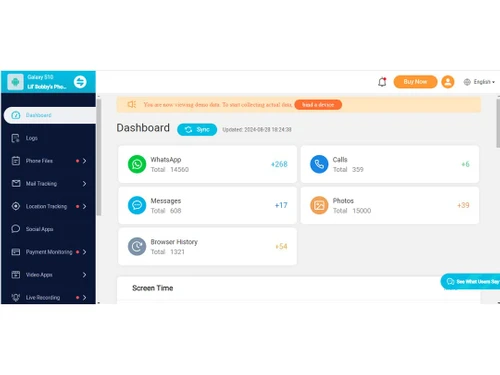
KidsGuard Pro dashboard
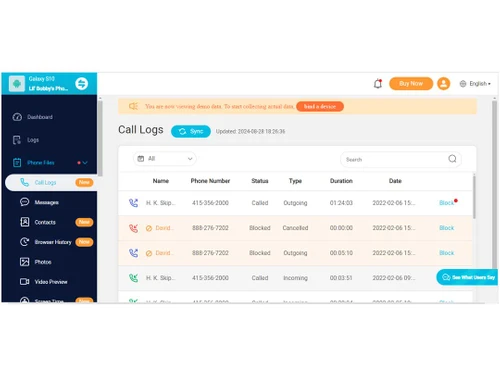
Kidsguard Pro call logs

Kidsguard Pro

Brand: Clevguard Software

  • 4.1

  • 5 Ratings & 1 Review

KidsGuard Pro is a parental control software that enables parents to monitor their children's online activities and ensure their safety. It offers features like GPS location tracking, phone call recording, and real-time monitoring, helping parents manage their child’s smartphone usage with ease.

See More

Have you used Kidsguard Pro before?

Share your insights for better experience

Add a Review
Starting Price
$110

View plans

100% Genuine
Products
Best Price
Guaranteed
Safe & Secure
Payment
  • Description

  • Pricing

  • Features

  • Specification

  • Review

  • Compare

  • Alternatives

  • FAQ

Starting at $110

Kidsguard Pro Software Overview

What is KidsGuard Pro?

KidsGuard Pro is a powerful parental control software and business software designed to help parents safeguard their children's online experiences. As a versatile solution for parents and guardians, it enables them to track their child's real-time GPS location, check call logs, monitor social media apps, and record phone calls. The app works discreetly in the background, providing parents with a comprehensive view of their child's smartphone activities without being intrusive.

The software supports multiple operating systems, including Android and iOS, making it suitable for a wide range of devices. With its user-friendly interface, even parents with limited technical skills can easily manage and track their children's online behavior. Whether you're concerned about your child’s safety or want to ensure they're using their devices responsibly, KidsGuard Pro offers a reliable solution. The app also provides real-time alerts and allows parents to set up geofencing zones, ensuring kids stay within safe boundaries.

Parents can easily access the dashboard from any device, allowing remote monitoring without the need to physically access the child's phone. KidsGuard Pro has become a popular tool among parents who want to maintain control over their child’s digital world without disrupting their privacy or trust.

Why Choose KidsGuard Pro?

  • Real-Time Monitoring: Keep track of your child's location, messages, and activities in real time.
  • User-Friendly Interface: Simple to set up and use, with no advanced technical skills required.
  • Discreet Operation: The app runs in the background without your child knowing, ensuring unobtrusive monitoring.
  • Wide Compatibility: Works with Android and iOS, making it versatile for most smartphones.
  • Comprehensive Alerts: Get instant notifications when certain activities or locations are detected.

Benefits of KidsGuard Pro Parental Control Software

  • Enhanced Child Safety: Monitor GPS location and ensure your child is in safe areas.
  • Remote Access: Parents can control and view data from any device, even if they're not physically near their child.
  • Privacy-Friendly: It balances safety and privacy by discreetly operating without alerting the child.
  • Activity Reports: Get detailed reports on calls, location history, and social media usage.
  • Prevent Misuse: Track and control smartphone use to avoid overuse or misuse of apps, calls, and texts.
  • Multi-Device Support: Monitor multiple devices simultaneously, ideal for parents with more than one child.
  • Geofencing: Set geographical boundaries and receive alerts when your child leaves or enters a restricted area.
  • Data Security: All data is securely stored and encrypted to prevent unauthorized access.
  • Comprehensive Tracking: Track not only GPS but also browsing history, text messages, and social media activity.
  • Call Recording: Record and review important conversations to ensure your child’s safety.

Pricing Of KidGuard Pro

KidsGuard Pro price starts at $ 109.99/year at techjockey.com. The pricing model is based on different parameters, including extra features, deployment type, and the total number of users. For further queries related to the product, you can contact our product team and learn more about the pricing and offers.

Read more

Kidsguard Pro Pricing & Plans

Lite Plan
Key Features
  • 1 Device
  • Call logs
  • Contacts
  • Browser history
  • Social Apps
  • Location tracking
  • Past notifications
  • Text messages
Starting at $110
    • Licenses

      Licenses
      Licenses
    • Yearly

      Yearly
      Yearly

Key Features

  • 1 Device

  • Call logs

  • Contacts

  • Browser history

  • Social Apps

  • Location tracking

  • Past notifications

  • Text messages

Kidsguard Pro Features

  • icon_check Calendar Monitoring
    View scheduled events, reminders, and appointments to track daily activities.
  • icon_check Cloud Drive Access
    Remotely check iCloud Drive files and documents for added oversight and protection
  • icon_check App Activity Monitoring
    Monitor which apps are used, how often, and for how long to manage screen time.
  • icon_check GPS Location Tracking
    Track real-time device location with address, date, and time for safety assurance.
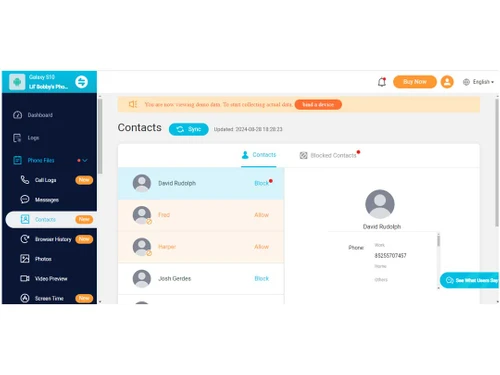
  • icon_check Contacts Monitoring
    View all saved contacts remotely, including names, phone numbers, and details for safety and trust-building
  • icon_check Call Logs Tracking
    Access call history with timestamps, call duration, and contact info to monitor communication patterns
  • icon_check Messages Monitoring
    Read sent and received SMS, MMS, and chats to ensure safe, appropriate conversations
  • icon_check Photo and Video Access
    Browse device photos and videos remotely, keeping an eye on media content for safety
Kidsguard Pro Demo Video play icon

Get Kidsguard Pro Demo

Watch the demo video to explore key features, real workflows, and how the software fits your business needs.

Understand
Key Features
Personal
Demo Insights
Interactive
Demo Support

Kidsguard Pro Specifications

Supported Platforms
Windows Windows iOS iOS Android Android MacOS MacOS
Devices
Desktop Desktop Mobile Mobile Tablet Tablet iPad iPad
Deployment
Cloud-Based Cloud-Based Perpetual Perpetual
Suitable For
All Industries
Business Specific
All Businesses
Business Size
Small Business Medium Business Enterprises SMEs MSMBs MSMEs
Customer Support
Email Communities
Language
English
Training Resources
Videos

Explore the Best Alternative Solutions Similar to Your Business Size and Needs

Kidsguard Pro Review

4.1

Out of 5

img

Overall Rating

Based on
1 Verified Review

Rating Breakdown

  • Features 4.1
  • Value for Money 4
  • Ease of Use 4.2
  • Customer Support 4.1

96% Recommend this Product

Add Review

Kidsguard Pro Video Review

youtubeVideoId

3.9

“Best Parental Control App for iPhone and Android | KidsGuard Pro Review!”

Review by: Swarnim Tiwari

Compare Kidsguard Pro With other Parental Control Software

Products
Ratings
Pricing
Device Supported
Deployment
Supported Platforms
  • img

    Kidsguard Pro

  • 4.1

  • Price On Request

  • Desktop

    Mobile

  • Web based

    On Premises

  • Windows

    Mac OS

  • img

    Qustodio

  • 4.1

  • Price On Request

  • Desktop

    Mobile

  • Web based

    On Premises

  • Windows

    Mac OS

  • img

    Norton Family

  • 4.3

  • ₹ 1749

  • Desktop

    Mobile

  • Web based

    On Premises

  • Windows

    Mac OS

  • img

    FlashGet Kids

  • 3.9

  • Price On Request

  • Desktop

    Mobile

  • Web based

    On Premises

  • Windows

    Mac OS

  • img

    Family Link

  • 4.5

  • Price On Request

  • Desktop

    Mobile

  • Web based

    On Premises

  • Windows

    Mac OS

  • img

    FamiSafe

  • 4.2

  • Price On Request

  • Desktop

    Mobile

  • Web based

    On Premises

  • Windows

    Mac OS

  • img

    FamilyTime

  • 4.3

  • Price On Request

  • Desktop

    Mobile

  • Web based

    On Premises

  • Windows

    Mac OS

  • img

    KidLogger

  • 4.2

  • Price On Request

  • Desktop

    Mobile

  • Web based

    On Premises

  • Windows

    Mac OS

  • img

    Net Nanny

  • 4.1

  • Price On Request

  • Desktop

    Mobile

  • Web based

    On Premises

  • Windows

    Mac OS

  • img

    Refog

  • 4.2

  • Price On Request

  • Desktop

    Mobile

  • Web based

    On Premises

  • Windows

    Mac OS

(2) Product(s) selected

Kidsguard Pro Alternatives

See All Kidsguard Pro Alternatives

Starting Price:

$40 /Year

Starting Price:

$30 /Month

What is KidsGuard Pro?

KidsGuard Pro is a parental control app that helps parents monitor their child’s smartphone activities and location in real time.

Can KidsGuard Pro track GPS locations?

Yes, KidsGuard Pro allows you to track your child's real-time GPS location and access their location history.

Is KidsGuard Pro available for both Android and iOS?

Yes, KidsGuard Pro supports both Android and iOS devices.

Does KidsGuard Pro record phone calls?

Yes, the software allows you to record phone calls made and received on your child's phone.

How does KidsGuard Pro capture screenshots?

KidsGuard Pro can capture real-time screenshots of your child’s smartphone activities, which you can view remotely.

Can I monitor multiple devices with KidsGuard Pro?

Yes, KidsGuard Pro allows you to monitor multiple devices from a single dashboard.

Is KidsGuard Pro detectable by the child?

KidsGuard Pro runs discreetly in the background and does not alert the child about its presence.

How do I access the data collected by KidsGuard Pro?

You can access all the data through a secure online dashboard from any device.

Does KidsGuard Pro offer geofencing?

Yes, you can set geofencing zones and receive alerts when your child enters or leaves a designated area.

How secure is the data in KidsGuard Pro?

All data collected by KidsGuard Pro is encrypted and securely stored, ensuring complete privacy and security.

20,000+ Software Listed

Best Price Guranteed

Free Expert Consultation

2M+ Happy Customers

Terms and Condtions

close

Users with registered businesses can purchase goods from merchants on the platform to satisfy their business needs. Users are not permitted to utilize any products acquired through the platform for resale, advertising, business, or further distribution.

For each purchase made, users will receive a Tax Invoice (or 'GST invoice') that includes specific details such as:

  • the GSTIN of the user associated with their registered business, and

  • the specified Entity Name for their business.

It should be noted that not all products are eligible for GST Invoice. Only the products displayed by participating sellers with the 'GST-based Invoice Available' callout on the product description page would qualify.

Certain goods and services are not eligible to get a GST Invoice, including items with VAS, i.e., Value Added Services (e.g., Total Mobile Protection/Assured Buyback) and those involving an exchange offer at the time of purchase.

Users must ensure the accuracy of the GSTIN, and business entity name provided for the GST Invoice. Requests for corrections into GST Invoice would not be accommodated by Techjockey.com or any Seller, and any issues arising from user-provided information are the sole responsibility of users.

Techjockey.com is not liable for the GST Invoice or any associated input tax credit. To efficiently claim an input tax credit, users should select the registered place of business address as per the GST authority's data and follow the provisions of the GST Act and rules.

To claim an input tax credit, the delivery and billing addresses must match. Furthermore, input tax credits will not be granted if the delivery address and GSTIN on the invoice are from different states. In case of incorrect GST details provided during the order placement, the order will be canceled automatically.