linkedin
Family Link logo
play Google Family Link - How To Manage Your Child's Screen Time
family link timing
family link settings

Family Link

Brand: Google

  • 4.5

  • 5 Ratings

Family Link was developed by Google, designed to help parents manage their children's digital activities and screen time on Android devices.

See More

Have you used Family Link before?

Share your insights for better experience

Add a Review

Price Available on Request

Questions about pricing or customization? We’re here to help, just a click away.

100% Genuine
Products
Best Price
Guaranteed
Safe & Secure
Payment
  • Description

  • Pricing

  • Features

  • Specification

  • Review

  • Compare

  • Alternatives

  • FAQ

Family Link Software Overview

What is Family Link?

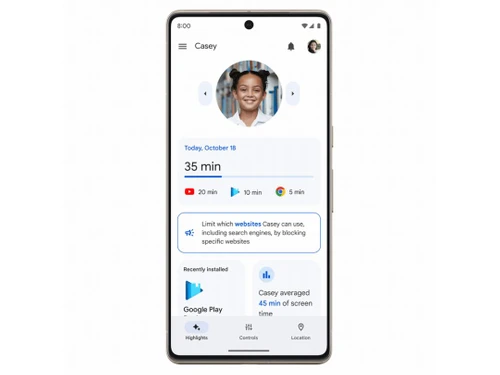
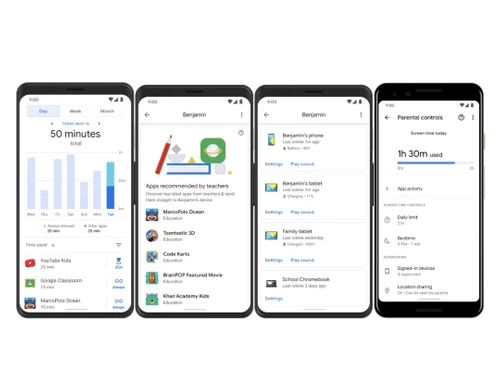
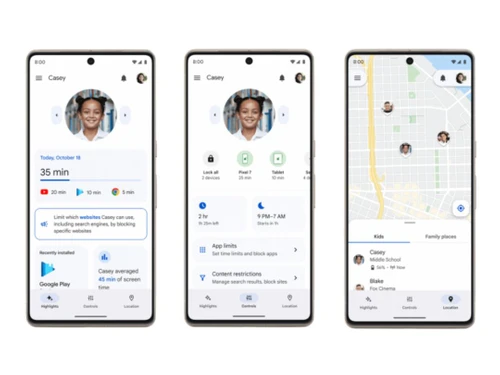
Family Link is a parental control software developed by Google, offering tools for managing children's digital activities on Android devices. Parents can set screen time limits, manage app usage, and remotely monitor and control content access.

The software also provides insights into children's online habits and allows parents to approve or block app downloads from the Google Play Store. With its user-friendly interface and robust features, Family Link helps parents guide their children's digital experiences responsibly and safely.

Why Choose Family Link Software?

  • Control: It offers a wide range of features for managing children's digital activities, including screen time limits, app management, and content filtering, providing parents with comprehensive control over their child's device usage.
  • User-Friendly Interface: The software is designed with a user-friendly interface that makes it easy for parents to set up and customize settings according to their preferences, ensuring a seamless experience for parents and children.
  • Remote Management: It allows parents to remotely monitor and manage their child's device from anywhere with an internet connection, providing flexibility and convenience in managing digital parenting.
  • Insights and Reports: It provides insights and reports on children's device usage. It gives parents valuable information to understand their child's digital habits and make informed decisions about their screen time and online activities.
  • Google Integration: As a product developed by Google, It seamlessly integrates with Google services and devices, ensuring compatibility and reliability for users already using Google products and services.
  • Child Safety: It prioritizes child safety by offering content filtering and app approval features, helping parents create a safe and age-appropriate digital environment for their children.

Benefits of Family Link Platform

  • Simple Setup: Easy-to-follow setup process automatically begins when a child signs into a Google child account.
  • Chromebook Compatibility: Compatible with Chromebooks, enabling monitoring of desktop use via the app.
  • Location Tracking: Allows parents to track their child's device location for added peace of mind.
  • Screen Time Management: Enables setting screen time limits, device bedtime, and remote device locking.
  • App Management: Let parents approve or decline app downloads and in-app purchases.
  • Account Management: Allows access to and management of a child's account and data settings.
  • Device Security: Provides tools to secure a child's account and data for online safety.
  • Comprehensive Features: Includes various tools for managing apps, setting rules, and more.
  • Support: Offers assistance through FAQs, the app's help section, and customer support.
  • Age Limit: Designed for children under 13 years old, older children can switch to a regular account.
  • Google Account Management: Enables parents to manage their child's account settings.
  • Chrome Browser Management: Allows controlling access to specific websites on Chrome.
  • Search Filter: Offers SafeSearch to filter explicit content in search results.
  • Google Assistant Management: Controls access to Google Assistant features and transactions.
  • Device Locking: Allows remote locking of a child's device for added security.
  • Purchase Approval: Approves purchases made through Google Play's billing system.
  • Location Sharing: Shares a child's device location for parental monitoring.
  • Google Account Settings: Allows changing some Google Account settings for a child.

Pricing of Family Link Parental Control Software

Family Link price details are available on request at techjockey.com.

The pricing model is based on different parameters, including extra features, deployment type, and the total number of users. For further queries related to the product, you can contact our product team and learn more about the pricing and offers.

Read more

Google Company Details

Founded Year:  1998

Google is a multinational corporation that specializes in Internet-related services and products.

Director/Founders Easir Arafat, Larry Page, Masudur Rahman, Mohammad Faruk, Sergey Brin
Company Size 1000+ Employees

Family Link Pricing & Plans

Looking for The Right Pricing?

Share your requirements and get a plan built around your business.

  • Define your business needs
  • Get customised pricing
  • Choose features that fit your workflow

Price Available on Request

Get personalised Family Link pricing that fits your needs. Our team will connect with you.

Family Link Features

  • icon_check Screen Time Limits
    Allows setting time restrictions to promote healthy device usage habits.
  • icon_check App Blocking
    Enables blocking specific apps or games for age-appropriate content access.
  • icon_check Permission Management
    Controls access to app features and information.
  • icon_check Account Management
    Manages child's Google account settings for online safety.
  • icon_check Location Tracking
    Tracks child's whereabouts for safety assurance.
  • icon_check Alerts & Notifications
    Sends alerts on screen time limits and blocked content attempts.
  • icon_check Mobile App
    Provides monitoring features via a mobile application.
  • icon_check Account Supervision
    Supervises children's online activities and provides behavior reports.
Family Link Demo Video play icon

Get Family Link Demo

Watch the demo video to explore key features, real workflows, and how the software fits your business needs.

Understand
Key Features
Personal
Demo Insights
Interactive
Demo Support

Family Link Specifications

Supported Platforms
Ubuntu Ubuntu Windows Windows iOS iOS Android Android MacOS MacOS Linux Linux
Devices
Desktop Desktop Mobile Mobile Tablet Tablet iPad iPad
Deployment
Cloud-Based Cloud-Based
Suitable For
All Industries
Business Specific
All Businesses
Business Size
Small Business Startups Medium Business Enterprises
Customer Support
Email Communities
Language
English
Training Resources
Videos

Explore the Best Alternative Solutions Similar to Your Business Size and Needs

Family Link Review

4.5

Out of 5

img

Overall Rating

Based on
5 Verified Ratings

Rating Breakdown

  • Features 4.3
  • Value for Money 4.3
  • Ease of Use 4.8
  • Customer Support 4.7

90% Recommend this Product

Add Review

Be the First to Review

This product has no reviews yet. Be the first to leave your feedback.

Add Review

Compare Family Link With other Parental Control Software

Products
Ratings
Pricing
Device Supported
Deployment
Supported Platforms
  • img

    Family Link

  • 4.5

  • Price On Request

  • Desktop

    Mobile

  • Web based

    On Premises

  • Windows

    Mac OS

  • img

    Qustodio

  • 4.1

  • Price On Request

  • Desktop

    Mobile

  • Web based

    On Premises

  • Windows

    Mac OS

  • img

    Norton Family

  • 4.3

  • ₹ 1749

  • Desktop

    Mobile

  • Web based

    On Premises

  • Windows

    Mac OS

  • img

    FamiSafe

  • 4.2

  • Price On Request

  • Desktop

    Mobile

  • Web based

    On Premises

  • Windows

    Mac OS

  • img

    FamilyTime

  • 4.3

  • Price On Request

  • Desktop

    Mobile

  • Web based

    On Premises

  • Windows

    Mac OS

  • img

    FlashGet Kids

  • 3.9

  • Price On Request

  • Desktop

    Mobile

  • Web based

    On Premises

  • Windows

    Mac OS

  • img

    KidLogger

  • 4.2

  • Price On Request

  • Desktop

    Mobile

  • Web based

    On Premises

  • Windows

    Mac OS

  • img

    Refog

  • 4.2

  • Price On Request

  • Desktop

    Mobile

  • Web based

    On Premises

  • Windows

    Mac OS

  • img

    Net Nanny

  • 4.1

  • Price On Request

  • Desktop

    Mobile

  • Web based

    On Premises

  • Windows

    Mac OS

(0) Product(s) selected

Family Link Alternatives

See All Family Link Alternatives

Starting Price:

$30 /Month

Starting Price:

$40 /Year

Which operating system does Family Link Software Support?

Family Link Software is compatible with Ubuntu, Windows, Linux, and MacOS.

Is there any Family Link Software App?

Yes, Family Link Software app is available for Android and iOS app users.

What is the deployment type of Family Link Software?

It supports web-based deployment.

How much does Family Link Software Cost?

Family Link price details are available on request at techjockey.com.

Who are the potential users of Family Link Software?

Family Link Software is typically used by all industries for managing children's digital activities on Android devices.

Is there any free demo for Family Link Software?

Yes, a demo of Family Link is available at techjockey.com.

Is Family Link Software Free?

Family Link Software is not available for free. You can contact our product experts to learn more about the pricing plans.

Does Family Link offer a free trial?

Yes, Family Link Software offers a free trial.

How can you download Family Link Software?

Family Link Software installation is not required, as it is web-based. Just open the Setup Wizard to get started.

How does Family Link Software Work?

Family Link Software works by enabling parents to supervise their child's digital activities through the creation of a Google Account and management of settings via the Family Link app, offering features like screen time limits, app approvals, and activity monitoring.

20,000+ Software Listed

Best Price Guranteed

Free Expert Consultation

2M+ Happy Customers

Terms and Condtions

close

Users with registered businesses can purchase goods from merchants on the platform to satisfy their business needs. Users are not permitted to utilize any products acquired through the platform for resale, advertising, business, or further distribution.

For each purchase made, users will receive a Tax Invoice (or 'GST invoice') that includes specific details such as:

  • the GSTIN of the user associated with their registered business, and

  • the specified Entity Name for their business.

It should be noted that not all products are eligible for GST Invoice. Only the products displayed by participating sellers with the 'GST-based Invoice Available' callout on the product description page would qualify.

Certain goods and services are not eligible to get a GST Invoice, including items with VAS, i.e., Value Added Services (e.g., Total Mobile Protection/Assured Buyback) and those involving an exchange offer at the time of purchase.

Users must ensure the accuracy of the GSTIN, and business entity name provided for the GST Invoice. Requests for corrections into GST Invoice would not be accommodated by Techjockey.com or any Seller, and any issues arising from user-provided information are the sole responsibility of users.

Techjockey.com is not liable for the GST Invoice or any associated input tax credit. To efficiently claim an input tax credit, users should select the registered place of business address as per the GST authority's data and follow the provisions of the GST Act and rules.

To claim an input tax credit, the delivery and billing addresses must match. Furthermore, input tax credits will not be granted if the delivery address and GSTIN on the invoice are from different states. In case of incorrect GST details provided during the order placement, the order will be canceled automatically.