USA
USA UAE
UAESmall Business
Designed for startups and growing businesses

See More





Brand: Mangools
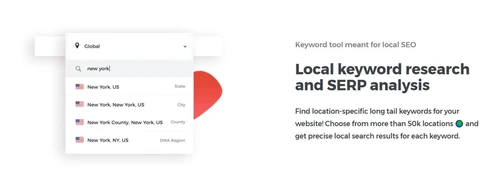
KWFinder is an online keyword research tool that enables users to find low-competition but high-search-volume keywords for SEO and PPC. It offers comprehensive SERP analysis, competitor keyword lists, and historical trends for content optimization and better rankings.
See MoreHave you used KWFinder before?
Share your insights for better experience
Brand: Mangools
Founded Year: 2014
Mangools is an user-friendly SEO tools trusted by productive SEO professionals all around the world
 Keyword Research Tool Competitor Keywords SERP Lookups Keyword Tracking Backlink Row Site Audit Simultaneous Logins Google Suggest Keyword Bulk Import Local SEO Targeting Keyword Difficulty (KD) Meter Historical Search Volume Custom Keyword Lists

Watch the demo video to explore key features, real workflows, and how the software fits your business needs.
 Windows
  Desktop
  Cloud-Based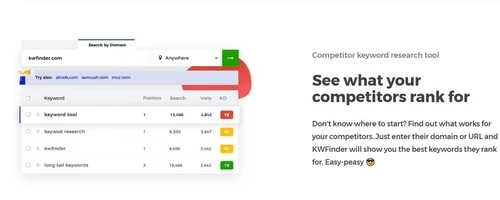

Small Business
Designed for startups and growing businesses
Medium Business
Built for business growth and flexibility
Enterprises
Designed for complex and large-scale business needs
4.6
Out of 5

Overall Rating
Based on
7 Verified Reviews
Rating Breakdown
88% Recommend this Product
Add ReviewUsers generally appreciate KWFinder for its user-friendly interface and comprehensive keyword insights, making it a valuable tool for both SEO and PPC marketers. Many highlight its effectiveness in competitive research and the regular updates that enhance its functionality. However, some users note that the pricing can be on the higher side, and there are suggestions for improving the depth of performance statistics. Overall, the sentiment is positive, with users recommending it for its ease of use and reliability.
Pros
"Search volume accuracy, competition indication, and relevant keyword insights."
"Provides us with an entire list of localized keywords with SERP Analysis, along with suggestion for alternate keywords."
Cons
"Statistics about the performance and quality of the page are not so elaborate. Can be improved."


Jan 1, 2023
Techjockey Verified
“KWFinder is a great keyword search tool and it’s very simple to use.”
Pros
I’ve used this tool to find new keywords for my blog, to find keywords that competitors are using, to get information about advertising costs and to find new keywords for using in my PPC campaigns. It is a great tool for SEO marketers and PPC marketers.
Cons
No cons as of now.
Dec 30, 2022
Techjockey Verified
“Easy to use keyword research tool.”
Pros
KWFinder is a great keyword research tool that gives you a lot of information about the keywords you research. It provides you with keyword difficulty ranking, monthly search volume, and many other metrics that can help you decide if it is worth it to rank for a particular keyword.
Cons
It is bit costly.
Jan 1, 2023
Techjockey Verified
“Perfect tool for keyword research for beginners.”
Pros
I use KWFinder to do my competitive research and to find new keywords. And I can’t forget to mention that the KWFinder team is always updating the tool so that it can be more helpful and faster than before. KWFinder is the top keyword research tool I’ve ever used.
Cons
NO CONS

KWFinder
Price On Request
Desktop
Mobile
Web based
On Premises
Windows
Mac OS

Keywords Everywhere
Price On Request
Desktop
Mobile
Web based
On Premises
Windows
Mac OS

AI Keywording
Price On Request
Desktop
Mobile
Web based
On Premises
Windows
Mac OS

KeywordSpy
Price On Request
Desktop
Mobile
Web based
On Premises
Windows
Mac OS

SeoWebChecker
₹ 500
Desktop
Mobile
Web based
On Premises
Windows
Mac OS

Search Alkemy
Price On Request
Desktop
Mobile
Web based
On Premises
Windows
Mac OS

Keyword Insights
Price On Request
Desktop
Mobile
Web based
On Premises
Windows
Mac OS

KeywordSearch
Price On Request
Desktop
Mobile
Web based
On Premises
Windows
Mac OS

Keywrds AI
Price On Request
Desktop
Mobile
Web based
On Premises
Windows
Mac OS

Long Tail Pro
Price On Request
Desktop
Mobile
Web based
On Premises
Windows
Mac OS

AnswerThePublic
Price On Request
Desktop
Mobile
Web based
On Premises
Windows
Mac OS
(0) Product(s) selected
Available
Price on Request
Available
Price on Request
Starting Price:
$19 /Month
Starting Price:
$10 /Month

Available
Price on Request

Available
Price on Request

Available
Price on Request
Yes, there is moneyback guarantee of 45 days.
The starting price of KWFinder is $36.75 per month. There are other plans are available with additional features and functionalities.
KWFinder uses search patterns, competition, and keyword difficulty to help users identify low-competition, high-volume keywords. KWFinder includes SERP analysis, competitor analysis, and historic data, giving companies the proper tools to efficiently optimize SEO practice.
Yes, KWFinder is available for free with limited features and capabilities.
No, there is no demo available in KWFinder.
The major users of KWFinder are SEO professionals, marketers, bloggers, e-commerce businesses, and agencies
No, there is no mobile app of KWFinder.
20,000+ Software Listed
Best Price Guranteed
Free Expert Consultation
2M+ Happy Customers
Terms and Condtions

Users with registered businesses can purchase goods from merchants on the platform to satisfy their business needs. Users are not permitted to utilize any products acquired through the platform for resale, advertising, business, or further distribution.
For each purchase made, users will receive a Tax Invoice (or 'GST invoice') that includes specific details such as:
the GSTIN of the user associated with their registered business, and
the specified Entity Name for their business.
It should be noted that not all products are eligible for GST Invoice. Only the products displayed by participating sellers with the 'GST-based Invoice Available' callout on the product description page would qualify.
Certain goods and services are not eligible to get a GST Invoice, including items with VAS, i.e., Value Added Services (e.g., Total Mobile Protection/Assured Buyback) and those involving an exchange offer at the time of purchase.
Users must ensure the accuracy of the GSTIN, and business entity name provided for the GST Invoice. Requests for corrections into GST Invoice would not be accommodated by Techjockey.com or any Seller, and any issues arising from user-provided information are the sole responsibility of users.
Techjockey.com is not liable for the GST Invoice or any associated input tax credit. To efficiently claim an input tax credit, users should select the registered place of business address as per the GST authority's data and follow the provisions of the GST Act and rules.
To claim an input tax credit, the delivery and billing addresses must match. Furthermore, input tax credits will not be granted if the delivery address and GSTIN on the invoice are from different states. In case of incorrect GST details provided during the order placement, the order will be canceled automatically.