USA
USA UAE
UAESmall Business
Designed for startups and growing businesses
See More





Brand: SolarWinds
A log monitoring tool that simplifies logs into actionable insights! From real-time tracking to archiving, everything stays absolutely effortless and orderly.
See MoreHave you used Loggly before?
Share your insights for better experience
Brand: SolarWinds
Founded Year: 1999
SolarWinds is a leading provider of simple, powerful and secure solutions designed to help organizations accelerate business transformation in today’s hybrid IT world by monitor and manage the performance of their IT environments, whether on-premises, in the cloud or in hybrid deployments
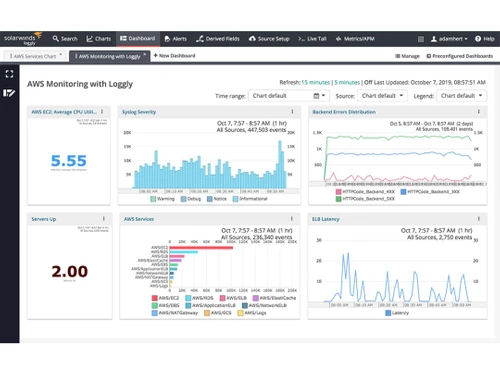
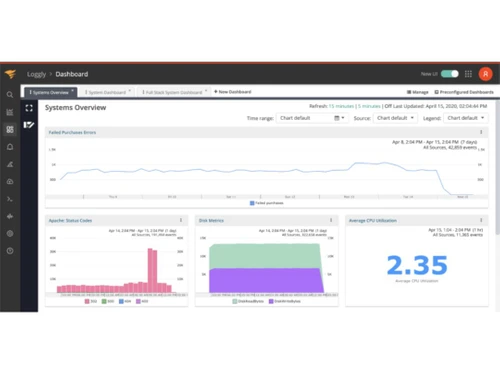
 Centralized Logging Agentless Log Collection Automated Parsing Automated Filters Log Usage Dashboards API Access Federated Identity Management Anomaly Detection JIRA Software Integration Peak Overage Protection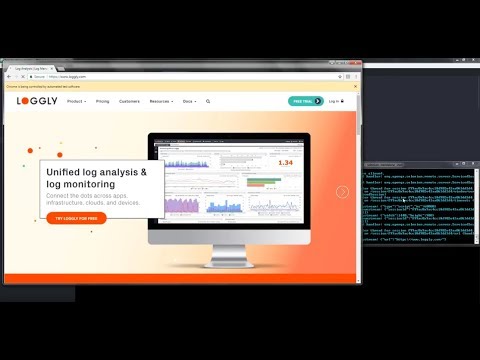

Watch the demo video to explore key features, real workflows, and how the software fits your business needs.
 Ubuntu
  Windows
  MacOS
MacOS  Linux
Linux  Desktop
  Cloud-Based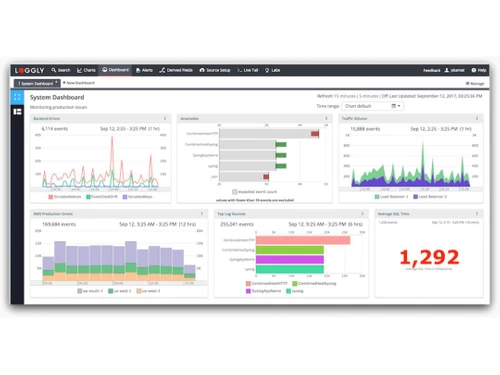
Small Business
Designed for startups and growing businesses
Medium Business
Built for business growth and flexibility
Enterprises
Designed for complex and large-scale business needs
4.4
Out of 5

Overall Rating
Based on
4 Verified Ratings
Rating Breakdown
90% Recommend this Product
Add ReviewThis product has no reviews yet. Be the first to leave your feedback.
Add Review
Loggly
Price On Request
Desktop
Mobile
Web based
On Premises
Windows
Mac OS

Kiwi Syslog Server
Price On Request
Desktop
Mobile
Web based
On Premises
Windows
Mac OS

Papertrail
Price On Request
Desktop
Mobile
Web based
On Premises
Windows
Mac OS

Better Stack
Price On Request
Desktop
Mobile
Web based
On Premises
Windows
Mac OS

Atatus
Price On Request
Desktop
Mobile
Web based
On Premises
Windows
Mac OS

Coralogix
Price On Request
Desktop
Mobile
Web based
On Premises
Windows
Mac OS

Logit
Price On Request
Desktop
Mobile
Web based
On Premises
Windows
Mac OS

NetVizura EventLog Analyzer
Price On Request
Desktop
Mobile
Web based
On Premises
Windows
Mac OS

Mezmo Log Analysis
Price On Request
Desktop
Mobile
Web based
On Premises
Windows
Mac OS

GoAccess
Price On Request
Desktop
Mobile
Web based
On Premises
Windows
Mac OS

LogMeister
Price On Request
Desktop
Mobile
Web based
On Premises
Windows
Mac OS
(2) Product(s) selected
Starting Price:
$7 /Month
Available
Price on Request
Starting Price:
$200 /Quantity

Available
Price on Request

Available
Price on Request

Available
Price on Request
Loggly pricing begins at $948 per year on techjockey.com. The cost depends on factors like features, number of users, and deployment type. For exact details, the product team can share personalized pricing and offers.
Loggly is primarily used by development teams to monitor applications and fix issues quickly. Technical operations teams rely on it to manage servers and resolve errors. Product and customer service teams also use it to study trends and improve performance.
Loggly is mainly accessed through a web-based interface for logging and analysis. There is no separate mobile app for general use. However, it provides Android logging and log viewing options for specific needs.
Loggly works well with major operating systems including Ubuntu, Windows, MacOS, and Linux. Compatibility with these platforms ensures flexibility for businesses of all sizes. Teams can use it without worrying about system restrictions.
Yes, Loggly provides a free trial for new users. This allows teams to test its features before making a purchase. It also helps businesses understand how the platform fits their operations.
Loggly collects logs from different systems, applications, and servers into one platform. It lets teams monitor performance, detect issues, and analyze trends. All of this happens in the cloud, so no extra hardware is needed.
20,000+ Software Listed
Best Price Guranteed
Free Expert Consultation
2M+ Happy Customers
Terms and Condtions

Users with registered businesses can purchase goods from merchants on the platform to satisfy their business needs. Users are not permitted to utilize any products acquired through the platform for resale, advertising, business, or further distribution.
For each purchase made, users will receive a Tax Invoice (or 'GST invoice') that includes specific details such as:
the GSTIN of the user associated with their registered business, and
the specified Entity Name for their business.
It should be noted that not all products are eligible for GST Invoice. Only the products displayed by participating sellers with the 'GST-based Invoice Available' callout on the product description page would qualify.
Certain goods and services are not eligible to get a GST Invoice, including items with VAS, i.e., Value Added Services (e.g., Total Mobile Protection/Assured Buyback) and those involving an exchange offer at the time of purchase.
Users must ensure the accuracy of the GSTIN, and business entity name provided for the GST Invoice. Requests for corrections into GST Invoice would not be accommodated by Techjockey.com or any Seller, and any issues arising from user-provided information are the sole responsibility of users.
Techjockey.com is not liable for the GST Invoice or any associated input tax credit. To efficiently claim an input tax credit, users should select the registered place of business address as per the GST authority's data and follow the provisions of the GST Act and rules.
To claim an input tax credit, the delivery and billing addresses must match. Furthermore, input tax credits will not be granted if the delivery address and GSTIN on the invoice are from different states. In case of incorrect GST details provided during the order placement, the order will be canceled automatically.