linkedin
Lsoft UNFORMAT 8 logo
play UNFORMAT - Lsoft UNFORMAT 8 Demo
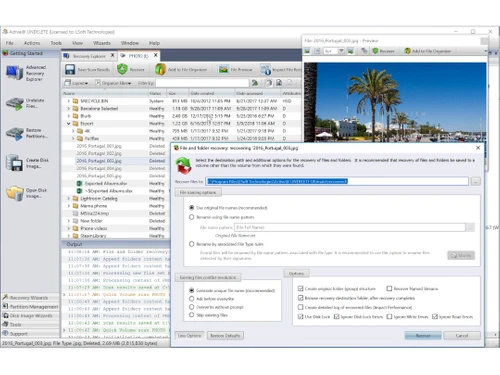
lsoft active undelete-restore
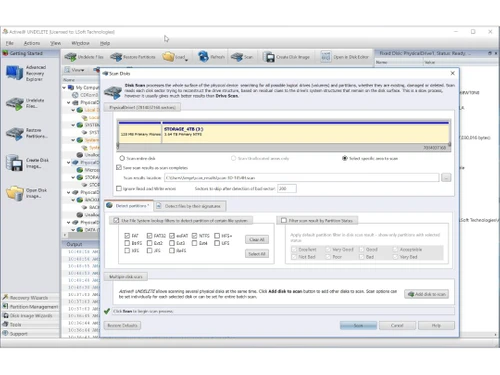
lsoft active undelete-storage

Lsoft UNFORMAT 8

Brand: Lsoft

  • 4.6

  • 2 Ratings & 2 Reviews

  • A data recovery software designed to restore accidentally deleted files.
  • It helps users recover data from hard drives, USB drives, and memory cards.
  • The software supports multiple file systems and storage devices.
  • It simplifies the process of recovering lost partitions and damaged data.
See More

Have you used Lsoft UNFORMAT 8 before?

Share your insights for better experience

Add a Review
Starting Price
₹2030

View plans

100% Genuine
Products
Best Price
Guaranteed
Safe & Secure
Payment
  • Description

  • Pricing

  • Features

  • Specification

  • Review

  • Compare

  • Alternatives

  • FAQ

Starting at ₹2,030

Lsoft UNFORMAT 8 Software Overview

What is LSoft UNFORMAT 8?

LSoft UNFORMAT 8 is a data backup software that is designed to recover lost and deleted or formatted data that has been lost due to system damage. It supports internal and external storage devices such as hard drives, SSDs, USB flash drives, and memory cards.

The software has been primarily applied to restore formatted partitions as well as recover files in damaged or corrupted storage media. It is compatible with wide-ranging file systems like NTFS, FAT, and exFAT, making it compatible with Windows-based systems.

What are the Benefits of Choosing LSoft UNFORMAT 8?

  • Formatted Drive Recovery: The software is created to salvage data that has been inadvertently formatted on drives. Therefore, assists users to restore valuable documents, photographs, videos, and other files even after complete formatting.
  • Partition Recovery: It can identify and reconstruct lost or deleted partitions. Thus, users can reconstruct the partition structures and access areas of storage that might otherwise be inaccessible.
  • Support for Multiple File Systems: LSoft UNFORMAT 8 is compatible with different types of storage devices and configurations. It supports NTFS, FAT12/16/32, and exFAT file systems.
  • Deep Scan Technology: The computer program analyses storage sectors in detail to find recoverable data, even when the file system is destroyed or overwritten partially.
  • Recovery from External Devices: It can rescue flash drives, memory cards, and external hard disks. It can be handy for photographers, students, and professionals.
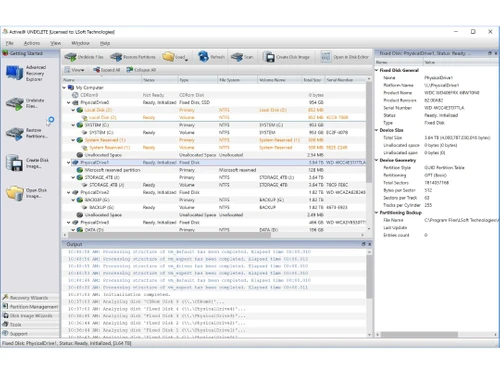
  • User-Friendly Interface: The interface has been made user-friendly to the extent that it can lead a user through the process of a non-technical user through the recovery process.
  • Preview Before Recovery: Users can preview files that can be restored, and this would assist them in making sure that they have selected the right files.
  • Safe Recovery Process: The software does not modify the original data to avoid causing additional damage to original data during recovery without causing damage to the original data.
  • Quick and Advanced Scan Modes: It provides the option of various scans to ensure that the user is at liberty to select the scans that are not time-consuming, and a more in-depth analysis when the data is lost.
  • Useful for Accidental Deletions: Deletion of files accidentally or loss because of formatting errors, the tool enhances the possibility of successful recuperation.

LSoft UNFORMAT 8 Pricing

Pricing for LSoft UNFORMAT 8 starts from INR 2,030 at Techjockey. You can get in touch with them for more information related to the software.

Read more

Lsoft Company Details

Founded Year:  1999

Lsoft

Director/Founders Ilya Chudinov
Company Size 1-100 Employees

Lsoft UNFORMAT 8 Pricing & Plans

Unformat
Starting at ₹2030
    • Quantity (License)

      Quantity (License)
      Quantity (License)

Key Features

  • Interface Mangement

  • Backup and Recovery

  • Data Recovery

  • Driver Management

  • Service & Support

Unformat Professional
Starting at ₹2730
    • Quantity (License)

      Quantity (License)
      Quantity (License)

Key Features

  • Interface Mangement

  • Backup and Recovery

  • Data Recovery

  • Driver Management

  • Service & Support

Lsoft UNFORMAT 8 Features

  • icon_check Volume Restoration
    Reconstructs unreadable or lost logical volumes on hard drives, ensuring the operating system can recognize the data again.
  • icon_check Service & Support
    Support for exFAT, Apple HFS+ & Linux ExtFS, Support for large HDDs.
  • icon_check Data Recovery
    Advanced recovery by folder/by file
  • icon_check Backup and Recovery
    Restores formatted HDD, USB & Flash drives
  • icon_check Interface Mangement
    Recovers data from NTFS, FAT32, FAT file systems. Automatic operability for user convenience. Simple and well thought-out
  • icon_check Driver Management
    USB connected disks and flash drives. Memory cards accidently formatted in cameras, smart phones, MP3 Players, etc. PC hard
Lsoft UNFORMAT 8 Demo Video play icon

Get Lsoft UNFORMAT 8 Demo

Watch the demo video to explore key features, real workflows, and how the software fits your business needs.

Understand
Key Features
Personal
Demo Insights
Interactive
Demo Support

Lsoft UNFORMAT 8 Specifications

Supported Platforms
Ubuntu Ubuntu Windows Windows MacOS MacOS Linux Linux
Devices
Desktop Desktop
Deployment
Cloud-Based Cloud-Based
Suitable For
All Industries
Business Specific
All Businesses
Business Size
Small Business Startups Medium Business SMBs
Customer Support
Phone Email
Language
English
Training Resources
Videos

Explore the Best Alternative Solutions Similar to Your Business Size and Needs

Lsoft UNFORMAT 8 Reviews

4.6

Out of 5

img

Overall Rating

Based on
2 Verified Reviews

Rating Breakdown

  • Features 4.5
  • Value for Money 4.4
  • Ease of Use 4.7
  • Customer Support 4.7

95% Recommend this Product

Add Review

Hira Laskar

User

4.7

Reviewed on: Jun 10, 2019

Techjockey Verified

“Got my deleted data and felt so relieved ”

Pros

This a product on which I can totally rely just in case I have lost my data due to any reason, this software just recovers my data by file and folder. I am truly satisfied with this.

Cons

NO CONS

Saifuddin ansari

User

4.5

Reviewed on: Jun 19, 2018

Techjockey Verified

“Highly recommended”

Pros

I began this process with no knowledge of the programs, and no familiarity with the process. I expected only to get a feel for the options and more information to research ? instead, Techjockey gave me immediate solutions. I couldn?t be happier.

Cons

N/A

Compare Lsoft UNFORMAT 8 With other Data Backup Software

Products
Ratings
Pricing
Device Supported
Deployment
Supported Platforms
  • img

    Lsoft UNFORMAT 8

  • 4.6

  • Price On Request

  • Desktop

    Mobile

  • Web based

    On Premises

  • Windows

    Mac OS

  • img

    Ideas Plus

  • 4.5

  • Price On Request

  • Desktop

    Mobile

  • Web based

    On Premises

  • Windows

    Mac OS

  • img

    Apna Backup

  • 4.3

  • ₹ 1562

  • Desktop

    Mobile

  • Web based

    On Premises

  • Windows

    Mac OS

  • img

    Allway Sync

  • 4.5

  • Price On Request

  • Desktop

    Mobile

  • Web based

    On Premises

  • Windows

    Mac OS

  • img

    Staz

  • 4.2

  • ₹ 1000

  • Desktop

    Mobile

  • Web based

    On Premises

  • Windows

    Mac OS

  • img

    Veeam Data Cloud

  • 4.4

  • Price On Request

  • Desktop

    Mobile

  • Web based

    On Premises

  • Windows

    Mac OS

  • img

    Retrospect Backup

  • 4.5

  • Price On Request

  • Desktop

    Mobile

  • Web based

    On Premises

  • Windows

    Mac OS

  • img

    iTransor for iOS

  • 4.7

  • ₹ 3289

  • Desktop

    Mobile

  • Web based

    On Premises

  • Windows

    Mac OS

(2) Product(s) selected

Lsoft UNFORMAT 8 Alternatives

See All Lsoft UNFORMAT 8 Alternatives

Starting Price:

₹1,562 /Month ₹2,003

SAVE UPTO 22%
SAVE UPTO 33%

Available

Price on Request

Articles for Lsoft UNFORMAT 8

See All Related Articles

How much does LSoft UNFORMAT 8 cost?

Pricing of LSoft UNFORMAT 8 starts from INR 2,030 at Techjockey.

How does LSoft UNFORMAT 8 work?

It scans formatted or damaged drives, detects recoverable files and partitions, and allows users to restore selected data safely.

Who should use LSoft UNFORMAT 8?

Individuals, IT professionals, businesses, and anyone who needs to recover lost or formatted data can use this software.

Can it recover data after formatting a drive?

Yes, it is specifically designed to recover data from formatted drives and partitions.

Does it support USB and external drives?

Yes, it supports recovery from USB drives, memory cards, and external hard disks.

Is it safe to use?

Yes, it uses read-only scanning to avoid overwriting or damaging existing data during recovery.

Does it preview files before recovery?

Yes, users can preview files before restoring them.

Can it recover deleted partitions?

Yes, it can detect and restore lost or deleted partitions.

Is it compatible with Windows systems?

Yes, it is designed for Windows-based environments and supports common Windows file systems.

20,000+ Software Listed

Best Price Guranteed

Free Expert Consultation

2M+ Happy Customers

Terms and Condtions

close

Users with registered businesses can purchase goods from merchants on the platform to satisfy their business needs. Users are not permitted to utilize any products acquired through the platform for resale, advertising, business, or further distribution.

For each purchase made, users will receive a Tax Invoice (or 'GST invoice') that includes specific details such as:

  • the GSTIN of the user associated with their registered business, and

  • the specified Entity Name for their business.

It should be noted that not all products are eligible for GST Invoice. Only the products displayed by participating sellers with the 'GST-based Invoice Available' callout on the product description page would qualify.

Certain goods and services are not eligible to get a GST Invoice, including items with VAS, i.e., Value Added Services (e.g., Total Mobile Protection/Assured Buyback) and those involving an exchange offer at the time of purchase.

Users must ensure the accuracy of the GSTIN, and business entity name provided for the GST Invoice. Requests for corrections into GST Invoice would not be accommodated by Techjockey.com or any Seller, and any issues arising from user-provided information are the sole responsibility of users.

Techjockey.com is not liable for the GST Invoice or any associated input tax credit. To efficiently claim an input tax credit, users should select the registered place of business address as per the GST authority's data and follow the provisions of the GST Act and rules.

To claim an input tax credit, the delivery and billing addresses must match. Furthermore, input tax credits will not be granted if the delivery address and GSTIN on the invoice are from different states. In case of incorrect GST details provided during the order placement, the order will be canceled automatically.