linkedin
Meetily logo
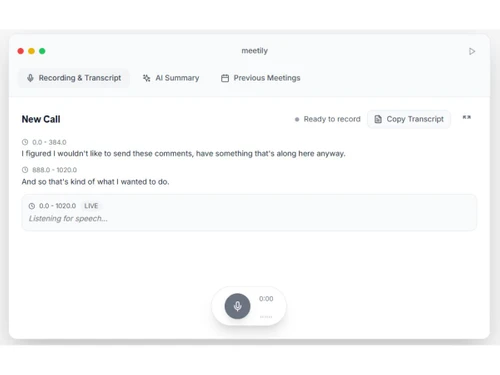
Meetily-recording
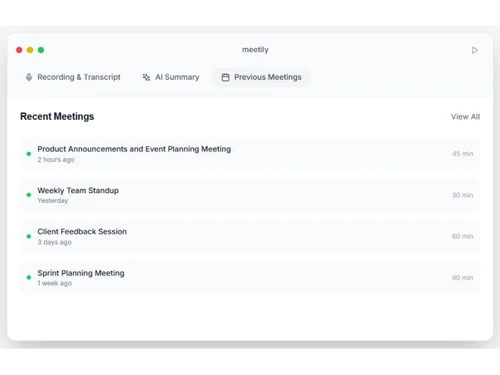
Meetily-meeting
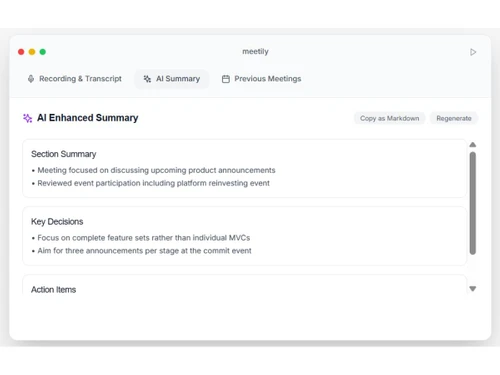
Meetily-summary

Meetily

Brand: Zackriya Solutions

  • 4.5

  • 4 Ratings

Meetily is a privacy-focused AI meeting assistant that records, transcribes, and summarizes meetings locally on the user's device.

See More

Have you used Meetily before?

Share your insights for better experience

Add a Review
Starting Price
$10

View plans

100% Genuine
Products
Best Price
Guaranteed
Safe & Secure
Payment
  • Description

  • Pricing

  • Features

  • Specification

  • Review

  • Compare

  • Alternatives

Starting at $10

Meetily Software Overview

What is Meetily?

Meetily is a sophisticated, privacy-first AI meeting assistant designed to enhance productivity by automating the note-taking process. Its core transcription and data processing can run entirely on your local device, helping keep sensitive meeting data, including audio and transcripts, under your control. This makes it a suitable solution for individuals and businesses concerned with data privacy.

The software seamlessly integrates with popular meeting platforms like Zoom, Microsoft Teams, and Google Meet. Its core function is to record, transcribe, and generate intelligent summaries of your meetings in real-time. With an open-source foundation, Meetily is trusted by a large community of users and developers, offering a transparent and powerful alternative to cloud-based meeting assistants.

Why Choose Meetily?

  • Unmatched Security: Meetily's local-first architecture allows recordings and transcripts to be processed on your device, helping keep sensitive meeting data under your control when local AI processing is used.
  • Offline Capability: Meetily can perform local transcription and summarization offline after the initial setup and model downloads, making it suitable for meetings in environments with limited connectivity.
  • Open-Source Trust: Built on an open-source core, Meetily offers transparency and is vetted by a global community, as evidenced by its popularity on GitHub.
  • High Accuracy: Meetily uses local AI models to provide real-time transcription and AI-powered meeting summaries.
  • Seamless Workflow: It automates the entire meeting documentation workflow, from live transcription to generating summaries with key points and action items, freeing you to focus on the conversation.

Advanced Features of Meetily

  • Real-Time Transcription: Get a live, written record of your conversation as it happens.
  • Speaker Identification (Diarization): Meetily supports speaker identification capabilities for distinguishing between different speakers and attributing transcript text to the correct person.
  • AI-Powered Summaries: Instantly generate concise summaries that highlight key points, decisions, and actionable items from the entire meeting.
  • Enhanced Accuracy Models: Pro users gain access to advanced models that deliver even higher transcription accuracy.
  • Custom AI Integration: Connect custom AI models or use your own API-compatible endpoint for generating summaries, allowing greater customization and control over AI processing.
  • Custom Summary Templates: Create and use templates to standardize the format of your meeting summaries for consistency across your team.
  • Advanced Export Options: Easily export your transcripts and summaries in various formats, including PDF, DOCX, and Markdown, for simple sharing and archiving.
  • Auto-Detect Meetings: Pro users can use automatic meeting detection to detect meetings on supported platforms such as Zoom, Microsoft Teams, and Google Meet and start the recording workflow with less manual intervention.

Key Capabilities of Meetily

  • Recording: The tool securely records meeting audio directly on your device. It also supports importing existing audio and video files in over 10 formats for transcription after the fact.
  • Transcription: Using powerful local AI models, Meetily converts spoken words into accurate, time-stamped text in real-time. Users can also re-transcribe recordings for improved accuracy.
  • People Identification: After a meeting, you can easily identify and name each speaker. The AI then automatically attributes all dialogue in the transcript, making the conversation easy to follow.
  • AI Summary: With a single click, Meetily analyzes the full transcript to produce a structured summary. This summary includes the most critical points discussed and a clear list of action items, providing an at-a-glance overview of the meeting's outcome.

How to Use Meetily?

  1. Installation & Setup: Download and install the application on your personal computer. It runs locally without complex server configurations.
  2. Start a Meeting: Join your meeting on any major platform like Zoom, Teams, or Google Meet. Meetily can be configured to automatically detect and start transcribing once a meeting begins.
  3. Live Transcription: As the meeting progresses, you can see the live transcript being generated within the Meetily interface.
  4. Post-Meeting Wrap-Up: Once the meeting concludes, the recording and transcript are immediately available. You can then identify speakers and generate an AI summary.
  5. Review & Export: Review the generated summary, key points, and action items. Make any necessary edits and export the final document in your preferred format (PDF, DOCX, etc.) for distribution or record-keeping.

Meetily Pricing

Meetily price starts at USD 10 at techjockey.com.

The pricing model is based on different parameters, including extra features, deployment type, and the total number of users. For further queries related to the product, you can contact our product team and learn more about the pricing and offers.

Read more

Zackriya Solutions Company Details

Founded Year:  2020

Zackriya Solutions offers embedded design and web application development, artificial intelligence, and cloud solutions.

Director/Founders Sandeep Zachariah
Company Size 1-100 Employees

Meetily Pricing & Plans

Pro
Key Features
  • All Pro features unlocked
  • Speaker diarization (who said what)
  • Custom AI model connector
  • Custom summary templates
  • Auto-detect meetings
Starting at $10
    • Users

      Users
      Users
    • Monthly

      Monthly
      Monthly

Key Features

  • All Pro features unlocked

  • Speaker diarization (who said what)

  • Custom AI model connector

  • Custom summary templates

  • Auto-detect meetings

Meetily Features

  • icon_check Automatic Transcription
    Converts spoken meeting audio into accurate text in real time using on-device Whisper transcription models.
  • icon_check AI Meeting Summaries
    Generates concise summaries of discussions using local AI models, highlighting key decisions and action items.
  • icon_check Privacy-First Processing
    All meeting recordings, transcripts, and summaries are processed locally to ensure complete data confidentiality.
  • icon_check Multi-Platform Support
    Compatible with Zoom, Google Meet, Teams, and other platforms by recording audio directly from your system.
  • icon_check Offline Functionality
    Performs transcription and summarization fully offline, without requiring an internet connection or cloud access.
  • icon_check Local LLM Integration
    Integrates with local large language models via tools like Ollama for summarization and contextual responses.
  • icon_check Speaker Diarization
    Detects and labels different speakers in the meeting transcript to enhance clarity and participant tracking.
  • icon_check Custom Summary Prompts
    Allows users to define custom summary templates and prompts for specific meeting goals or note formats.
  • icon_check Multi-Language Support
    Supports transcription and summarization in multiple languages, enabling global and multilingual meetings.
  • icon_check Meeting Export Options
    Exports transcripts and summaries in multiple formats like TXT, DOCX, or PDF for easy sharing and archiving.
  • icon_check Lightweight Performance
    Optimized for efficiency, running seamlessly on modern CPUs and GPUs with minimal system resource use.
  • icon_check API Integration
    Provides API endpoints for connecting summaries and transcripts with CRM, Slack, or project management tools.

Meetily Specifications

Supported Platforms
Windows Windows MacOS MacOS
Devices
Desktop Desktop
Deployment
Perpetual Perpetual
Suitable For
All Industries
Business Specific
All Businesses
Business Size
Small Business Startups Medium Business Enterprises
Customer Support
Email Communities
Language
English
Training Resources
Documentation Videos
AI Features
AI Integrated

Explore the Best Alternative Solutions Similar to Your Business Size and Needs

Medium Business

Built for business growth and flexibility

Krisp

4.3

MeetGeek

4.5

Read AI

4.4

See More

Meetily Review

4.5

Out of 5

img

Overall Rating

Based on
4 Verified Ratings

Rating Breakdown

  • Features 4.8
  • Value for Money 4.1
  • Ease of Use 4.7
  • Customer Support 4.2

80% Recommend this Product

Add Review

Be the First to Review

This product has no reviews yet. Be the first to leave your feedback.

Add Review
Compare Meetily With other AI Meeting Assistants

Products
Ratings
Pricing
Device Supported
Deployment
Supported Platforms
  • img

    Meetily

  • 4.5

  • Price On Request

  • Desktop

    Mobile

  • Web based

    On Premises

  • Windows

    Mac OS

  • img

    Read AI

  • 4.4

  • Price On Request

  • Desktop

    Mobile

  • Web based

    On Premises

  • Windows

    Mac OS

  • img

    Krisp

  • 4.3

  • Price On Request

  • Desktop

    Mobile

  • Web based

    On Premises

  • Windows

    Mac OS

  • img

    Fellow

  • 4.2

  • Price On Request

  • Desktop

    Mobile

  • Web based

    On Premises

  • Windows

    Mac OS

  • img

    Cluely

  • 4.4

  • Price On Request

  • Desktop

    Mobile

  • Web based

    On Premises

  • Windows

    Mac OS

  • img

    Otter

  • 4.5

  • Price On Request

  • Desktop

    Mobile

  • Web based

    On Premises

  • Windows

    Mac OS

  • img

    Rumi AI

  • 4.2

  • Price On Request

  • Desktop

    Mobile

  • Web based

    On Premises

  • Windows

    Mac OS

  • img

    Claap

  • 4.4

  • Price On Request

  • Desktop

    Mobile

  • Web based

    On Premises

  • Windows

    Mac OS

  • img

    Laxis

  • 4.1

  • Price On Request

  • Desktop

    Mobile

  • Web based

    On Premises

  • Windows

    Mac OS

  • img

    Jamie

  • 4.1

  • Price On Request

  • Desktop

    Mobile

  • Web based

    On Premises

  • Windows

    Mac OS

  • img

    Meeting.ai

  • 4.2

  • Price On Request

  • Desktop

    Mobile

  • Web based

    On Premises

  • Windows

    Mac OS

(0) Product(s) selected

Meetily Alternatives

See All Meetily Alternatives

Starting Price:

$29 /Host/Month

Starting Price:

€30 /Month

Starting Price:

$16 /Month

Starting Price:

€25 /Month

Beyz

3.9

Starting Price:

$50 /Month

Hedy

4.2

Starting Price:

$10 /Month

Starting Price:

$45 /Month

Articles for Meetily

See All Related Articles

20,000+ Software Listed

Best Price Guranteed

Free Expert Consultation

2M+ Happy Customers

Terms and Condtions

close

Users with registered businesses can purchase goods from merchants on the platform to satisfy their business needs. Users are not permitted to utilize any products acquired through the platform for resale, advertising, business, or further distribution.

For each purchase made, users will receive a Tax Invoice (or 'GST invoice') that includes specific details such as:

  • the GSTIN of the user associated with their registered business, and

  • the specified Entity Name for their business.

It should be noted that not all products are eligible for GST Invoice. Only the products displayed by participating sellers with the 'GST-based Invoice Available' callout on the product description page would qualify.

Certain goods and services are not eligible to get a GST Invoice, including items with VAS, i.e., Value Added Services (e.g., Total Mobile Protection/Assured Buyback) and those involving an exchange offer at the time of purchase.

Users must ensure the accuracy of the GSTIN, and business entity name provided for the GST Invoice. Requests for corrections into GST Invoice would not be accommodated by Techjockey.com or any Seller, and any issues arising from user-provided information are the sole responsibility of users.

Techjockey.com is not liable for the GST Invoice or any associated input tax credit. To efficiently claim an input tax credit, users should select the registered place of business address as per the GST authority's data and follow the provisions of the GST Act and rules.

To claim an input tax credit, the delivery and billing addresses must match. Furthermore, input tax credits will not be granted if the delivery address and GSTIN on the invoice are from different states. In case of incorrect GST details provided during the order placement, the order will be canceled automatically.