USA
USA UAE
UAESmall Business
Designed for startups and growing businesses

See More



Brand: Cluely
Have you used Cluely before?
Share your insights for better experience
Brand: Cluely
Founded Year: 2025
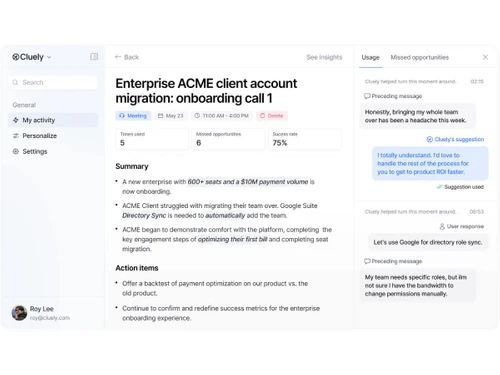
Cluely is the #1 AI assistant for meetings. Take perfect, beautiful meeting notes, answer questions in real-time, and be the most prepared person on every call.
 Session Note Taking People Search Follow-Up Emails Screen Share Invisible Universal Platform Support Action Item Extraction Past Conversations Recall Multi User Support Collaboration Tools Keyword Highlighting Multi-Language Support Meeting Preparation Tools
  Windows
  MacOS
MacOS  Desktop
  Perpetual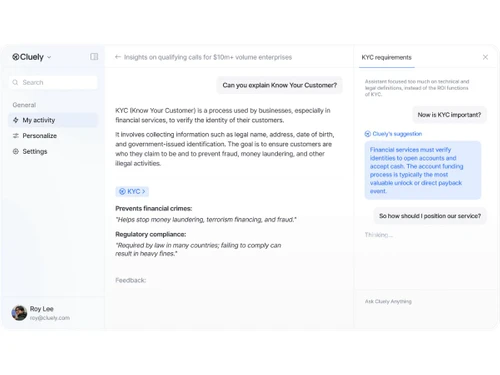
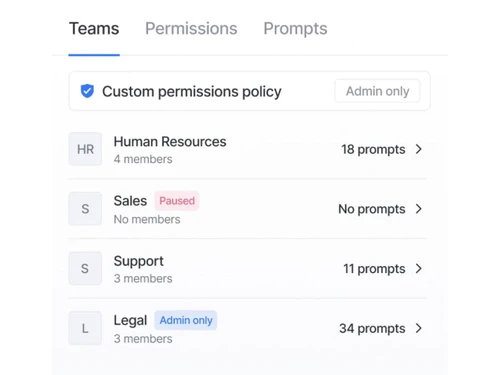
Small Business
Designed for startups and growing businesses
Medium Business
Built for business growth and flexibility
Enterprises
Designed for complex and large-scale business needs
4.4
Out of 5

Overall Rating
Based on
6 Verified Reviews
Rating Breakdown
81% Recommend this Product
Add ReviewUsers generally appreciate Cluely for its ability to provide quick suggestions and follow-ups during meetings, enhancing their confidence and efficiency. The "undetectable" mode is particularly praised for maintaining a natural flow. However, common concerns revolve around inaccuracies in suggestions, which can undermine credibility and create awkward moments. Additionally, ethical worries about privacy and the tool's invisible listening capabilities are frequently highlighted, raising questions about data security and consent. Overall, while the potential is recognized, execution issues and ethical implications remain significant limitations.
Pros
"When Cluely works, it gives quick suggestions for objections, helps me recall previous points about customers, and supplies follow-ups. It improves confidence in calls."
"Cluely’s “undetectable” mode (overlay that doesn’t show up in screen share or recordings) is appealing for maintaining flow in meetings. It’s a strong selling point."
"After meetings, Cluely’s follow-up emails and summaries save me time. The “action items” and notes are pretty useful."
Cons
"But when it “hallucinates” or misremembers, or suggests something wrong (e.g certain details a customer never said), it undermines credibility. Mistakes are visible."
"The invisible listening/screen reading feels creepy. I worry about what data is stored, who sees it, and if it might violate consent laws. Several reviews raise these issues."
"Technical glitches: suggestions are sometimes generic, latency is noticeable, app doesn’t always respond well under load. Articles review these shortcomings."


May 25, 2025
Techjockey Verified
“Usage in Sales Calls Shows Promise, but Errors Cost Credibility”
In sales calls, Cluely has helped me by giving quick conflict rebuttals or questions to ask. But once it suggests something inaccurate, I have to correct or pause, which can break trust.
Pros
When Cluely works, it gives quick suggestions for objections, helps me recall previous points about customers, and supplies follow-ups. It improves confidence in calls.
Cons
But when it “hallucinates” or misremembers, or suggests something wrong (e.g certain details a customer never said), it undermines credibility. Mistakes are visible.
Reason to switch
I switched from using Meeting.ai because I needed something that works in real time during calls. Cluely gives that boost, but I keep human oversight.
Apr 26, 2025
Techjockey Verified
“It’s Undetectable, Until Something Goes Wrong”
Using Cluely in a panel interview, I hoped for smooth help. Instead, when the AI was slow or off-mark, it was more distracting than helpful, and I think people might have noticed.
Pros
Cluely’s “undetectable” mode (overlay that doesn’t show up in screen share or recordings) is appealing for maintaining flow in meetings. It’s a strong selling point.
Cons
But because it’s hidden, when suggestions lag or don’t match context, it becomes obvious. Also, people might notice odd behavior (typing, glancing at screen). The contradictions in design and privacy policy heighten risk.
Reason to switch
I switched from Otter because it felt embarrassing; Cluely’s hidden mode sounded better—but real-world performance has highlighted some risks.
Mar 13, 2025
Techjockey Verified
“Helpful Follow-Ups and Auto Notes, But Privacy Is Worrying”
I appreciate that after each video call, I don’t need to scramble to remember what was said, the auto-notes help. But morally and legally, using a tool that quietly listens feels risky.
Pros
After meetings, Cluely’s follow-up emails and summaries save me time. The “action items” and notes are pretty useful.
Cons
The invisible listening/screen reading feels creepy. I worry about what data is stored, who sees it, and if it might violate consent laws. Several reviews raise these issues.
Reason to switch
I had used visible transcription tools before, but felt they were distracting during calls. Cluely promised a smoother, less intrusive experience—but not without trade-offs in ethics and clarity.

Cluely
Price On Request
Desktop
Mobile
Web based
On Premises
Windows
Mac OS

Read AI
Price On Request
Desktop
Mobile
Web based
On Premises
Windows
Mac OS

Krisp
Price On Request
Desktop
Mobile
Web based
On Premises
Windows
Mac OS

Fellow
Price On Request
Desktop
Mobile
Web based
On Premises
Windows
Mac OS

Otter
Price On Request
Desktop
Mobile
Web based
On Premises
Windows
Mac OS

Rumi AI
Price On Request
Desktop
Mobile
Web based
On Premises
Windows
Mac OS
Claap
Price On Request
Desktop
Mobile
Web based
On Premises
Windows
Mac OS

Laxis
Price On Request
Desktop
Mobile
Web based
On Premises
Windows
Mac OS

Jamie
Price On Request
Desktop
Mobile
Web based
On Premises
Windows
Mac OS
Meetily
Price On Request
Desktop
Mobile
Web based
On Premises
Windows
Mac OS

Meeting.ai
Price On Request
Desktop
Mobile
Web based
On Premises
Windows
Mac OS
(0) Product(s) selected
Cluely price starts at $20 at Techjockey.com
Yes, Cluely AI meeting assistant software offers a free trial with limited AI responses.
Yes. Cluely is enterprise-grade, meeting the requirements of SOC 2, ISO 27001, GDPR, and HIPAA, keeping your meeting data confidential and secure.
Cluely integrates with all significant platforms such as Zoom, Microsoft Teams, Slack, and Webex, which is why it can be easily incorporated into your existing workflow.
Cluely attends your virtual calls, records the chat in the real time, and systematically sorts the main points and action items.
Yes, Cluely can be integrated with multiple applications, including meeting platforms and productivity applications.
Cluely fits clients, teams, and enterprises in sales, support, recruiting, consulting, and others, anyone desiring to have smarter and more productive meetings.
Cluely will help you take notes, provide responses, and answer questions in real time by using AI at a meeting. It also gives attendee background prior to the calls and the follow-ups are automated after meetings.
20,000+ Software Listed
Best Price Guranteed
Free Expert Consultation
2M+ Happy Customers
Terms and Condtions

Users with registered businesses can purchase goods from merchants on the platform to satisfy their business needs. Users are not permitted to utilize any products acquired through the platform for resale, advertising, business, or further distribution.
For each purchase made, users will receive a Tax Invoice (or 'GST invoice') that includes specific details such as:
the GSTIN of the user associated with their registered business, and
the specified Entity Name for their business.
It should be noted that not all products are eligible for GST Invoice. Only the products displayed by participating sellers with the 'GST-based Invoice Available' callout on the product description page would qualify.
Certain goods and services are not eligible to get a GST Invoice, including items with VAS, i.e., Value Added Services (e.g., Total Mobile Protection/Assured Buyback) and those involving an exchange offer at the time of purchase.
Users must ensure the accuracy of the GSTIN, and business entity name provided for the GST Invoice. Requests for corrections into GST Invoice would not be accommodated by Techjockey.com or any Seller, and any issues arising from user-provided information are the sole responsibility of users.
Techjockey.com is not liable for the GST Invoice or any associated input tax credit. To efficiently claim an input tax credit, users should select the registered place of business address as per the GST authority's data and follow the provisions of the GST Act and rules.
To claim an input tax credit, the delivery and billing addresses must match. Furthermore, input tax credits will not be granted if the delivery address and GSTIN on the invoice are from different states. In case of incorrect GST details provided during the order placement, the order will be canceled automatically.