linkedin
Read AI logo
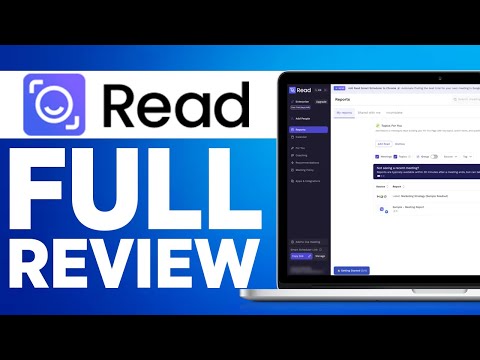
play Read Dashboard - Introduction
read ai-transcription
read ai-copilot

Read AI

Brand: Read AI

  • 4.4

  • 4 Ratings & 1 Review

An AI Meeting Assistant that captures, transcribes, and summarizes meetings, emails, and chats into clear, searchable insights.

See More

Have you used Read AI before?

Share your insights for better experience

Add a Review
Starting Price
$20

View plans

100% Genuine
Products
Best Price
Guaranteed
Safe & Secure
Payment
  • Description

  • Pricing

  • Features

  • Specification

  • Review

  • Compare

  • Alternatives

  • FAQ

Starting at $20

Read AI Software Overview

What is Read AI?

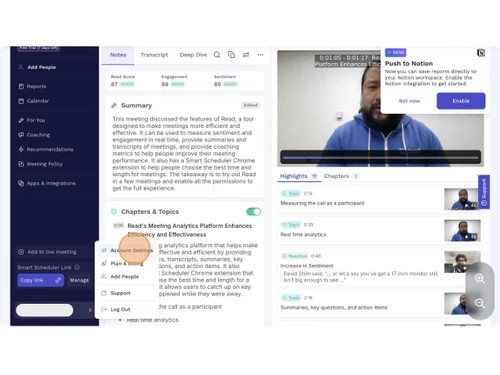
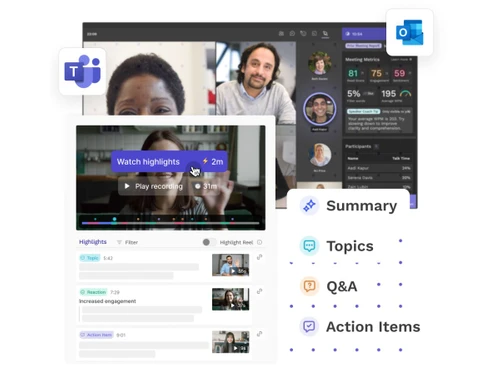
Read AI is an AI Meeting Assistants that automatically summarizes your meetings, emails, chats, and documents into clear transcripts, highlights, and action items.

It works across Zoom, Google Meet, Teams, Gmail, Slack, and other platforms. The tool helps you quickly review key points without rewatching or rereading content.

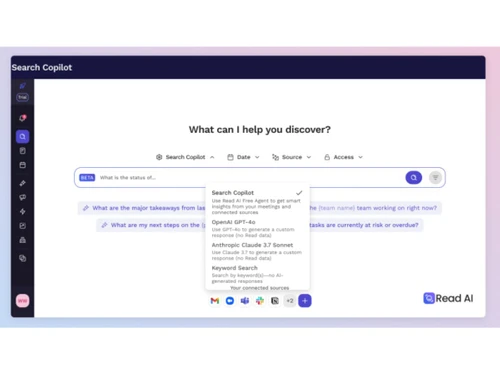
It also offers a unified search to find past decisions or discussions instantly.

Why Choose Read AI Software?

  • Automatic Meeting Summaries: Read AI instantly generates concise summaries after every meeting. This saves time and ensures you never miss key discussions.
  • Accurate Transcriptions: The software provides highly accurate, automated transcripts. You can refer back to conversations anytime without replaying recordings.
  • Cross-Platform Integration: Read AI works with Zoom, Google Meet, Teams, Slack, Gmail, Outlook, and more. This makes it easy to use across your entire workflow.
  • AI-Generated Action Items: It automatically identifies follow-up tasks and action items from conversations. This helps teams stay organized and accountable.
  • Unified Search Copilot: You can search across meetings, emails, chats, and documents in one place. This makes finding past decisions or discussions incredibly easy.
  • Time-Saving Insights: Read AI eliminates the need to rewatch long meetings or reread lengthy threads. It gives you the key takeaways instantly.
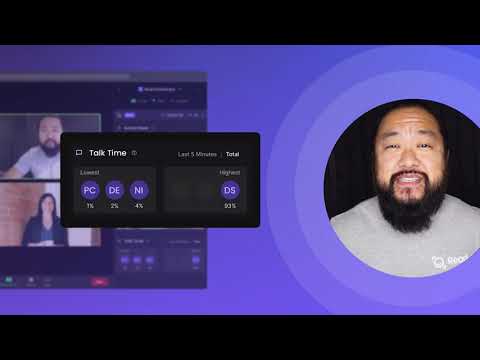
  • Smart Meeting Analytics: The tool offers engagement metrics, talk-time data, and sentiment analysis. These insights help improve team communication and performance.
  • Real-Time Note-Taking: Read AI captures notes live during the meeting. This ensures nothing important is missed, even in fast-paced discussions.
  • Automated Workflows: Read AI connects with task tools to automatically create follow-ups. This reduces manual work and improves efficiency.
  • Customizable Summaries: You can tailor the detail level and style of summaries. This flexibility helps match your team's communication needs.

Benefits of Read AI Software

  • Multi-Language Support: The software supports transcripts and summaries in multiple languages. Ideal for global teams with diverse communication needs.
  • Email Intelligence: Read AI can summarize long email threads automatically. It highlights key points so you don't have to read everything manually.
  • Document Summaries: You can upload PDFs or documents for instant AI-based summaries. This helps quickly understand lengthy files.
  • Meeting Recordings Storage: The tool stores your meeting notes and recordings securely. This creates an organized knowledge library for your team.
  • Integrates with CRMs: Read AI works with CRM systems like HubSpot and Salesforce. This helps streamline sales and customer communication workflows.
  • Reduces Communication Gaps: Read AI ensures everyone stays updated, even if they miss a meeting. It keeps teams aligned with accurate, shared insights.

Read AI Pricing

Read AI price starts at USD 20 at Techjockey.com. The pricing model is based on different parameters, including extra features, deployment type, and the total number of users. For further queries related to the product, you can contact our product team and learn more about the pricing and offers.

Read more

Read AI Company Details

Founded Year:  2021

Read Dashboard is a digital platform centered on participation that promotes a more effective and inclusive visual interaction for users.

Director/Founders David Shim, Elliott Waldron, Rob Williams
Company Size 1-100 Employees

Read AI Pricing & Plans

Pro
Starting at $20
    • Users

      Users
      Users
    • Monthly

      Monthly
      Monthly

Key Features

  • 100 file upload credits /mo

  • Unlimited meeting transcripts

  • Premium integrations

Enterprise
Starting at $30
    • Users

      Users
      Users
    • Monthly

      Monthly
      Monthly

Key Features

  • Everything in Pro, plus:

  • Audio & video playback

  • Video highlights

  • 200 file upload credits /mo

  • Premium support

Enterprise+
Starting at $40
    • Users

      Users
      Users
    • Monthly

      Monthly
      Monthly

Key Features

  • Everything in Enterprise, plus:

  • Requires 10+ licenses

  • SSO & SAML

  • Domain capture

  • Custom data retention policy

  • 300 file upload credits /mo

  • Workspace onboarding

Read AI Features

  • icon_check Real Time Transcription
    Converts spoken content into accurate text instantly during live or virtual meetings.
  • icon_check Meeting Summarization
    Automatically creates concise summaries highlighting key points, actions, and outcomes.
  • icon_check Action Item Detection
    Identifies and extracts follow-up tasks and responsibilities discussed during meetings.
  • icon_check Sentiment Analysis
    Measures participant tone and engagement levels to assess overall meeting sentiment.
  • icon_check Engagement Metrics
    Monitors listener reactions and speaker activity to gauge meeting effectiveness.
  • icon_check Speaker Identification
    Recognizes individual speakers and attributes their dialogue in the meeting transcript.
  • icon_check Playback Navigation
    Allows users to jump to specific transcript sections and replay related meeting moments.
  • icon_check Alerts & Notifications
    Sends real-time alerts or email summaries after meeting completion for quick review.
  • icon_check Data Synchronization
    Keeps transcripts, notes, and meeting metrics consistent across devices and platforms.
  • icon_check Calendar Integration
    Connects with Google Calendar, Outlook, or Teams to auto-join and record scheduled calls.
  • icon_check Collaboration Tools
    Allows team members to share, comment, and edit meeting summaries in shared workspaces.
  • icon_check Voice Analytics
    Analyzes tone, pacing, and filler words to deliver speaker performance feedback.
  • icon_check Data Management
    Ensures encrypted storage and privacy compliance for all meeting recordings.
  • icon_check Custom Branding
    Allows customization of assistant name and appearance when joining professional meetings.
Read AI Demo Video play icon

Get Read AI Demo

Watch the demo video to explore key features, real workflows, and how the software fits your business needs.

Understand
Key Features
Personal
Demo Insights
Interactive
Demo Support

Read AI Specifications

Supported Platforms
Ubuntu Ubuntu Windows Windows MacOS MacOS Linux Linux
Devices
Desktop Desktop
Deployment
Cloud-Based Cloud-Based
Suitable For
All Industries
Business Specific
All Businesses
Business Size
Individual Small Business Startups Medium Business Enterprises SMBs SMEs MSMBs MSMEs
Customer Support
Email Communities
Language
English
Training Resources
Videos
AI Features
AI Integrated

Explore the Best Alternative Solutions Similar to Your Business Size and Needs

Medium Business

Built for business growth and flexibility

Krisp

4.3

MeetGeek

4.5

Fellow

4.2

See More

Read AI Review

4.4

Out of 5

img

Overall Rating

Based on
1 Verified Review

Rating Breakdown

  • Features 4.6
  • Value for Money 4.2
  • Ease of Use 4.3
  • Customer Support 4.6

85% Recommend this Product

Add Review

Read AI Video Review

youtubeVideoId

4.3

“Read AI Review - Is It Worth It”

Review by: EasyInternet

Compare Read AI With other AI Meeting Assistants

Products
Ratings
Pricing
Device Supported
Deployment
Supported Platforms
  • img

    Read AI

  • 4.4

  • Price On Request

  • Desktop

    Mobile

  • Web based

    On Premises

  • Windows

    Mac OS

  • img

    Krisp

  • 4.3

  • Price On Request

  • Desktop

    Mobile

  • Web based

    On Premises

  • Windows

    Mac OS

  • img

    Fellow

  • 4.2

  • Price On Request

  • Desktop

    Mobile

  • Web based

    On Premises

  • Windows

    Mac OS

  • img

    Cluely

  • 4.4

  • Price On Request

  • Desktop

    Mobile

  • Web based

    On Premises

  • Windows

    Mac OS

  • img

    Otter

  • 4.5

  • Price On Request

  • Desktop

    Mobile

  • Web based

    On Premises

  • Windows

    Mac OS

  • img

    Laxis

  • 4.1

  • Price On Request

  • Desktop

    Mobile

  • Web based

    On Premises

  • Windows

    Mac OS

  • img

    Rumi AI

  • 4.2

  • Price On Request

  • Desktop

    Mobile

  • Web based

    On Premises

  • Windows

    Mac OS

  • img

    Claap

  • 4.4

  • Price On Request

  • Desktop

    Mobile

  • Web based

    On Premises

  • Windows

    Mac OS

  • img

    Jamie

  • 4.1

  • Price On Request

  • Desktop

    Mobile

  • Web based

    On Premises

  • Windows

    Mac OS

  • img

    Meetily

  • 4.5

  • Price On Request

  • Desktop

    Mobile

  • Web based

    On Premises

  • Windows

    Mac OS

  • img

    Beyz

  • 3.9

  • Price On Request

  • Desktop

    Mobile

  • Web based

    On Premises

  • Windows

    Mac OS

(2) Product(s) selected

Read AI Alternatives

See All Read AI Alternatives

Starting Price:

$16 /Month

Starting Price:

$29 /Host/Month

Starting Price:

€25 /Month

Available

Price on Request

Beyz

3.9

Starting Price:

$50 /Month

Hedy

4.2

Starting Price:

$10 /Month

Articles for Read AI

See All Related Articles

How much does Read AI cost?

Read AI pricing starts at USD 20 on Techjockey.com.

Is there a mobile app available for Read AI Software?

No, Read AI has no mobile apps for both Android and iOS.

Which operating systems are compatible with Read AI Software?

Read AI works on Windows, macOS, Ubuntu, Linux, and through the web.

Does Read AI Software offer a free trial?

Yes, Read AI provides a free trial for new users.

How does Read AI Software function?

Read AI records and analyzes meetings, emails, and chats to generate summaries, transcripts, and action items.

Who uses Read AI Software?

Professionals, teams, and businesses that need automated meeting notes and summaries use Read AI.

Is a free demo available for Read AI Software?

Yes, users can access a free demo or start with the free plan.

Is Read AI Software available for free?

Yes, Read AI offers a forever-free plan with limited usage.

20,000+ Software Listed

Best Price Guranteed

Free Expert Consultation

2M+ Happy Customers

Terms and Condtions

close

Users with registered businesses can purchase goods from merchants on the platform to satisfy their business needs. Users are not permitted to utilize any products acquired through the platform for resale, advertising, business, or further distribution.

For each purchase made, users will receive a Tax Invoice (or 'GST invoice') that includes specific details such as:

  • the GSTIN of the user associated with their registered business, and

  • the specified Entity Name for their business.

It should be noted that not all products are eligible for GST Invoice. Only the products displayed by participating sellers with the 'GST-based Invoice Available' callout on the product description page would qualify.

Certain goods and services are not eligible to get a GST Invoice, including items with VAS, i.e., Value Added Services (e.g., Total Mobile Protection/Assured Buyback) and those involving an exchange offer at the time of purchase.

Users must ensure the accuracy of the GSTIN, and business entity name provided for the GST Invoice. Requests for corrections into GST Invoice would not be accommodated by Techjockey.com or any Seller, and any issues arising from user-provided information are the sole responsibility of users.

Techjockey.com is not liable for the GST Invoice or any associated input tax credit. To efficiently claim an input tax credit, users should select the registered place of business address as per the GST authority's data and follow the provisions of the GST Act and rules.

To claim an input tax credit, the delivery and billing addresses must match. Furthermore, input tax credits will not be granted if the delivery address and GSTIN on the invoice are from different states. In case of incorrect GST details provided during the order placement, the order will be canceled automatically.