linkedin
Microsoft Azure Monitor logo
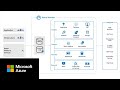
play What is Azure Monitor?
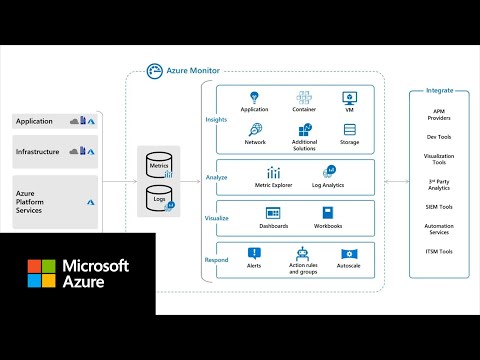
azure monitor
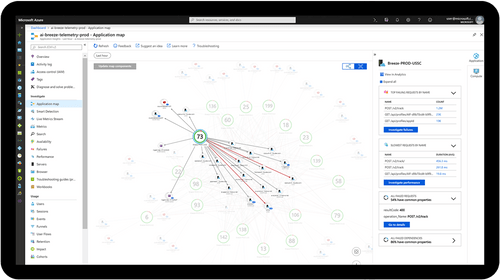
azure monitor map

Microsoft Azure Monitor

Brand: Microsoft Corporation

  • 4.1

  • 6 Ratings

About Microsoft Azure Monitor Microsoft Azure Monitor is a network performance monitoring and enhancing software. It helps users in maximizing the availability and performance of their applications by identifying the problems within them. Users can test their hypothesis and even reveal several hidde...

See More

Have you used Microsoft Azure Monitor before?

Share your insights for better experience

Add a Review

Price Available on Request

Questions about pricing or customization? We’re here to help, just a click away.

100% Genuine
Products
Best Price
Guaranteed
Safe & Secure
Payment
  • Description

  • Pricing

  • Features

  • Specification

  • Review

  • Compare

  • Alternatives

  • FAQ

Microsoft Azure Monitor Software Overview

About Microsoft Azure Monitor

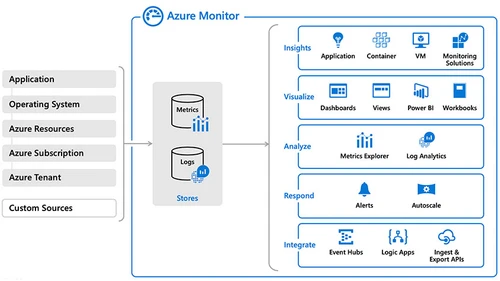
Microsoft Azure Monitor is a network performance monitoring and enhancing software. It helps users in maximizing the availability and performance of their applications by identifying the problems within them. Users can test their hypothesis and even reveal several hidden patterns with the help of an advanced analytical engine, built-in machine learning and interactive query language provided by the software. 

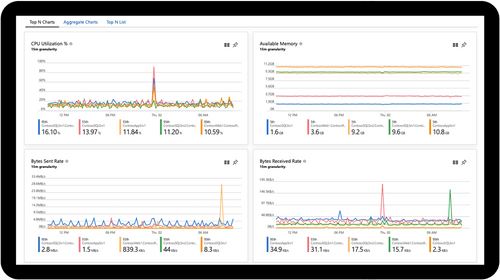
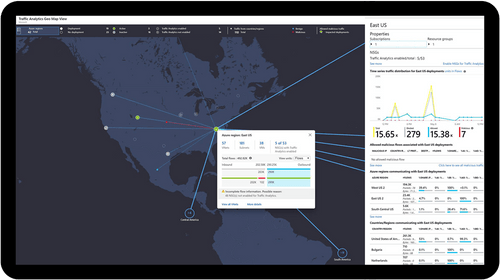
Users get access to visualization maps and an intuitive dashboard by using Microsoft Azure Monitor. Moreover, it identifies any issue in the application such as network glitches, CPU spikes and memory leaks in the code. The software also helps in critical decision making through its detailed analytics and reporting features.

How is the security provided by Microsoft Azure Monitor beneficial for its users?

Microsoft Azure Monitor is a secure cloud foundation from the house of Microsoft. The company annually invests more than 1 billion USD dollars on the development and research of cybersecurity. The software enables its users in extending their protections to hybrid environments. It features a team of 3,500+ global security experts, who work as a team and safeguards the user’s business. Further, Microsoft Azure Monitor enables its users to identify new threats and respond to them in real-time. The software generates actionable insights for its users, by analyzing 400 billion emails, 1billion windows device updates, 18 billion Bing web pages and 450 billion monthly authentications.

Pricing of Microsoft Azure Monitor

If you are interested to use Microsoft Azure Monitor, please send us a callback request. Our customer care team will provide you with an activation key. If you are looking for a license renewal, we are there for you. 

The Latest Version of Microsoft Azure Monitor

The latest version of Microsoft Azure Monitor includes the following upgrades:

  1. General: The makers have added a new video featuring an overview of the software. They have also added a new site for Azure Monitor data reference.
  2. Alerts: The latest version of the software includes additional explanations for resource manager templates. Users also get to understand how metric alerts work for Azure Monitor.
  3. Application Insights: The latest version includes data cap alert along with standard metrics. The software also enables its users to add multiple tables with a detailed export structure.
  4. Insights: The software has an updated depreciation date for office 365 management solutions in Azure Monitor.
  5. Service maps: The Latest Version of Microsoft Azure Monitor offers a richer monitoring experience along with map data sets for Service Map Customers.  

 Compatible Platforms of Microsoft Azure Monitor

The operating systems with which the software is compatible are:

  1. Windows 
  2. Linux

What are the benefits of Microsoft Azure Monitor?

  1. Seamless monitoring: Microsoft Azure Monitor requires minimal technical effort for application monitoring. The user can rely on its automated monitoring and application insights. It eliminates the gap within the performance crack.
  2. Real-time alerts: The software enables its users to set up alerts, analyze multiple data and get end-to-end views of their applications. They can use the machine learning insights provided by the software to instantly identify and solve the problems within their systems.
  3. Powerful Analytics: Microsoft Azure Monitor offers a powerful analytical platform that helps its users isolate all the anomalies and detect problems in real-time.
  4. Security: The software is secured by multiple layers of security provided by Microsoft data centers and infrastructures on a global basis. Users get access to a secured cloud-based platform that is created with customized hardware. It also has integrated security controls within its firmware and hardware.
Read more

Microsoft Corporation Company Details

Founded Year:  1975

Microsoft Corporation is an American multinational technology company with headquarters in Redmond, Washington.

Director/Founders Paul Allen , Bill Gates
Company Size 1000+ Employees

Microsoft Azure Monitor Pricing & Plans

Looking for The Right Pricing?

Share your requirements and get a plan built around your business.

  • Define your business needs
  • Get customised pricing
  • Choose features that fit your workflow

Price Available on Request

Get personalised Microsoft Azure Monitor pricing that fits your needs. Our team will connect with you.

Microsoft Azure Monitor Features

  • icon_check Unify Access
    Microsoft Azure Monitor stores and analyses operational data within a centralized, scalable and fully managed data store.
  • icon_check Monitor your Infrastructure
    By using Microsoft Azure Monitor, users can timely monitor their infrastructures like Azure Kubernetes Services, Azure Storage,
  • icon_check Monitor your Applications
    The software enables its users to monitor their applications that are hosted on Azure or on-premises. It also supports multiple
  • icon_check Network Monitoring
    Microsoft Azure Monitor enables its users to diagnose and control different network-related issues without logging into their
  • icon_check Insights
    The software features a powerful analytical platform along with extensive query language, enabling its users to interact,
  • icon_check Analyze
    Microsoft Azure Monitor enables its users to analyze their network security, data, alerts, virtual machines, operational
  • icon_check Integrations
    The software allows its users to seamlessly integrate with event management tools, IT service, DevOps issue management, security
  • icon_check Full GDPR compliance
  • icon_check Get data encryption at rest
  • icon_check Operational dashboarding
Microsoft Azure Monitor Demo Video play icon

Get Microsoft Azure Monitor Demo

Watch the demo video to explore key features, real workflows, and how the software fits your business needs.

Understand
Key Features
Personal
Demo Insights
Interactive
Demo Support

Microsoft Azure Monitor Specifications

Supported Platforms
Ubuntu Ubuntu Windows Windows MacOS MacOS Linux Linux
Devices
Desktop Desktop Mobile Mobile Tablet Tablet iPad iPad
Deployment
Cloud-Based Cloud-Based
Suitable For
All Industries
Business Specific
All Businesses
Business Size
Small Business Startups Medium Business Enterprises SMBs SMEs MSMBs MSMEs
Customer Support
Phone Email Live Chat
Language
English français Italiano 한국어 普通话 Português русский
Integration
API Integration
Training Resources
Webinars Documentation Videos

Explore the Best Alternative Solutions Similar to Your Business Size and Needs

Microsoft Azure Monitor Review

4.1

Out of 5

img

Overall Rating

Based on
6 Verified Ratings

Rating Breakdown

  • Features 4.0
  • Value for Money 4.0
  • Ease of Use 3.8
  • Customer Support 4.5

91% Recommend this Product

Add Review

Be the First to Review

This product has no reviews yet. Be the first to leave your feedback.

Add Review

Compare Microsoft Azure Monitor With other Cloud Monitoring Tools

Products
Ratings
Pricing
Device Supported
Deployment
Supported Platforms
  • img

    Microsoft Azure Monitor

  • 4.1

  • Price On Request

  • Desktop

    Mobile

  • Web based

    On Premises

  • Windows

    Mac OS

  • img

    Sematext Cloud

  • 4.6

  • Price On Request

  • Desktop

    Mobile

  • Web based

    On Premises

  • Windows

    Mac OS

  • img

    Grafana Cloud

  • 4.2

  • Price On Request

  • Desktop

    Mobile

  • Web based

    On Premises

  • Windows

    Mac OS

  • img

    Riemann

  • 4.2

  • Price On Request

  • Desktop

    Mobile

  • Web based

    On Premises

  • Windows

    Mac OS

  • img

    Sumo Logic

  • 4.3

  • Price On Request

  • Desktop

    Mobile

  • Web based

    On Premises

  • Windows

    Mac OS

  • img

    Datadog

  • 4.6

  • Price On Request

  • Desktop

    Mobile

  • Web based

    On Premises

  • Windows

    Mac OS

(0) Product(s) selected

Microsoft Azure Monitor Alternatives

See All Microsoft Azure Monitor Alternatives

Starting Price:

$15 /Monthly

Available

Price on Request

What is the alert feature in Microsoft Azure Monitor?

The software instantly notifies its users when any new conditions are found within their monitoring data. It provides four kinds of alerts, that are Metric value, Log Query, Activity Log and Web. The results provided by the Metric value exceeds the threshold and the results provided by Log Query, Activity Log and Web test match the defined criteria.

Can Microsoft Azure Monitor track on-premise resources?

Yes, the software monitors on-premises resources by collecting data from virtual machines and applications.

Can I get a demo of Microsoft Azure Monitor?

Yes, Techjockey provides an online demo of Microsoft Azure Monitor. You can send us a demo request mentioning your preferable time and date.

Is there a limit to data collection in Microsoft Azure Monitor?

No, there is no limit on data collection in Microsoft Azure Monitor.

Does Microsoft Azure Monitor have a mobile app?

Currently, Microsoft Azure Monitor does not have a mobile app.

20,000+ Software Listed

Best Price Guranteed

Free Expert Consultation

2M+ Happy Customers

Terms and Condtions

close

Users with registered businesses can purchase goods from merchants on the platform to satisfy their business needs. Users are not permitted to utilize any products acquired through the platform for resale, advertising, business, or further distribution.

For each purchase made, users will receive a Tax Invoice (or 'GST invoice') that includes specific details such as:

  • the GSTIN of the user associated with their registered business, and

  • the specified Entity Name for their business.

It should be noted that not all products are eligible for GST Invoice. Only the products displayed by participating sellers with the 'GST-based Invoice Available' callout on the product description page would qualify.

Certain goods and services are not eligible to get a GST Invoice, including items with VAS, i.e., Value Added Services (e.g., Total Mobile Protection/Assured Buyback) and those involving an exchange offer at the time of purchase.

Users must ensure the accuracy of the GSTIN, and business entity name provided for the GST Invoice. Requests for corrections into GST Invoice would not be accommodated by Techjockey.com or any Seller, and any issues arising from user-provided information are the sole responsibility of users.

Techjockey.com is not liable for the GST Invoice or any associated input tax credit. To efficiently claim an input tax credit, users should select the registered place of business address as per the GST authority's data and follow the provisions of the GST Act and rules.

To claim an input tax credit, the delivery and billing addresses must match. Furthermore, input tax credits will not be granted if the delivery address and GSTIN on the invoice are from different states. In case of incorrect GST details provided during the order placement, the order will be canceled automatically.