linkedin
Movebot logo
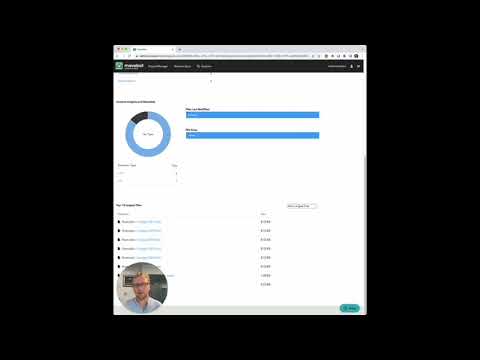
play Getting Started with Movebot
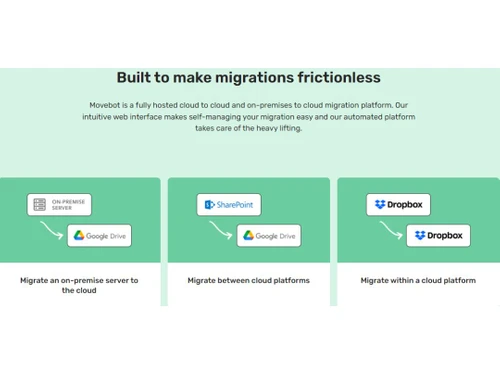
Movebot Make migrations frictionless
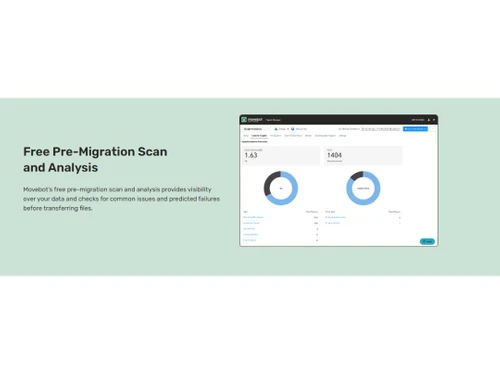
Movebot Free Pre-Migration scan & analysis

Movebot

Brand: Couchdrop

  • 4.3

  • 3 Ratings

Movebot Cloud Migration Software streamlines and automates migrating your data, applications, and configurations to the cloud, ensuring seamless transitions.

See More

Have you used Movebot before?

Share your insights for better experience

Add a Review
Starting Price
$390

View plans

100% Genuine
Products
Best Price
Guaranteed
Safe & Secure
Payment
  • Description

  • Pricing

  • Features

  • Specification

  • Review

  • Compare

  • Alternatives

  • FAQ

Starting at $390

Movebot Software Overview

What is Movebot Software?

Movebot leverages cloud technology to provide a seamless migration experience. This cloud migration tool simplifies and accelerates moving files between 30+ storage platforms and on-premises servers. The software enables seamless data transfer between popular services like SharePoint, Google Workspace, Dropbox, Egnyte, Box, GCP, AWS, Azure, and more, as well as on-premises file servers and NAS appliances.

Movebot takes the complexity out of data migration by eliminating the need for infrastructure management. Its scalable architecture ensures scalability to meet your data transfer needs. It allows you to move terabytes of data per day. The lightning-fast transfer speed sets Movebot apart, bypassing provider limitations, and ensures your files reach their destination promptly.

Users gain complete control over data migration projects through its user-friendly web interface. The pre-migration scan feature identifies potential issues or compatibility challenges to make necessary adjustments for a smooth transition. Movebot offers insightful features like data trend analysis and simplified mass file deletions through its Explorer and Eraser functionalities.

Why Choose Movebot?

  • Simulation & Discovery: Scan your source platform to identify data for migration, assess content volume, and auto-resolve challenges.
  • Execution Speed: Enhance migration performance by adding additional compute power to each execution, ensuring timely and efficient migrations.
  • Error Handling: Detects issues in the scan and automatically resolves file-related problems during migration.
  • Project Support: Segment your migration into projects for advanced control and granularity. Move organizations, departments, or teams with ease.
  • Logging and Compliance: Ensure transparency and meet governance requirements with real-time logging, post-migration reports, and downloadable audit of migrated data.
  • Permissions and Versions: Migrate user permissions and file versions seamlessly with Movebot, mapping permissions automatically or customizing them as needed.

Benefits of Movebot Cloud Migration Software

  • It will boost partner margins with every migration.
  • You can enjoy no cost or commitment during the migration process.
  • It will help you scale without limits with unlimited worker nodes.
  • Users will get access to premium support at no extra cost for a seamless experience.

Movebot Pricing

Movebot pricing starts at $100 at techjockey.com.

The overall pricing model is based on different factors such as personalization, extra features required, total users, and the deployment type. Please feel free to request a call from our product experts if you want to learn more about our subscription plans or premium package deals.

Read more

Couchdrop Company Details

Founded Year:  2017

Couchdrop is your Cloud SFTP, File Automation and File Ingestion platform. Through acting as your cloud and file server gateway, secure web portal, and secure pipe between systems or clients (B2B) to your cloud storage backend. Couchdrop is secure and compliant with SOC2 and HIPAA.

Director/Founders Michael Lawson
Company Size 1-100 Employees

Movebot Pricing & Plans

Pay Per TB
Key Features
  • No subscription
  • Data never expires and can be used across multiple
  • Support for over 30 platforms
  • Move files and folders
  • Move emails, contacts, and calendars
Starting at $390
    • Storage

      Storage
      Storage

Key Features

  • No subscription

  • Data never expires and can be used across multiple

  • Support for over 30 platforms

  • Move files and folders

  • Move emails, contacts, and calendars

Movebot Features

  • icon_check Connect Storage
    Streamline data migration with integration to 30+ storage providers.
  • icon_check Discovery Scan & Simulation
    Unlock seamless migration planning with discovery scan.
  • icon_check Primary Migration
    Move your data swiftly during primary migration with lightning-fast speeds of 3 to 5TB daily.
  • icon_check Delta Migration & Cutover
    Effortlessly transfer updated data with delta migration, ensuring zero downtime for staff.
  • icon_check Simple & intuitive to use
    Effortlessly manage, track, and report through a user-friendly web admin portal for seamless operations and visibility.
  • icon_check Fully Hosted, Cloud Native, & Easy
    Effortlessly migrate through an intuitive cloud interface without any software or hardware management.
  • icon_check Free Pre-Migration Scan & Analysis
    Gain data visibility and preemptively detect issues with a free pre-migration scan.
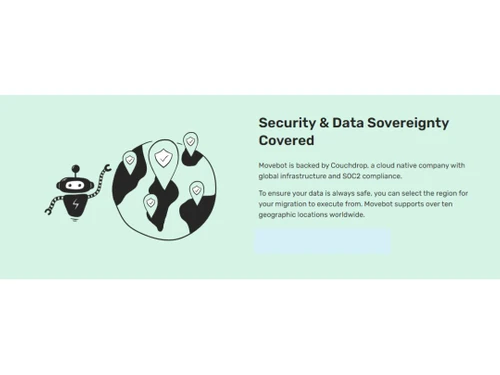
  • icon_check Data Sovereignty Covered
    Take control of your data's security. Choose from 10+ global locations for migration and ensure compliance and peace of mind.
  • icon_check Secure Architecture
    Experience secure and scalable data migration with modern architecture, ensuring data privacy.
  • icon_check Granular Control
    Control your migrations by prioritizing specific file types.
Movebot Demo Video play icon

Get Movebot Demo

Watch the demo video to explore key features, real workflows, and how the software fits your business needs.

Understand
Key Features
Personal
Demo Insights
Interactive
Demo Support

Movebot Specifications

Supported Platforms
Ubuntu Ubuntu Windows Windows MacOS MacOS Linux Linux
Devices
Desktop Desktop Mobile Mobile Tablet Tablet iPad iPad
Deployment
Cloud-Based Cloud-Based
Suitable For
All Industries
Business Specific
All Businesses
Business Size
Small Business Startups Medium Business Enterprises SMBs SMEs MSMBs MSMEs
Customer Support
Phone Email Communities
Language
English 普通话
Integration
API Integration
Training Resources
Documentation Videos

Movebot Review

4.3

Out of 5

img

Overall Rating

Based on
3 Verified Ratings

Rating Breakdown

  • Features 4.6
  • Value for Money 4.6
  • Ease of Use 4.1
  • Customer Support 4

83% Recommend this Product

Add Review

Be the First to Review

This product has no reviews yet. Be the first to leave your feedback.

Add Review

Compare Movebot With other Cloud Migration Tools

Products
Ratings
Pricing
Device Supported
Deployment
Supported Platforms
  • img

    Movebot

  • 4.3

  • Price On Request

  • Desktop

    Mobile

  • Web based

    On Premises

  • Windows

    Mac OS

  • img

    MailJerry

  • 4.4

  • ₹ 1382

  • Desktop

    Mobile

  • Web based

    On Premises

  • Windows

    Mac OS

  • img

    Cloudsfer

  • 4.5

  • Price On Request

  • Desktop

    Mobile

  • Web based

    On Premises

  • Windows

    Mac OS

  • img

    CloudM

  • 4.0

  • Price On Request

  • Desktop

    Mobile

  • Web based

    On Premises

  • Windows

    Mac OS

  • img

    Azure Migrate

  • 4.1

  • Price On Request

  • Desktop

    Mobile

  • Web based

    On Premises

  • Windows

    Mac OS

  • img

    Carbonite Migrate

  • 4.1

  • Price On Request

  • Desktop

    Mobile

  • Web based

    On Premises

  • Windows

    Mac OS

(0) Product(s) selected

Movebot Alternatives

See All Movebot Alternatives

Starting Price:

$25 /Monthly

Available

Price on Request

Articles for Movebot

See All Related Articles

Which operating system does the Movebot Software Support?

Movebot software is compatible with Windows and macOS operating systems.

Is there any Movebot App?

The Movebot app is unavailable on Android and iOS devices.

What is the deployment type of the Movebot?

Movebot supports web-based deployment.

How much does the Movebot cost?

Movebot pricing starts from $100 at techjockey.com.

Who are the potential users of the Movebot?

Movebot can be used by businesses operating in the cloud.

Is there any free trial or demo for Movebot?

Movebot demo is available for free with techjockey.com.

Is Movebot Free?

Movebot does not offer a free trial.

How can you download the Movebot?

Movebot is a web-based software. So, you need not download any software to use it.

How does Movebot work?

Movebot is an advanced cloud migration software that facilitates seamless and efficient data transfer to the cloud. It provides rapid, user-friendly, affordable solutions for migrating data to various cloud storage platforms.

20,000+ Software Listed

Best Price Guranteed

Free Expert Consultation

2M+ Happy Customers

Terms and Condtions

close

Users with registered businesses can purchase goods from merchants on the platform to satisfy their business needs. Users are not permitted to utilize any products acquired through the platform for resale, advertising, business, or further distribution.

For each purchase made, users will receive a Tax Invoice (or 'GST invoice') that includes specific details such as:

  • the GSTIN of the user associated with their registered business, and

  • the specified Entity Name for their business.

It should be noted that not all products are eligible for GST Invoice. Only the products displayed by participating sellers with the 'GST-based Invoice Available' callout on the product description page would qualify.

Certain goods and services are not eligible to get a GST Invoice, including items with VAS, i.e., Value Added Services (e.g., Total Mobile Protection/Assured Buyback) and those involving an exchange offer at the time of purchase.

Users must ensure the accuracy of the GSTIN, and business entity name provided for the GST Invoice. Requests for corrections into GST Invoice would not be accommodated by Techjockey.com or any Seller, and any issues arising from user-provided information are the sole responsibility of users.

Techjockey.com is not liable for the GST Invoice or any associated input tax credit. To efficiently claim an input tax credit, users should select the registered place of business address as per the GST authority's data and follow the provisions of the GST Act and rules.

To claim an input tax credit, the delivery and billing addresses must match. Furthermore, input tax credits will not be granted if the delivery address and GSTIN on the invoice are from different states. In case of incorrect GST details provided during the order placement, the order will be canceled automatically.