linkedin
AWS Database Migration Service logo
play AWS Database Migration ServiceAWS Database Migration Service
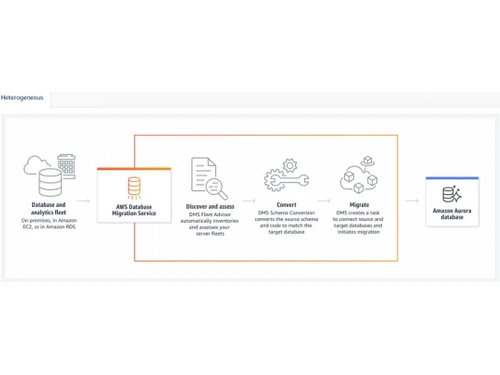
AWS Database Migration Service Heterogeneous database migration
AWS Database Migration Service Migrate database & analytics workloads

AWS Database Migration Service

Brand: Amazon

  • 4.2

  • 6 Ratings

AWS Database Migration Service (AWS DMS) is a tool that helps you move your databases to AWS quickly, securely, and with minimal downtime.

See More

Have you used AWS Database Migration Service before?

Share your insights for better experience

Add a Review

Price Available on Request

Questions about pricing or customization? We’re here to help, just a click away.

100% Genuine
Products
Best Price
Guaranteed
Safe & Secure
Payment
  • Description

  • Pricing

  • Features

  • Specification

  • Review

  • Compare

  • Alternatives

  • FAQ

AWS Database Migration Service Software Overview

What is AWS Database Migration Service?

AWS Database Migration Service (AWS DMS) is a cloud migration tool that helps you move your databases to AWS quickly and securely.

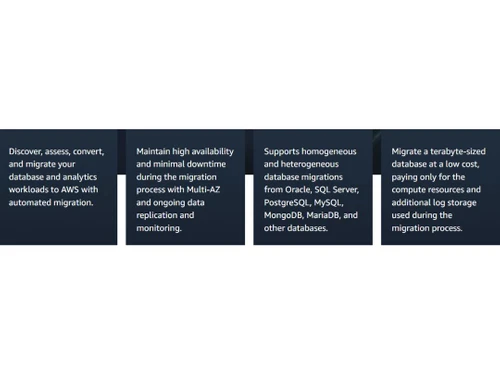
It supports both similar (e.g., Oracle to Oracle) and different (e.g., SQL Server to MySQL) database migrations with minimal downtime, as the source database remains operational during the process.

AWS DMS also allows for continuous data replication, keeping your target database in sync with the source.

It compatible with various commercial and open-source databases, and its serverless option automatically manages resources, making migrations more efficient and cost-effective.

Why Choose AWS Database Migration Service Software?

  • No installation required: Start migrations directly from the AWS Management Console without installing software or drivers.
  • Quick start: Initiate migrations in just a few steps, reducing setup time.
  • Automated migration planning: AWS DMS Fleet Advisor inventories and assesses your databases for migration.
  • Schema conversion: AWS Schema Conversion Tool (SCT) helps convert database schemas for heterogeneous migrations.
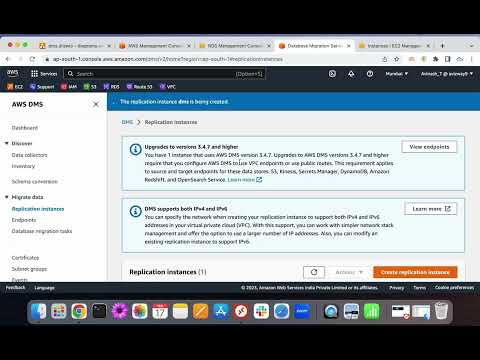
  • Minimal source database changes: Often, no changes are needed to the source database during migration.
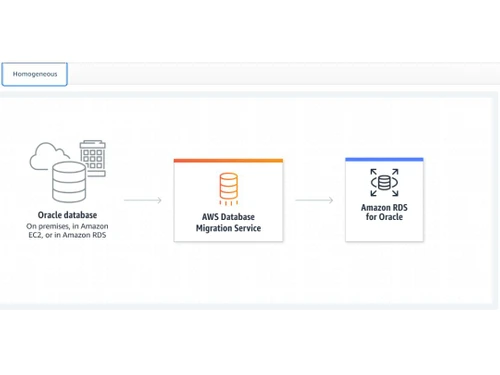
  • Supports homogeneous migrations: E.g., Oracle to Oracle.
  • Supports heterogeneous migrations: E.g., SQL Server to MySQL.
  • Continuous data replication: Keeps source and target databases in sync during migration.
  • Change Data Capture (CDC): Captures ongoing changes to source databases and applies them to targets.
  • Data filtering and transformation: Migrate only specific data and transform it during migration.
  • Supports various source databases: Including Oracle, SQL Server, MySQL, PostgreSQL, MongoDB, and more.
  • Supports various target databases: Including Amazon RDS, Aurora, Redshift, DynamoDB, and S3.

Benefits of AWS Database Migration Service Software

  • NoSQL support: Migrate data to NoSQL databases like Amazon DynamoDB.
  • Data warehouse support: Migrate data to Amazon Redshift for analytics.
  • Supports on-premises and cloud databases: Migrate data from on-premises or other cloud providers to AWS.
  • Network isolation: Use Amazon VPC for secure network configurations.
  • Serverless option: AWS DMS Serverless automatically adjusts resources as needed.
  • Multi-AZ support: Provides high availability and failover capabilities.
  • Scales with data volume: Handles migrations from small to large databases efficiently.
  • Automatic failover: Ensures migration continues seamlessly in case of failures.
  • No upfront costs: Eliminates the need for significant initial investment.

AWS Database Migration Service Pricing

AWS Database Migration Service price details are available on request at techjockey.com.

The pricing model is based on different parameters, including extra features, deployment type, and the total number of users. For further queries related to the product, you can contact our product team and learn more about the pricing and offers.

Read more

Amazon Company Details

Founded Year:  1994

Amazon is an e-commerce website for consumers, sellers, and content creators.

Director/Founders Jeff Bezos, Marcelio Leal, Osman Nahid
Company Size 1000+ Employees

AWS Database Migration Service Pricing & Plans

Looking for The Right Pricing?

Share your requirements and get a plan built around your business.

  • Define your business needs
  • Get customised pricing
  • Choose features that fit your workflow

Price Available on Request

Get personalised AWS Database Migration Service pricing that fits your needs. Our team will connect with you.

AWS Database Migration Service Features

  • icon_check Minimal downtime
    DMS keeps your source database running during migration, so there’s very little or no disruption to your business.
  • icon_check Low-cost service
    You only pay for the resources you use, making it an affordable option for all business sizes.
  • icon_check Highly resilient & self-healing
    The service automatically handles failures and restarts tasks to ensure smooth migration.
  • icon_check On-going replication
    DMS can keep copying data from the source to the destination even after the initial migration, keeping both in sync.
  • icon_check Database Consolidation
    You can combine data from multiple databases into a single target database.
  • icon_check Automates migration planning
    Tools like AWS DMS Fleet Advisor assess your setup and suggest a smooth migration plan.
  • icon_check Homogeneous database migrations
    Move data between similar database engines (e.g., Oracle to Oracle) easily.
  • icon_check Heterogeneous database migrations
    Move data between different types of databases (e.g., SQL Server to MySQL) with built-in conversion tools.
  • icon_check Continuous data replication
    It supports ongoing data syncing for live environments, ideal for high-availability needs.
  • icon_check Migrate data both into & out of cloud
    DMS works for migrations to AWS, between AWS services, and even back to on-premises systems if needed.
AWS Database Migration Service Demo Video play icon

Get AWS Database Migration Service Demo

Watch the demo video to explore key features, real workflows, and how the software fits your business needs.

Understand
Key Features
Personal
Demo Insights
Interactive
Demo Support

AWS Database Migration Service Specifications

Supported Platforms
Ubuntu Ubuntu Windows Windows MacOS MacOS Linux Linux
Devices
Desktop Desktop Mobile Mobile Tablet Tablet iPad iPad
Deployment
Cloud-Based Cloud-Based
Suitable For
All Industries
Business Specific
All Businesses
Business Size
Small Business Startups Medium Business Enterprises SMBs SMEs MSMBs MSMEs
Customer Support
Email Communities
Language
Nederlands English français Italiano 한국어 普通话 Português Español ภาษาไทย Türkçe
Integration
API Integration
Training Resources
Webinars Documentation Videos

AWS Database Migration Service Review

4.2

Out of 5

img

Overall Rating

Based on
6 Verified Ratings

Rating Breakdown

  • Features 3.9
  • Value for Money 4.7
  • Ease of Use 4.2
  • Customer Support 4.2

91% Recommend this Product

Add Review

Be the First to Review

This product has no reviews yet. Be the first to leave your feedback.

Add Review

Compare AWS Database Migration Service With other Cloud Migration Tools

Products
Ratings
Pricing
Device Supported
Deployment
Supported Platforms
  • img

    AWS Database Migration Service

  • 4.2

  • Price On Request

  • Desktop

    Mobile

  • Web based

    On Premises

  • Windows

    Mac OS

  • img

    MailJerry

  • 4.4

  • ₹ 1382

  • Desktop

    Mobile

  • Web based

    On Premises

  • Windows

    Mac OS

  • img

    Cloudsfer

  • 4.5

  • Price On Request

  • Desktop

    Mobile

  • Web based

    On Premises

  • Windows

    Mac OS

  • img

    Movebot

  • 4.3

  • Price On Request

  • Desktop

    Mobile

  • Web based

    On Premises

  • Windows

    Mac OS

  • img

    CloudM

  • 4.0

  • Price On Request

  • Desktop

    Mobile

  • Web based

    On Premises

  • Windows

    Mac OS

  • img

    Azure Migrate

  • 4.1

  • Price On Request

  • Desktop

    Mobile

  • Web based

    On Premises

  • Windows

    Mac OS

  • img

    Carbonite Migrate

  • 4.1

  • Price On Request

  • Desktop

    Mobile

  • Web based

    On Premises

  • Windows

    Mac OS

(2) Product(s) selected

AWS Database Migration Service Alternatives

See All AWS Database Migration Service Alternatives

Starting Price:

$25 /Monthly

Starting Price:

$390 /Monthly

Available

Price on Request

Articles for AWS Database Migration Service

See All Related Articles

How much does AWS Database Migration Service Software cost?

Price details for AWS Database Migration Service software are available upon request at techjockey.com.

Is there a mobile app available for AWS Database Migration Service Software?

No, AWS Database Migration Service does not offer a mobile app.

Which operating systems are compatible with AWS Database Migration Service Software?

AWS Database Migration Service is compatible with Ubuntu, Linux, MacOS and Windows.

Does AWS Database Migration Service Software offer a free trial?

No, AWS Database Migration Service does not offer a free trial.

How does AWS Database Migration Service Software function?

AWS DMS connects source and target databases, performing data migration through replication instances that handle full data loads and ongoing changes.

Who uses AWS Database Migration Service Software?

Organizations of all sizes, from startups to large enterprises, use AWS DMS to migrate databases to AWS securely and with minimal downtime.

Is a free demo available for AWS Database Migration Service Software?

Yes, AWS offers a free tier for DMS, including 750 hours per month of a dms.t3.micro instance and 50 GB of storage.

Is AWS Database Migration Service Software available for free?

While AWS DMS offers a free tier, usage beyond the free limits incurs charges based on resources consumed.

20,000+ Software Listed

Best Price Guranteed

Free Expert Consultation

2M+ Happy Customers

Terms and Condtions

close

Users with registered businesses can purchase goods from merchants on the platform to satisfy their business needs. Users are not permitted to utilize any products acquired through the platform for resale, advertising, business, or further distribution.

For each purchase made, users will receive a Tax Invoice (or 'GST invoice') that includes specific details such as:

  • the GSTIN of the user associated with their registered business, and

  • the specified Entity Name for their business.

It should be noted that not all products are eligible for GST Invoice. Only the products displayed by participating sellers with the 'GST-based Invoice Available' callout on the product description page would qualify.

Certain goods and services are not eligible to get a GST Invoice, including items with VAS, i.e., Value Added Services (e.g., Total Mobile Protection/Assured Buyback) and those involving an exchange offer at the time of purchase.

Users must ensure the accuracy of the GSTIN, and business entity name provided for the GST Invoice. Requests for corrections into GST Invoice would not be accommodated by Techjockey.com or any Seller, and any issues arising from user-provided information are the sole responsibility of users.

Techjockey.com is not liable for the GST Invoice or any associated input tax credit. To efficiently claim an input tax credit, users should select the registered place of business address as per the GST authority's data and follow the provisions of the GST Act and rules.

To claim an input tax credit, the delivery and billing addresses must match. Furthermore, input tax credits will not be granted if the delivery address and GSTIN on the invoice are from different states. In case of incorrect GST details provided during the order placement, the order will be canceled automatically.