linkedin
Azure Migrate logo
play How to get started with Azure Migrate
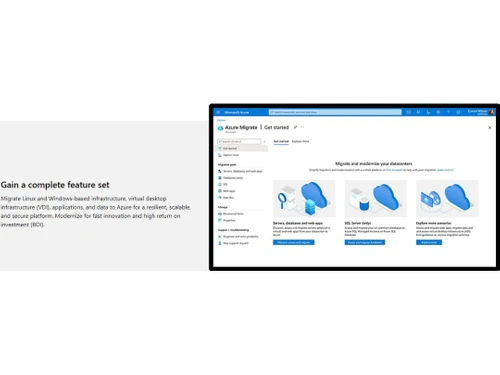
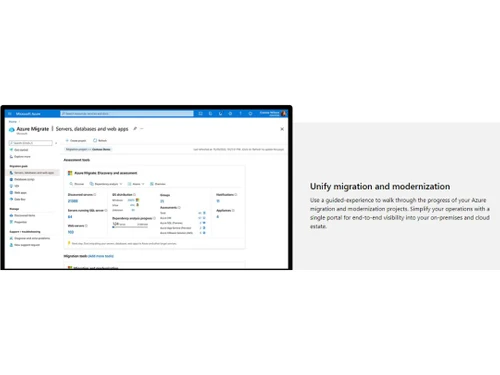
Azure Migrate Unify migration & modernization
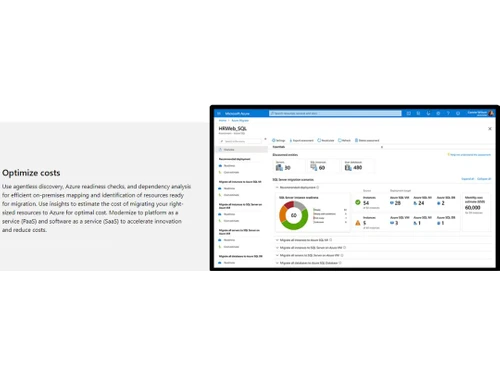
Azure Migrate Optimize costs

Azure Migrate

Brand: Microsoft Corporation

  • 4.1

  • 4 Ratings

Azure Migrate simplifies cloud migration by offering comprehensive discovery, assessment, and migration capabilities, enabling a seamless transition of workloads to Azure.

See More

Have you used Azure Migrate before?

Share your insights for better experience

Add a Review

Price Available on Request

Questions about pricing or customization? We’re here to help, just a click away.

100% Genuine
Products
Best Price
Guaranteed
Safe & Secure
Payment
  • Description

  • Pricing

  • Features

  • Specification

  • Review

  • Compare

  • Alternatives

  • FAQ

Azure Migrate Software Overview

What is Azure Migrate Software?

Azure Migrate is a powerful tool used for cloud assessment and migration, and it is developed and offered by Microsoft Azure. It provides a suite of tools for businesses to seamlessly move their on-premises resources to the cloud. It is designed to simplify the process of transitioning workloads to Azure.

Businesses can leverage a unified migration platform with a single portal for starting, running, and tracking the entire migration process. Offers discovery and assessment capabilities, migration and modernization tools, and integration with third-party tools and independent software vendors (ISV). These features help businesses to assess and migrate servers, databases, web apps, and virtual desktops with ease.

It will help businesses gain the ability to assess their on-premises resources, right-size them for Azure, and estimate the associated costs of running these resources in the cloud. It allows the identification of cross-server dependencies for moving interdependent servers to Azure. It also offers a seamless and efficient migration process with minimal disruption and downtime. With Azure Migrate, businesses can unlock the scalability, flexibility, and cost-efficiency of the Azure cloud platform for their workloads.

Why Choose Azure Migrate?

  • Dependency analysis: It will help identify dependencies and optimize interdependent servers for seamless migration to Azure.
  • Unified migration platform: Users can easily streamline their Azure migration journey with a single portal for starting, running, and tracking progress.
  • Database Assessments: These will help you evaluate the readiness of your SQL Server data estate for migration to Azure SQL Database or Azure SQL Managed Instances.
  • Anomaly Detector: You can efficiently detect data anomalies for quick issue identification and troubleshooting.
  • Azure Migrate: Users can effortlessly migrate on-premises virtual machines to Azure through comprehensive assessment and seamless migration.

Benefits of Azure Migrate Tools

  • It offers simplified migration, modernization, and optimization for Azure workloads.
  • You will get a comprehensive assessment of on-premises resources for migration planning.
  • You can use extensive tools for discovery, assessment, and migration processes.
  • It offers seamless integration with third-party tools and ISV offerings for expanded capabilities.
  • It will help in the quick identification of cross-server dependencies and optimization strategies.
  • Offers seamless migration of servers, databases, web apps, and virtual desktops.

Azure Migrate Pricing

Azure Migrate cloud migration solution pricing is available on request at techjockey.com.

The overall pricing model is based on different factors such as personalization, extra features required, total users, and the deployment type. Please feel free to request a call from our product experts if you want to learn more about our subscription plans or premium package deals.

Read more

Microsoft Corporation Company Details

Founded Year:  1975

Microsoft Corporation is an American multinational technology company with headquarters in Redmond, Washington.

Director/Founders Paul Allen , Bill Gates
Company Size 1000+ Employees

Azure Migrate Pricing & Plans

Looking for The Right Pricing?

Share your requirements and get a plan built around your business.

  • Define your business needs
  • Get customised pricing
  • Choose features that fit your workflow

Price Available on Request

Get personalised Azure Migrate pricing that fits your needs. Our team will connect with you.

Azure Migrate Features

  • icon_check Efficient cloud migration
    Simplify your virtual machine migration to the cloud using Azure's migration tools.
  • icon_check Simple & intuitive interface
    The simple and intuitive user interface makes it easy for users to navigate the dashboard to manage operations.
  • icon_check Unify migration & modernization
    Get end-to-end visibility into your on-premises and cloud estate with a single portal.
  • icon_check Single portal for end-to-end visibility
    It is highly secure and offers end-to-end visibility to enhance infrastructure resilience.
  • icon_check Optimize costs
    Efficiently map resources for Azure migration, estimate costs, and accelerate innovation.
  • icon_check For Linux & Windows workloads
    You can easily separate the workloads for Linux and Windows using cloud technology for smooth operations.
  • icon_check Track & manage your progress
    Fulfil all the cloud computing tasks within the stipulated time by tracking, managing, and generating reports.
  • icon_check Central dashboard
    It offers a glimpse of every operation, and the admin can admin navigate and manage cloud operations.
  • icon_check Resilient, scalable, & secure platform
    Highly secure, scalable, and resilient features of Azure Migrate makes it one of the top cloud platforms.
  • icon_check Azure readiness checks, & dependency analysis
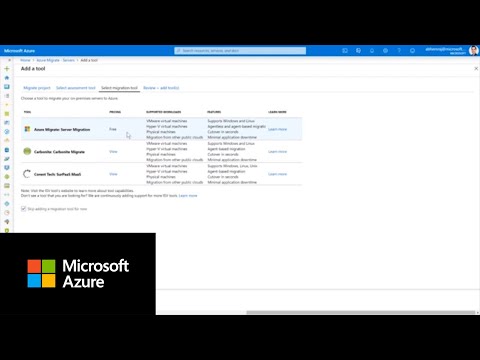
    Visualize and identify cross-server dependencies while devising optimization strategies for migrating interdependent servers.
Azure Migrate Demo Video play icon

Get Azure Migrate Demo

Watch the demo video to explore key features, real workflows, and how the software fits your business needs.

Understand
Key Features
Personal
Demo Insights
Interactive
Demo Support

Azure Migrate Specifications

Supported Platforms
Windows Windows Linux Linux
Devices
Desktop Desktop
Deployment
Cloud-Based Cloud-Based
Suitable For
All Industries
Business Specific
All Businesses
Business Size
Small Business Startups Medium Business Enterprises SMBs SMEs MSMBs MSMEs
Customer Support
Phone Email Live Chat Communities
Language
Nederlands English français Italiano 한국어 普通话 Português русский Español Türkçe
Integration
API Integration
Training Resources
Webinars Documentation Videos

Azure Migrate Review

4.1

Out of 5

img

Overall Rating

Based on
4 Verified Ratings

Rating Breakdown

  • Features 3.7
  • Value for Money 4.5
  • Ease of Use 4
  • Customer Support 4.2

100% Recommend this Product

Add Review

Be the First to Review

This product has no reviews yet. Be the first to leave your feedback.

Add Review

Compare Azure Migrate With other Cloud Migration Tools

Products
Ratings
Pricing
Device Supported
Deployment
Supported Platforms
  • img

    Azure Migrate

  • 4.1

  • Price On Request

  • Desktop

    Mobile

  • Web based

    On Premises

  • Windows

    Mac OS

  • img

    MailJerry

  • 4.4

  • ₹ 1382

  • Desktop

    Mobile

  • Web based

    On Premises

  • Windows

    Mac OS

  • img

    Cloudsfer

  • 4.5

  • Price On Request

  • Desktop

    Mobile

  • Web based

    On Premises

  • Windows

    Mac OS

  • img

    Movebot

  • 4.3

  • Price On Request

  • Desktop

    Mobile

  • Web based

    On Premises

  • Windows

    Mac OS

  • img

    CloudM

  • 4.0

  • Price On Request

  • Desktop

    Mobile

  • Web based

    On Premises

  • Windows

    Mac OS

  • img

    Carbonite Migrate

  • 4.1

  • Price On Request

  • Desktop

    Mobile

  • Web based

    On Premises

  • Windows

    Mac OS

(0) Product(s) selected

Azure Migrate Alternatives

See All Azure Migrate Alternatives

Starting Price:

$25 /Monthly

Starting Price:

$390 /Monthly

Available

Price on Request

Articles for Azure Migrate

See All Related Articles

Which operating system does the Azure Migrate Software Support?

Azure Migrate software is compatible with Windows and macOS operating systems.

Is there any Azure Migrate App?

Azure Migrate app is unavailable on Android and iOS devices.

What is the deployment type of the Azure Migrate?

Azure Migrate supports cloud-based deployment.

How much does the Azure Migrate Cloud Migration Cost?

Azure Migrate Cloud Migration software pricing is available on request at techjockey.com.

Who are the potential users of the Azure Migrate?

Azure Migrate Cloud Migration can be used by IT managers, cloud architects, system administrators, and IT consultants.

Is there any free trial or demo for Azure Migrate Tools?

Azure Migrate solution demo is available for free with techjockey.com.

Is Azure Migrate Cloud Platform Free?

Azure Migrate Cloud Migration platform does not offer a free trial.

How can you download the Azure Migrate Cloud Migration Software?

Azure Migrate is a cloud-based software. So, download the installation file on your system and open the Setup Wizard to get started.

How does Azure Migrate Cloud Migration work?

Microsoft provides Azure Migrate that simplifies migrating on-premises infrastructure to the Azure cloud. It assesses the current environment, identifies dependencies, and provides recommendations for a successful migration, ensuring a smooth transition to the cloud.

20,000+ Software Listed

Best Price Guranteed

Free Expert Consultation

2M+ Happy Customers

Terms and Condtions

close

Users with registered businesses can purchase goods from merchants on the platform to satisfy their business needs. Users are not permitted to utilize any products acquired through the platform for resale, advertising, business, or further distribution.

For each purchase made, users will receive a Tax Invoice (or 'GST invoice') that includes specific details such as:

  • the GSTIN of the user associated with their registered business, and

  • the specified Entity Name for their business.

It should be noted that not all products are eligible for GST Invoice. Only the products displayed by participating sellers with the 'GST-based Invoice Available' callout on the product description page would qualify.

Certain goods and services are not eligible to get a GST Invoice, including items with VAS, i.e., Value Added Services (e.g., Total Mobile Protection/Assured Buyback) and those involving an exchange offer at the time of purchase.

Users must ensure the accuracy of the GSTIN, and business entity name provided for the GST Invoice. Requests for corrections into GST Invoice would not be accommodated by Techjockey.com or any Seller, and any issues arising from user-provided information are the sole responsibility of users.

Techjockey.com is not liable for the GST Invoice or any associated input tax credit. To efficiently claim an input tax credit, users should select the registered place of business address as per the GST authority's data and follow the provisions of the GST Act and rules.

To claim an input tax credit, the delivery and billing addresses must match. Furthermore, input tax credits will not be granted if the delivery address and GSTIN on the invoice are from different states. In case of incorrect GST details provided during the order placement, the order will be canceled automatically.