linkedin
Movio logo
play How to Record Voiceover for Video Online
Movio-Create AI videos
Movio-Customizable templates

Movio

Brand: Movio

  • 4.6

  • 3 Ratings

Movio Video Making Software empowers users to create stunning videos effortlessly, offering a comprehensive suite of intuitive tools for video editing, customizable templates, and a vast media library.

See More

Have you used Movio before?

Share your insights for better experience

Add a Review
Starting Price
$30

View plans

100% Genuine
Products
Best Price
Guaranteed
Safe & Secure
Payment
  • Description

  • Pricing

  • Features

  • Specification

  • Review

  • Compare

  • Alternatives

  • FAQ

Starting at $30

Movio Software Overview

What is Movio Software?

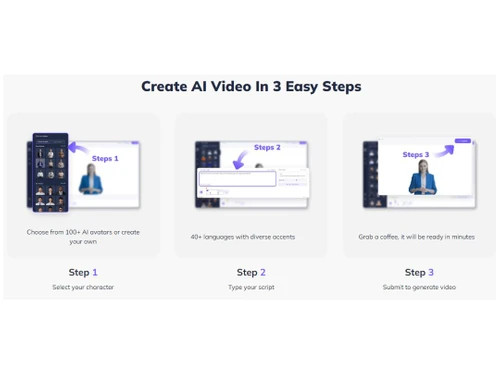
Movio is an AI-based video creation software designed to cater to the needs of businesses across various industries. The platform allows businesses to select avatars and languages to automatically generate videos with customized content. This intelligent system lets users personalize their videos and tailor them to their target audience.

It offers an extensive avatar library with various characters and styles to suit different brand identities and target demographics. This ensures businesses can create videos that resonate with their audience and effectively convey their message. The video-making software supports multiple languages and enables businesses to reach a global audience without costly and time-consuming translation services.

The platform offers a user-friendly interface that empowers even those with limited technical expertise to create professional-looking videos. Automating the video creation process saves businesses valuable time and resources and allows them to focus on other important aspects of their operations.

Why Choose Movio?

  • Caption and Subtitle Support: The video creation solution allows you to add captions and subtitles to your videos for accessibility and language support.
  • Voiceover Recording: You can record custom voiceovers to narrate your videos and add a personal touch.
  • Chroma Keying: The software allows you to use chroma keying techniques to replace a specific colour in your videos with a different background or visual element.
  • Green Screen Effects: It enables you to use green screen technology to replace backgrounds and create stunning visual effects.
  • Interactive Elements: The video-making tool allows you to add interactive elements, such as clickable buttons and overlays, to engage your audience.
  • Storyboarding: It allows you to plan and visualize your videos with storyboard tools to arrange scenes and shots in a structured manner.
  • Transcription Services: It enables you to automatically transcribe audio content in your videos to create accurate captions and subtitles.

Benefits of Movio Video-Making Software

  • The video creation solution allows you to transition between scenes and clips with various visually appealing transitions.
  • It enables you to test different versions of your videos to determine the most effective content and messaging.
  • Protect your videos with personalized watermarks to maintain ownership and brand integrity.
  • The video-making tool allows you to Incorporate eye-catching motion graphics and animations to bring your videos to life.
  • It offers a range of video editing features, such as trimming, cropping, and adding transitions, to refine your videos.

Pricing of Movio Video Making Software

Movio video-making system pricing starts at $30 at techjockey.com.

The overall pricing model is based on different factors such as personalization, extra features required, total users, and the deployment type. Please feel free to request a call from our product experts if you want to learn more about our subscription plans or premium package deals.

Read more

Movio Company Details

Founded Year:  2022

MOVIO is an AI video generator that can help you take your marketing text and turn it into a spokesperson video in just minutes.

Director/Founders Joshua Xu, Wayne Liang
Company Size 101-500 Employees

Movio Pricing & Plans

Essential
Key Features
  • 10-min Video Credits / Month
  • 100+ Human Avatars
  • 20+ languages
  • 200+ voices
  • 200+ templates
  • TalkingPhoto Upload
  • FaceSwap
  • PowerPoint/PPT Import
  • Up to 10-min per video
  • Video Bio
  • Video Share
  • Web Widget Export
  • Auto Captions
  • Unlimited Hosting
  • No Watermark
  • Priority Video Processing
  • Branding Kit
Starting at $30
    • Licenses

      Licenses
      Licenses
    • Monthly

      Monthly
      Monthly

Key Features

  • 10-min Video Credits / Month

  • 100+ Human Avatars

  • 20+ languages

  • 200+ voices

  • 200+ templates

  • TalkingPhoto Upload

  • FaceSwap

  • PowerPoint/PPT Import

  • Up to 10-min per video

  • Video Bio

  • Video Share

  • Web Widget Export

  • Auto Captions

  • Unlimited Hosting

  • No Watermark

  • Priority Video Processing

  • Branding Kit

Movio Features

  • icon_check Video Making Tool
    Provides a user-friendly tool for creating professional videos.
  • icon_check Text To Video
    Easily convert text content into captivating video presentations.
  • icon_check Audio Uploads
    Add custom audio files to enhance your videos.
  • icon_check 40+ Languages
    Create videos in over 40 languages to reach a global audience.
  • icon_check Multi-Scene Videos
    Craft dynamic videos with multiple scenes and transitions.
  • icon_check 1080P Download
    Download your videos in high definition 1080p resolution for crisp visuals.
  • icon_check Video Sharing
    Share your videos across various platforms and channels.
  • icon_check Creative Styles
    Choose from various creative styles and themes to personalize your videos.
  • icon_check Background Music
    Enhance the mood of your videos with a selection of background music tracks.
  • icon_check Customizable Templates
    Access a library of video templates to streamline your creation process.
  • icon_check AI Video Generator
    Utilize advanced artificial intelligence technology to generate videos automatically.
  • icon_check Unlimited Downloads
    Enjoy unlimited downloads of your created videos without any restrictions.
  • icon_check Face Swap
    Swap faces in videos for entertaining and engaging content.
  • icon_check Talking Photos
    Transform static photos into animated talking pictures.
  • icon_check Custom Avatar
    Create a personalized avatar to represent yourself or your brand in videos.
  • icon_check Affordable Prices
    Access cost-effective pricing options that fit within your budget.
  • icon_check Engaging Videos
    Produce captivating and attention-grabbing videos to captivate your audience.
Movio Demo Video play icon

Get Movio Demo

Watch the demo video to explore key features, real workflows, and how the software fits your business needs.

Understand
Key Features
Personal
Demo Insights
Interactive
Demo Support

Movio Specifications

Supported Platforms
Windows Windows iOS iOS Android Android MacOS MacOS Linux Linux
Devices
Desktop Desktop Mobile Mobile Tablet Tablet iPad iPad
Deployment
Cloud-Based Cloud-Based
Suitable For
All Industries
Business Specific
All Businesses
Business Size
Small Business Startups Medium Business Enterprises
Customer Support
Email Communities
Language
English
Training Resources
Documentation Videos

Explore the Best Alternative Solutions Similar to Your Business Size and Needs

Movio Review

4.6

Out of 5

img

Overall Rating

Based on
3 Verified Ratings

Rating Breakdown

  • Features 4.3
  • Value for Money 4.8
  • Ease of Use 4.5
  • Customer Support 5

86% Recommend this Product

Add Review

Techjockey Trusted Reviews from Verified Users

No reviews are currently available for Movio. Discover similar Video Making Software reviews

  • Designs Videomaker

    5.0

    Whats great - Quick and easy way of creating short form videos. All the content is available. Video making process is very intuitive read more

  • Wondershare Filmora

    4.3

    Whats great - It seemed to me all so familiar and straightforward, I easily processed various video files and made interesting titles and e... read more

  • Monarch Smart Cut Pro

    4.8

    Whats great - Awesome service and product! I would highly recommend Techjockey. read more

Compare Movio With other Video Making Software

Products
Ratings
Pricing
Device Supported
Deployment
Supported Platforms
  • img

    Movio

  • 4.6

  • Price On Request

  • Desktop

    Mobile

  • Web based

    On Premises

  • Windows

    Mac OS

  • img

    VEED

  • 4.6

  • ₹ 5988

  • Desktop

    Mobile

  • Web based

    On Premises

  • Windows

    Mac OS

  • img

    Renderforest

  • 4.5

  • ₹ 899

  • Desktop

    Mobile

  • Web based

    On Premises

  • Windows

    Mac OS

  • img

    D-ID

  • 4.7

  • Price On Request

  • Desktop

    Mobile

  • Web based

    On Premises

  • Windows

    Mac OS

  • img

    Designs Videomaker

  • 5

  • Price On Request

  • Desktop

    Mobile

  • Web based

    On Premises

  • Windows

    Mac OS

  • img

    Lumen5

  • 4.7

  • Price On Request

  • Desktop

    Mobile

  • Web based

    On Premises

  • Windows

    Mac OS

  • img

    Tavus

  • 4.5

  • Price On Request

  • Desktop

    Mobile

  • Web based

    On Premises

  • Windows

    Mac OS

  • img

    Quinvio AI

  • 4.6

  • Price On Request

  • Desktop

    Mobile

  • Web based

    On Premises

  • Windows

    Mac OS

  • img

    Beeble AI

  • 4.7

  • Price On Request

  • Desktop

    Mobile

  • Web based

    On Premises

  • Windows

    Mac OS

  • img

    Doratoon

  • 4.3

  • Price On Request

  • Desktop

    Mobile

  • Web based

    On Premises

  • Windows

    Mac OS

(0) Product(s) selected

Movio Alternatives

See All Movio Alternatives

Starting Price:

$275

Starting Price:

$12 /Month

Starting Price:

$59

Starting Price:

$18 /Month

Starting Price:

$47

Starting Price:

$59 /Month

Articles for Movio

See All Related Articles

Which operating system does Movio Software Support?

Movio software is compatible with Windows and macOS operating systems.

Is there any Movio App?

Movio app is unavailable on Android and iOS devices.

What is the deployment type of the Movio Software?

Movio system supports web-based deployment.

How much does the Movio cost?

Movio pricing starts from $30 at techjockey.com.

Who are the potential users of Movio?

Movio can be used by various businesses, like marketing businesses, e-commerce, video editors and individuals who need AI-powered video-making software.

Is there any free trial or demo for Movio?

Movio system demo is available for free with techjockey.com.

Is Movio System free?

Movio system does not offer a free trial.

How can you download the Movio software?

Movio is a web-based platform. So, you need not download any software or app to use it.

How does Movio work?

Movio is a remarkable AI video generator that utilizes advanced algorithms and machine learning techniques to create captivating videos. It combines various elements, such as images, text, and audio, to generate high-quality, original video content.

20,000+ Software Listed

Best Price Guranteed

Free Expert Consultation

2M+ Happy Customers

Terms and Condtions

close

Users with registered businesses can purchase goods from merchants on the platform to satisfy their business needs. Users are not permitted to utilize any products acquired through the platform for resale, advertising, business, or further distribution.

For each purchase made, users will receive a Tax Invoice (or 'GST invoice') that includes specific details such as:

  • the GSTIN of the user associated with their registered business, and

  • the specified Entity Name for their business.

It should be noted that not all products are eligible for GST Invoice. Only the products displayed by participating sellers with the 'GST-based Invoice Available' callout on the product description page would qualify.

Certain goods and services are not eligible to get a GST Invoice, including items with VAS, i.e., Value Added Services (e.g., Total Mobile Protection/Assured Buyback) and those involving an exchange offer at the time of purchase.

Users must ensure the accuracy of the GSTIN, and business entity name provided for the GST Invoice. Requests for corrections into GST Invoice would not be accommodated by Techjockey.com or any Seller, and any issues arising from user-provided information are the sole responsibility of users.

Techjockey.com is not liable for the GST Invoice or any associated input tax credit. To efficiently claim an input tax credit, users should select the registered place of business address as per the GST authority's data and follow the provisions of the GST Act and rules.

To claim an input tax credit, the delivery and billing addresses must match. Furthermore, input tax credits will not be granted if the delivery address and GSTIN on the invoice are from different states. In case of incorrect GST details provided during the order placement, the order will be canceled automatically.