linkedin
Winxvideo AI logo
play Winxvideo AI Newly Announced | An AI-Powered Video/Image Enhancer & Converter
winxvideo ai images
winxvideo-ai edit

Winxvideo AI

Brand: Digiarty Software

  • 4.3

  • 6 Ratings

Winxvideo AI is a suite of generative AI tools focused on video generation. It leverages advanced algorithms to create videos autonomously based on user inputs and preferences.

See More

Have you used Winxvideo AI before?

Share your insights for better experience

Add a Review
Starting Price
$40

View plans

100% Genuine
Products
Best Price
Guaranteed
Safe & Secure
Payment
  • Description

  • Pricing

  • Features

  • Specification

  • Review

  • Compare

  • Alternatives

  • FAQ

Starting at $40

Winxvideo AI Software Overview

What is Winxvideo AI?

Winxvideo AI is a cutting-edge platform offering generative AI tools specializing in video generation. Advanced algorithms enable users to create high-quality videos autonomously without extensive manual editing. With its AI video generators, Winxvideo AI revolutionizes content creation by simplifying the process and enhancing efficiency.

From generating engaging social media content to producing professional marketing videos, Winxvideo AI caters to diverse video production needs. Its intuitive interface and customizable features empower users to easily customize and refine generated videos to their preferences.

Why Choose Winxvideo AI Software?

  • Efficiency: Streamlines the video creation process, saving time and effort by autonomously generating videos based on user inputs and preferences.
  • Quality: Ensures high-quality video output with advanced generative AI algorithms, maintaining professional standards and engaging visual content.
  • Versatility: Caters to diverse video production needs, from social media content to marketing videos, offering flexibility for various industries and purposes.
  • Ease of Use: Features a user-friendly interface and intuitive controls, making it accessible to users of all skill levels, minimizing the learning curve for quick adoption.
  • Customization: Despite its automated approach, it allows for customization, empowering users to fine-tune generated videos to their specific requirements and branding.
  • Cost-Effectiveness: Automating the video production process helps businesses save on labor costs and resources compared to traditional methods.

Benefits of Winxvideo AI Platform

  • Rapid Content Creation: Speeds up content creation, enabling timely marketing campaigns and promotions by producing videos faster.
  • Consistency in Branding: Using customizable templates and branding options, the company ensures consistent visual style and messaging across all videos, strengthening brand identity.
  • Access to Advanced Features: Provides advanced features like motion graphics, animations, and visual effects, enhancing video creativity and impact.
  • Reduced Dependency on External Agencies: Empowers in-house teams to create professional-quality videos, reducing reliance on external agencies and saving costs.
  • Insights from Analytics: Offers analytics tools to track video performance metrics such as views, engagement, and conversion rates, enabling data-driven decisions for optimizing future content.
  • Expanded Reach: Produces videos optimized for various platforms and formats, helping businesses expand their reach across different channels and driving brand awareness.

Pricing of Winxvideo AI

Winxvideo AI price in India starts at $26 at techjockey.com.

The pricing model is based on different parameters, including extra features, deployment type, and the total number of users. If you have further queries related to the product, you can contact our product team to learn more about the pricing and offers.

Read more

Digiarty Software Company Details

Founded Year:  2006

Digiarty Software offering DVD/video converting and backup, iPhone/iPad transfer and management solutions.

Director/Founders Jack Han
Company Size 1-100 Employees

Winxvideo AI Pricing & Plans

1-Year Plan / 3 PCs
Starting at $40
    • Licenses

      Licenses
      Licenses
    • Yearly

      Yearly
      Yearly

Key Features

  • video/image enhancing, stabilization, frame interp

  • 1-year access to full features

  • 1-year free upgrades, loyalty discount for future

Lifetime / 1 PC
Starting at $70
    • Licenses

      Licenses
      Licenses
    • Yearly

      Yearly
      Yearly

Key Features

  • video/image enhancing, stabilization, frame interp

  • Lifetime access to full features

  • Keep Up-to-date with future versions for free

Winxvideo AI Features

  • icon_check Images Enhance
    It enhances the quality of images, improving clarity, sharpness, and overall visual appeal.
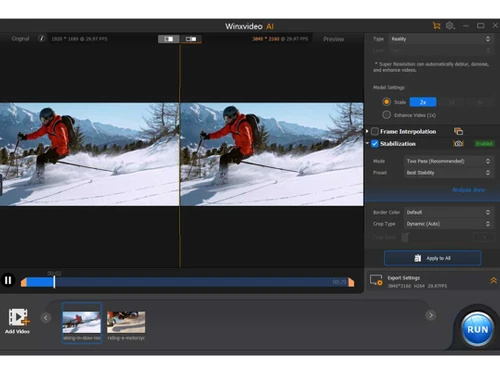
  • icon_check Super Resolution
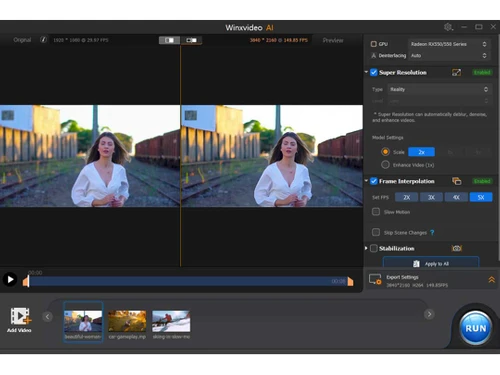
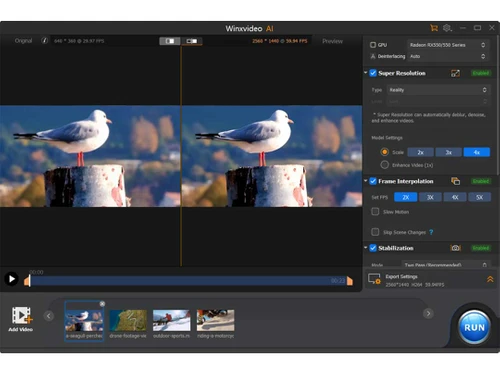
    It increases the resolution of images, videos, or screen recordings, resulting in higher-quality output with finer details.
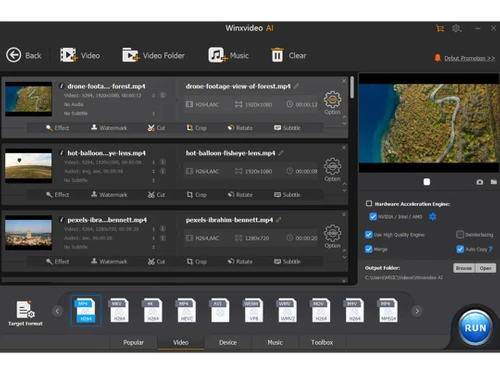
  • icon_check Edit/Cut Video to Craft Perfect Story
    It offers editing tools to trim, cut, and rearrange video clips, allowing users to create compelling narratives and stories.
  • icon_check Record Screen at Will
    Users can easily capture their computer screen and record actions or presentations with Its screen recording feature.
  • icon_check Speed Control
    It adjusts video playback speed for storytelling enhancement or highlighting key moments.
  • icon_check Rotate/Flip
    It provides options to rotate or flip videos, correct orientation, or achieve creative effects easily.
  • icon_check Reduce Noise
    It reduces background noise or interference in audio recordings, resulting in clearer, more professional-sounding audio.
  • icon_check Make GIF/Snapshot
    Users can create GIF animations or capture snapshots from videos, adding visual interest and versatility to their content.
Winxvideo AI Demo Video play icon

Get Winxvideo AI Demo

Watch the demo video to explore key features, real workflows, and how the software fits your business needs.

Understand
Key Features
Personal
Demo Insights
Interactive
Demo Support

Winxvideo AI Specifications

Supported Platforms
Windows Windows MacOS MacOS
Devices
Desktop Desktop
Deployment
Cloud-Based Cloud-Based
Suitable For
All Industries
Business Specific
All Businesses
Business Size
Small Business Medium Business SMBs SMEs MSMBs
Customer Support
Email
Language
English
Training Resources
In Person Videos
AI Features
AI Integrated

Explore the Best Alternative Solutions Similar to Your Business Size and Needs

Winxvideo AI Review

4.3

Out of 5

img

Overall Rating

Based on
6 Verified Ratings

Rating Breakdown

  • Features 4.2
  • Value for Money 4.4
  • Ease of Use 4.1
  • Customer Support 4.4

91% Recommend this Product

Add Review

Techjockey Trusted Reviews from Verified Users

No reviews are currently available for Winxvideo AI. Discover similar Video Making Software reviews

  • Designs Videomaker

    5.0

    Whats great - Quick and easy way of creating short form videos. All the content is available. Video making process is very intuitive read more

  • Wondershare Filmora

    4.3

    Whats great - It seemed to me all so familiar and straightforward, I easily processed various video files and made interesting titles and e... read more

  • Monarch Smart Cut Pro

    4.8

    Whats great - Awesome service and product! I would highly recommend Techjockey. read more

Compare Winxvideo AI With other Video Making Software

Products
Ratings
Pricing
Device Supported
Deployment
Supported Platforms
  • img

    Winxvideo AI

  • 4.3

  • Price On Request

  • Desktop

    Mobile

  • Web based

    On Premises

  • Windows

    Mac OS

  • img

    VEED

  • 4.6

  • ₹ 5988

  • Desktop

    Mobile

  • Web based

    On Premises

  • Windows

    Mac OS

  • img

    Movio

  • 4.6

  • Price On Request

  • Desktop

    Mobile

  • Web based

    On Premises

  • Windows

    Mac OS

  • img

    Renderforest

  • 4.5

  • ₹ 899

  • Desktop

    Mobile

  • Web based

    On Premises

  • Windows

    Mac OS

  • img

    D-ID

  • 4.7

  • Price On Request

  • Desktop

    Mobile

  • Web based

    On Premises

  • Windows

    Mac OS

  • img

    Designs Videomaker

  • 5

  • Price On Request

  • Desktop

    Mobile

  • Web based

    On Premises

  • Windows

    Mac OS

  • img

    Lumen5

  • 4.7

  • Price On Request

  • Desktop

    Mobile

  • Web based

    On Premises

  • Windows

    Mac OS

  • img

    Tavus

  • 4.5

  • Price On Request

  • Desktop

    Mobile

  • Web based

    On Premises

  • Windows

    Mac OS

  • img

    Quinvio AI

  • 4.6

  • Price On Request

  • Desktop

    Mobile

  • Web based

    On Premises

  • Windows

    Mac OS

  • img

    Beeble AI

  • 4.7

  • Price On Request

  • Desktop

    Mobile

  • Web based

    On Premises

  • Windows

    Mac OS

(0) Product(s) selected

Winxvideo AI Alternatives

See All Winxvideo AI Alternatives

Starting Price:

$275

Starting Price:

$12 /Month

Starting Price:

$59

Starting Price:

$18 /Month

Starting Price:

$59 /Month

Starting Price:

$47

How does Winxvideo AI create videos?

It uses AI algorithms to generate videos, adding elements like images, text, and music as per user specifications.

Can I customize the videos made by Winxvideo AI?

You can customize the videos to match your specific needs and branding.

What kind of videos can I make with Winxvideo AI?

You can make various types of videos, including social media content, marketing videos, and more.

Does Winxvideo AI offer templates?

It provides customizable templates to help you create videos faster.

Is there a free trial for Winxvideo AI?

No, Winxvideo AI does not offer a free trial.

Can I add my music and images to the videos?

You can upload and use your music and images in the videos.

Does Winxvideo AI help with branding?

Yes, it offers tools to ensure consistency in branding across all your videos.

How quickly can I create a video with Winxvideo AI?

Compared to traditional methods, you can create a video much faster, often in just a few minutes.

Can multiple team members work on a video together?

Winxvideo AI has features allowing team collaboration on video projects.

20,000+ Software Listed

Best Price Guranteed

Free Expert Consultation

2M+ Happy Customers

Terms and Condtions

close

Users with registered businesses can purchase goods from merchants on the platform to satisfy their business needs. Users are not permitted to utilize any products acquired through the platform for resale, advertising, business, or further distribution.

For each purchase made, users will receive a Tax Invoice (or 'GST invoice') that includes specific details such as:

  • the GSTIN of the user associated with their registered business, and

  • the specified Entity Name for their business.

It should be noted that not all products are eligible for GST Invoice. Only the products displayed by participating sellers with the 'GST-based Invoice Available' callout on the product description page would qualify.

Certain goods and services are not eligible to get a GST Invoice, including items with VAS, i.e., Value Added Services (e.g., Total Mobile Protection/Assured Buyback) and those involving an exchange offer at the time of purchase.

Users must ensure the accuracy of the GSTIN, and business entity name provided for the GST Invoice. Requests for corrections into GST Invoice would not be accommodated by Techjockey.com or any Seller, and any issues arising from user-provided information are the sole responsibility of users.

Techjockey.com is not liable for the GST Invoice or any associated input tax credit. To efficiently claim an input tax credit, users should select the registered place of business address as per the GST authority's data and follow the provisions of the GST Act and rules.

To claim an input tax credit, the delivery and billing addresses must match. Furthermore, input tax credits will not be granted if the delivery address and GSTIN on the invoice are from different states. In case of incorrect GST details provided during the order placement, the order will be canceled automatically.