linkedin
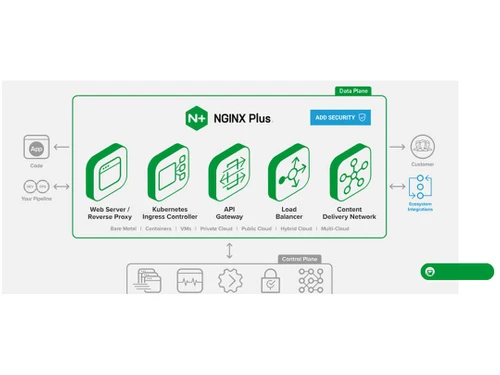
NGINX Plus logo
play Using NGINX Plus for Advanced Video Streaming
play Advanced API security for Kubernetes containers running in AWS
NGINX Plus

NGINX Plus

Brand: NGINX (part of F5)

  • 4.1

  • 4 Ratings & 4 Reviews

Modernize app delivery with NGINX Plus, the all-in-one load balancer, web server, and API gateway for delivering secure, high-performance applications at scale.

See More

Have you used NGINX Plus before?

Share your insights for better experience

Add a Review

Price Available on Request

Questions about pricing or customization? We’re here to help, just a click away.

100% Genuine
Products
Best Price
Guaranteed
Safe & Secure
Payment
  • Description

  • Pricing

  • Features

  • Specification

  • Review

  • Compare

  • Alternatives

  • FAQ

NGINX Plus Software Overview

What is NGINX Plus?

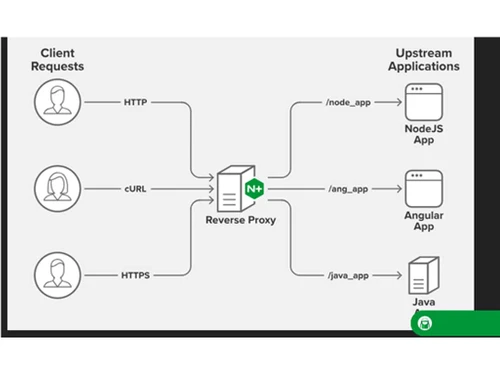
NGINX Plus is a comprehensive, cloud-native software suite that functions as an all-in-one load balancer, reverse proxy, web server, content cache, and API gateway. It is the commercial, enterprise-grade version of the widely used NGINX Open Source, enhanced with advanced features, professional support, and integrations designed for modern application architectures. As a core component of the F5 NGINX One platform, NGINX Plus is engineered to deliver, secure, and scale applications, APIs, and AI workloads across distributed, hybrid, and multi-cloud environments.

Unlike its open-source counterpart, NGINX Plus provides a complete application delivery solution that helps organizations modernize legacy monolithic applications into microservices-based architectures. It is designed to handle the unpredictable traffic patterns of today's digital landscape, ensuring high performance, reliability, and security for mission-critical services.

Why Choose NGINX Plus?

  • Enterprise-Grade Support: NGINX Plus includes award-winning, 24/7 support from F5's technical experts, ensuring that any issues are resolved quickly to minimize downtime and maintain business continuity.
  • Enhanced Performance and Reliability: It offers advanced features like session persistence, active health checks, and a high-availability clustering setup that are not available in the open-source version, significantly improving application uptime and resiliency under heavy load.
  • Advanced Security Controls: The platform integrates seamlessly with security modules like F5 WAF for NGINX and F5 DoS for NGINX, providing comprehensive protection against Layer 7 attacks, DDoS threats, and other vulnerabilities.
  • Simplified Management and Observability: With live activity monitoring dashboards and integration with NGINX Instance Manager, teams gain deep visibility into application health and performance, allowing for proactive management and faster troubleshooting.
  • Reduced Operational Overhead: By consolidating multiple functions (load balancing, API gateway, caching) into a single, lightweight software package, NGINX Plus simplifies the tech stack, reduces complexity, and lowers the total cost of ownership.

Advanced Features of NGINX Plus

  1. Advanced Load Balancing: Includes multiple load balancing algorithms, session persistence based on cookies or IP hashes, and active health checks that intelligently route traffic away from unhealthy upstream servers.
  2. High-Performance Content Caching: Reduces latency and server load by caching static and dynamic content closer to users, with advanced features like cache purging and conditional caching.
  3. Comprehensive API Gateway: Securely manages and routes API traffic with features like request routing, rate limiting, authentication using JWTs (JSON Web Tokens), and support for OpenAPI specifications.
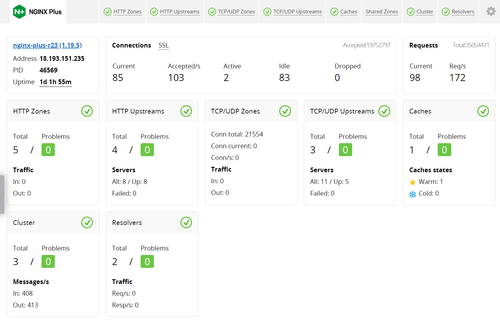
  4. Live Activity Monitoring: Provides a real-time dashboard with over 100 unique metrics, offering instant insights into traffic patterns, server health, and application performance without relying on external tools.
  5. Kubernetes Ingress Controller: Offers a robust, production-ready Ingress Controller for Kubernetes environments, enabling sophisticated traffic management, SSL/TLS termination, and security policies for containerized applications.
  6. Streaming Media Delivery: Supports adaptive bitrate streaming for formats like HLS and MPEG-DASH, making it an ideal solution for delivering high-quality video content at scale.

Key Capabilities of NGINX Plus

  • NGINX Instance Manager: A centralized control plane to identify, secure, manage, and monitor all NGINX Open Source and NGINX Plus instances across your entire infrastructure.
  • F5 WAF for NGINX: A powerful Web Application Firewall that protects applications and APIs from sophisticated Layer 7 attacks, including SQL injection and cross-site scripting (XSS).
  • NGINX Ingress Controller: Implements a unified API gateway, load balancer, and ingress controller across Kubernetes clusters, providing deep insights into application health.
  • NGINX Gateway Fabric: A modern, role-based tool that streamlines application and API connectivity across hybrid and multi-cloud Kubernetes environments.
  • NGINX One Console: A SaaS-based management console to configure, secure, and monitor NGINX instances at scale, ensuring consistent policy enforcement and observability.

How to Use NGINX Plus?

  1. Subscription and Setup: First, obtain a subscription from F5 NGINX. You will receive access to the software repository and your license keys.
  2. Installation: Install NGINX Plus on your chosen platform, which can be a bare-metal server, a virtual machine (VM), or a container in a cloud environment like AWS, Azure, or Google Cloud.
  3. Configuration: Configure NGINX Plus for your specific use case. This involves editing configuration files to define server blocks, upstream server groups for load balancing, caching rules, and security policies.
  4. Integration: Integrate NGINX Plus with other tools in your ecosystem, such as monitoring solutions (e.g., Prometheus, Grafana), security modules (e.g., F5 WAF), and management tools like NGINX Instance Manager.
  5. Monitoring and Optimization: Use the built-in live activity monitoring dashboard and API to track performance in real-time. Continuously optimize configurations based on traffic patterns and application needs to ensure peak performance and reliability.

NGINX Plus Price

NGINX Plus price is available on request at Techjockey. The pricing model is based on different parameters, including extra features, deployment type, and the total number of users. For further queries related to the product, you can contact our product expert and learn more about the pricing and offers.

Read more

NGINX Plus Pricing & Plans

Looking for The Right Pricing?

Share your requirements and get a plan built around your business.

  • Define your business needs
  • Get customised pricing
  • Choose features that fit your workflow

Price Available on Request

Get personalised NGINX Plus pricing that fits your needs. Our team will connect with you.

NGINX Plus Features

  • icon_check Single sign-on
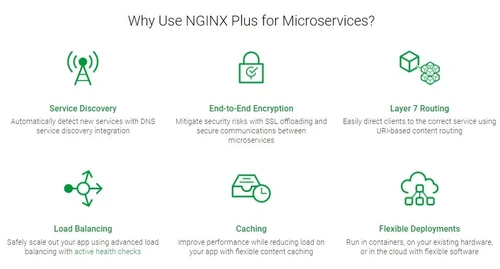
    NGINX Plus allows adding single sign on to every app with the help of connect compatible providers like OpenID. 
  • icon_check API Authentication
    NGINX Plus uses JWT tokens to restrict API access.
  • icon_check DDoS Mitigation
    NGINX minimizes network and service-related abuse by imposing bandwidth and rate limit.  
  • icon_check Service Discovery
    You can auto detect services that have DNS service discovery integration 
  • icon_check Layer 7 Routing
    You can easily direct your clients to a more suitable service with URI-based content routing. 
  • icon_check Flexible Deployments
    You can run your existing hardware in containers or in cloud using flexible software. 
  • icon_check Eliminate Vendor Lock‑In
    Feel free to choose between any cloud: public, private or hybrid, with feeling trapped by your public cloud vendor. 
  • icon_check Get Predictable Pricing
    Keep the cost in control by using volume discounts, site licenses.
  • icon_check Performance Analytics
    It helps you reduce page load time and slash costing with flexible content caching.
  • icon_check Maximize Compatibility
    It is compatible with Docker, Kubernetes, Mesos and other app development tools.   
  • icon_check Improve Site Speed
    It profoundly increases the frontend performance with the use of HTTP/2 and ensures that backend services are not
  • icon_check Speed Up Encryption
    Backward compatibility with RSA/ECC encryption is maintained in a way that the performance increase significantly. 
  • icon_check Save On Bandwidth
    You can reduce your bandwidth by more than 75% through content compression.
  • icon_check Monitor Performance
    Thanks to its real time monitoring dashboard, you can track your app’s performance.
  • icon_check Scale When You Need It
    Scaling of performance becomes easier with TCP, UDP & HTTP load balancing. 
  • icon_check API Definition and Publication
    You can define APIs once and can publish to various environments using a simple process. 
  • icon_check Rate Limiting
    It helps you protect your APIs from bad client requests and DDoS attacks.   
  • icon_check Cut Costs
    Save more than 80% of cost on hardware solutions without using artificial caps on throughout or SSL connections
  • icon_check Accelerate Time to Market
    You can scale up instantly without waiting for procurement of hardware
  • icon_check Real-Time Monitoring and Alerting
    You get critical understanding into application performance with visibility into over 100 metrics. 
  • icon_check Deploy Anywhere
    Use any public, private, or hybrid cloud, without having to worry about restrictive proprietary hardware
  • icon_check Modernize IT Infrastructure
    It will help you to move towards microservices and DevOps with a software ADC designed for modern app architectures
  • icon_check Integrate Easily
    You don't need to rip-off and replace your existing hardware, and you can use the NGINX Plus alongside it.
  • icon_check Empower Developers
    You can use NGINX Plus in development, staging, and production environments with low-cost developer licenses
NGINX Plus Demo Video play icon

Get NGINX Plus Demo

Watch the demo video to explore key features, real workflows, and how the software fits your business needs.

Understand
Key Features
Personal
Demo Insights
Interactive
Demo Support

NGINX Plus Specifications

Supported Platforms
Linux Linux
Devices
Desktop Desktop
Deployment
Cloud-Based Cloud-Based
Suitable For
All Industries
Business Specific
All Businesses
Business Size
Enterprises
Language
English

NGINX Plus Reviews

4.1

Out of 5

img

Overall Rating

Based on
4 Verified Reviews

Rating Breakdown

  • Features 4
  • Value for Money 3.7
  • Ease of Use 4
  • Customer Support 4.7

77% Recommend this Product

Add Review

William Chew, Manager, IT Infrastructure & Service Delivery

User

4.2

Reviewed on: Feb 22, 2021

Techjockey Verified

“containerized private cloud”

Pros

With a second, containerized private cloud, we had to ensure minimal impact and downtime to our existing ticketing solution. We knew that if we stuck to a traditional configuration, we could face challenges with deployment efficiency and scalability. We needed a cost?effective way to address these and enable our teams to enjoy smoother collaboration so that they can introduce new and better features for our customers

Cons

NO CONS

Seth Hochberg, Director of Engineering

User

3.8

Reviewed on: Feb 22, 2021

Techjockey Verified

“manage individual components”

Pros

The architecture we had was cobbled together over time to meet the needs as we grew. But it had come to a point where it was increasingly difficult to manage individual components and even more so to ensure the level of service our users expected.

Cons

NO CONS

Clinton Fung, Head of Digital Innovation at African Bank.

User

4.1

Reviewed on: Feb 22, 2021

Techjockey Verified

“Perfect Solution”

Pros

We think of ourselves as a technology company that happens to operate a retail bank. As such we are constantly looking for ways to utilize technology that not only improve the bank’s operational efficiency but add value to our customer experience.

Cons

NO CONS

See All NGINX Plus Reviews

Compare NGINX Plus With other Load Balancing Software

Products
Ratings
Pricing
Device Supported
Deployment
Supported Platforms
  • img

    NGINX Plus

  • 4.1

  • Price On Request

  • Desktop

    Mobile

  • Web based

    On Premises

  • Windows

    Mac OS

  • img

    KEMP Load Balancer

  • 4.6

  • Price On Request

  • Desktop

    Mobile

  • Web based

    On Premises

  • Windows

    Mac OS

  • img

    Radware Alteon

  • 4.4

  • Price On Request

  • Desktop

    Mobile

  • Web based

    On Premises

  • Windows

    Mac OS

  • img

    NetScaler ADC

  • 4.2

  • Price On Request

  • Desktop

    Mobile

  • Web based

    On Premises

  • Windows

    Mac OS

  • img

    Cedexis Openmix

  • 4.1

  • Price On Request

  • Desktop

    Mobile

  • Web based

    On Premises

  • Windows

    Mac OS

(0) Product(s) selected

NGINX Plus Alternatives

See All NGINX Plus Alternatives

Available

Price on Request

Articles for NGINX Plus

See All Related Articles

Is NGINX Plus certified?

Yes. NGINX Plus is a tested and certified product. It works seamlessly with Red Hat, Amazon Linux, CentOS, Ubuntu, and Debian. The software has certified module partners like Curity, Cequence Security, Device Atlas, Forgerock, IDF Connect, Perimeter, Ping Identity, Phusion, Tala, and Wallarm.

What is the difference between NGINX Plus and NGINX Open Source?

NGINX Plus offers some additional features like active health checks, cache-purging API, JWT authentication, OpenID Connect single sign-on, built-in dashboard, configuration synchronisation across the cluster and key-value stores. These features are not available in NGINX Open Source.

What Does Commercial Support Cover?

The NGNIX+ Commercial Support Cover - 1. Use of Open Source NGINX and NGINX Plus 2. Assistance with Installation and Deployment 3. Debugging and Error Correction 4. Security Notifications 5. Software Updates 6. Documentation Discrepancies

What are the supported SSL/TLS versions by NGINX Plus?

NGINX Plus supports TLSv1, TLSv 1.1, TLSv 1.2, TLSv 1.3, SSLv2 and SSLv3.

What is the difference between NGINX Open Source and NGINX Plus?

Both the variants of NGINX are designed by their core engineering team. With NGINX Open Source, you get the benefits of the community support. And with NGINX Plus, you will get the managed release process and timely service by experts. Some of the other highlighting features of NGINX Open Source & NGINX Plus, which will help make an informed decision are: NGINX Open Source allows compiling of 100 plus third party modules. The commercial version includes more features like live activity monitoring data & load balanced groups with dynamic reconfiguration. NGINX Plus is an easy to use solution, which does not require supporting tools and third-party modules. NGINX Open Source users can enjoy similar benefits as that of NGINX Plus. However, they will require third-party implementations. NGINX Plus includes features, which are often missing in a web browser Most importantly, NGINX Open Source complements NGINX Plus and acts as a load-balancing frontend for NGINX OSS servers.

What is the difference between NGINX and NGINX Plus?

NGINX Plus is the commercial, enterprise-grade version of the free NGINX Open Source, offering advanced features for load balancing, content caching, and security, along with professional 24/7 support.

How much does NGINX Plus cost?

NGINX Plus price is available on request at Techjockey.com.

Is NGINX Plus worth it?

NGINX Plus is considered worth it for enterprises needing a complete application delivery solution to improve application speed, resiliency, and security while reducing operational costs and modernizing legacy systems.

What are NGINX Plus active health checks?

NGINX Plus includes features to monitor application health and performance, ensuring that traffic is routed only to reliable upstream servers to maintain high availability and resiliency under load.

What is NGINX One?

NGINX One is a comprehensive solution that enhances the core NGINX data plane software with SaaS-based tools for improved observability, management, and security across your applications and APIs.

What security features are available with NGINX Plus?

NGINX Plus offers comprehensive security through components like F5 WAF for NGINX and F5 DoS for NGINX, which are designed to protect applications and APIs from layer 7 attacks and denial-of-service threats.

How does NGINX Plus integrate with Kubernetes?

NGINX Plus integrates with Kubernetes using its Ingress Controller and Gateway Fabric to implement unified API gateways, load balancers, and streamline application connectivity across hybrid and multicloud Kubernetes environments.

How can I manage multiple NGINX instances?

You can use the NGINX Instance Manager component to identify, secure, manage, and monitor all of your organization's NGINX Open Source and NGINX Plus instances from a single interface.

Can I deploy NGINX Plus from a cloud marketplace?

Yes, NGINX is available as an Infrastructure-as-a-Service (NGINXaaS) solution that can be deployed directly from cloud marketplaces like Azure Marketplace and Google Cloud for enhanced app delivery.

20,000+ Software Listed

Best Price Guranteed

Free Expert Consultation

2M+ Happy Customers

Terms and Condtions

close

Users with registered businesses can purchase goods from merchants on the platform to satisfy their business needs. Users are not permitted to utilize any products acquired through the platform for resale, advertising, business, or further distribution.

For each purchase made, users will receive a Tax Invoice (or 'GST invoice') that includes specific details such as:

  • the GSTIN of the user associated with their registered business, and

  • the specified Entity Name for their business.

It should be noted that not all products are eligible for GST Invoice. Only the products displayed by participating sellers with the 'GST-based Invoice Available' callout on the product description page would qualify.

Certain goods and services are not eligible to get a GST Invoice, including items with VAS, i.e., Value Added Services (e.g., Total Mobile Protection/Assured Buyback) and those involving an exchange offer at the time of purchase.

Users must ensure the accuracy of the GSTIN, and business entity name provided for the GST Invoice. Requests for corrections into GST Invoice would not be accommodated by Techjockey.com or any Seller, and any issues arising from user-provided information are the sole responsibility of users.

Techjockey.com is not liable for the GST Invoice or any associated input tax credit. To efficiently claim an input tax credit, users should select the registered place of business address as per the GST authority's data and follow the provisions of the GST Act and rules.

To claim an input tax credit, the delivery and billing addresses must match. Furthermore, input tax credits will not be granted if the delivery address and GSTIN on the invoice are from different states. In case of incorrect GST details provided during the order placement, the order will be canceled automatically.