linkedin
Nudi logo
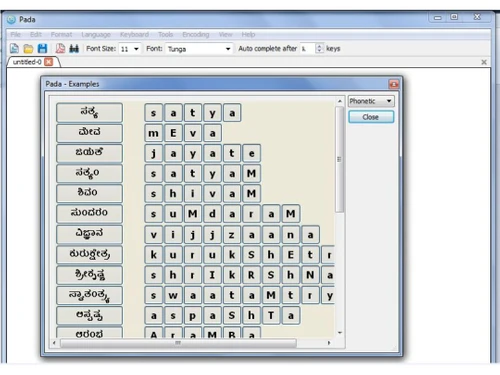
Nudi Console
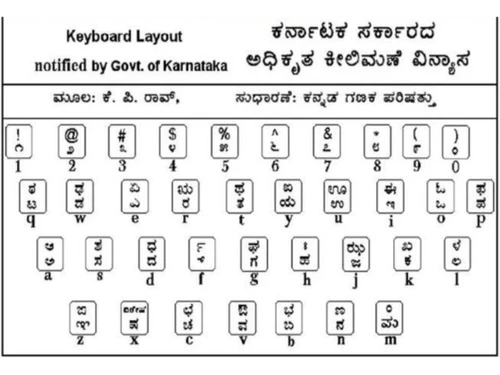
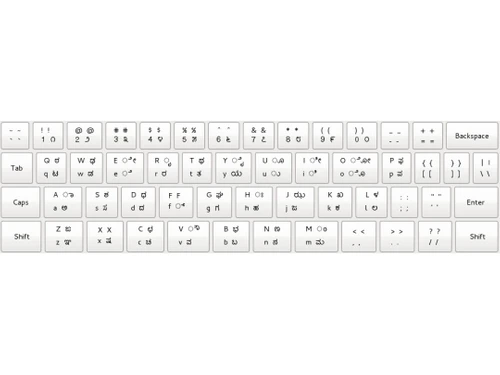
Nudi Keyboard Layout
Nudi Typing

Nudi

Brand: Nudi

  • 3.8

  • 3 Ratings

Nudi is a user-friendly typing software that offers personalized lessons and feedback to help you improve your typing speed and accuracy.

See More

Have you used Nudi before?

Share your insights for better experience

Add a Review

Free Forever

Get started immediately at no cost. Upgrade anytime if your business demand more.

100% Genuine
Products
Best Price
Guaranteed
Safe & Secure
Payment
  • Description

  • Pricing

  • Features

  • Specification

  • Review

  • Compare

  • FAQ

Nudi Software Overview

What is Nudi?

Nudi is a typing software that makes it easy to learn how to type. It offers a user-friendly interface, comprehensive lessons, and personalized feedback to help you improve your typing speed and accuracy. With its advanced features and engaging approach, Nudi is an ideal choice for both beginners and experienced typists looking to enhance their typing skills.

Improve your typing skills with fun and interactive lessons. This cloud-based software is designed to make learning to type enjoyable and effective. Its personalized lessons, interactive exercises, and progress tracking provide a structured and engaging approach to typing, helping you improve your typing speed and accuracy, and enhancing your productivity and communication skills.

Why Choose Nudi Software?

  • Learn at your own pace: Nudi provides self-paced lessons that adapt to your learning style, ensuring a tailored experience. Whether you're a beginner or an experienced typist, Nudi will adjust the lessons to match your pace and skill level.
  • Engaging lessons: The interactive lessons keep you motivated with fun and engaging exercises, making the learning process enjoyable. You won't feel like you're doing work – it's like playing a game!
  • Personalized feedback: Nudi analyzes your typing patterns and provides personalized feedback to help you identify and correct errors, leading to faster improvement. The software pinpoints your strengths and weaknesses so you can focus on areas that need improvement.
  • Variety of exercises: The software offers a wide range of exercises to cater to different typing skills and preferences, ensuring a comprehensive learning experience. Whether you want to focus on speed, accuracy, or both, Nudi has exercises to meet your needs.
  • Easy-to-use dashboard: Track your progress, set goals, and see how you're improving.
  • Personalized learning: Lessons adjust to your individual pace and skill level, so you're always learning at the right level.
  • Virtual keyboard: Practice typing on a realistic keyboard that appears on your screen.
  • Automatic error correction: The software automatically corrects common errors, so you can learn from your mistakes without getting frustrated.
  • Ergonomic design: Nudi's comfortable typing experience minimizes strain and fatigue, so you can practice for longer without getting tired.

Benefits of Nudi Platform

  • Improved typing speed: Nudi's structured lessons and regular practice help you develop faster typing skills, saving you time and effort. You'll be amazed at how quickly you can type after using Nudi!
  • Enhanced accuracy: The software focuses on accuracy, reducing errors and improving the overall quality of your typing. You'll make fewer mistakes, and your typing will be more polished and professional.
  • Increased productivity: Faster and more accurate typing translates into increased productivity, allowing you to accomplish more tasks in less time. You'll be able to get more done in a shorter amount of time, freeing up your time for other things.
  • Boosted confidence: As you progress through the lessons and see your skills improve, your confidence in typing abilities will grow. You'll feel more confident and comfortable when typing, which will lead to even greater productivity and success.
  • Type faster: Nudi's structured lessons and regular practice will help you develop speedier typing skills, saving you time and effort.
  • Make fewer mistakes: The software focuses on accuracy, reducing errors and improving the overall quality of your typing.
  • Get more done: Faster and more accurate typing translates into increased productivity, allowing you to accomplish more tasks in less time.
  • Feel more confident: As you progress through the lessons and see your skills improve, your confidence in your typing abilities will grow. You'll feel more confident and comfortable when typing, which will lead to even greater productivity and success.

Pricing of Nudi Typing Software

Nudi is available for free at techjockey.com.

The pricing model is based on different parameters, including extra features, deployment type, and the total number of users. For further queries related to the product, you can contact our product team and learn more about the pricing and offers.

Read more

Nudi Pricing & Plans

This Product is Available Free Forever.

Start instantly with no fees, no subscriptions, and no commitments.

  • Full access to basic version available
  • No credit card or sign-up required

Free Forever Plan

Get started immediately at no cost. Upgrade anytime if your business demand more.

Free Forever

Nudi Features

  • icon_check Dashboard
    Monitor your progress, set goals, and track your achievements in a user-friendly dashboard.
  • icon_check User interface
    User-friendly interface ensures a smooth learning experience.
  • icon_check Keyboard Layout
    Its intuitive keyboard layout helps in efficient input in various Indian languages.
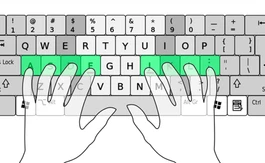
  • icon_check Onscreen keyboard
    Practice typing on a virtual keyboard that appears on your screen, providing a realistic typing experience.
  • icon_check Comfortable typing
    Nudi's ergonomic design ensures comfortable typing sessions, minimizing strain and fatigue.
  • icon_check Auto correction
    The software automatically corrects common errors, reducing frustration and helping you learn from mistakes.

Nudi Specifications

Supported Platforms
Windows Windows MacOS MacOS
Devices
Desktop Desktop
Deployment
Cloud-Based Cloud-Based
Suitable For
All Industries
Business Specific
All Businesses
Business Size
Small Business Medium Business Enterprises
Customer Support
Email
Language
English

Explore the Best Alternative Solutions Similar to Your Business Size and Needs

Nudi Review

3.8

Out of 5

img

Overall Rating

Based on
3 Verified Ratings

Rating Breakdown

  • Features 4
  • Value for Money 4
  • Ease of Use 3.8
  • Customer Support 3.6

90% Recommend this Product

Add Review

Techjockey Trusted Reviews from Verified Users

No reviews are currently available for Nudi. Discover similar Typing Software reviews

  • Lipikaar Typing Software

    4.5

    Whats great - I use Lipikar software both on mobile and Windows and it is helping me so much. I have a travelling job so accessing it is al... read more

  • Baraha Typing Software

    5.0

    Whats great - Easy to use and very good for beginners and it supports all native Indian languages. read more

  • Typing Baba

    5.0

    Whats great - Clarity of design and user friendly interface. read more

Compare Nudi With other Typing Software

Products
Ratings
Pricing
Device Supported
Deployment
Supported Platforms
  • img

    Nudi

  • 3.8

  • FREE

  • Desktop

    Mobile

  • Web based

    On Premises

  • Windows

    Mac OS

  • img

    TypingMaster

  • 3.8

  • ₹ 1395

  • Desktop

    Mobile

  • Web based

    On Premises

  • Windows

    Mac OS

  • img

    Typing Baba

  • 5

  • Price On Request

  • Desktop

    Mobile

  • Web based

    On Premises

  • Windows

    Mac OS

  • img

    Google Input Tools

  • 4.3

  • Price On Request

  • Desktop

    Mobile

  • Web based

    On Premises

  • Windows

    Mac OS

  • img

    TypingClub

  • Price On Request

  • Desktop

    Mobile

  • Web based

    On Premises

  • Windows

    Mac OS

  • img

    TypingWale

  • ₹ 99

  • Desktop

    Mobile

  • Web based

    On Premises

  • Windows

    Mac OS

  • img

    Quillpad

  • 4.1

  • Price On Request

  • Desktop

    Mobile

  • Web based

    On Premises

  • Windows

    Mac OS

(0) Product(s) selected

Articles for Nudi

See All Related Articles

Which operating system does Nudi Software Support?

Nudi software supports both Windows and macOS operating systems.

Is there any Nudi Typing Software App?

Nudi software does not have a mobile app for Android or iOS users.

What is the deployment type of Nudi Typing Software?

Nudi software supports on-premises deployment.

How much does the Nudi Software Platform Cost?

Nudi is available for free at techjockey.com.

Who are the potential users of Nudi Software?

Nudi software is suitable for individuals and professionals of all skill levels who want to improve their typing speed and accuracy.

Is there any free demo for Nudi Software?

A demo of Nudi software is available at techjockey.com.

Is Nudi Free?

Yes, Nudi software is available for free.

Does Nudi offer a free trial?

Nudi software does not offer a free trial.

How can you download Nudi Software?

For Nudi software installation, you can go directly to Techjockey's official website and buy this solution. Once purchased, you will receive a key to download the same via email.

How does Nudi Software Work?

Nudi software provides interactive lessons and exercises that help users improve their typing speed and accuracy. It analyzes typing patterns and provides personalized feedback to help users identify and correct errors.

20,000+ Software Listed

Best Price Guranteed

Free Expert Consultation

2M+ Happy Customers

Terms and Condtions

close

Users with registered businesses can purchase goods from merchants on the platform to satisfy their business needs. Users are not permitted to utilize any products acquired through the platform for resale, advertising, business, or further distribution.

For each purchase made, users will receive a Tax Invoice (or 'GST invoice') that includes specific details such as:

  • the GSTIN of the user associated with their registered business, and

  • the specified Entity Name for their business.

It should be noted that not all products are eligible for GST Invoice. Only the products displayed by participating sellers with the 'GST-based Invoice Available' callout on the product description page would qualify.

Certain goods and services are not eligible to get a GST Invoice, including items with VAS, i.e., Value Added Services (e.g., Total Mobile Protection/Assured Buyback) and those involving an exchange offer at the time of purchase.

Users must ensure the accuracy of the GSTIN, and business entity name provided for the GST Invoice. Requests for corrections into GST Invoice would not be accommodated by Techjockey.com or any Seller, and any issues arising from user-provided information are the sole responsibility of users.

Techjockey.com is not liable for the GST Invoice or any associated input tax credit. To efficiently claim an input tax credit, users should select the registered place of business address as per the GST authority's data and follow the provisions of the GST Act and rules.

To claim an input tax credit, the delivery and billing addresses must match. Furthermore, input tax credits will not be granted if the delivery address and GSTIN on the invoice are from different states. In case of incorrect GST details provided during the order placement, the order will be canceled automatically.