 USA
USA UAE
UAE


Brand: Learning Pool
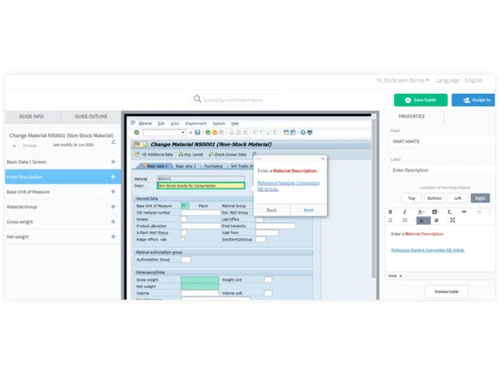
A digital adoption platform that brings clean, real-time guidance to everyday software work so that users can stay super confident through every step.
See MoreHave you used OnScreen before?
Share your insights for better experience
Brand: Learning Pool
Founded Year: 2006
Learning Pool is a full service elearning provider who help organizations maximise the potential of their people.
Looking for The Right Pricing?
Share your requirements and get a plan built around your business.
Price Available on Request
Get personalised OnScreen pricing that fits your needs. Our team will connect with you.
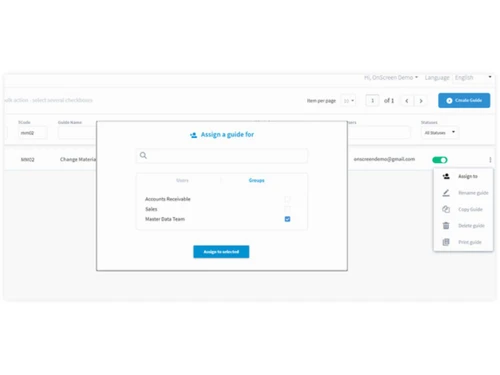
 In-App Digital Guidance Interactive Walkthroughs Rapid Guide Creation Contextual Understanding Multi-Platform Support Process Standardization Onboarding Automation Error Reduction Training Management Insights & Analytics Scalable Deployment
  Ubuntu
  Windows
  MacOS
MacOS  Linux
Linux  Desktop
  Cloud-Based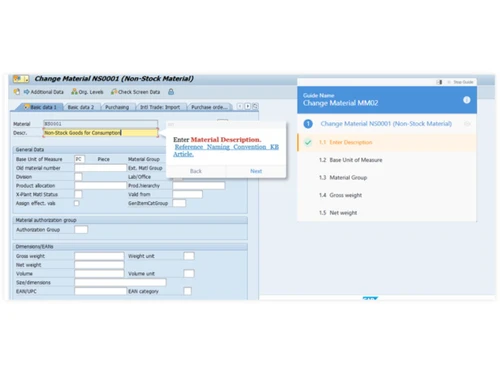
4.1
Out of 5

Overall Rating
Based on
5 Verified Ratings
Rating Breakdown
80% Recommend this Product
Add ReviewThis product has no reviews yet. Be the first to leave your feedback.
Add ReviewThe price for OnScreen Software is available on request at techjockey.com. It must be noted that the final cost depends on different factors, such as the features you choose, how you deploy it, and how many users you have.
OnScreen Software is mostly used by teams that need guided help while working on web or desktop applications. It supports users who want simple, on-screen instructions to complete tasks faster. The solution is just ideal for organizations that want easier training and smoother workflows.
No, there is no specific mobile app mentioned for OnScreen Software. It appears to work mainly as a web-based tool that provides guidance inside web and desktop applications.
OnScreen Software works on major operating systems like Ubuntu, Windows, macOS, and Linux. This makes it flexible for different teams using different devices.
Yes, OnScreen Software does provide a free trial. This lets users test the platform before making a decision.
OnScreen Software works by giving users step-by-step guidance directly on their screen. It helps people follow tasks inside web and desktop applications without any confusion.
20,000+ Software Listed
Best Price Guranteed
Free Expert Consultation
2M+ Happy Customers
Terms and Condtions

Users with registered businesses can purchase goods from merchants on the platform to satisfy their business needs. Users are not permitted to utilize any products acquired through the platform for resale, advertising, business, or further distribution.
For each purchase made, users will receive a Tax Invoice (or 'GST invoice') that includes specific details such as:
the GSTIN of the user associated with their registered business, and
the specified Entity Name for their business.
It should be noted that not all products are eligible for GST Invoice. Only the products displayed by participating sellers with the 'GST-based Invoice Available' callout on the product description page would qualify.
Certain goods and services are not eligible to get a GST Invoice, including items with VAS, i.e., Value Added Services (e.g., Total Mobile Protection/Assured Buyback) and those involving an exchange offer at the time of purchase.
Users must ensure the accuracy of the GSTIN, and business entity name provided for the GST Invoice. Requests for corrections into GST Invoice would not be accommodated by Techjockey.com or any Seller, and any issues arising from user-provided information are the sole responsibility of users.
Techjockey.com is not liable for the GST Invoice or any associated input tax credit. To efficiently claim an input tax credit, users should select the registered place of business address as per the GST authority's data and follow the provisions of the GST Act and rules.
To claim an input tax credit, the delivery and billing addresses must match. Furthermore, input tax credits will not be granted if the delivery address and GSTIN on the invoice are from different states. In case of incorrect GST details provided during the order placement, the order will be canceled automatically.

