linkedin
Sign In Workspace (Pronestor) logo
play Upgrade your room booking with visitor management
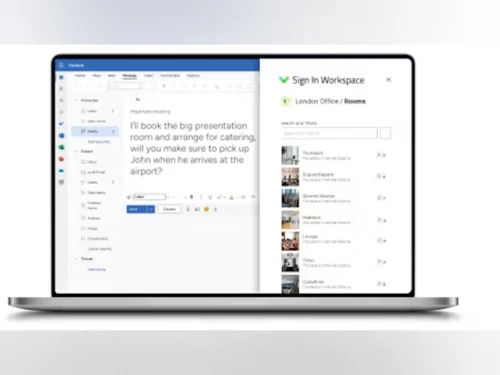
signin workspace dashboard
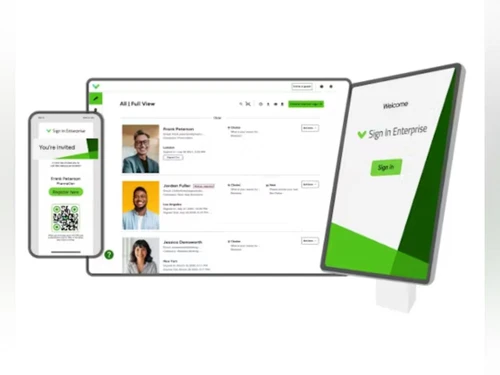
signin workspace devices

Sign In Workspace (Pronestor)

Brand: Sign In Solutions

  • 4.4

  • 6 Ratings

Sign In Workspace by Pronestor centralizes meeting room bookings, workplace services, and visitor management to streamline operations and improve workplace experiences.

See More

Have you used Sign In Workspace (Pronestor) before?

Share your insights for better experience

Add a Review

Price Available on Request

Questions about pricing or customization? We’re here to help, just a click away.

100% Genuine
Products
Best Price
Guaranteed
Safe & Secure
Payment
  • Description

  • Pricing

  • Features

  • Specification

  • Review

  • Compare

  • Alternatives

  • FAQ

Sign In Workspace (Pronestor) Software Overview

What is Sign In Workspace (Pronestor)?

Sign In Workspace, formerly known as Pronestor, is a sophisticated software platform designed to streamline and centralize all aspects of workplace management. It functions as an intelligent meeting room booking system that integrates seamlessly with visitor management, resource scheduling, and on-site logistics. By unifying these critical operations, the platform enhances the entire workplace experience, from the initial meeting invitation to a visitor's final departure.

The system is engineered to save time and reduce administrative work. It allows users to schedule meetings, reserve rooms, and manage meeting-related resources through Workspace. As part of the Sign In Solutions ecosystem, Workspace can also integrate with visitor management capabilities for workplace and visitor workflows.

Why Choose Sign In Workspace (Pronestor)?

  • Unified Management: It centralizes the booking of meeting rooms, desks, catering, and equipment, eliminating the need for multiple disparate systems and reducing administrative overhead.
  • Seamless Integration: The platform integrates with Microsoft Outlook, allowing users to access Workspace and view Workspace activity and desk bookings through their Outlook calendar.
  • Enhanced Visitor Experience: By combining with Sign In Solutions, it manages the entire visitor journey. This includes pre-visit preparations, frictionless on-site arrival, engagement during the visit, and a smooth departure process.
  • Data-Driven Decision Making: The software provides real-time insights and analytics on workspace usage. This data empowers facility managers and leadership to understand utilization patterns, optimize space allocation, and support future growth with confidence.
  • Improved Efficiency: Features like automatic resource allocation for rooms and parking, along with notifications via Teams, Slack, or SMS, ensure that meetings run smoothly and both hosts and guests are connected promptly.

Advanced Features of Sign In Workspace (Pronestor)

  • End-to-End Visitor Journey Orchestration: The system meticulously manages every touchpoint, from sending scheduling links and pre-uploading documents to frictionless QR code sign-in, automated host notifications, and streamlined sign-out.
  • Integrated Resource Management: Beyond booking rooms, users can order catering and A/V equipment directly within the meeting invitation. This ensures all necessary resources are coordinated and ready for a productive session.
  • Compliance and Risk Assessment: The platform facilitates compliance by allowing visitors to view and upload documents ahead of their visit. It also supports risk insight, approvals, and post-visit incident tracking to maintain a secure environment.
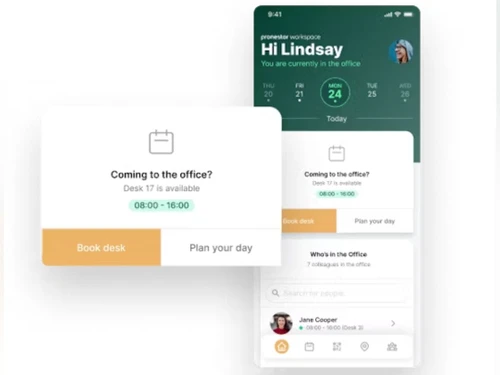
  • Real-Time Occupancy Monitoring: Workspace provides visibility into room, desk, and workplace usage, while connected visitor-management capabilities can provide information about people on-site for safety and security purposes.
  • Intelligent Resource Release: The system can automatically release rooms and other resources when meetings conclude earlier than scheduled, maximizing the availability of valuable spaces for others.
  • Multi-Location Support: Effortlessly find and reserve the ideal meeting space across multiple offices or global locations, all from a single, centralized platform.

Key Capabilities of Sign In Workspace (Pronestor)

  • Prepare: This initial phase covers all pre-arrival logistics. It includes sending invitations with scheduling links, allowing visitors to upload documents, performing risk assessments, and automatically allocating resources like meeting rooms and parking spaces.
  • Arrive: Focused on creating a frictionless welcome, this phase includes multiple sign-in options (phone, kiosk, QR code), automatic ID badge printing, and instant host notifications via integrated communication channels like Microsoft Teams, Slack, or SMS.
  • Engage: This phase enhances the on-site experience. It includes managing catering services, providing a real-time overview of all personnel on-site for safety and security, and monitoring room and desk utilization to ensure efficiency.
  • Depart: To conclude the visit smoothly, this phase can support visitor sign-out and the release of meeting resources, while connected visitor-management capabilities can support incident tracking and other post-visit processes.
  • Review: This final phase is dedicated to continuous improvement. It involves analyzing visitor patterns, assessing workspace utilization across regions, reviewing the compliance status of frequent visitors, and using these insights to optimize policies and workflows.

How to Use Sign In Workspace (Pronestor)?

  1. Book a Meeting: Users can schedule a meeting directly from their Microsoft Outlook calendar or by using the intuitive Sign In Workspace online platform.
  2. Find and Reserve a Space: While booking, the system helps users quickly locate an available and suitable room, filtering by capacity, location, or required amenities.
  3. Add Resources and Services: During the same booking process, users can order catering, request specific A/V equipment, and allocate other necessary resources.
  4. Invite and Manage Guests: The system automatically sends professional invitations to external guests, which can include pre-registration links and necessary documents, initiating the visitor management workflow.
  5. Analyze and Optimize: Administrators and facility managers can access the analytics dashboard to review detailed reports on room usage, visitor traffic, and resource allocation, enabling them to make informed decisions to optimize the workplace.

Sign In Workspace (Pronestor) Pricing

Sign In Workspace (Pronestor) pricing details are available on request on techjockey.com.

The pricing model is based on different parameters, including extra features, deployment type, and the total number of users. For further queries related to the product, you can contact our product team and learn more about the pricing and offers.

Read more

Sign In Solutions Company Details

Founded Year:  2013

Sign In App is the smart and safe way to sign in. Providing flexible tools built for the modern workplace. With contactless sign in options available, Sign In App is one of the safest ways to sign in employees and visitors.

Director/Founders Krishna Gowda N, Diwakar Singh, and Sanjay Srivastava
Company Size 1-100 Employees

Sign In Workspace (Pronestor) Pricing & Plans

Looking for The Right Pricing?

Share your requirements and get a plan built around your business.

  • Define your business needs
  • Get customised pricing
  • Choose features that fit your workflow

Price Available on Request

Get personalised Sign In Workspace (Pronestor) pricing that fits your needs. Our team will connect with you.

Sign In Workspace (Pronestor) Features

  • icon_check Meeting Management
  • icon_check Scheduling
  • icon_check Audio Conference
  • icon_check Integrated Workflow
Sign In Workspace (Pronestor) Demo Video play icon

Get Sign In Workspace (Pronestor) Demo

Watch the demo video to explore key features, real workflows, and how the software fits your business needs.

Understand
Key Features
Personal
Demo Insights
Interactive
Demo Support

Sign In Workspace (Pronestor) Specifications

Supported Platforms
Windows Windows
Devices
Desktop Desktop
Deployment
Cloud-Based Cloud-Based
Suitable For
All Industries
Business Specific
All Businesses
Business Size
Small Business Medium Business SMBs
Customer Support
Email
Language
English
Training Resources
Videos

Sign In Workspace (Pronestor) Review

4.4

Out of 5

img

Overall Rating

Based on
6 Verified Ratings

Rating Breakdown

  • Features 4.5
  • Value for Money 4.0
  • Ease of Use 4.5
  • Customer Support 4.6

91% Recommend this Product

Add Review

Techjockey Trusted Reviews from Verified Users

No reviews are currently available for Sign In Workspace (Pronestor). Discover similar Meeting Room Booking System reviews

  • UnSpot

    5.0

    Whats great - The setup was easy, and the tech support has been excellent. They're always quick to help when needed, which I really appreci... read more

  • truMe Meeting Room

    5.0

    Whats great - Excellent product with effective booking process and utilisation of meeting rooms is very effective. read more

  • Google Meet

    4.3

    Whats great - Google Meet is my top recommendation for meetings and project discussions. It offers user-friendly features like video record... read more

Compare Sign In Workspace (Pronestor) With other Meeting Room Booking System

Products
Ratings
Pricing
Device Supported
Deployment
Supported Platforms
  • img

    Sign In Workspace (Pronestor)

  • 4.4

  • Price On Request

  • Desktop

    Mobile

  • Web based

    On Premises

  • Windows

    Mac OS

  • img

    UnSpot

  • 5

  • Price On Request

  • Desktop

    Mobile

  • Web based

    On Premises

  • Windows

    Mac OS

  • img

    truMe Meeting Room

  • 5

  • Price On Request

  • Desktop

    Mobile

  • Web based

    On Premises

  • Windows

    Mac OS

  • img

    Meetable

  • 4.3

  • Price On Request

  • Desktop

    Mobile

  • Web based

    On Premises

  • Windows

    Mac OS

(0) Product(s) selected

Sign In Workspace (Pronestor) Alternatives

See All Sign In Workspace (Pronestor) Alternatives

Starting Price:

$3

Available

Price on Request

Articles for Sign In Workspace (Pronestor)

See All Related Articles

What does Sign In Workspace (Pronestor) do?

Sign In Workspace (formerly Pronestor) is a platform that centralizes bookings, services, and on-site logistics to streamline workplace operations and enhance experiences from booking to arrival and beyond. It helps manage meetings, visitors, and resources efficiently.

How much does Sign In Workspace (Pronestor) cost?

Sign In Workspace (Pronestor) pricing details are available on request on techjockey.com.

What are the main features of Sign In Workspace (Pronestor)?

Sign In Workspace offers features like easy meeting booking via Outlook or an online platform, finding and reserving meeting spaces, managing equipment and catering orders, and providing data insights into workspace usage. It also includes comprehensive visitor management from pre-arrival preparation and frictionless sign-in to engagement monitoring and streamlined departure.

Who can use Sign In Workspace (Pronestor)?

Sign In Workspace is designed for organizations across various industries, including Aerospace & Defense, Government, Manufacturing, Pharmaceutical, and Technology, to manage visitors, employees, meetings, and resources efficiently.

How does Sign In Workspace integrate with existing tools?

Sign In Workspace integrates with common tools like Outlook for scheduling meetings and can send notifications to hosts and visitors via platforms such as Teams, Slack, SMS, or email.

What kind of insights does Sign In Workspace provide?

Sign In Workspace provides real-time data insights into workspace usage, allowing organizations to monitor room and desk utilization, understand visitor patterns, and optimize planning for future growth.

How does Sign In Workspace enhance visitor experiences?

Sign In Workspace enhances visitor experiences by enabling pre-arrival preparation with invites and document uploads, offering frictionless sign-in options, printing ID badges, and providing amenities like catering upon arrival.

What role does Sign In Workspace play in compliance and risk management?

Sign In Workspace supports compliance and risk management by facilitating document uploads for pre-approval, tracking incidents for watch lists and risk assessments, and continually assessing the compliance status of frequent visitors and staff.

20,000+ Software Listed

Best Price Guranteed

Free Expert Consultation

2M+ Happy Customers

Terms and Condtions

close

Users with registered businesses can purchase goods from merchants on the platform to satisfy their business needs. Users are not permitted to utilize any products acquired through the platform for resale, advertising, business, or further distribution.

For each purchase made, users will receive a Tax Invoice (or 'GST invoice') that includes specific details such as:

  • the GSTIN of the user associated with their registered business, and

  • the specified Entity Name for their business.

It should be noted that not all products are eligible for GST Invoice. Only the products displayed by participating sellers with the 'GST-based Invoice Available' callout on the product description page would qualify.

Certain goods and services are not eligible to get a GST Invoice, including items with VAS, i.e., Value Added Services (e.g., Total Mobile Protection/Assured Buyback) and those involving an exchange offer at the time of purchase.

Users must ensure the accuracy of the GSTIN, and business entity name provided for the GST Invoice. Requests for corrections into GST Invoice would not be accommodated by Techjockey.com or any Seller, and any issues arising from user-provided information are the sole responsibility of users.

Techjockey.com is not liable for the GST Invoice or any associated input tax credit. To efficiently claim an input tax credit, users should select the registered place of business address as per the GST authority's data and follow the provisions of the GST Act and rules.

To claim an input tax credit, the delivery and billing addresses must match. Furthermore, input tax credits will not be granted if the delivery address and GSTIN on the invoice are from different states. In case of incorrect GST details provided during the order placement, the order will be canceled automatically.