linkedin
truMe Meeting Room logo
play How do you design a perfect meeting room in your office? | truMe
trume meeting room
trume real time

truMe Meeting Room

Brand: truMe

  • 5

  • 1 Rating & 1 Review

truMe Meeting Room is a meeting room management system that helps organizations streamline their meeting booking process, improve workplace efficiency, and enhance the employee experience.

See More

Have you used truMe Meeting Room before?

Share your insights for better experience

Add a Review

Price Available on Request

Questions about pricing or customization? We’re here to help, just a click away.

100% Genuine
Products
Best Price
Guaranteed
Safe & Secure
Payment
  • Description

  • Pricing

  • Features

  • Specification

  • Review

  • Compare

  • Alternatives

  • FAQ

truMe Meeting Room Software Overview

What is truMe Software?

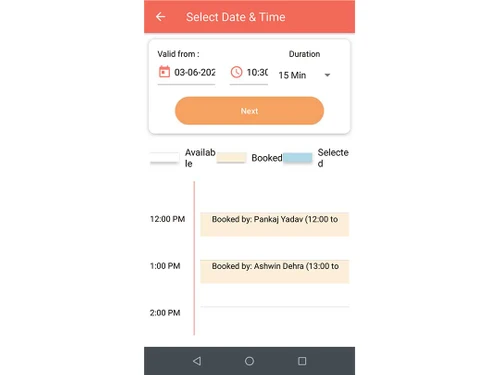
truMe Meeting Room is a secure meeting room booking system for the efficient management of meeting and conference rooms within your organization. It simplifies the entire process, from booking to usage to access control, and ensures that meeting spaces are used effectively. The user-friendly booking system allows authorized employees to schedule meeting rooms in a hassle-free manner.

The system also offers an optional access control layer, so that the admin can be sure that only approved personnel can open the meeting room doors during their reserved time slots.

truMe has a cutting-edge product for effective room management and it addresses various needs of enterprises that is touch-less and has a hygienic interface, productive use of meeting room space, and a pleasant experience for the users.

The software provides valuable insights into room usage, booking patterns, and occupancy data. This information can help organizations make informed decisions regarding room allocation and utilization among various departments. The booking status is prominently displayed outside the rooms. It enables employees to make well-informed decisions regarding room booking, access, and usage.

Why Choose truMe System?

  • It allows employees multiple options to book meeting rooms as per their convenience.
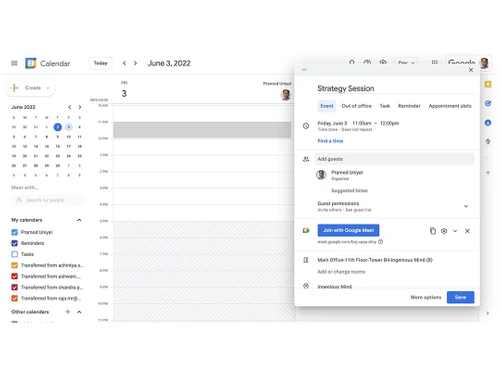
  • Apart from the truMe App, it also allows employees to book meeting rooms directly from their mail client, including Office 365 or Gmail.
  • The meeting room booking system provides booking and usage status on a display unit (an Android tablet) outside the room.
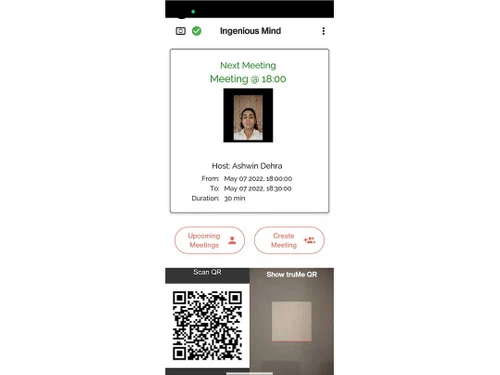
  • The meeting room scheduling software offers meeting participants real-time updates on meeting progress, host presence, and attendee status.
  • The software allows users to control meeting room doors on a need basis and supports entry only for authorized individuals via QR code scanning.

Benefits of truMe Meeting Room Booking Solution

  • The Meeting Room spaces are intended for orderly, uninterrupted, and productive use.
  • Users have the option to book a meeting room either through the truMe App or via O 365/Gmail.
  • Authorized participants in a meeting are equipped with updated information on various aspects, such as whether the meeting has commenced, the host's presence, and the list of attendees.
  • The booking and usage status of meeting rooms can be viewed on a display unit located immediately outside each meeting room.
  • Real-time notifications are sent to both the host and participants.
  • The meeting room door can be controlled as needed, allowing only individuals authorized for a specific time to gain entry by scanning a QR code.
  • The administrator possesses comprehensive visibility into the usage of meeting rooms across the entire office or various locations.
  • The solution operates globally, overcoming geographical constraints. Meetings can be booked from any location, and administrators can access centralized, real-time reports.
  • Robust data analytics and reporting functionalities are integrated into the system.

truMe Meeting Room Booking Platform Pricing

truMe pricing is available on request at techjockey.com.

The pricing model is based on only one criterion – number of meeting rooms. For further queries related to the product, you can contact our product team and learn more about the pricing and offers.

Read more

truMe Company Details

Founded Year:  2016

truMe is a global platform for Identity & Access Management having its presence across 10 countries.

Director/Founders Pramod N Uniyal
Company Size 1-100 Employees

truMe Meeting Room Pricing & Plans

Looking for The Right Pricing?

Share your requirements and get a plan built around your business.

  • Define your business needs
  • Get customised pricing
  • Choose features that fit your workflow

Price Available on Request

Get personalised truMe Meeting Room pricing that fits your needs. Our team will connect with you.

truMe Meeting Room Features

  • icon_check Multiple Booking Options
    Offers various methods for booking rooms to accommodate diverse user preferences and needs.
  • icon_check Real-Time Notifications
    Users receive instant notifications and updates about bookings and room access.
  • icon_check Access Control
    Allows only authorized personnel to enter meeting rooms during their scheduled times.
  • icon_check Scheduled Conferences
    Supports the scheduling of conferences to ensure the right rooms are reserved for these specific events.
  • icon_check Admin Module
    Includes an admin module for centralized control and management of the meeting and conference room system.
truMe Meeting Room Demo Video play icon

Get truMe Meeting Room Demo

Watch the demo video to explore key features, real workflows, and how the software fits your business needs.

Understand
Key Features
Personal
Demo Insights
Interactive
Demo Support

truMe Meeting Room Specifications

Supported Platforms
Windows Windows
Devices
Desktop Desktop
Deployment
Cloud-Based Cloud-Based
Suitable For
All Industries
Business Specific
All Businesses
Business Size
Small Business Medium Business Enterprises SMBs SMEs MSMBs
Customer Support
Email
Language
English
Training Resources
In Person

truMe Meeting Room Review

5

Out of 5

img

Overall Rating

Based on
1 Verified Review

Rating Breakdown

  • Features 5
  • Value for Money 5
  • Ease of Use 5
  • Customer Support 5

100% Recommend this Product

Add Review

Sandeep

IT Manager

Industry: IT

5

Reviewed on: Nov 17, 2023

Techjockey Verified

“Excellent product with effective meeting room booking process without any hassle!”

You can book the meeting room from anywhere and for anytime....very effective to see the availability of any meeting room in a single click

Pros

Excellent product with effective booking process and utilisation of meeting rooms is very effective.

Cons

TABLET is required to use the product.

Reason to switch

We can track all the meeting rooms availability in a single click and booking process is very smooth

Compare truMe Meeting Room With other Meeting Room Booking System

Products
Ratings
Pricing
Device Supported
Deployment
Supported Platforms
  • img

    truMe Meeting Room

  • 5

  • Price On Request

  • Desktop

    Mobile

  • Web based

    On Premises

  • Windows

    Mac OS

  • img

    UnSpot

  • 5

  • Price On Request

  • Desktop

    Mobile

  • Web based

    On Premises

  • Windows

    Mac OS

  • img

    Meetable

  • 4.3

  • Price On Request

  • Desktop

    Mobile

  • Web based

    On Premises

  • Windows

    Mac OS

(2) Product(s) selected

truMe Meeting Room Alternatives

See All truMe Meeting Room Alternatives

Starting Price:

$3

Available

Price on Request

Articles for truMe Meeting Room

See All Related Articles

Which operating system does truMe Meeting Room Software Support?

truMe Meeting Room software is compatible with both iOS and android operating systems.Is there any truMe Meeting Room App?

Is there any truMe Meeting Room App?

The truMe Meeting Room app is available for Android and iOS app users.

What is the deployment type of truMe Meeting Room System?

The truMe Meeting Room system supports web-based deployment. It is available in both on-prem and on-cloud models.

How much does truMe Meeting Room Solution Cost?

The truMe Meeting Room pricing is available on request at techjockey.com. The pricing is based on number of meeting rooms.

Who are the potential users of truMe?

truMe Meeting Room software is used by businesses of all sizes, office managers, corporate IT departments, meeting room administrators, and co-working spaces to streamline operations and improve the overall efficiency of their meeting room management.

Is there any free trial or demo for the truMe Meeting Room Booking System?

truMe Meeting Room booking system free demo is available at techjockey.com.

Is the truMe Meeting Room Free?

No, truMe Meeting Room is not a free software. It is a paid solution, and the premium plan with advanced features is available at techjockey.com with exciting deals.

Can you download truMe?

Yes, you can. However, you can use truMe only if you are employee of an organization that subscribes to truMe platform.

How does the truMe Meeting Room work?

TruMe is an IoT-based platform, and it operates on pre-verified identity and real-time authorization validation principles. It establishes a secure digital identity and access management ecosystem, ensuring best-in-class security and privacy standards. This facilitates seamless and enjoyable access to buildings and events, eliminating hassles for users. Moreover, you can configure, book, and monitor meeting rooms seamlessly.

20,000+ Software Listed

Best Price Guranteed

Free Expert Consultation

2M+ Happy Customers

Terms and Condtions

close

Users with registered businesses can purchase goods from merchants on the platform to satisfy their business needs. Users are not permitted to utilize any products acquired through the platform for resale, advertising, business, or further distribution.

For each purchase made, users will receive a Tax Invoice (or 'GST invoice') that includes specific details such as:

  • the GSTIN of the user associated with their registered business, and

  • the specified Entity Name for their business.

It should be noted that not all products are eligible for GST Invoice. Only the products displayed by participating sellers with the 'GST-based Invoice Available' callout on the product description page would qualify.

Certain goods and services are not eligible to get a GST Invoice, including items with VAS, i.e., Value Added Services (e.g., Total Mobile Protection/Assured Buyback) and those involving an exchange offer at the time of purchase.

Users must ensure the accuracy of the GSTIN, and business entity name provided for the GST Invoice. Requests for corrections into GST Invoice would not be accommodated by Techjockey.com or any Seller, and any issues arising from user-provided information are the sole responsibility of users.

Techjockey.com is not liable for the GST Invoice or any associated input tax credit. To efficiently claim an input tax credit, users should select the registered place of business address as per the GST authority's data and follow the provisions of the GST Act and rules.

To claim an input tax credit, the delivery and billing addresses must match. Furthermore, input tax credits will not be granted if the delivery address and GSTIN on the invoice are from different states. In case of incorrect GST details provided during the order placement, the order will be canceled automatically.