linkedin
Sign In App logo
play Sign In App | Smart Visitor Management
sign-in-app-history
sign-in-app-profile

Sign In App

Brand: Sign In Solutions

  • 4.1

  • 5 Ratings

Sign In App helps organizations manage visitors, staff, desk booking, and safety compliance with secure, contactless solutions.

See More

Have you used Sign In App before?

Share your insights for better experience

Add a Review
Starting Price
$600

View plans

100% Genuine
Products
Best Price
Guaranteed
Safe & Secure
Payment
  • Description

  • Pricing

  • Features

  • Specification

  • Review

  • Compare

  • Alternatives

  • FAQ

Starting at $600

Sign In App Software Overview

What is Sign In App?

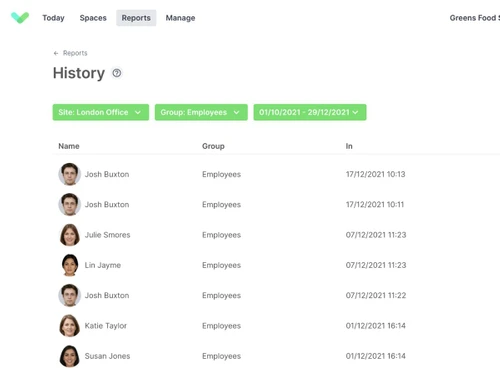
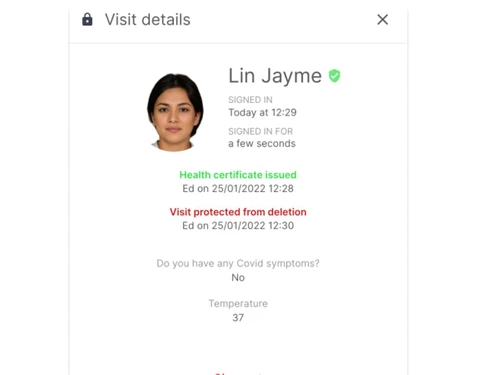
Sign In App is a visitor management system used by organizations to make guest check-ins smooth, safe, and efficient. It lets visitors pre-register online and get a QR code for quick sign-in when they arrive, reducing waiting time.

The system supports multiple sign-in methods, prints visitor badges, and notifies hosts instantly about arrivals. It ensures privacy by controlling what visitor data is collected and how it's stored, while still keeping accurate records for security.

Sign In App also helps with health and safety by providing real-time evacuation reports to know exactly who is inside the building during emergencies.

The app can show important messages, safety policies, or NDAs to visitors and supports multiple languages for a better visitor experience. Businesses can also customize the app with their branding and even manage desk and room bookings, along with employee time tracking.

Why Choose Sign In App Software?

  • Contactless Check-In: Safe, touch-free sign-in via QR codes, RFID, or mobile devices.
  • Visitor Management: Register, track, and manage visitors with ease.
  • Staff Sign-In: Accurate employee check-in/out and attendance tracking.
  • Custom Badge Printing: Prints personalized visitor badges instantly.
  • Desk & Room Booking: Book desks, meeting rooms, and shared spaces.
  • Real-Time Evacuation Lists: Generate instant roll calls in emergencies.
  • Pre-Registration Option: Guests can pre-register for faster entry.
  • Companion Mobile App: Remote check-in and workplace access on the go.
  • Multilingual Support: User-friendly in multiple global languages.
  • Integration with Popular Tools: Works with G Suite, Office 365, Slack, Salesforce, etc.
  • Data Privacy & Compliance: GDPR and CCPA compliant for secure data.

Benefits of Sign In App Software

  • Custom Branding: Add logos, themes, and branded visitor experiences.
  • Flexible Notifications: Instant SMS or email alerts when visitors arrive.
  • Contractor Management: Track contractor check-ins and compliance.
  • Digital Document Signing: Collect NDAs and policies electronically.
  • Multiple Site Management: Manage check-ins across multiple locations.
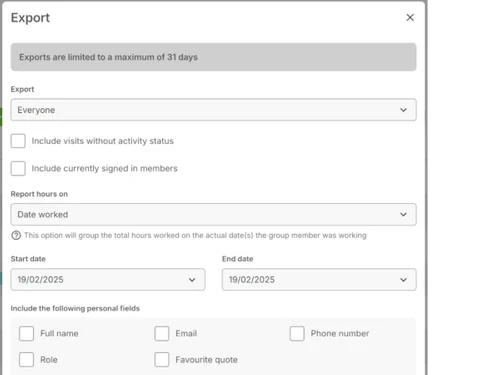
  • Time & Attendance Reports: Detailed workforce tracking and analytics.
  • User-Friendly Interface: Simple and intuitive for staff and visitors.
  • Cost-Effective Subscription: Affordable, flexible pricing plans.
  • Trusted Worldwide: Used in 150+ countries by global organizations.

Sign In App Pricing

Sign In App price starts at $600 at techjockey.com.

The pricing model is based on different parameters, including extra features, deployment type, and the total number of users. For further queries related to the product, you can contact our product team and learn more about the pricing and offers.

Read more

Sign In Solutions Company Details

Founded Year:  2013

Sign In App is the smart and safe way to sign in. Providing flexible tools built for the modern workplace. With contactless sign in options available, Sign In App is one of the safest ways to sign in employees and visitors.

Director/Founders Krishna Gowda N, Diwakar Singh, and Sanjay Srivastava
Company Size 1-100 Employees

Sign In App Pricing & Plans

Core
Starting at $600
    • Site

      Site
      Site
    • Yearly

      Yearly
      Yearly

Key Features

  • All standard features

  • Email & chat support

  • Unlimited visitors

  • Mobile Companion app

  • Custom fields and messages

  • Contactless sign in options

  • Delivery sign in & notifications

Enhanced
Starting at $1200
    • Site

      Site
      Site
    • Yearly

      Yearly
      Yearly

Key Features

  • Includes all Core features

  • Onboarding

  • Priority support

  • Spaces - 50 desks

  • Scheduling - 2,400 appointments

  • Time & Attendance - 50 employees

  • Central Record - 50 employees

Pro
Starting at $1800
    • Site

      Site
      Site
    • Yearly

      Yearly
      Yearly

Key Features

  • Includes all Core & Enhanced features

  • SSO and user provisioning

  • Bespoke onboarding

  • Account manager & phone support

  • Scheduling - 9,600 appointments

  • Time & Attendance - 500 employees

  • Central Record - 500 employees

Sign In App Features

  • icon_check Visitor Management
    Seamlessly register, track, and manage visitor details.
  • icon_check Staff Sign-In
    Enables accurate employee check-in/out and attendance monitoring.
  • icon_check Contactless Sign In
    Allows safe, touch-free entry via QR codes, RFID, or mobile.
  • icon_check Evacuation Reports
    Generates real-time roll calls for emergency safety.
  • icon_check Time & Attendance Tracking
    Records working hours and produces reports.
  • icon_check Multilingual Support
    Offers a user-friendly experience in multiple languages.
  • icon_check API Integration
    Connects easily with other workplace tools and systems.
  • icon_check Pre-Registration
    Let's visitors register in advance for faster check-ins.
  • icon_check Alerts & Notifications
    Sends instant messages when guests arrive.
  • icon_check Security & Privacy
    Ensures data safety with GDPR and CCPA compliance.
Sign In App Demo Video play icon

Get Sign In App Demo

Watch the demo video to explore key features, real workflows, and how the software fits your business needs.

Understand
Key Features
Personal
Demo Insights
Interactive
Demo Support

Sign In App Specifications

Supported Platforms
Windows Windows iOS iOS Android Android MacOS MacOS
Devices
Desktop Desktop Mobile Mobile
Deployment
Cloud-Based Cloud-Based
Suitable For
All Industries
Business Specific
All Businesses
Business Size
Small Business Medium Business Enterprises SMBs SMEs MSMBs MSMEs
Customer Support
Phone Email Live Chat Forums
Language
English
Integration
API Integration
Training Resources
Live Online Webinars Documentation Videos

Explore the Best Alternative Solutions Similar to Your Business Size and Needs

Sign In App Review

4.1

Out of 5

img

Overall Rating

Based on
5 Verified Ratings

Rating Breakdown

  • Features 4
  • Value for Money 4.5
  • Ease of Use 3.8
  • Customer Support 4.2

94% Recommend this Product

Add Review

Techjockey Trusted Reviews from Verified Users

No reviews are currently available for Sign In App. Discover similar Visitor Management Software reviews

  • SeQure Visitor Management Software

    4.7

    Whats great - The visitor tracking and screening feature has helped keep the office premises covid free. The centralized system for accessi... read more

  • Eptura Visitor

    4.5

    Whats great - Overall the product is high quality, comprehensive and well regarded. read more

  • INDAS Visitor Management (iVMS)

    4.3

    Whats great - iVMS has drastically cut down on the time we spend on visitor management. Highly recommend it. read more

Compare Sign In App With other Visitor Management Software

Products
Ratings
Pricing
Device Supported
Deployment
Supported Platforms
  • img

    Sign In App

  • 4.1

  • Price On Request

  • Desktop

    Mobile

  • Web based

    On Premises

  • Windows

    Mac OS

  • img

    Spintly VMS

  • 4.9

  • Price On Request

  • Desktop

    Mobile

  • Web based

    On Premises

  • Windows

    Mac OS

  • img

    Sign In Enterprise

  • 4.2

  • Price On Request

  • Desktop

    Mobile

  • Web based

    On Premises

  • Windows

    Mac OS

  • img

    SwipedOn

  • 4.2

  • Price On Request

  • Desktop

    Mobile

  • Web based

    On Premises

  • Windows

    Mac OS

  • img

    BelleVie

  • 5

  • Price On Request

  • Desktop

    Mobile

  • Web based

    On Premises

  • Windows

    Mac OS

  • img

    Vizitor App

  • 5

  • ₹ 19200

  • Desktop

    Mobile

  • Web based

    On Premises

  • Windows

    Mac OS

  • img

    Archie

  • 4.3

  • Price On Request

  • Desktop

    Mobile

  • Web based

    On Premises

  • Windows

    Mac OS

  • img

    EasyLobby

  • 4.3

  • Price On Request

  • Desktop

    Mobile

  • Web based

    On Premises

  • Windows

    Mac OS

  • img

    Entry2Exit

  • 4.7

  • Price On Request

  • Desktop

    Mobile

  • Web based

    On Premises

  • Windows

    Mac OS

(2) Product(s) selected

Sign In App Alternatives

See All Sign In App Alternatives

Available

Price on Request

Starting Price:

$109 /Month

Available

Price on Request

VAMS

4.5

Available

Price on Request

Available

Price on Request
Available

Price on Request

Starting Price:

$36 /Location/Month

Starting Price:

$19 /Location/Month

Articles for Sign In App

See All Related Articles

How much does Sign In App Software cost?

The starting price of the Sign In App is $600 on techjockey.com.

Is there a mobile app available for Sign In App Software?

Yes, Sign In App mobile app is available for iOS and Android.

Which operating systems are compatible with Sign In App Software?

Sign In App works on iOS, Android, Windows, and MacOS.

Does Sign In App Software offer a free trial?

Yes, Sign In App free trial is available for new users.

How does Sign In App Software function?

Sign In App manages visitor and staff check-ins using QR codes, RFID, and mobile devices.

Who uses Sign In App Software?

Businesses, schools, offices, and organizations worldwide use Sign In App for check-in and compliance.

Is a free demo available for Sign In App Software?

Yes, Sign In App free demo can be requested from the provider.

Is Sign In App Software available for free?

No, Sign In App is a paid software, but offers a free trial.

20,000+ Software Listed

Best Price Guranteed

Free Expert Consultation

2M+ Happy Customers

Terms and Condtions

close

Users with registered businesses can purchase goods from merchants on the platform to satisfy their business needs. Users are not permitted to utilize any products acquired through the platform for resale, advertising, business, or further distribution.

For each purchase made, users will receive a Tax Invoice (or 'GST invoice') that includes specific details such as:

  • the GSTIN of the user associated with their registered business, and

  • the specified Entity Name for their business.

It should be noted that not all products are eligible for GST Invoice. Only the products displayed by participating sellers with the 'GST-based Invoice Available' callout on the product description page would qualify.

Certain goods and services are not eligible to get a GST Invoice, including items with VAS, i.e., Value Added Services (e.g., Total Mobile Protection/Assured Buyback) and those involving an exchange offer at the time of purchase.

Users must ensure the accuracy of the GSTIN, and business entity name provided for the GST Invoice. Requests for corrections into GST Invoice would not be accommodated by Techjockey.com or any Seller, and any issues arising from user-provided information are the sole responsibility of users.

Techjockey.com is not liable for the GST Invoice or any associated input tax credit. To efficiently claim an input tax credit, users should select the registered place of business address as per the GST authority's data and follow the provisions of the GST Act and rules.

To claim an input tax credit, the delivery and billing addresses must match. Furthermore, input tax credits will not be granted if the delivery address and GSTIN on the invoice are from different states. In case of incorrect GST details provided during the order placement, the order will be canceled automatically.