USA
USA UAE
UAESmall Business
Designed for startups and growing businesses


See More


Brand: Heptagon Technologies
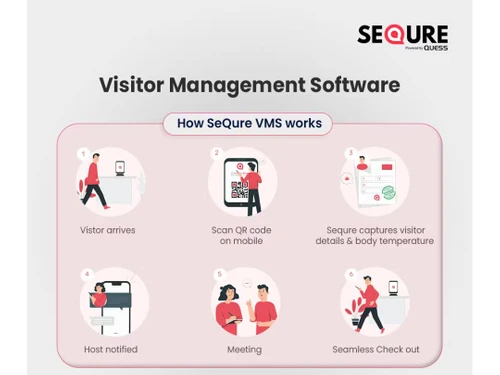
SeQure is a smart visitor management software used for managing and tracking check ins/check outs at office premises. It’s a cloud-based visitor management system, which helps your employees and visitors check in directly through QR code scanning. SeQure helps with touchless visitor and attendance management directly through the smartphone. SeQure visitor management software helps in creatin...
See MoreHave you used SeQure Visitor Management Software before?
Share your insights for better experience
View plans
 Save upto 18%, Get GST Invoice on your business purchase T&C Buy Now & Pay Later, Check offer on payment page.
 Brand: Heptagon Technologies
Founded Year: 2016
We help your business succeed by building future-ready solutions, with you and with passion.
 Assistant Notification (SMS and Mail) Visitor Logs View Visitor Trends (Insights) Exit Approval QR Code Touchless Solution QR Code Sign-in Default Host/ID Proofs Manage Employees Active Directory Integration Material Management Open Tickets With QR Code Track Communications Private Chats Custom Ticket Views Distributed Asset Management Unique QR Code for Assets Intuitive Dashboard for Asset Status Asset Maintenance Status Asset Maintenance History QR Code Check-in Security Scanning/Self Declaration Export Visitor Reports Face Recognition Approved Visitor Entry Capture Image of the Visitor Schedule Meeting Assign Roles OTP Based Checkin Emergency Notification Custom Branding Email Notifications Printing Badges(From portal) Manage Admins (Location and Company admin) SMS Notification Reminder Notifications ( SMS) Asset User Log Automate Ticket Management Insights and Reports Recognizing Previously visited visitor Autocheckout/Self checkout
  Ubuntu
  Windows
  iOS
iOS  Android MacOS
  Linux
Linux  Desktop
  Mobile
  Cloud-Based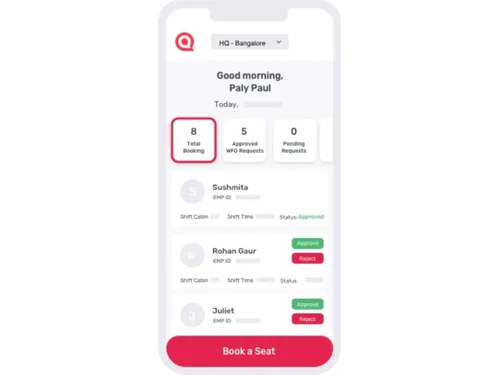
Small Business
Designed for startups and growing businesses
Medium Business
Built for business growth and flexibility
Enterprises
Designed for complex and large-scale business needs
4.6
Out of 5

Overall Rating
Based on
10 Verified Reviews
Rating Breakdown
90% Recommend this Product
Add ReviewOverall, users express high satisfaction with SeQure Visitor Management Software, praising its effectiveness in ensuring safe, contactless visitor check-ins, particularly during the COVID pandemic. The software's user-friendly interface and features like QR code check-in and visitor tracking are frequently highlighted as valuable. However, some users note limitations such as the absence of multi-language support, a bulk SMS feature, and occasional dashboard clutter. Despite these minor drawbacks, many recommend the solution for its robust capabilities in managing visitor safety and security.
Pros
"This is one of the best applications I came across after searching for quite a long time. its ease to use its user friendly its worth every penny"
"from this, I am able to manage each and every person and this QR scan feature is really helpful it is just the app I need"
"It's just amazing it has everything for management purposes. Close your eyes and go for it."
Cons
"little long loading time other than that its good to give it a try"
"till now I came across none but will edit this if I found one"
"The software has only eased the daily visitor tracking tasks as we are a large enterprise and client visits are quite frequent. No complains till now. "

Oct 18, 2020
Techjockey Verified
“Touchless employee and visitor management system”
Pros
The visitor tracking and screening feature has helped keep the office premises covid free. The centralized system for accessing visitor information from different locations makes sure we have information right at our doorstep.
Cons
The software has only eased the daily visitor tracking tasks as we are a large enterprise and client visits are quite frequent. No complains till now.
Reason to switch
The last software didn't offer a centralized view of visitors' data. The dashboard wasn't very user friendly.
Aug 5, 2020
Techjockey Verified
“Ensures contactless visitor management”
Pros
We are using SeQure for visitor management for quite a long time. The visitor management system has proved even more useful in this COVID situation. The customer care is available 24/7 to address even the slightest issue.
Cons
The multi-language support is missing.
Reason to switch
More robust features were required as the number of client visits to our office increased with time.
May 12, 2020
Techjockey Verified
“Powerful visitor management tool for securing business premises”
Pros
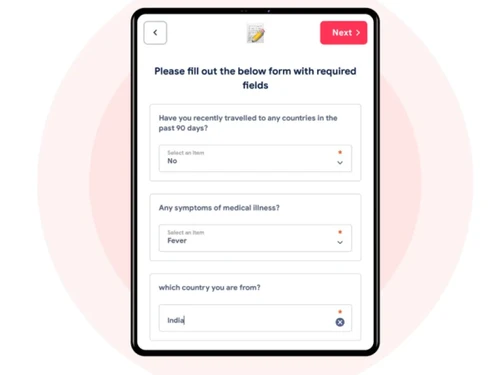
SeQure is a smart tool for visitor management and ensures the safety of employees and visitors. Its facial detection feature is accurate and ensures that there are no fake entries. Given the pandemic situation, we don't want to take any chances and the software has also been helps in assigning self-declaration COVID forms to visitors.
Cons
We are already using the app for schedule management. However, the bulk SMS feature is missing for conference purposes.
Reason to switch
We couldn't compromise with the safety of our employees and hence we made a move to SeQure that has advanced visitor tracking features

SeQure Visitor Management Software
₹ 500.00 excl. GST
Desktop
Mobile
Web based
On Premises
Windows
Mac OS

Spintly VMS
Price On Request
Desktop
Mobile
Web based
On Premises
Windows
Mac OS

BelleVie
Price On Request
Desktop
Mobile
Web based
On Premises
Windows
Mac OS

Vizitor App
₹ 19200
Desktop
Mobile
Web based
On Premises
Windows
Mac OS

INDAS Visitor Management (iVMS)
Price On Request
Desktop
Mobile
Web based
On Premises
Windows
Mac OS

Archie
Price On Request
Desktop
Mobile
Web based
On Premises
Windows
Mac OS
EasyLobby
Price On Request
Desktop
Mobile
Web based
On Premises
Windows
Mac OS

Entry2Exit
Price On Request
Desktop
Mobile
Web based
On Premises
Windows
Mac OS

VAMS
Price On Request
Desktop
Mobile
Web based
On Premises
Windows
Mac OS

GuestRAR
₹ 1999
Desktop
Mobile
Web based
On Premises
Windows
Mac OS

NoBrokerHood
Price On Request
Desktop
Mobile
Web based
On Premises
Windows
Mac OS
(0) Product(s) selected
Available
Price on Request
Starting Price:
$109 /Month
Available
Price on Request
Available
Price on Request
Available
Price on Request
Available
Price on Request
Available
Price on Request

Starting Price:
$19 /Location/Month

Available
Price on Request
Available
Price on Request

Starting Price:
$420 /Location/Year
You can manage assets, track their current location and the maintenance schedule with SeQure visitor software.
Facial recognition and QR code scanning are some of the key touchless login functionalities offered by SeQure.
Print badges on the spot automatically with SeQure visitor management software.
Yes, for unplanned visits in your office premise, SeQure supports a system of instant and automated alerts and notifications.
Free demo for SeQure is available with Techjockey on request.
20,000+ Software Listed
Best Price Guranteed
Free Expert Consultation
2M+ Happy Customers
Terms and Condtions

Users with registered businesses can purchase goods from merchants on the platform to satisfy their business needs. Users are not permitted to utilize any products acquired through the platform for resale, advertising, business, or further distribution.
For each purchase made, users will receive a Tax Invoice (or 'GST invoice') that includes specific details such as:
the GSTIN of the user associated with their registered business, and
the specified Entity Name for their business.
It should be noted that not all products are eligible for GST Invoice. Only the products displayed by participating sellers with the 'GST-based Invoice Available' callout on the product description page would qualify.
Certain goods and services are not eligible to get a GST Invoice, including items with VAS, i.e., Value Added Services (e.g., Total Mobile Protection/Assured Buyback) and those involving an exchange offer at the time of purchase.
Users must ensure the accuracy of the GSTIN, and business entity name provided for the GST Invoice. Requests for corrections into GST Invoice would not be accommodated by Techjockey.com or any Seller, and any issues arising from user-provided information are the sole responsibility of users.
Techjockey.com is not liable for the GST Invoice or any associated input tax credit. To efficiently claim an input tax credit, users should select the registered place of business address as per the GST authority's data and follow the provisions of the GST Act and rules.
To claim an input tax credit, the delivery and billing addresses must match. Furthermore, input tax credits will not be granted if the delivery address and GSTIN on the invoice are from different states. In case of incorrect GST details provided during the order placement, the order will be canceled automatically.