linkedin
WorkinSync logo
play WorkInSync - One App for all your Hybrid Workplace needs!
workinsync-booking
workinsync-meetings

WorkinSync

Brand: MoveInSync Technology Solutions

  • 4.1

  • 4 Ratings

WorkInSync simplifies office operations by offering solutions like desk booking, meeting room management, and visitor management.

See More

Have you used WorkinSync before?

Share your insights for better experience

Add a Review

Price Available on Request

Questions about pricing or customization? We’re here to help, just a click away.

100% Genuine
Products
Best Price
Guaranteed
Safe & Secure
Payment
  • Description

  • Pricing

  • Features

  • Specification

  • Review

  • Compare

  • Alternatives

  • FAQ

WorkinSync Software Overview

What is WorkinSync?

WorkinSync is a workplace management app designed to facilitate flexible work arrangements in modern offices. It allows employees to reserve desks and seek permission to work on-site, adapting to the reduced number of people in the office post-pandemic. The app generates a QR code that employees scan upon entry, ensuring a smooth check-in process.

WorkinSync effectively addresses various challenges related to office management, including scheduling, attendance tracking, and parking management. It aims to streamline operations and enhance the overall workplace experience by providing an easy-to-use interface for both employees and management. With its focus on optimizing office workflows, WorkinSync is becoming a preferred solution for organizations looking to adapt to new ways of working.

Why Choose WorkinSync Software?

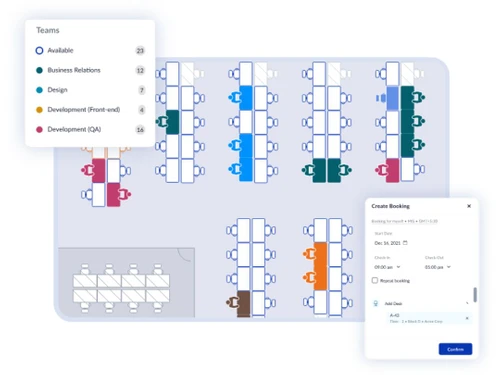
  • Office Management: WorkinSync simplifies the management of hybrid work environments, making it easier for employees to reserve desks and meeting spaces.
  • Flexible Work Arrangements: The software supports modern flexible work models, allowing organizations to adapt to reduced office occupancy and staggered schedules.
  • User-Friendly Interface: With its intuitive design, WorkinSync is easy to use for both employees and administrators, enhancing overall user experience.
  • Efficient Check-In Process: The app generates QR codes for quick scanning at entry points, facilitating a smooth check-in process for employees.
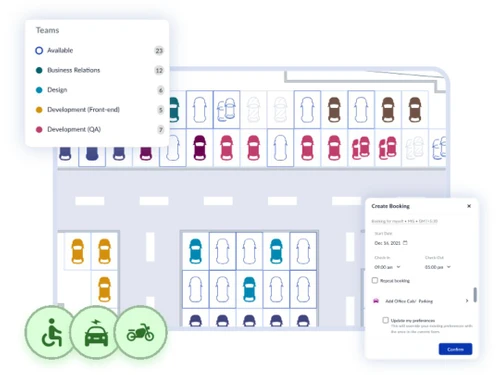
  • Resource Management: It helps manage various workplace resources, including desks, meeting rooms, and parking spaces, ensuring optimal utilization.
  • Real-Time Analytics: WorkinSync provides analytics to track space usage and employee attendance, helping organizations make informed decisions about office layouts.
  • Integration Capabilities: The software integrates seamlessly with popular tools like Microsoft 365 and Google Workspace, enhancing existing workflows.
  • Enhanced Productivity: By streamlining operations and reducing administrative burdens, WorkinSync helps improve overall productivity in the workplace.
  • Proven Effectiveness: The software has been tested successfully in real-world scenarios, demonstrating its reliability and functionality in managing office workflows.
  • Expert Support: WorkinSync offers access to product experts who can assist organizations in tailoring the software to meet specific workplace needs.

Benefits of WorkinSync Software

  • Improved Space Optimization: It helps organizations optimize their office layouts by providing insights into space utilization, enabling better planning for future needs.
  • Enhanced Employee Experience: The platform fosters a positive employee experience by allowing staff to easily find and reserve the resources they need for their workday.
  • Automated Notifications: Users receive automated reminders and notifications about their reservations, helping them manage their schedules effectively.
  • Customizable Settings: Organizations can customize the app's settings to align with their specific policies and workflows, ensuring it meets unique operational needs.
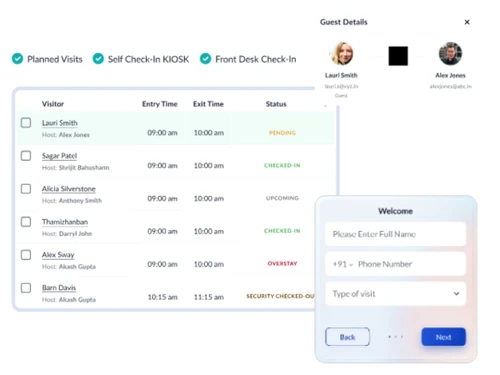
  • Visitor Management: It includes features for managing visitor access, making it easier to track who is in the office at any given time.
  • Safety Compliance: The software aids in maintaining health and safety protocols by controlling occupancy levels and ensuring social distancing measures are followed.
  • Remote Work Support: It provides tools that support remote work arrangements, facilitating seamless transitions between in-office and remote work environments.
  • Cost Savings: By optimizing resource usage and reducing unnecessary overhead, WorkinSync can lead to significant cost savings for organizations.
  • Integration with HR Systems: The software can integrate with existing HR management systems, streamlining employee onboarding and resource allocation processes.

Pricing of WorkinSync

WorkinSync price details are available on request at techjockey.com.

The pricing model is based on different parameters, including extra features, deployment type, and the total number of users. For further queries related to the product, you can contact our product team and learn more about the pricing and offers.

Read more

MoveInSync Technology Solutions Company Details

Founded Year:  2009

MoveInSync is a workplace mobility company that helps enterprises optimise employee transportation and workplace operations. Its AI-powered platform automates employee commutes, fleet management, desk booking, parking, visitor management, and workplace

Director/Founders Deepesh Agarwal and Akash Maheshwaria
Company Size 1-100 Employees

WorkinSync Pricing & Plans

Looking for The Right Pricing?

Share your requirements and get a plan built around your business.

  • Define your business needs
  • Get customised pricing
  • Choose features that fit your workflow

Price Available on Request

Get personalised WorkinSync pricing that fits your needs. Our team will connect with you.

WorkinSync Features

  • icon_check Hybrid Workplace
    Enables seamless coordination for employees working both remotely and in-office.
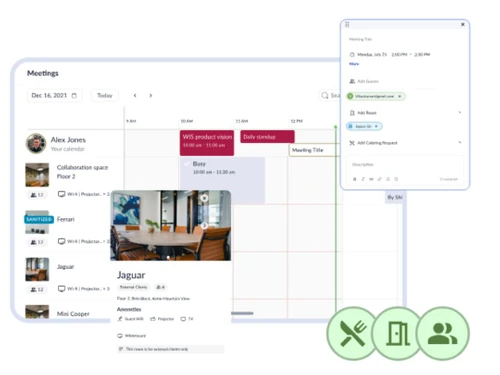
  • icon_check Meeting Room Booking
    Allows users to book meeting rooms based on availability, ensuring efficient use of space.
  • icon_check Booking Management
    Centralized system for managing all bookings, ensuring streamlined operations for workspaces.
  • icon_check Facility Scheduling
    Lets teams schedule and manage the use of different facilities within the workplace, optimizing resource allocation.
  • icon_check Calendar Management
    Synchronizes team calendars, helping coordinate meetings, bookings, and events easily.
  • icon_check Integration
    Integrates with other software tools for seamless data exchange, improving workflow efficiency.
  • icon_check Team Scheduling
    Enables easy scheduling for team members, aligning with their availability and project needs.
  • icon_check Contactless Access Management
    Provides a secure, touch-free method for accessing office spaces, promoting hygiene and safety.
  • icon_check Manage Employee Booking
    Allows administrators to monitor and manage employee bookings for workspace and meeting areas.
  • icon_check Attendance Dashboard
    Displays real-time employee attendance data, helping track and manage workforce presence efficiently.
WorkinSync Demo Video play icon

Get WorkinSync Demo

Watch the demo video to explore key features, real workflows, and how the software fits your business needs.

Understand
Key Features
Personal
Demo Insights
Interactive
Demo Support

WorkinSync Specifications

Supported Platforms
Windows Windows iOS iOS Android Android
Devices
Desktop Desktop Mobile Mobile
Deployment
Cloud-Based Cloud-Based
Suitable For
All Industries
Business Specific
All Businesses
Business Size
Small Business Startups Medium Business Enterprises SMBs SMEs MSMBs MSMEs
Language
English

Explore the Best Alternative Solutions Similar to Your Business Size and Needs

WorkinSync Review

4.1

Out of 5

img

Overall Rating

Based on
4 Verified Ratings

Rating Breakdown

  • Features 3.8
  • Value for Money 4.6
  • Ease of Use 4.2
  • Customer Support 3.8

92% Recommend this Product

Add Review

Techjockey Trusted Reviews from Verified Users

No reviews are currently available for WorkinSync. Discover similar Visitor Management Software reviews

  • SeQure Visitor Management Software

    4.7

    Whats great - The visitor tracking and screening feature has helped keep the office premises covid free. The centralized system for accessi... read more

  • Eptura Visitor

    4.5

    Whats great - Overall the product is high quality, comprehensive and well regarded. read more

  • INDAS Visitor Management (iVMS)

    4.3

    Whats great - iVMS has drastically cut down on the time we spend on visitor management. Highly recommend it. read more

Compare WorkinSync With other Visitor Management Software

Products
Ratings
Pricing
Device Supported
Deployment
Supported Platforms
  • img

    WorkinSync

  • 4.1

  • Price On Request

  • Desktop

    Mobile

  • Web based

    On Premises

  • Windows

    Mac OS

  • img

    Spintly VMS

  • 4.9

  • Price On Request

  • Desktop

    Mobile

  • Web based

    On Premises

  • Windows

    Mac OS

  • img

    BelleVie

  • 5

  • Price On Request

  • Desktop

    Mobile

  • Web based

    On Premises

  • Windows

    Mac OS

  • img

    Vizitor App

  • 5

  • ₹ 19200

  • Desktop

    Mobile

  • Web based

    On Premises

  • Windows

    Mac OS

  • img

    Archie

  • 4.3

  • Price On Request

  • Desktop

    Mobile

  • Web based

    On Premises

  • Windows

    Mac OS

  • img

    EasyLobby

  • 4.3

  • Price On Request

  • Desktop

    Mobile

  • Web based

    On Premises

  • Windows

    Mac OS

  • img

    Entry2Exit

  • 4.7

  • Price On Request

  • Desktop

    Mobile

  • Web based

    On Premises

  • Windows

    Mac OS

  • img

    VAMS

  • 4.5

  • Price On Request

  • Desktop

    Mobile

  • Web based

    On Premises

  • Windows

    Mac OS

  • img

    GuestRAR

  • 4.1

  • ₹ 1999

  • Desktop

    Mobile

  • Web based

    On Premises

  • Windows

    Mac OS

(0) Product(s) selected

WorkinSync Alternatives

See All WorkinSync Alternatives

Available

Price on Request

Starting Price:

$109 /Month

Available

Price on Request

VAMS

4.5

Available

Price on Request

Available

Price on Request

Available

Price on Request

Starting Price:

$19 /Location/Month

Available

Price on Request

Articles for WorkinSync

See All Related Articles

What is the cost of WorkinSync Software?

The pricing details for WorkinSync are available upon request on techjockey.com.

Is there a WorkinSync Software mobile app available?

Yes, WorkinSync offers an iOS and Android mobile app for easy access and management.

Which operating systems are supported by WorkinSync Software?

WorkinSync supports Windows and mobile platforms like iOS and Android.

Does WorkinSync Software offer a free trial?

No, WorkinSync does not offer a free trial.

How does WorkinSync Software function?

WorkinSync software functions by allowing employees to reserve desks and meeting spaces through an app, generating QR codes for entry, and streamlining office management tasks.

Who can benefit from using WorkinSync Software?

Organizations, employees, and facility managers can benefit from using WorkinSync software to enhance workplace efficiency and adapt to flexible work arrangements.

Is there a free demo available for WorkinSync Software?

Yes, WorkinSync offers a free demo for users to experience its features.

Is WorkinSync Software available for free?

No, WorkinSync is a paid software.

20,000+ Software Listed

Best Price Guranteed

Free Expert Consultation

2M+ Happy Customers

Terms and Condtions

close

Users with registered businesses can purchase goods from merchants on the platform to satisfy their business needs. Users are not permitted to utilize any products acquired through the platform for resale, advertising, business, or further distribution.

For each purchase made, users will receive a Tax Invoice (or 'GST invoice') that includes specific details such as:

  • the GSTIN of the user associated with their registered business, and

  • the specified Entity Name for their business.

It should be noted that not all products are eligible for GST Invoice. Only the products displayed by participating sellers with the 'GST-based Invoice Available' callout on the product description page would qualify.

Certain goods and services are not eligible to get a GST Invoice, including items with VAS, i.e., Value Added Services (e.g., Total Mobile Protection/Assured Buyback) and those involving an exchange offer at the time of purchase.

Users must ensure the accuracy of the GSTIN, and business entity name provided for the GST Invoice. Requests for corrections into GST Invoice would not be accommodated by Techjockey.com or any Seller, and any issues arising from user-provided information are the sole responsibility of users.

Techjockey.com is not liable for the GST Invoice or any associated input tax credit. To efficiently claim an input tax credit, users should select the registered place of business address as per the GST authority's data and follow the provisions of the GST Act and rules.

To claim an input tax credit, the delivery and billing addresses must match. Furthermore, input tax credits will not be granted if the delivery address and GSTIN on the invoice are from different states. In case of incorrect GST details provided during the order placement, the order will be canceled automatically.