linkedin
Vizitor App logo
play Vizitor: Visitor Management System | Make your visitors check-in smartly - Vizitor App Demo
VizitorApplogo
VizitorApplogo

Vizitor App

Brand: Vizitor

  • 5

  • 1 Rating & 1 Review

Track visitors and manage attendance effortlessly with real-time check-ins, biometric integration, and easy reporting.

See More

Have you used Vizitor App before?

Share your insights for better experience

Add a Review
Starting Price
₹19,200 excl.GST
₹ 22,656 incl. GST

View plans

offer Save upto 18%, Get GST Invoice on your business purchase T&C
offer Buy Now & Pay Later, Check offer on payment page.
Buy Now
100% Genuine
Products
Best Price
Guaranteed
Safe & Secure
Payment
  • Description

  • Pricing

  • Features

  • Specification

  • Review

  • Compare

  • Alternatives

  • FAQ

  • Questions

Starting at ₹19,200
Buy Now

Vizitor App Software Overview

What is Vizitor?

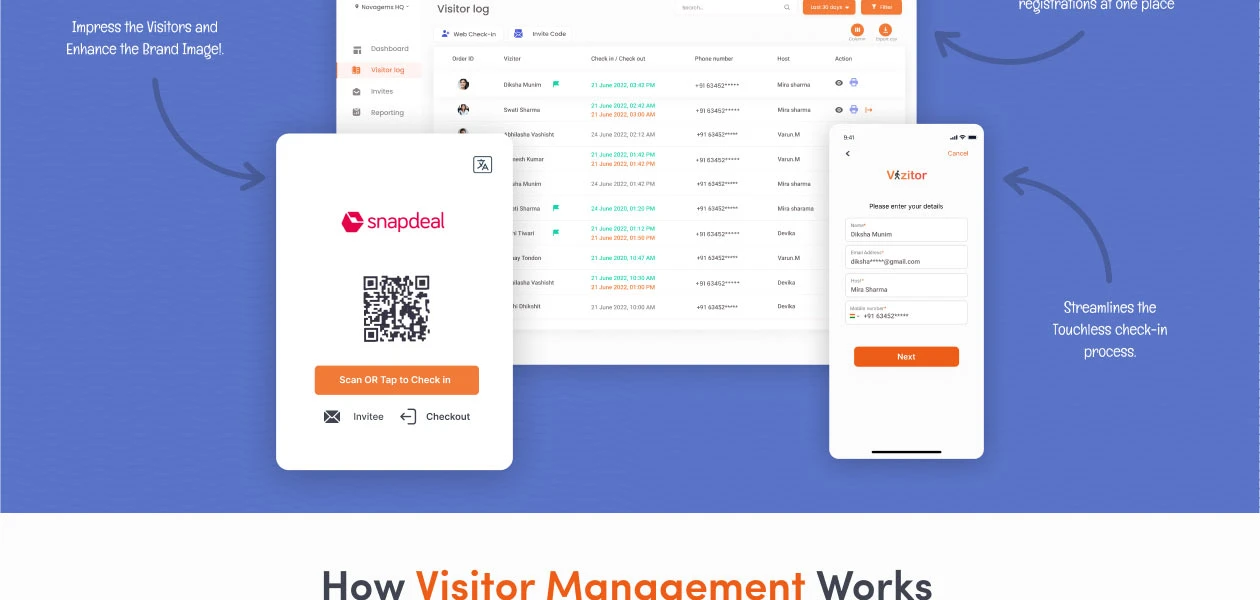
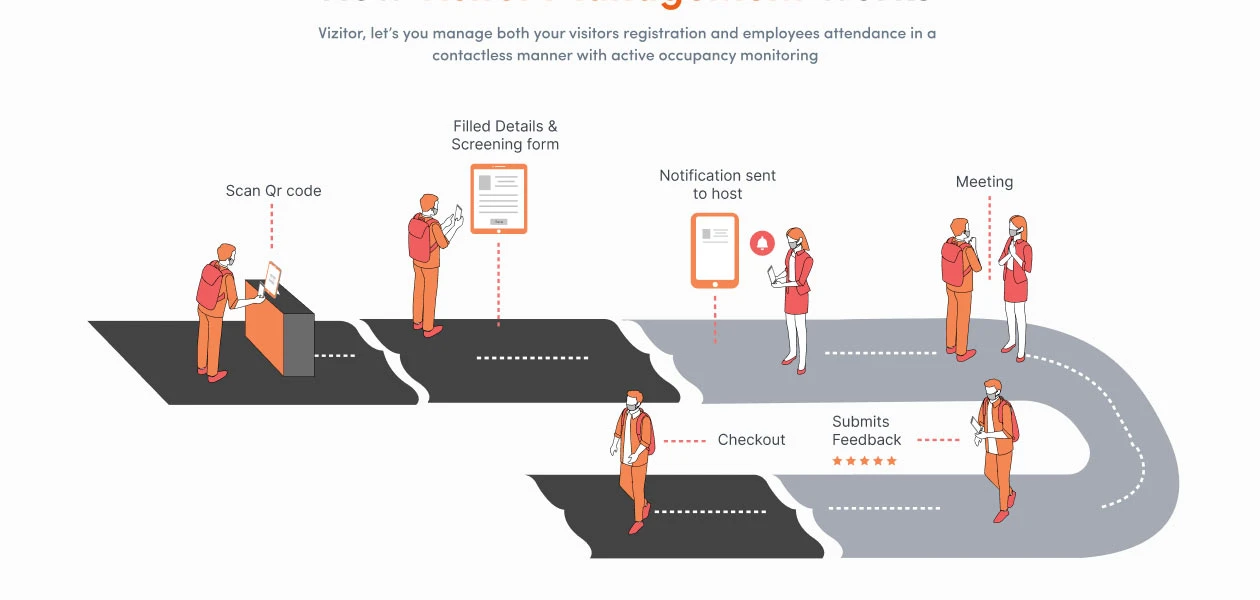
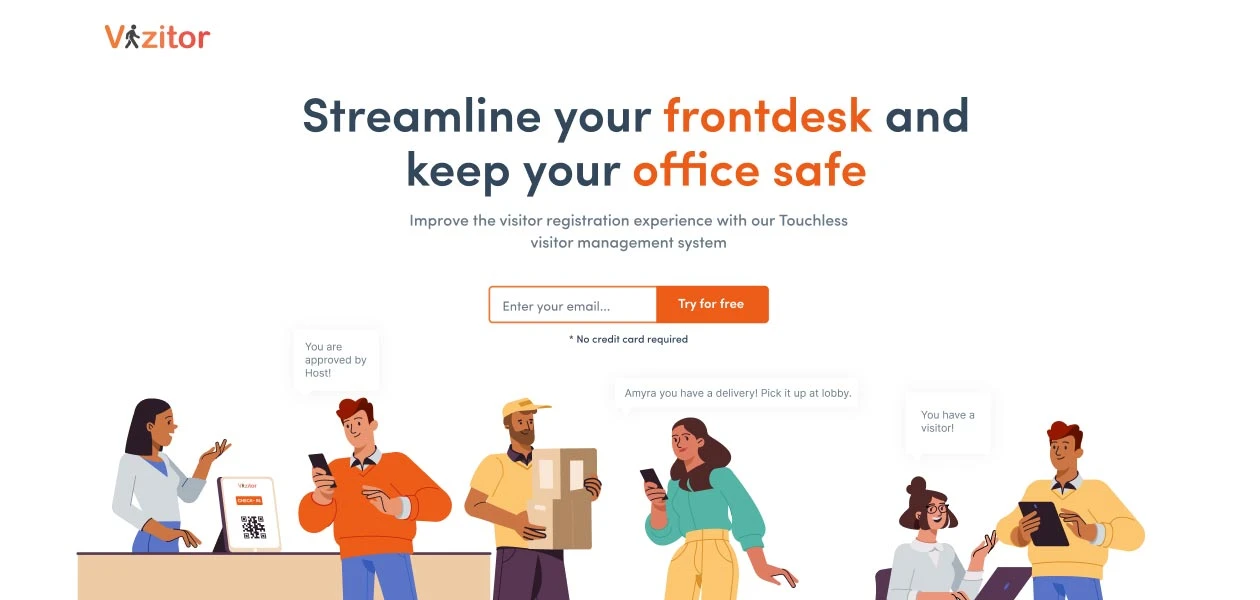
Vizitor is an innovative attendance management software for businesses, ensuring secure entry for employees into office premises. It offers digital, touchless check-in for safe entry, eliminating time-consuming employee screenings. Employees enter their details by scanning a QR code or entering information on a kiosk. The host receives notifications and can grant access efficiently.

This attendance management system can be personalized with your company logo and design to give it a more authentic feel. In addition to that, this attendance management app generates a digital badge for their identification (in case of recurring visitors).

Key Functionalities of Vizitor

  • Touchless/QR Check-in: Streamline the check-in process with digital check-ins it reduces reliance on paper-based methods for quick and easy entry.
  • Pre-registration: Vizitor offers a smooth check-in for important visitors by enabling them to register in advance, optimizing efficiency and planning.
  • Instant Host Notifications: This attendance management software enhances host communication by sending immediate alerts when guests check in. 
  • Customizable Badge Printing: Vizitor allows to easily identify employees through customizable badges that have all the essential details and photos.
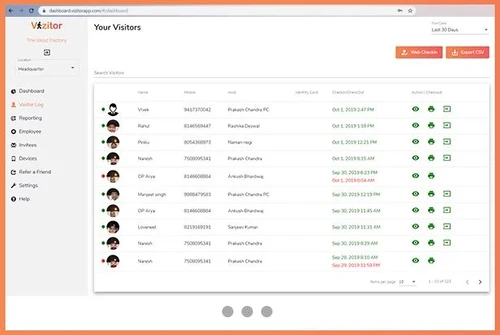
  • Time Tracking: This attendance management software offers a dashboard to get a comprehensive overview of employees and employee entry and exit times, it simplifies records and improves security.

Why Choose Vizitor?

  • Efficiency Boost: This attendance management software makes things go faster by doing paperwork automatically. This saves time and reduces work.
  • Professional Image: You can make this attendance management software look like it's part of your company, which makes you look good.
  • Zero Hardware Setup: It doesn't need any special equipment, making it easy to use immediately.
  • Competitive Pricing: Vizitor attendance management software is budget-friendly and won't break the bank.
  • Multi-Platform Support: This is available for iOS, Android, and web so that you can use it with different platforms.
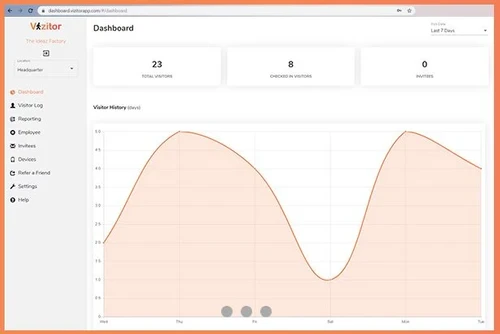
  • Advanced Analytics: Vizitor also provides you with real-time information on the number of people visiting your place. 

Benefits of Using Vizitor

  • Enhanced Safety: Vizitor attendance management software’s contactless check-in and contact tracing features are crucial for maintaining workplace safety, especially during health-related concerns.
  • Improved First Impressions: This also helps to brand your organization by displaying your logo which enhances the iPad kiosk as well as the badges. 
  • Operational Efficiency: Vizitor attendance management software enhances your operations through the automation of attendance management which makes the entire process more efficient and less time-consuming.
  • Professional Image: Appearance of your workplace provides an executive image to the employees which is helpful in overall reputation and impacts.

Vizitor Pricing

Vizitor attendance management software has three plans which are as follows:

  • Starter Plan: Starter Plan: INR 1,600 per month, that’s, INR 19,200 per year if billed yearly. Great for companies with up to 300 check-ins per thirty days. Includes a 10-day free trial.
  • Premium Plan: INR 3,200 per month (if billed annually). Accessible for middle operations, with an opportunity for 1,000 check-ins per month. In addition, the model is available with a 10-day free trial.
Read more

Vizitor Company Details

Founded Year:  2018

Make your visitors check-in smartly!

Director/Founders Gaurav Saini, Ria Sawhney
Company Size 1-100 Employees

Vizitor App Pricing & Plans

Starter:(Rs.1,600/month Billed yearly)

Calculated Price

₹ 19200 Exclusive of all taxes
    • Quantity

      Quantity
      Quantity
    • Yearly

      Yearly
      Yearly

Key Features

  • Single location access

  • Multi-Language support

  • Host notifications

  • Pre-invitation

  • Image capturing

  • E-badges

  • Approve/Disapprove visitors

Premium(Rs.3,200/month Billed yearly)

Calculated Price

₹ 38400 Exclusive of all taxes
    • Quantity

      Quantity
      Quantity
    • Yearly

      Yearly
      Yearly

Key Features

  • 1000 Check-ins

  • 2 location access

  • Emergency Evacuation

  • Multi-location

  • Badge Printing

  • Create custom form fields

  • Legal documentation (NDA)

  • Email & SMS notifications

  • OTP Authentication

  • Pre-registration

Vizitor App Features

  • icon_check Custom Badges
    Every e-badge generated by Vizitor is full of information like the intent of visitation, type of visitation, name, & mobile
  • icon_check Email and SMS Notifications
    The visitor management app can generate notifications through email and text messages as well.
  • icon_check OTP Authentication
    This visitor management system uses one-time passwords to authenticate pre-planned visitors.
  • icon_check Check-in & Check-out
    Vizitor records every employee and visitor's check-in and check-out details in its system.
  • icon_check Pre-Registration
    Visitors can get their e-badge and access pre-planned through pre-registration forms.
  • icon_check Security & Compliance
    Enhances safety and ensures legal adherence to visitor data.
  • icon_check Multi Device Management
    Efficiently manages the system from different devices.
  • icon_check Integrations
    Seamlessly connects with other systems, expanding functionality and data flow.
  • icon_check Google Directory
    Vizitor uses Google Directory to search users and groups in the organization using the Google app for business purposes.
  • icon_check Black Listing
    Admins can blacklist certain visitors based on their behavior and restrict their access to the premises.
  • icon_check OutStay Alerts/Overstay Alerts
    The visitor management app generates automated alerts to admins for outstay or overstay visitors.
  • icon_check Custom validity Invite pass
    You can create an invite pass and provide a custom validity pass for regular visitors.
  • icon_check Appointment by Link
    Admin can share the link with the visitor to create the self-pre-appointment.
  • icon_check Multi-language
    This visitor management software can be customized to any regional language of India to facilitate easy interaction.
  • icon_check Logo Customization
    A visitor management system allows companies to place their logo for branding purposes.
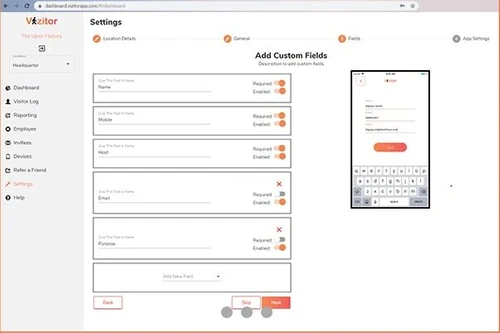
  • icon_check Create Custom Forms Fields
    Admins can create multiple customized fields for various purposes. Such as making a questionnaire, taking extra contact details.
  • icon_check Support offline check-in
    This visitor management system allows users to make check-in entries even without the Internet.
  • icon_check Image Capture
    Vizitor takes a picture of every visitor with the help of the in-built camera of the device.
  • icon_check QR code based check-in
    The visitor management app sends a QR code to the visitor’s email address to ensure a touchless entry.
  • icon_check Legal documentation (NDA)
    Organizations can get a legal non-disclosure agreement signed with the visitors before allowing entry to the premises.
  • icon_check Visitor Dashboard
    Users can check the “visitor dashboard” for access to complete details of every individual who visits the facility.
  • icon_check E-Badges
    Vizitor generates an e-badge to identify the visitors separately.
Vizitor App Demo Video play icon

Get Vizitor App Demo

Watch the demo video to explore key features, real workflows, and how the software fits your business needs.
Understand
Key Features
Personal
Demo Insights
Interactive
Demo Support
Product Enrichment Section Image

Vizitor App Specifications

Supported Platforms
Ubuntu Ubuntu Windows Windows iOS iOS Android Android MacOS MacOS Linux Linux
Devices
Desktop Desktop Mobile Mobile Tablet Tablet iPad iPad
Deployment
Cloud-Based Cloud-Based
Suitable For
Education Spa & Salon Hotel Corporations Resort Hospital Societies
Business Specific
Restaurants Hotels Spa/Salon School/Colleges/Coaching Societies/Apartments/
Business Size
Small Business Startups Medium Business Enterprises SMBs SMEs MSMBs MSMEs
Customer Support
Email Communities
Language
English
Training Resources
Videos

Explore the Best Alternative Solutions Similar to Your Business Size and Needs

Vizitor App Review

5

Out of 5

img

Overall Rating

Based on
1 Verified Review

Rating Breakdown

  • Features 5
  • Value for Money 5
  • Ease of Use 5
  • Customer Support 5

100% Recommend this Product

Add Review

simar singh

Administrator

User since: < 6 months

5

Reviewed on: Jul 24, 2020

Techjockey Verified

“Best check-in solution for hotels.”

Pros

Digital transformation of business. Contactless check-in and check-out Easy to install . Easy to operate.

Cons

In the 6 months that I personally have been using this system I have not encountered any issues

Compare Vizitor App With other Visitor Management Software

Products
Ratings
Pricing
Device Supported
Deployment
Supported Platforms
  • img

    Vizitor App

  • 5

  • ₹ 19200.00 excl. GST

  • Desktop

    Mobile

  • Web based

    On Premises

  • Windows

    Mac OS

  • img

    Spintly VMS

  • 4.9

  • Price On Request

  • Desktop

    Mobile

  • Web based

    On Premises

  • Windows

    Mac OS

  • img

    BelleVie

  • 5

  • Price On Request

  • Desktop

    Mobile

  • Web based

    On Premises

  • Windows

    Mac OS

  • img

    NoBrokerHood

  • 4.4

  • Price On Request

  • Desktop

    Mobile

  • Web based

    On Premises

  • Windows

    Mac OS

  • img

    Archie

  • 4.3

  • Price On Request

  • Desktop

    Mobile

  • Web based

    On Premises

  • Windows

    Mac OS

  • img

    EasyLobby

  • 4.3

  • Price On Request

  • Desktop

    Mobile

  • Web based

    On Premises

  • Windows

    Mac OS

  • img

    VAMS

  • 4.5

  • Price On Request

  • Desktop

    Mobile

  • Web based

    On Premises

  • Windows

    Mac OS

  • img

    Entry2Exit

  • 4.7

  • Price On Request

  • Desktop

    Mobile

  • Web based

    On Premises

  • Windows

    Mac OS

  • img

    GuestRAR

  • 4.1

  • ₹ 1999

  • Desktop

    Mobile

  • Web based

    On Premises

  • Windows

    Mac OS

(0) Product(s) selected

Vizitor App Alternatives

See All Vizitor App Alternatives

Available

Price on Request

Starting Price:

$109 /Month

Available

Price on Request

VAMS

4.5

Available

Price on Request

Available

Price on Request
Available

Price on Request

Starting Price:

$19 /Location/Month

Starting Price:

$420 /Location/Year

Starting Price:

$199 /Month

Articles for Vizitor App

See All Related Articles

Which operating system does Vizitor support?

Vizitor management software is compatible with Windows and Mac operating systems.

Is there any free trial or demo for Vizitor?

The demo of this attendance management software is available for free with Techjockey.com.

Is there any Vizitor app?

The app is available for Android and iOS mobile devices.

How can you download Vizitor?

The installation is not required, as it is web-based. Just open the Setup Wizard to get started.

How much does Vizitor cost?

The software pricing starts at INR 19200 per year (1600 per month, billed annually) with free trials of 10 days.

How does the Vizitor management system work?

The software operates by turning attendance management through touchless processes. It simplifies front desk tasks with digital check-ins.

Can I upgrade my plan later?

Yes, you can easily upgrade to a higher plan as your business needs grow.

Is Vizitor compatible with biometric devices?

Yes, it integrates with biometric devices for seamless and secure attendance tracking.

Vizitor App Questions

Q:

How does contactless check-in work in VizitorApp?

Vimala Sivakumar • Dec 2, 2024
A:

Visitors scan QR codes on their devices to complete contactless check-in. The visitor completes a computerized form that may ask for their health information and photo. An e-pass is granted access following submission.

HARSHUUUU_1510 • Dec 2, 2024
A:

The 'Enterprise' package permits an unlimited number of users to check in or out in a single day, while the 'Premium' plan has a daily cap of 1,000 recorded visits, according to VizitorApp's pricing details.

Abdul Aziz Awan • Dec 2, 2024
Q:

How do I see the employee dropdown list in VizitorApp?

Soumya Ranjan Sahoo • Dec 1, 2024
A:

To see the employee dropdown list in VizitorApp, follow the steps given below:

  • Open VizitorApp
  • Navigate to the 'Directory' or 'Employees' section
  • The employee dropdown list will be visible there
  • This list allows you to select and manage specific employee profiles or assign tasks.
Bitato nnntea • Dec 2, 2024
A:

To add an organization using the Vizitor Pass app, follow the steps given below:

  • Open Vizitor
  • Go to the organization settings
  • Utilize the 'Add Organization' option
  • Input the required details
  • Hit Save
Rishi Mohapatra • Dec 2, 2024
Q:

How do I add a new employee in VizitorApp?

Soumya Ranjan Sahoo • Nov 30, 2024
A:

To add a new employee in VizitorApp, follow the steps given below:

  • Open VizitorApp
  • Navigate to the 'Employee Directory' section
  • Hit 'Add New'
  • Input the required details
  • Save the changes
Satyam Singh • Dec 1, 2024
See All Vizitor App Questions

20,000+ Software Listed

Best Price Guranteed

Free Expert Consultation

2M+ Happy Customers

Terms and Condtions

close

Users with registered businesses can purchase goods from merchants on the platform to satisfy their business needs. Users are not permitted to utilize any products acquired through the platform for resale, advertising, business, or further distribution.

For each purchase made, users will receive a Tax Invoice (or 'GST invoice') that includes specific details such as:

  • the GSTIN of the user associated with their registered business, and

  • the specified Entity Name for their business.

It should be noted that not all products are eligible for GST Invoice. Only the products displayed by participating sellers with the 'GST-based Invoice Available' callout on the product description page would qualify.

Certain goods and services are not eligible to get a GST Invoice, including items with VAS, i.e., Value Added Services (e.g., Total Mobile Protection/Assured Buyback) and those involving an exchange offer at the time of purchase.

Users must ensure the accuracy of the GSTIN, and business entity name provided for the GST Invoice. Requests for corrections into GST Invoice would not be accommodated by Techjockey.com or any Seller, and any issues arising from user-provided information are the sole responsibility of users.

Techjockey.com is not liable for the GST Invoice or any associated input tax credit. To efficiently claim an input tax credit, users should select the registered place of business address as per the GST authority's data and follow the provisions of the GST Act and rules.

To claim an input tax credit, the delivery and billing addresses must match. Furthermore, input tax credits will not be granted if the delivery address and GSTIN on the invoice are from different states. In case of incorrect GST details provided during the order placement, the order will be canceled automatically.