linkedin
Vizitor QMS logo
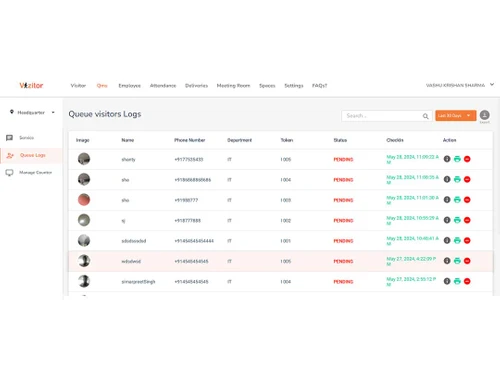
vizitor qms visitors logs
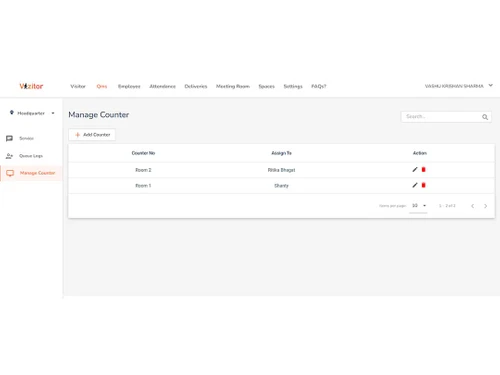
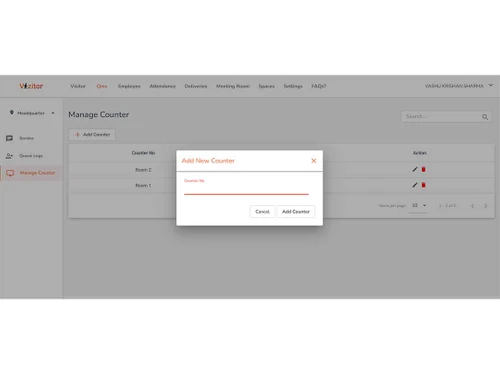
vizitor qms counter
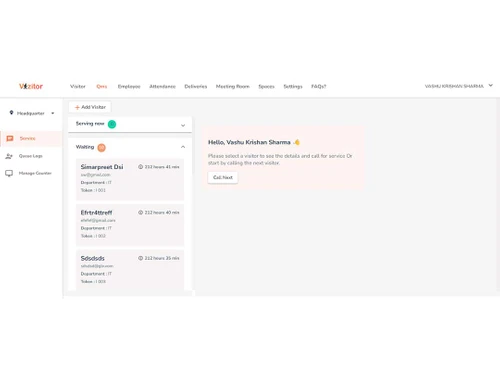
vizitor qms scheduling

Vizitor QMS

Brand: Vizitor

  • 4.2

  • 6 Ratings

Vizitor QMS optimizes queue handling with a digital system that streamlines customer flow and reduces wait times.

See More

Have you used Vizitor QMS before?

Share your insights for better experience

Add a Review
Starting Price
₹2,000 excl.GST
₹ 2,360 incl. GST

View plans

offer Save upto 18%, Get GST Invoice on your business purchase T&C
offer Buy Now & Pay Later, Check offer on payment page.
Buy Now
100% Genuine
Products
Best Price
Guaranteed
Safe & Secure
Payment
  • Description

  • Pricing

  • Features

  • Specification

  • Review

  • Compare

  • Alternatives

  • FAQ

Starting at ₹2,000
Buy Now

Vizitor QMS Software Overview

What is Vizitor QMS Software?

Vizitor QMS is an innovative queue management software designed for businesses to ensure secure and efficient entry for visitors into office premises. It offers digital, touchless check-in for safe entry, eliminating time-consuming visitor screenings. Visitors enter their details by scanning a QR code or entering information on a kiosk. Upon check-in, a token is generated, allowing for efficient queue management. The host receives notifications and can grant access efficiently.

It can be personalized with your company logo and design to give it a more authentic feel. This queue management system also generates a digital badge for visitor identification, which is handy for recurring visitors.

Why Choose Vizitor QMS?

  • Efficiency Boost: Automates queue management, reducing manual efforts and saving time for both visitors and employees.
  • Professional Image: Customizable with your company logo and design, reinforcing your brand image.
  • Zero Hardware Setup: Requires no additional hardware, making it easy to implement and use immediately.
  • Competitive Pricing: Affordable and budget-friendly, with pricing starting at Rs.1500 in India.
  • Multi-Platform Support: Compatible with iOS, Android, and web platforms, ensuring device accessibility.
  • Ease of Use: Simple to set up and user-friendly, requiring minimal staff training.

Benefits of Vizitor QMS Solution

  • Enhanced Visitor Experience: Reduces wait times and improves service efficiency, increasing visitor satisfaction.
  • Operational Efficiency: Streamlines visitor management, reducing manual processes and enhancing workflow efficiency.
  • Professional Image: Presents a polished and organized image to visitors, positively impacting business relationships.
  • Improved Safety: Manages visitor flow effectively, contributing to a safer environment in healthcare and other settings.

Vizitor QMS Pricing

Vizitor QMS software pricing starts from INR 2,000 at techjockey.com.

For further queries related to the product, you can contact our product team and learn more about the pricing and offers.

Read more

Vizitor Company Details

Founded Year:  2018

Make your visitors check-in smartly!

Director/Founders Gaurav Saini, Ria Sawhney
Company Size 1-100 Employees

Vizitor QMS Pricing & Plans

Starter
Key Features
  • 300 Visits
  • Touchless Check-in
  • Token e-badges
  • Customizable Alerts
  • Virtual Queueing
  • Department-wise token generation
  • Employee-wise token generation
  • Self-service kiosks
  • Ticket printers/Waiting area displays
  • Online appointment booking
  • Automatic customer & staff notifications
  • Counter displays

Calculated Price

2000 Exclusive of all taxes
    • Quantity

      Quantity
      Quantity
    • Monthly

      Monthly
      Monthly

Key Features

  • 300 Visits

  • Touchless Check-in

  • Token e-badges

  • Customizable Alerts

  • Virtual Queueing

  • Department-wise token generation

  • Employee-wise token generation

  • Self-service kiosks

  • Ticket printers/Waiting area displays

  • Online appointment booking

  • Automatic customer & staff notifications

  • Counter displays

Vizitor QMS Features

  • icon_check Priority Queuing
    Offer priority queuing options for VIPs, senior citizens, or visitors with special needs.
  • icon_check Integration with CRM
    Seamlessly integrate with CRM systems to maintain comprehensive visitor records.
  • icon_check Mobile App Integration
    Integrate with mobile apps to allow visitors to join queues, & check status.
  • icon_check Customizable Alerts
    Set up customizable alerts for staff and visitors regarding queue status.
  • icon_check Virtual Queueing
    Allow visitors to join a virtual queue remotely through their smartphones, reducing physical waiting lines.
  • icon_check Real-time Queue Updates
    Provide real-time updates on queue status and estimated waiting times through SMS or app notifications.
  • icon_check Appointment Scheduling
    Enable visitors to schedule appointments in advance, optimizing service efficiency.
  • icon_check Ticketing System
    Generate digital tickets for visitors, allowing them to track their position in the queue.
  • icon_check Multi-Queue Management
    Manage multiple queues simultaneously for different services or departments, streamlining operations.
  • icon_check Kiosk Integration
    Integrate with self-service kiosks to allow visitors to check in, register, and join queues.
  • icon_check Analytics & Reporting
    Provide detailed analytics and reporting on queue performance, visitor flow, and service times.
  • icon_check Customizable Queue Settings
    Allow admins to customize queue settings such as priority levels, service times, and capacity.
  • icon_check Feedback Collection
    Collect feedback from visitors on their queue experience through surveys.
  • icon_check Real-time Dashboards
    Provide real-time dashboards for staff to monitor queue status, visitor flow, and service efficiency.
  • icon_check Visitor Flow Management
    Optimize visitor flow within the premises by directing them to the appropriate service points.
  • icon_check Touchless Check-in
    Implement touchless check-in options using QR codes or NFC technology.

Vizitor QMS Specifications

Supported Platforms
Windows Windows iOS iOS Android Android
Devices
Desktop Desktop Mobile Mobile
Deployment
Cloud-Based Cloud-Based
Suitable For
Retail Hospital
Business Specific
Hospitals Clinics Banking
Business Size
Small Business Medium Business SMBs SMEs
Customer Support
Phone Email
Language
English
Integration
API Integration
Training Resources
In Person

Vizitor QMS Review

4.2

Out of 5

img

Overall Rating

Based on
6 Verified Ratings

Rating Breakdown

  • Features 4.4
  • Value for Money 3.9
  • Ease of Use 4.4
  • Customer Support 4.2

88% Recommend this Product

Add Review

Be the First to Review

This product has no reviews yet. Be the first to leave your feedback.

Add Review

Compare Vizitor QMS With other Queue Management Software

Products
Ratings
Pricing
Device Supported
Deployment
Supported Platforms
  • img

    Vizitor QMS

  • 4.2

  • ₹ 2000.00 excl. GST

  • Desktop

    Mobile

  • Web based

    On Premises

  • Windows

    Mac OS

  • img

    QWaiting

  • 5

  • Price On Request

  • Desktop

    Mobile

  • Web based

    On Premises

  • Windows

    Mac OS

  • img

    E-Token Solution

  • 5

  • ₹ 2100

  • Desktop

    Mobile

  • Web based

    On Premises

  • Windows

    Mac OS

  • img

    QHAPS

  • Price On Request

  • Desktop

    Mobile

  • Web based

    On Premises

  • Windows

    Mac OS

(0) Product(s) selected

Vizitor QMS Alternatives

See All Vizitor QMS Alternatives

Available

Price on Request

Available

Price on Request

What is the cost of Vizitor QMS Software?

Vizitor QMS software pricing starts from INR 2,000 at techjockey.com.

Is there any mobile app available for Vizitor QMS?

Vizitor QMS is available on iOS and Android devices.

Which operating system does Vizitor QMS Queue Management Software support?

Vizitor QMS supports operating systems, including Ubuntu, Windows, Linux, and macOS.

Does Vizitor QMS Platform offer a free trial?

No, Vizitor QMS platform does not offer a free trial to the users.

Who can use Vizitor QMS Queue Management?

Hospitals and clinics, service centers, banks and customer service spaces use Vizitor QMS.

How does Vizitor QMS Platform function?

Vizitor QMS Queue Management Software works by digitizing and streamlining the queuing process. Customers check in via a kiosk, tablet, or mobile device, receiving a digital ticket or queue number.

20,000+ Software Listed

Best Price Guranteed

Free Expert Consultation

2M+ Happy Customers

Terms and Condtions

close

Users with registered businesses can purchase goods from merchants on the platform to satisfy their business needs. Users are not permitted to utilize any products acquired through the platform for resale, advertising, business, or further distribution.

For each purchase made, users will receive a Tax Invoice (or 'GST invoice') that includes specific details such as:

  • the GSTIN of the user associated with their registered business, and

  • the specified Entity Name for their business.

It should be noted that not all products are eligible for GST Invoice. Only the products displayed by participating sellers with the 'GST-based Invoice Available' callout on the product description page would qualify.

Certain goods and services are not eligible to get a GST Invoice, including items with VAS, i.e., Value Added Services (e.g., Total Mobile Protection/Assured Buyback) and those involving an exchange offer at the time of purchase.

Users must ensure the accuracy of the GSTIN, and business entity name provided for the GST Invoice. Requests for corrections into GST Invoice would not be accommodated by Techjockey.com or any Seller, and any issues arising from user-provided information are the sole responsibility of users.

Techjockey.com is not liable for the GST Invoice or any associated input tax credit. To efficiently claim an input tax credit, users should select the registered place of business address as per the GST authority's data and follow the provisions of the GST Act and rules.

To claim an input tax credit, the delivery and billing addresses must match. Furthermore, input tax credits will not be granted if the delivery address and GSTIN on the invoice are from different states. In case of incorrect GST details provided during the order placement, the order will be canceled automatically.