linkedin
EasyLobby logo
play EasyLobby® - Visitor Management Software
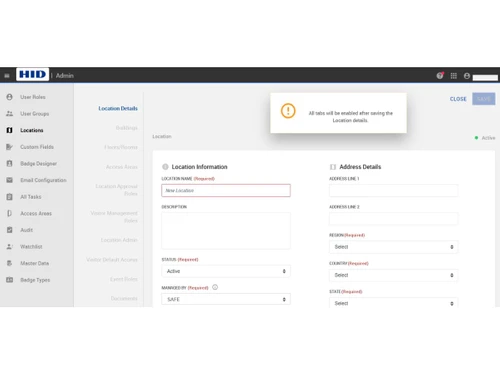
easylobby-dashboard
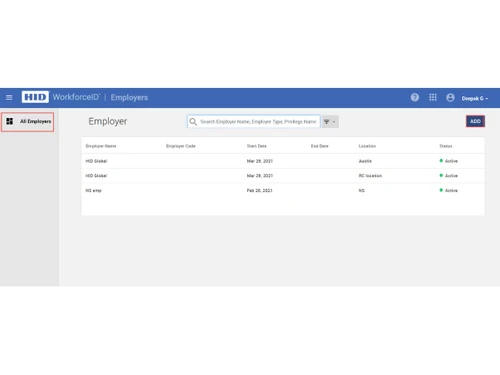
easylobby-employers

EasyLobby

Brand: HID Global

  • 4.3

  • 3 Ratings

EasyLobby is visitor management software simplifying guest registration, badge issuance, and facility security for organizations worldwide.

See More

Have you used EasyLobby before?

Share your insights for better experience

Add a Review

Price Available on Request

Questions about pricing or customization? We’re here to help, just a click away.

100% Genuine
Products
Best Price
Guaranteed
Safe & Secure
Payment
  • Description

  • Pricing

  • Features

  • Specification

  • Review

  • FAQ

EasyLobby Software Overview

What is EasyLobby?

EasyLobby is visitor management software designed to streamline guest check-ins, badge printing, and facility access control. It works by digitizing visitor registration, automating identification, and integrating with access systems.

EasyLobby features automated badge creation, pre-registration options, and integration with access control systems. It supports visitor self-service kiosks, customizable workflows, and centralized reporting. Real-time notifications, audit trails, and multi-location support enhance safety and efficiency.

This Visitor Management Software ensures compliance with organizational policies while improving visitor experience and reducing administrative workload.

Why Choose EasyLobby?

  • Visitor check-ins: Automates guest registration and badge printing, reducing wait times and improving visitor satisfaction significantly.
  • Security: EasyLobby Visitor Management Software integrates with access control systems, ensuring only authorized individuals gain entry to sensitive areas.
  • Vistior workflows: Adapts visitor processes to organizational needs, offering flexibility and scalability across diverse industries.
  • Centralized reporting: Provides detailed visitor logs and analytics, supporting compliance, audits, and operational decision-making.
  • Self-service kiosks: EasyLobby enables independent visitor registration, reducing staff workload and speeding up facility entry processes.

Benefits of EasyLobby

  • Improved visitor experience: Simplifies check-ins, enhances professionalism, and ensures guests feel welcomed and secure.
  • Automated badge issuance: This Visitor Management Software creates visitor badges instantly, reducing manual errors and strengthening facility access control.
  • Audit-ready records: Maintains detailed visitor logs, supporting compliance, investigations, and organizational transparency.
  • Self-registration option: EasyLobby Visitor Management Software allows guests to register independently, reducing staff involvement and improving efficiency.
  • Multi-location support: Centralizes visitor data across branches, ensuring consistent security and operational standards.
  • Customizable workflows: Tailors visitor management processes to organizational requirements, enhancing flexibility and scalability.

Pricing of EasyLobby

EasyLobby details are available on request at techjockey.com.

EasyLobby may vary based on factors like customization, additional features required, number of users, and the deployment type. Please request a callback for subscription-related details and to avail offers on premium packages at techjockey.com.

Read more

HID Global Company Details

Founded Year:  1991

Headquartered in Austin, Texas, HID Global has over 4,000 employees worldwide and operates international offices that support more than 100 countries.

Director/Founders HID Global Corporation
Company Size 1000+ Employees

EasyLobby Pricing & Plans

Looking for The Right Pricing?

Share your requirements and get a plan built around your business.

  • Define your business needs
  • Get customised pricing
  • Choose features that fit your workflow

Price Available on Request

Get personalised EasyLobby pricing that fits your needs. Our team will connect with you.

EasyLobby Features

  • icon_check Pre-Registration
    Allows employees to pre-register visitors via a web-based form, reducing check-in time.
  • icon_check ID Scan
    Captures visitor information by scanning government-issued IDs, passports, or business cards.
  • icon_check Image Capture
    Takes a photo of each visitor during check-in for identification and security purposes.
  • icon_check Badge Printing
    Prints customized visitor badges with photos, names, and QR codes for easy identification.
  • icon_check Alerts & Notifications
    Sends alerts to hosts via email or SMS when their visitors arrive.
  • icon_check Watchlist Screening
    Checks visitors against internal and external watchlists to enhance security.
  • icon_check Visitor Tracking
    Monitors and logs visitor movements within the facility for security and compliance.
  • icon_check Audit Trail
    Maintains detailed records of visitor activities for auditing and compliance purposes.
  • icon_check Real-Time Dashboards
    Provides live updates on visitor status and facility occupancy.
  • icon_check Customizable Workflows
    Allows configuration of visitor check-in processes based on visitor type or location.
  • icon_check Multi-Site Management
    Supports deployment across multiple locations with centralized control.
  • icon_check Data Encryption
    Ensures visitor data is encrypted during storage and transmission for privacy protection.
  • icon_check Compliance Reporting
    Generates reports to assist with regulatory compliance and internal policies.
  • icon_check Visitor Type Categorization
    Differentiates between guests, contractors, vendors, and employees for tailored processing.
  • icon_check Emergency Evacuation Lists
    Provides real-time lists of all visitors on-site for emergency situations.
  • icon_check Customization
    Allows creation of personalized badge templates to match organizational branding.
EasyLobby Demo Video play icon

Get EasyLobby Demo

Watch the demo video to explore key features, real workflows, and how the software fits your business needs.

Understand
Key Features
Personal
Demo Insights
Interactive
Demo Support

EasyLobby Specifications

Supported Platforms
Windows Windows
Devices
Desktop Desktop
Deployment
Perpetual Perpetual
Suitable For
All Industries
Business Specific
All Businesses
Business Size
Small Business Medium Business SMBs MSMBs
Customer Support
Email Communities
Language
English français Deutsche Italiano Português Español
Training Resources
Videos

EasyLobby Review

4.3

Out of 5

img

Overall Rating

Based on
3 Verified Ratings

Rating Breakdown

  • Features 4.1
  • Value for Money 3.8
  • Ease of Use 4.6
  • Customer Support 4.5

80% Recommend this Product

Add Review

Techjockey Trusted Reviews from Verified Users

No reviews are currently available for EasyLobby. Discover similar Visitor Management Software reviews

  • SeQure Visitor Management Software

    4.7

    Whats great - The visitor tracking and screening feature has helped keep the office premises covid free. The centralized system for accessi... read more
  • Eptura Visitor

    4.5

    Whats great - Overall the product is high quality, comprehensive and well regarded. read more

  • INDAS Visitor Management (iVMS)

    4.3

    Whats great - iVMS has drastically cut down on the time we spend on visitor management. Highly recommend it. read more

Articles for EasyLobby

See All Related Articles

How much does EasyLobby cost?

EasyLobby pricing can be requested at techjockey.com.

Who uses EasyLobby Visitor Management Software?

EasyLobby is used by corporations, government facilities, and institutions to manage visitors, badges, and facility security operations.

How does EasyLobby work?

EasyLobby Visitor Management Software works by digitizing visitor registration, automating badge issuance, and integrating with access control systems for secure facility management.

Which operating systems are compatible with EasyLobby Visitor Management Software?

EasyLobby runs smoothly on OS like Windows, macOs, Linux and web-based platforms.

Is a free demo available for EasyLobby Visitor Management Software?

Yes, a free demo of EasyLobby Visitor Management Software is available, allowing organizations to explore features before purchasing.

Does EasyLobby support badge printing?

Yes, EasyLobby supports instant badge printing, enabling secure identification and streamlined visitor access within facilities.

Can EasyLobby manage multiple branches simultaneously?

EasyLobby Visitor Management Software supports multi-location management, centralizing visitor data and ensuring consistent security across organizational sites.

How does EasyLobby enhance compliance?

EasyLobby maintains audit-ready visitor logs, integrates with security systems, and supports regulatory compliance across industries.

Does EasyLobby provide real-time notifications?

Yes, EasyLobby Visitor Management Software sends real-time alerts for visitor activity, unauthorized access, or emergencies, ensuring rapid response and safety.

20,000+ Software Listed

Best Price Guranteed

Free Expert Consultation

2M+ Happy Customers

Terms and Condtions

close

Users with registered businesses can purchase goods from merchants on the platform to satisfy their business needs. Users are not permitted to utilize any products acquired through the platform for resale, advertising, business, or further distribution.

For each purchase made, users will receive a Tax Invoice (or 'GST invoice') that includes specific details such as:

  • the GSTIN of the user associated with their registered business, and

  • the specified Entity Name for their business.

It should be noted that not all products are eligible for GST Invoice. Only the products displayed by participating sellers with the 'GST-based Invoice Available' callout on the product description page would qualify.

Certain goods and services are not eligible to get a GST Invoice, including items with VAS, i.e., Value Added Services (e.g., Total Mobile Protection/Assured Buyback) and those involving an exchange offer at the time of purchase.

Users must ensure the accuracy of the GSTIN, and business entity name provided for the GST Invoice. Requests for corrections into GST Invoice would not be accommodated by Techjockey.com or any Seller, and any issues arising from user-provided information are the sole responsibility of users.

Techjockey.com is not liable for the GST Invoice or any associated input tax credit. To efficiently claim an input tax credit, users should select the registered place of business address as per the GST authority's data and follow the provisions of the GST Act and rules.

To claim an input tax credit, the delivery and billing addresses must match. Furthermore, input tax credits will not be granted if the delivery address and GSTIN on the invoice are from different states. In case of incorrect GST details provided during the order placement, the order will be canceled automatically.