linkedin
Property Inspect logo
play Managing your Templates
propertyinspect-rooms
propertyinspect-write

Property Inspect

Brand: Radweb

  • 4.1

  • 5 Ratings

An inspection management software that simplifies and automates building and property inspections and reporting.

See More

Have you used Property Inspect before?

Share your insights for better experience

Add a Review
Starting Price
$49

View plans

100% Genuine
Products
Best Price
Guaranteed
Safe & Secure
Payment
  • Description

  • Pricing

  • Features

  • Specification

  • Review

  • FAQ

Starting at $49

Property Inspect Software Overview

What is Property Inspect?

Property Inspect is a property inspection management software that helps manage residential, commercial, and facility inspections.

It allows users to capture photos, videos, notes, and key data during inspections and convert them into professional reports. The platform automates tasks like scheduling, reminders, and maintenance tracking.

It works on desktop and mobile, offering features like offline access and secure audit trails to streamline property management workflows.

Why Choose Property Inspect Software?

  • Streamlined Inspection Process: Property Inspect simplifies every inspection by allowing digital data capture, automatic sync, and structured workflows, reducing the time spent on manual tasks.
  • Professional-Quality Reports: The software generates clean, customizable, and branded reports that enhance credibility and professionalism for property managers and inspectors.
  • Real-Time Collaboration: Teams can work together from different locations, update inspection details instantly, and keep everyone aligned through real-time data sharing.
  • Mobile App Support: With Android and iOS apps, inspections can be conducted on-site using phones or tablets, complete with offline access for remote locations.
  • Automated Scheduling & Reminders: The platform automates booking, scheduling, and reminder notifications to ensure inspections are timely and no task is overlooked.
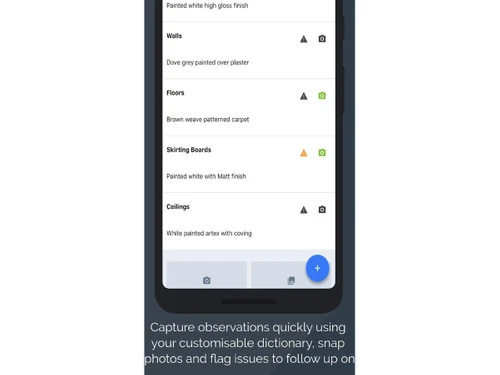
  • Photo & Video Capture: Inspectors can attach high-quality photos, videos, and notes directly within the app to create clear, evidence-based assessments.
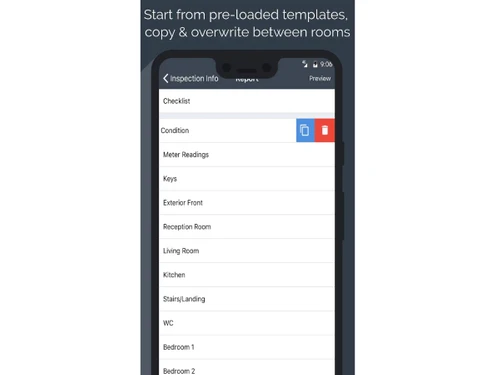
  • Custom Templates: Users can create templates tailored to different types of inspections, ensuring consistency and saving time with repetitive tasks.
  • Secure Audit Trails: The system maintains time-stamped records and activity logs, providing complete transparency and compliance for all inspections.

Benefits of Property Inspect Software

  • Centralized Documentation: All inspection reports, media, and documents are stored in one cloud platform, making retrieval fast and organization effortless.
  • Maintenance Tracking: Property Inspect helps track repairs, issues, and maintenance tasks, improving communication between landlords, tenants, and contractors.
  • Client Portal Access: Clients can view reports, approve actions, or provide feedback through their dedicated online portal, enhancing customer experience.
  • Compliance Support: The platform adheres to industry standards and regulatory requirements, helping users meet compliance needs efficiently.
  • Offline Mode Functionality: Inspectors can continue working without the internet, and the data syncs automatically once the connection is restored.
  • Integration Capabilities: It integrates with various CRM, property management, and workflow tools, improving system compatibility and reducing manual data entry.
  • Multi-Property Management: Ideal for agencies or enterprises managing multiple sites, the software provides easy tracking and reporting across all properties.
  • Enhanced Accuracy: Automated workflows and guided templates reduce errors and ensure every inspection is consistent and reliable.
  • Digital Signatures: Tenants, landlords, and inspectors can sign documents electronically, speeding up approvals and reducing paperwork.
  • Cost & Time Efficiency: By reducing manual reporting and repetitive tasks, the platform saves operational costs and significantly cuts inspection times.
  • Scalable for All Business Sizes: Whether for individual inspectors or large enterprises, the software adapts to different scales and business requirements.
  • Excellent Customer Support: Property Inspect offers responsive support, training materials, and onboarding assistance to help users get the most out of the platform.

Property Inspect Pricing

Property Inspect price starts at USD 49 at Techjockey.com. The pricing model is based on different parameters, including extra features, deployment type, and the total number of users. For further queries related to the product, you can contact our product team and learn more about the pricing and offers.

Read more

Radweb Company Details

Founded Year:  2005

Radweb are an enthusiastic and passionate team of business leaders, software engineers, UI experts and marketing professionals based in Portsmouth, UK.

Director/Founders James Taylor, Steve Rad
Company Size 1-100 Employees

Property Inspect Pricing & Plans

Solo
Starting at $49
    • Licenses

      Licenses
      Licenses
    • Monthly

      Monthly
      Monthly

Key Features

  • Unlimited Inspections

  • Unlimited Photos

  • 100 Properties / Units

  • Single User

  • Unlimited Client Logins

Standard
Starting at $97
    • Licenses

      Licenses
      Licenses
    • Monthly

      Monthly
      Monthly

Key Features

  • Unlimited Inspections

  • Unlimited Photos

  • 250 Properties / Units

  • 2 Users Included

  • Unlimited Client Logins

Pro
Starting at $275
    • Licenses

      Licenses
      Licenses
    • Monthly

      Monthly
      Monthly

Key Features

  • Unlimited Inspections

  • Unlimited Photos

  • 500 Properties / Units

  • 10 Users Included

  • Unlimited Client Logins

Property Inspect Features

  • icon_check Templates
    Design standardized templates to structure inspections, ensuring consistent formatting and reducing manual setup.
  • icon_check Scheduling
    Plan and allocate inspections using team calendars, drag-drop diaries, and automated notifications for clients.
  • icon_check Client Portal
    Provide secure client access to manage properties, schedule appointments, and view historical inspection reports.
  • icon_check Invoicing
    Generate invoices automatically from completed inspections, sync with pricing rules, and track payment statuses.
  • icon_check Custom Reporting
    Customize report layouts, content, and media presentation with branding options for professional client delivery.
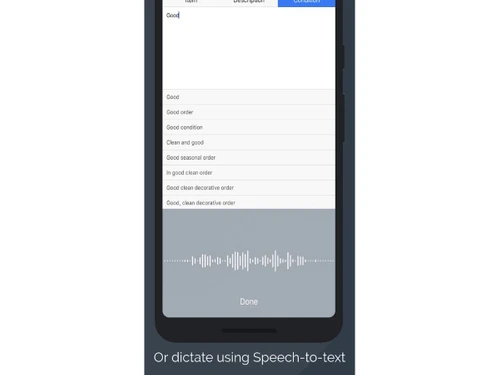
  • icon_check Speech-to-Text Analysis
    Dictate inspection notes verbally, using automatic transcription to reduce typing effort and speed up reporting
  • icon_check Photo Capture
    Take multiple photos quickly, embed them in reports, and reference specific rooms or items for clear documentation.
  • icon_check Audio Recording
    Record audio notes for inspection sections, then transcribe or attach files to reports for comprehensive detail.
  • icon_check Digital Signature
    Collect electronic signatures from tenants, landlords, or inspectors in-person or remotely to finalize inspection.
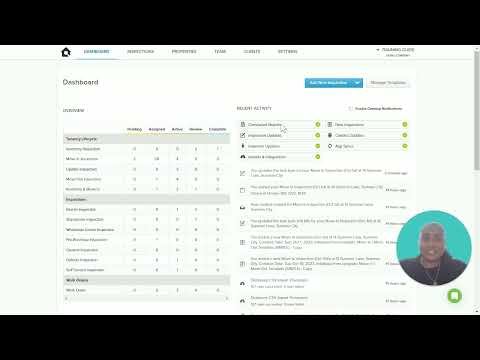
  • icon_check Dashboards
    Monitor inspection timelines, notifications, and progress across all properties and teams from one centralized hub.
  • icon_check Maintenance Tracking
    Log maintenance issues, assign tasks, and track completion with full audit trails stored against property records
  • icon_check API Integration
    Integrate with third-party tools and property systems through open API and webhooks for seamless data exchange
  • icon_check Workflow Automation
    Automate inspection workflows to route reports for internal review or direct client delivery, saving administration
  • icon_check Audit Trail
    Maintain a complete audit history of inspections, communications, and updates to ensure accountability and trust.
Property Inspect Demo Video play icon

Get Property Inspect Demo

Watch the demo video to explore key features, real workflows, and how the software fits your business needs.

Understand
Key Features
Personal
Demo Insights
Interactive
Demo Support

Property Inspect Specification

Supported Platforms
Windows Windows iOS iOS Android Android MacOS MacOS Linux Linux
Devices
Desktop Desktop Mobile Mobile Tablet Tablet iPad iPad
Deployment
Web-Based Web-Based
Suitable For
Property
Business Specific
Property
Business Size
Small Business Startups Medium Business Enterprises
Customer Support
Email Communities
Language
English
Integration
API Integration
Training Resources
Videos

Property Inspect Review

4.1

Out of 5

img

Overall Rating

Based on
5 Verified Ratings

Rating Breakdown

  • Features 4.2
  • Value for Money 4.1
  • Ease of Use 4
  • Customer Support 4.3

80% Recommend this Product

Add Review

Be the First to Review

This product has no reviews yet. Be the first to leave your feedback.

Add Review
How much does Property Inspect cost?

Property Inspect pricing begins at USD 49 on Techjockey.com.

Is there a mobile app available for Property Inspect Software?

Yes, Property Inspect offers a mobile app for both Android and iOS.

Which operating systems are compatible with Property Inspect Software?

Property Inspect works on Linux, Windows, MacOS, Android, and iOS devices.

Does Property Inspect Software offer a free trial?

Yes, Property Inspect provides a free trial for new users.

How does Property Inspect Software function?

Property Inspect enables users to perform inspections, capture evidence, and generate detailed reports digitally.

Who uses Property Inspect Software?

Property managers, inspectors, facility managers, landlords, and real estate professionals use Property Inspect.

Is a free demo available for Property Inspect Software?

Yes, a free demo can be requested from the Property Inspect team.

Is Property Inspect Software available for free?

No, Property Inspect is a paid software, though a free trial is offered.

20,000+ Software Listed

Best Price Guranteed

Free Expert Consultation

2M+ Happy Customers

Terms and Condtions

close

Users with registered businesses can purchase goods from merchants on the platform to satisfy their business needs. Users are not permitted to utilize any products acquired through the platform for resale, advertising, business, or further distribution.

For each purchase made, users will receive a Tax Invoice (or 'GST invoice') that includes specific details such as:

  • the GSTIN of the user associated with their registered business, and

  • the specified Entity Name for their business.

It should be noted that not all products are eligible for GST Invoice. Only the products displayed by participating sellers with the 'GST-based Invoice Available' callout on the product description page would qualify.

Certain goods and services are not eligible to get a GST Invoice, including items with VAS, i.e., Value Added Services (e.g., Total Mobile Protection/Assured Buyback) and those involving an exchange offer at the time of purchase.

Users must ensure the accuracy of the GSTIN, and business entity name provided for the GST Invoice. Requests for corrections into GST Invoice would not be accommodated by Techjockey.com or any Seller, and any issues arising from user-provided information are the sole responsibility of users.

Techjockey.com is not liable for the GST Invoice or any associated input tax credit. To efficiently claim an input tax credit, users should select the registered place of business address as per the GST authority's data and follow the provisions of the GST Act and rules.

To claim an input tax credit, the delivery and billing addresses must match. Furthermore, input tax credits will not be granted if the delivery address and GSTIN on the invoice are from different states. In case of incorrect GST details provided during the order placement, the order will be canceled automatically.