 USA
USA UAE
UAESmall Business
Designed for startups and growing businesses


See More





Brand: RoxyBrowser
A browser software that lets users manage multiple accounts safely with fingerprint protection, privacy features, and workflow tools.
See MoreHave you used RoxyBrowser before?
Share your insights for better experience
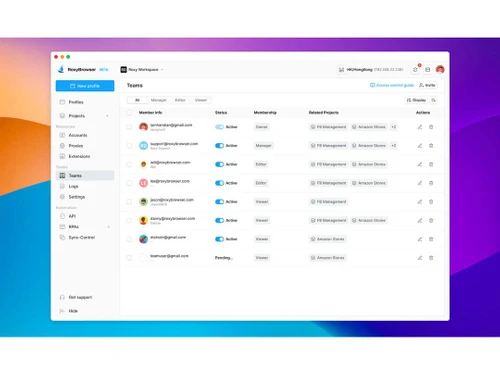
 Profile Template Team Space Proxy Panel Account Hub Window Sync API Flow Encryption Transfer Anti-Fingerprinting Technology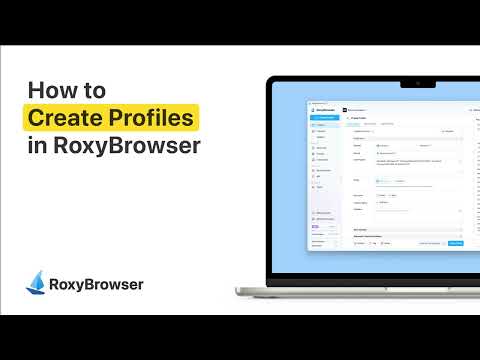

Watch the demo video to explore key features, real workflows, and how the software fits your business needs.
 Windows
  MacOS
MacOS  Desktop
  Perpetual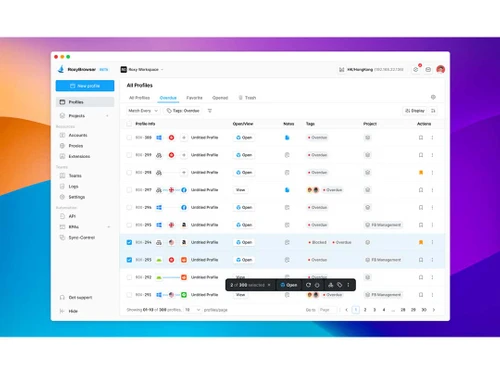
Small Business
Designed for startups and growing businesses
Medium Business
Built for business growth and flexibility
Enterprises
Designed for complex and large-scale business needs
4.8
Out of 5

Overall Rating
Based on
6 Verified Reviews
Rating Breakdown
95% Recommend this Product
Add ReviewUsers generally express high satisfaction with RoxyBrowser, highlighting its effectiveness in multi-account management and environmental isolation, which significantly reduces the risk of account bans. The browser's fast loading speed, smooth interface, and built-in privacy features are frequently praised. However, some users note limitations such as occasional plugin compatibility issues and the absence of built-in proxy support. Additionally, the lack of functionality for exporting configurations is mentioned as a drawback, suggesting room for improvement in data portability.
Pros
"I like RoxyBrowser's environment isolation, where each profile's environment can be changed to suit your needs in order to protect your account against correlation"
"I like how smooth RoxyBrowser is for web exploration, and how it protects my account when I'm browsing the web."
"My favorite thing about RoxyBrowser is the support, when I have a question, the Roxy team always gives me the fastest and comprehensive support!"
Cons
"Some plugins may have compatibility issues, but the probability is very small."
"The only point of dissatisfaction might be that there is no built-in proxy."
"The overall experience of using it was smooth and there was nothing unsatisfactory about it"

Hotaru 
Digital Marketer
Jul 16, 2025
Techjockey Verified
“A subversive online experience”
RoxyBrowser has done a great job in multi-account management, automatic configuration switching, and environmental isolation.
Pros
RoxyBrowser prevents tracking by simulating browser fingerprint information (such as Canvas, WebGL, time zone, language, font, etc.), while maintaining web page compatibility, truly achieving invisibility without reducing the experience.
Cons
Some plugins may have compatibility issues, but the probability is very small.
Reason to switch
Faster, better experience
kayla
User
Jun 6, 2025
Techjockey Verified
“The overall Roxy experience can be described in four words: smooth and safe.”
From the first time I opened it, the loading speed is very fast, there is no interference from advertisement pop-ups, and the interface is simple and refreshing, which makes it very smooth to use. Especially when switching web pages and multi-tab browsing, you can hardly feel the lag!
Pros
The improvement in smoothness is noticeable compared to previous browsers I've used. What reassures me most is its security, built-in privacy protection, automatic blocking of trackers, and access to malicious sites
Cons
The only point of dissatisfaction might be that there is no built-in proxy.
May 13, 2025
Techjockey Verified
“Social Media Operations Solutions”
RoxyBrowser solves the problem of environmental isolation for me, I use it to manage my numerous Amazon accounts, and it helps me to manage and protect my accounts.
Pros
I like RoxyBrowser's environment isolation, where each profile's environment can be changed to suit your needs in order to protect your account against correlation
Cons
The overall experience of using it was smooth and there was nothing unsatisfactory about it

RoxyBrowser
Price On Request
Desktop
Mobile
Web based
On Premises
Windows
Mac OS

ChatGPT Atlas
₹ 399
Desktop
Mobile
Web based
On Premises
Windows
Mac OS
XNXubd VPN Browser
Price On Request
Desktop
Mobile
Web based
On Premises
Windows
Mac OS

Perplexity Comet
Price On Request
Desktop
Mobile
Web based
On Premises
Windows
Mac OS
SquareX
Price On Request
Desktop
Mobile
Web based
On Premises
Windows
Mac OS

DICloak Antidetect Browser
Price On Request
Desktop
Mobile
Web based
On Premises
Windows
Mac OS

Vivaldi
Price On Request
Desktop
Mobile
Web based
On Premises
Windows
Mac OS

Brave Browser
Price On Request
Desktop
Mobile
Web based
On Premises
Windows
Mac OS

Fellou
Price On Request
Desktop
Mobile
Web based
On Premises
Windows
Mac OS

GoLogin
Price On Request
Desktop
Mobile
Web based
On Premises
Windows
Mac OS

Mozilla Firefox
Price On Request
Desktop
Mobile
Web based
On Premises
Windows
Mac OS
(0) Product(s) selected
Starting Price:
₹399 /Month
Available
Price on Request
Starting Price:
$20 /Month
Available
Price on Request
Available
Price on Request
Starting Price:
$20 /Month
Starting Price:
$49 /month
Available
Price on Request

Available
Price on Request

Available
Price on Request

Available
Price on Request
RoxyBrowser pricing starts from $8 per month on Techjockey.com.
No, RoxyBrowser is currently available only for desktop.
RoxyBrowser works on Windows and macOS.
Yes, RoxyBrowser provides a 7-day free trial of premium features.
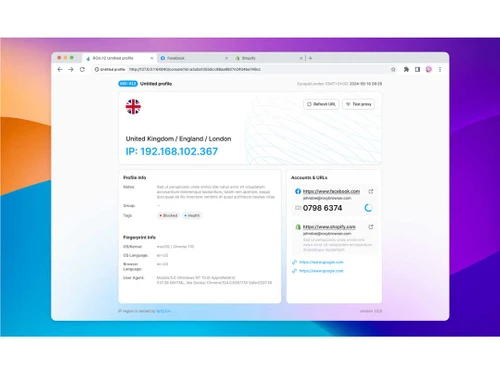
RoxyBrowser creates isolated browser profiles with unique fingerprints and proxies for safe multi-account use.
Marketers, e-commerce sellers, affiliate managers, crypto traders, and social media teams use RoxyBrowser.
Yes, a free RoxyBrowser demo can be requested from the official site.
Yes, RoxyBrowser free plan with up to 5 profiles is available.
20,000+ Software Listed
Best Price Guranteed
Free Expert Consultation
2M+ Happy Customers
Terms and Condtions

Users with registered businesses can purchase goods from merchants on the platform to satisfy their business needs. Users are not permitted to utilize any products acquired through the platform for resale, advertising, business, or further distribution.
For each purchase made, users will receive a Tax Invoice (or 'GST invoice') that includes specific details such as:
the GSTIN of the user associated with their registered business, and
the specified Entity Name for their business.
It should be noted that not all products are eligible for GST Invoice. Only the products displayed by participating sellers with the 'GST-based Invoice Available' callout on the product description page would qualify.
Certain goods and services are not eligible to get a GST Invoice, including items with VAS, i.e., Value Added Services (e.g., Total Mobile Protection/Assured Buyback) and those involving an exchange offer at the time of purchase.
Users must ensure the accuracy of the GSTIN, and business entity name provided for the GST Invoice. Requests for corrections into GST Invoice would not be accommodated by Techjockey.com or any Seller, and any issues arising from user-provided information are the sole responsibility of users.
Techjockey.com is not liable for the GST Invoice or any associated input tax credit. To efficiently claim an input tax credit, users should select the registered place of business address as per the GST authority's data and follow the provisions of the GST Act and rules.
To claim an input tax credit, the delivery and billing addresses must match. Furthermore, input tax credits will not be granted if the delivery address and GSTIN on the invoice are from different states. In case of incorrect GST details provided during the order placement, the order will be canceled automatically.



