 USA
USA UAE
UAESmall Business
Designed for startups and growing businesses


See More





Brand: Apple Inc
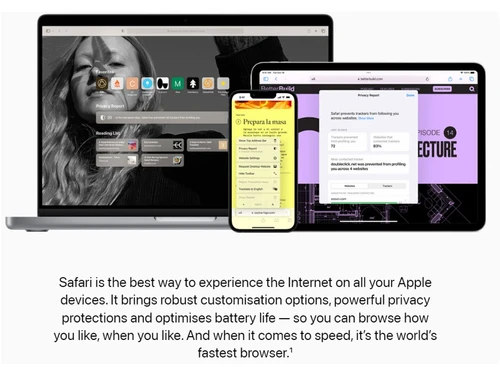
Safari is a secure web browser application designed for all Apple Inc. devices, giving fast, secure browsing experience.
See MoreHave you used Safari before?
Share your insights for better experience
Brand: Apple Inc
Founded Year: 1976
Apple is a multinational corporation that designs, manufactures, and markets consumer electronics, personal computers, and software.
This Product is Available Free Forever.
Start instantly with no fees, no subscriptions, and no commitments.
Free Forever Plan
Get started immediately at no cost. Upgrade anytime if your business demand more.
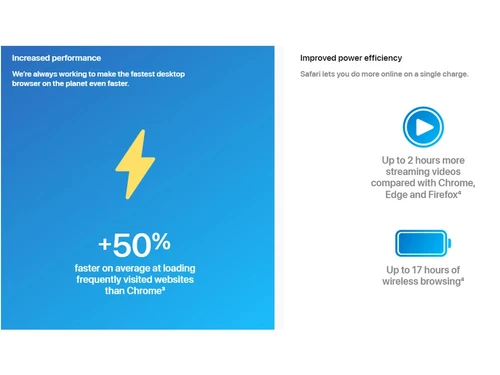
Free Forever Private Browser Increased Performance 4K Video Streaming Privacy Translation Reader Mode Apple Pay Integration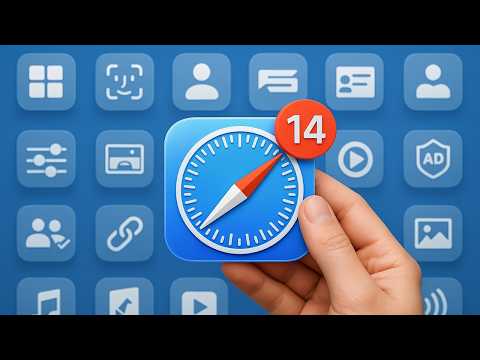

Watch the demo video to explore key features, real workflows, and how the software fits your business needs.
 iOS MacOS
  Desktop
  Mobile
  iPad
iPad  Cloud-Based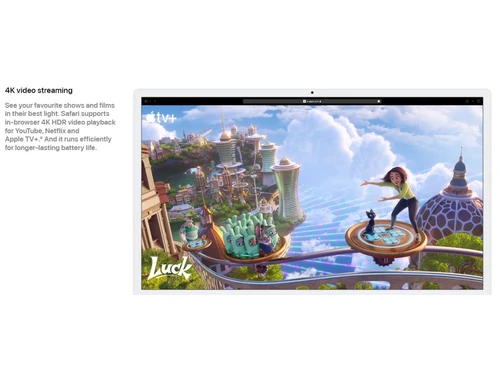
Small Business
Designed for startups and growing businesses
Medium Business
Built for business growth and flexibility
Enterprises
Designed for complex and large-scale business needs
4.4
Out of 5

Overall Rating
Based on
12 Verified Reviews
Rating Breakdown
87% Recommend this Product
Add ReviewUsers generally appreciate Safari for its speed, low memory usage, and strong privacy features, making it a reliable choice for everyday tasks like reading and browsing. Many find its seamless integration with Apple devices, particularly the Handoff feature, to be a significant advantage. However, common complaints include a lack of advanced features, limited customization options, and a less robust extension library compared to competitors. Some users also note that it can lag with multiple tabs open and is not as effective on mobile devices.
Pros
"Reader mode and video playback are smooth and easy on the eyes."
"Excellent performance on Mac with smooth scrolling and gestures."
"Super fast browsing, clean and simple interface, great integration with other Apple devices and services (like iCloud Keychain), strong focus on privacy."
Cons
"No built-in VPN or advanced privacy tools like other browsers."
"Limited compatibility with certain browser-based games and extensions."
"Not as many extensions as Chrome, and sometimes websites aren't perfectly optimized for it."


Feb 11, 2025
Techjockey Verified
“Great for Battery Life”
I stick with Safari when I’m on the go because it really helps stretch battery life. However, if I’m working on something where I want a highly customized setup, I switch to another browser.
Pros
Helps my MacBook battery last noticeably longer.
Cons
Limited themes, toolbar options, and custom shortcuts.
Reason to switch
Restricts some tabs and consists of storage limitations with resource intensive operations.
Feb 18, 2025
Techjockey Verified
“Private and Lightweight, Ideal for Casual Browsing”
I use Safari when I want something lightweight and private. It’s great for quick browsing or checking emails. But for deeper privacy, I end up switching to something more feature-rich.
Pros
Low memory usage and strong privacy defaults.
Cons
No built-in VPN or advanced privacy tools like other browsers.
Reason to switch
Potential compatibility issues with some websites due to its privacy settings, and a tendency to be resource-intensive.
Apr 1, 2025
Techjockey Verified
“Simple and Fast but Not for Developers”
Safari is perfect for everyday use. It’s light, fast, and gets the job done. But when I need to test web pages or debug, I have to switch to something like Chrome or Firefox.
Pros
Streamlined UI and fast startup times.
Cons
Lacks many developer-focused features.
Reason to switch
Needed a browser that uses less system resources and memory.

Safari
FREE
Desktop
Mobile
Web based
On Premises
Windows
Mac OS
ChatGPT Atlas
₹ 399
Desktop
Mobile
Web based
On Premises
Windows
Mac OS
XNXubd VPN Browser
Price On Request
Desktop
Mobile
Web based
On Premises
Windows
Mac OS

Perplexity Comet
Price On Request
Desktop
Mobile
Web based
On Premises
Windows
Mac OS
SquareX
Price On Request
Desktop
Mobile
Web based
On Premises
Windows
Mac OS
DICloak Antidetect Browser
Price On Request
Desktop
Mobile
Web based
On Premises
Windows
Mac OS

Vivaldi
Price On Request
Desktop
Mobile
Web based
On Premises
Windows
Mac OS

Brave Browser
Price On Request
Desktop
Mobile
Web based
On Premises
Windows
Mac OS
Fellou
Price On Request
Desktop
Mobile
Web based
On Premises
Windows
Mac OS

GoLogin
Price On Request
Desktop
Mobile
Web based
On Premises
Windows
Mac OS

Mozilla Firefox
Price On Request
Desktop
Mobile
Web based
On Premises
Windows
Mac OS
(2) Product(s) selected
Starting Price:
₹399 /Month
Available
Price on Request
Starting Price:
$20 /Month
Available
Price on Request
Available
Price on Request
Starting Price:
$20 /Month
Starting Price:
$49 /month
Available
Price on Request

Available
Price on Request

Available
Price on Request

Available
Price on Request
Safari is a browsing software built by Apple. It can be used on a range of Apple devices, including iPhones, iPads, Macs, so on and so forth.
Yes, Safari is specifically designed for Apple devices and cannot be used on any other operating system.
Safari is used to browse the web in a fast, secure, and privacy-focused manner. Users can also use it to bookmark webpages and add them to their Favourites and Reading List to turn to in the future.
Though Safari can be used in incognito mode, it still allows websites to keep a tab on your online activity. It is therefore not completely private but that does not take away from the fact that it adds an additional, pretty powerful layer of security and privacy to web browsing.
Yes, Safari is safe to use as it offers top tier privacy protection and allows users to choose what they wish to share while browsing the web. For the same, you can head to Safari settings and remove/block data the websites can get access to and use to track you in Safari.
Safari is generally available on your Apple device’s Home Screen. However, if you fail to find it there, you can search for it in App Library and add it to your Home Screen.
Yes, Safari, just like its contemporaries in the field, is a free browsing software.
Any and every Apple device, such as Macs, iPads, iPhones, and Apple watches, can make use of Safari.
Yes, Safari is a mobile app that comes preinstalled on Apple devices and is exclusively made for them.
Safari is a free browser, pre-installed on all Apple devices, with no separate demo version.
Safari runs on macOS, iOS, and iPadOS, providing smooth browsing performance across Apple devices.
Though both the said browsing software solutions are best in what they do, one field in which Safari beats Chrome through and through is memory usage.
0 0
Yes, Safari collects user data, but it keeps it private majorly. That is to say that it shares the least possible amount of it with third-party search engines. For instance, it won’t share your precise location or cookies with them, as is the case with other browsers.
0 0
Yes, Safari has built-in pop-up blocking and ad-blocking features for a smooth browsing experience.
0 0
Yes, Safari supports a wide range of extensions for enhancing functionality like ad-blocking and password management.
0 0
Safari is optimized for iOS, giving superior speed and performance compared to other third-party browsers.
0 0
20,000+ Software Listed
Best Price Guranteed
Free Expert Consultation
2M+ Happy Customers
Terms and Condtions

Users with registered businesses can purchase goods from merchants on the platform to satisfy their business needs. Users are not permitted to utilize any products acquired through the platform for resale, advertising, business, or further distribution.
For each purchase made, users will receive a Tax Invoice (or 'GST invoice') that includes specific details such as:
the GSTIN of the user associated with their registered business, and
the specified Entity Name for their business.
It should be noted that not all products are eligible for GST Invoice. Only the products displayed by participating sellers with the 'GST-based Invoice Available' callout on the product description page would qualify.
Certain goods and services are not eligible to get a GST Invoice, including items with VAS, i.e., Value Added Services (e.g., Total Mobile Protection/Assured Buyback) and those involving an exchange offer at the time of purchase.
Users must ensure the accuracy of the GSTIN, and business entity name provided for the GST Invoice. Requests for corrections into GST Invoice would not be accommodated by Techjockey.com or any Seller, and any issues arising from user-provided information are the sole responsibility of users.
Techjockey.com is not liable for the GST Invoice or any associated input tax credit. To efficiently claim an input tax credit, users should select the registered place of business address as per the GST authority's data and follow the provisions of the GST Act and rules.
To claim an input tax credit, the delivery and billing addresses must match. Furthermore, input tax credits will not be granted if the delivery address and GSTIN on the invoice are from different states. In case of incorrect GST details provided during the order placement, the order will be canceled automatically.



