linkedin
Serpent logo
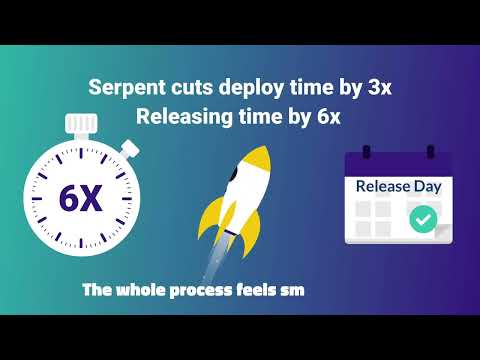
play Serpent - Where Modern Salesforce Teams
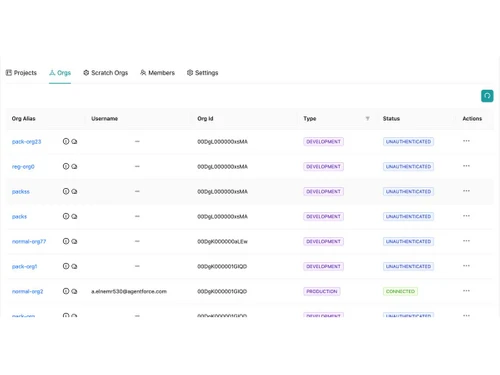
serpent orgs
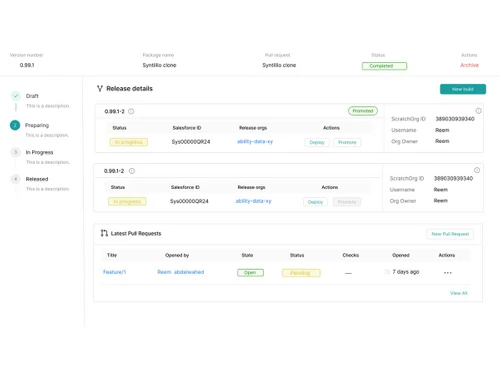
serpent Overhead

Serpent

Brand: Tekunda

  • 4.2

  • 5 Ratings

A DevOps tool that simplifies planning, testing, and deploying updates by turning complex tasks into an easy, visual workflow.

See More

Have you used Serpent before?

Share your insights for better experience

Add a Review
Starting Price
$149

View plans

100% Genuine
Products
Best Price
Guaranteed
Safe & Secure
Payment
  • Description

  • Pricing

  • Features

  • Specification

  • Review

  • Compare

  • Alternatives

  • FAQ

Starting at $149

Serpent Software Overview

What is Serpent?

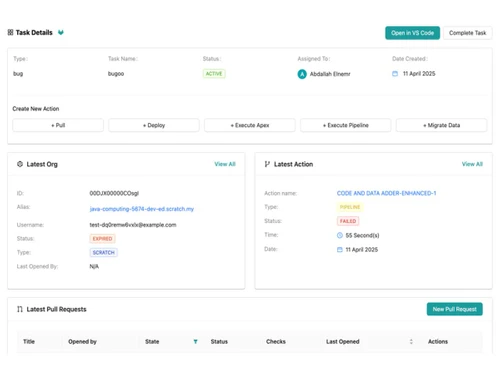
Serpent by Tekunda is a DevOps tool that helps Salesforce teams make and deliver changes faster and with less effort.

It simplifies complex DevOps work by turning updates, fixes, and new features into easy-to-manage tasks using a visual interface.

Instead of using complicated commands and manual steps, users can plan, test, and deploy changes with just a few clicks. Each task keeps a clear record of its history, testing status, and deployment details, making tracking simple.

Serpent works with different Salesforce environments like production and sandboxes, even for non-technical users. It also reduces errors, saves time, and improves team productivity by automating repetitive work.

Why Choose Serpent Software?

  • Task-Based Workflow: Every update or fix becomes a clearly defined task, making development more organized and easier to track.
  • No Git Expertise Required: Lets teams use a visual interface instead of dealing with complex Git commands or CLI tools.
  • Faster Releases: Accelerates release cycles significantly compared to traditional methods.
  • Saves Time and Effort: Helps teams reclaim many hours per month by automating repetitive DevOps tasks.
  • Supports All Team Roles: Works for developers, admins, testers, and non-technical staff, enabling smooth collaboration.
  • Flexible Org Management: Easily manage production, sandbox, and scratch orgs with minimal effort.
  • One-Click Deployments: Enables deployments with just a few clicks without heavy scripting.
  • Built-In Version Control: Tracks changes, test results, and deployment history for clarity and auditability.
  • Automatic Rollback: Easily revert to a previous stable state if issues occur.
  • Continuous Integration / Delivery (CI/CD): Supports automated pipelines for fast and reliable deployments.
  • Reduces Deployment Risks: Minimizes common errors and conflicts from manual processes.
  • Unified Interface: All tasks, builds, orgs, and history are managed in one clean dashboard.

Benefits of Serpent Software

  • VS Code Extension Support: Allows developers to sync and deploy directly from their IDE.
  • Suitable for All Team Sizes: Scales from small teams to large enterprises.
  • Transparent Pricing: Clear pricing structure with no surprise charges.
  • Quick Onboarding: Easy setup with fast implementation.
  • Better Team Collaboration: Improves coordination among developers, QA, admins, and product owners.
  • Clean Audit Trails: Maintains detailed logs for compliance and tracking.
  • Supports Metadata and Data Deployments: Full control over both code and data changes.
  • Reduces Manual Workload: Eliminates tedious scripts and manual change sets.
  • Improves Deployment Consistency: Ensures repeatable and reliable release processes.
  • Faster Feedback Cycles: Quick testing and deployment feedback for agile improvement.
  • Reduces Complexity: Avoids complicated CI/CD setups and branching issues.
  • Salesforce-Focused Design: Built specifically for Salesforce workflows and challenges.
  • Hybrid Workflow Support: Suitable for both low-code and code-driven teams.
  • Compliance Friendly: Supports audit requirements with full history tracking.
  • Less Stress for Teams: Smoother releases reduce deployment pressure and errors.
  • Cost-Effective Solution: Strong balance between features and pricing.
  • Flexible Scalability: Grows with increasing team size and project scope.
  • Multi-Org Support: Ideal for managing multiple Salesforce orgs or client environments.

Serpent Pricing

Serpent price starts at USD 149 at Techjockey.com. The pricing model is based on different parameters, including extra features, deployment type, and the total number of users. For further queries related to the product, you can contact our product team and learn more about the pricing and offers.

Read more

Tekunda Company Details

Founded Year:  2019

That’s why we build products and AI-powered tools that simplify business operations, eliminate grunt work, and help teams move faster with confidence.

Director/Founders Andrew Hanna
Company Size 1-100 Employees

Serpent Pricing & Plans

Starter
Starting at $149
    • Licenses

      Licenses
      Licenses
    • Monthly

      Monthly
      Monthly

Key Features

  • For teams, up to 3 users

  • All Serpent core DevOps features

  • Up to 30 feature releases/month

  • No per-user billing surprises

Scale
Starting at $699
    • Licenses

      Licenses
      Licenses
    • Monthly

      Monthly
      Monthly

Key Features

  • For teams, up to 10 users

  • Everything in Starter +

  • Up to 100 feature releases/month

  • Scratch Orgs Pre-warmup Pooling

Serpent Features

  • icon_check Scratch Org Pooling
    Manage and reuse scratch orgs for dev/test.
  • icon_check Sandbox Pooling
    Pre-provision and share sandboxes efficiently.
  • icon_check Task-Based GitFlow
    Auto-link tasks with Git branches for clarity.
  • icon_check Role-Based Access Control (RBAC)
    Control access by role and team.
  • icon_check Multi-Org Deployment
    Deploy across scratch, sandbox, and production.
  • icon_check Performance Metrics
    Track release accuracy and velocity.
  • icon_check Third Party Integrations
    Connect Serpent with external tools.
  • icon_check Custom Dashboards
    Monitor releases and tasks in real time.
  • icon_check Automated Testing Support
    Run tests during deployment cycles.
  • icon_check Audit Trail
    Track tasks from dev to release visually.
Serpent Demo Video play icon

Get Serpent Demo

Watch the demo video to explore key features, real workflows, and how the software fits your business needs.

Understand
Key Features
Personal
Demo Insights
Interactive
Demo Support

Serpent Specifications

Supported Platforms
Linux Linux
Devices
Desktop Desktop
Deployment
Perpetual Perpetual
Suitable For
All Industries
Business Specific
All Businesses
Business Size
Small Business Startups Medium Business SMBs SMEs MSMBs MSMEs
Customer Support
Email
Language
English
Integration
API Integration
Training Resources
Live Online

Explore the Best Alternative Solutions Similar to Your Business Size and Needs

Enterprises

Designed for complex and large-scale business needs

Github

4.5

Buddy

4.4

See More

Serpent Review

4.2

Out of 5

img

Overall Rating

Based on
5 Verified Ratings

Rating Breakdown

  • Features 4.3
  • Value for Money 4.2
  • Ease of Use 4.2
  • Customer Support 4.2

80% Recommend this Product

Add Review

Techjockey Trusted Reviews from Verified Users

No reviews are currently available for Serpent. Discover similar Devops Tools reviews
  • Github

    4.5

    Whats great - The free tier for public repos is generous; unlimited collaborators; GitHub Student for students. For teams, paid tiers add a... read more

  • Buddy

    4.4

    Whats great - Works from mobile app or browser read more

  • Progress Chef

    5.0

    Whats great - Ampla gama de recursos; Fácil de usar; Suporte a Python, Suporte ao cliente excelente; Comunidade ativa. read more
Compare Serpent With other Devops Tools

Products
Ratings
Pricing
Device Supported
Deployment
Supported Platforms
  • img

    Serpent

  • 4.2

  • Price On Request

  • Desktop

    Mobile

  • Web based

    On Premises

  • Windows

    Mac OS

  • img

    Github

  • 4.5

  • Price On Request

  • Desktop

    Mobile

  • Web based

    On Premises

  • Windows

    Mac OS

  • img

    Vercel

  • 4.1

  • Price On Request

  • Desktop

    Mobile

  • Web based

    On Premises

  • Windows

    Mac OS

  • img

    Gearset

  • 4.3

  • Price On Request

  • Desktop

    Mobile

  • Web based

    On Premises

  • Windows

    Mac OS

  • img

    Agro CD

  • 4.3

  • Price On Request

  • Desktop

    Mobile

  • Web based

    On Premises

  • Windows

    Mac OS

  • img

    AirOps

  • 4.5

  • Price On Request

  • Desktop

    Mobile

  • Web based

    On Premises

  • Windows

    Mac OS

  • img

    LaunchDarkly

  • 4.5

  • Price On Request

  • Desktop

    Mobile

  • Web based

    On Premises

  • Windows

    Mac OS

  • img

    Copado

  • 4.2

  • Price On Request

  • Desktop

    Mobile

  • Web based

    On Premises

  • Windows

    Mac OS

  • img

    InsForge

  • 4.3

  • Price On Request

  • Desktop

    Mobile

  • Web based

    On Premises

  • Windows

    Mac OS

  • img

    aikido code

  • 4.1

  • Price On Request

  • Desktop

    Mobile

  • Web based

    On Premises

  • Windows

    Mac OS

(0) Product(s) selected

Serpent Alternatives

See All Serpent Alternatives

Available

Price on Request

Available

Price on Request

Starting Price:

$10 /Month

Starting Price:

₹23,000 /Month

Starting Price:

$24 /Month

Available

Price on Request
Jeli

4.7

Starting Price:

$3,000

Available

Price on Request

Starting Price:

$149 /year

Starting Price:

$7

Available

Price on Request

Articles for Serpent

See All Related Articles

How much does Serpent cost?

Serpent price starts at USD 149 at Techjockey.com.

Is there a mobile app available for Serpent Software?

No, the Serpent mobile app is not available.

Which operating systems are compatible with Serpent Software?

Serpent is compatible with Linux.

Does Serpent Software offer a free trial?

Yes, Serpent free trial is available.

How does Serpent Software function?

Serpent works as a DevOps automation platform for Salesforce that converts each update or feature into a task, then automates building, testing, version control, and deployment via a clean visual interface removing the need for manual Git/CLI work.

Who uses Serpent Software?

Salesforce admins, developers, QA teams, consultants, and internal IT/DevOps teams (from small consultancies to large enterprises) use Serpent to manage development, testing and deployment workflows.

Is a free demo available for Serpent Software?

Yes, Serpent offers a free trial/demo so you can test its core DevOps features before buying.

Is Serpent Software available for free?

No, Serpent is a paid solution (plans start around US $149/month for a small team), though the paid plan includes a trial period.

20,000+ Software Listed

Best Price Guranteed

Free Expert Consultation

2M+ Happy Customers

Terms and Condtions

close

Users with registered businesses can purchase goods from merchants on the platform to satisfy their business needs. Users are not permitted to utilize any products acquired through the platform for resale, advertising, business, or further distribution.

For each purchase made, users will receive a Tax Invoice (or 'GST invoice') that includes specific details such as:

  • the GSTIN of the user associated with their registered business, and

  • the specified Entity Name for their business.

It should be noted that not all products are eligible for GST Invoice. Only the products displayed by participating sellers with the 'GST-based Invoice Available' callout on the product description page would qualify.

Certain goods and services are not eligible to get a GST Invoice, including items with VAS, i.e., Value Added Services (e.g., Total Mobile Protection/Assured Buyback) and those involving an exchange offer at the time of purchase.

Users must ensure the accuracy of the GSTIN, and business entity name provided for the GST Invoice. Requests for corrections into GST Invoice would not be accommodated by Techjockey.com or any Seller, and any issues arising from user-provided information are the sole responsibility of users.

Techjockey.com is not liable for the GST Invoice or any associated input tax credit. To efficiently claim an input tax credit, users should select the registered place of business address as per the GST authority's data and follow the provisions of the GST Act and rules.

To claim an input tax credit, the delivery and billing addresses must match. Furthermore, input tax credits will not be granted if the delivery address and GSTIN on the invoice are from different states. In case of incorrect GST details provided during the order placement, the order will be canceled automatically.