linkedin
Snapsheet logo
play Snapsheet Claims Platform drives digital claims transformation
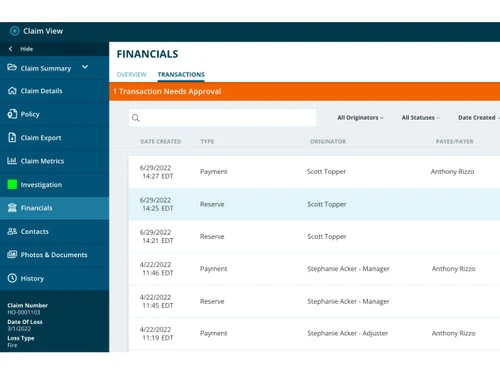
snapsheet-financials
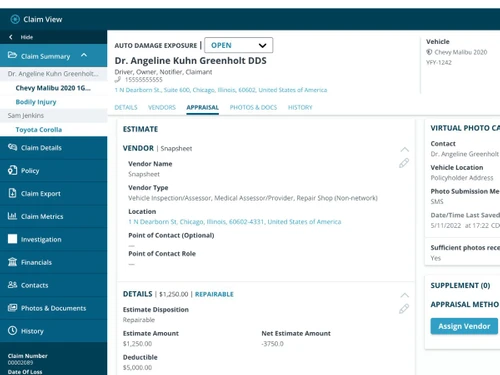
snapsheet-summary

Snapsheet

Brand: Snapsheet

  • 4.3

  • 3 Ratings

Snapsheet is a modern digital claims platform that speeds up insurance processes using virtual tools and smart automation.

See More

Have you used Snapsheet before?

Share your insights for better experience

Add a Review

Price Available on Request

Questions about pricing or customization? We’re here to help, just a click away.

100% Genuine
Products
Best Price
Guaranteed
Safe & Secure
Payment
  • Description

  • Pricing

  • Features

  • Specification

  • Review

  • Compare

  • Alternatives

  • FAQ

Snapsheet Software Overview

What is a Snapsheet?

Snapsheet is an advanced claims management software that helps insurance companies manage the full claim lifecycle through automation and digital tools. From handling claims online to making quick payouts, Snapsheet simplifies everything.

It replaces slow paper-based methods with fast, mobile-friendly tools that support virtual appraisals, automated workflows, and real-time communication between insurers and customers. This results in quicker claims, less paperwork, and happier clients.

Built to suit modern insurance workflows, Snapsheet supports multiple languages, secure payments, fraud detection, and API connections for smooth integrations. It also features a secure client portal and compliance tools to meet industry rules easily.

Snapsheet is trusted by many insurers for its speed, user experience, and flexible cloud-based design, making it a reliable choice for improving both customer service and backend operations.

Why Choose Snapsheet

  • Digital-First Platform: Snapsheet works fully online, allowing insurers to handle claims from anywhere without needing paperwork or physical visits.
  • Virtual Claims Handling: Using virtual appraisals and online portals, it allows faster claim estimates without physical inspection delays.
  • Smart Automation: The built-in workflow automation saves time by moving claims through steps automatically, with fewer manual actions.
  • Improves Customer Experience: With self-service options and real-time updates, customers stay informed and feel more in control during the claim process.
  • Faster Payments: Snapsheet supports digital payment systems that help insurance companies settle claims much faster than traditional methods.

Benefits of Snapsheet

  • Reduces Claim Processing Time: By combining automation and virtual tools, Snapsheet cuts down the claim process time drastically.
  • Lower Operational Costs: With fewer manual tasks and no need for paper documents or physical offices, it saves companies a lot of money.
  • Boosts Customer Trust: Quick responses, easy tracking, and fast payments lead to higher customer satisfaction and better brand reputation.
  • Works on Mobile Devices: Snapsheet is mobile-friendly, so your team and customers can manage claims from any device.
  • Real-Time Data Insights: The platform gives live updates on claims, user activity, and payout status, helping teams act quickly and smartly.

Snapsheet Pricing

Snapsheet pricing is available on request at Techjockey.com. The pricing model is based on different parameters, including extra features, deployment type, and the total number of users. For further queries related to the product, you can contact our product team and learn more about the pricing and offers.

Read more

Snapsheet Company Details

Founded Year:  2011

At Snapsheet, we take pride in being at the forefront of claims management technology, pioneering the virtual appraisals revolution, and setting new standards in efficiency for auto, property, and commercial lines.

Director/Founders Brad Weisberg
Company Size 501-1000 Employees

Snapsheet Pricing & Plans

Looking for The Right Pricing?

Share your requirements and get a plan built around your business.

  • Define your business needs
  • Get customised pricing
  • Choose features that fit your workflow

Price Available on Request

Get personalised Snapsheet pricing that fits your needs. Our team will connect with you.

Snapsheet Features

  • icon_check Workflow Automation
    Move claims through steps automatically with predefined rules and task triggers.
  • icon_check Payment Management
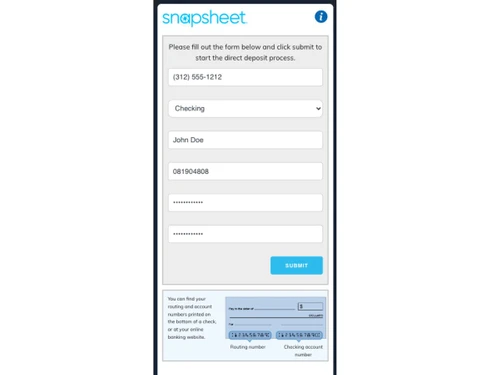
    Manage and automate all claim-related payments through a secure digital process.
  • icon_check Virtual Appraisals
    Assess damage or claims without on-site visits using digital tools and photos.
  • icon_check API Integration
    Easily connect Snapsheet with CRMs, payment tools, or core insurance systems.
  • icon_check Fraud Detection
    Identify and flag risky or false claims in real-time using advanced tracking tools.
  • icon_check Client Portal
    Customers can submit claims, upload files, and check progress from a simple online portal.
  • icon_check Compliance Checking
    Ensure all claims follow insurance laws and internal policy rules using built-in checks.
  • icon_check Multi-Language Support
    Use the platform in various languages to serve a wide and diverse customer base.
Snapsheet Demo Video play icon

Get Snapsheet Demo

Watch the demo video to explore key features, real workflows, and how the software fits your business needs.

Understand
Key Features
Personal
Demo Insights
Interactive
Demo Support

Snapsheet Specifications

Supported Platforms
Ubuntu Ubuntu Windows Windows MacOS MacOS Linux Linux
Devices
Desktop Desktop
Deployment
Cloud-Based Cloud-Based
Suitable For
All Industries
Business Specific
All Businesses
Business Size
Small Business Startups Medium Business Enterprises SMBs SMEs MSMBs MSMEs
Customer Support
Email Communities
Language
English
Training Resources
Videos

Snapsheet Review

4.3

Out of 5

img

Overall Rating

Based on
3 Verified Ratings

Rating Breakdown

  • Features 4.3
  • Value for Money 4.5
  • Ease of Use 4.1
  • Customer Support 4.3

80% Recommend this Product

Add Review

Be the First to Review

This product has no reviews yet. Be the first to leave your feedback.

Add Review

Compare Snapsheet With other Claims Management Software

Products
Ratings
Pricing
Device Supported
Deployment
Supported Platforms
  • img

    Snapsheet

  • 4.3

  • Price On Request

  • Desktop

    Mobile

  • Web based

    On Premises

  • Windows

    Mac OS

  • img

    YoroClaims

  • 4.3

  • Price On Request

  • Desktop

    Mobile

  • Web based

    On Premises

  • Windows

    Mac OS

  • img

    ClaimBook

  • 4.5

  • Price On Request

  • Desktop

    Mobile

  • Web based

    On Premises

  • Windows

    Mac OS

  • img

    Perfios Acclaim

  • 4.5

  • Price On Request

  • Desktop

    Mobile

  • Web based

    On Premises

  • Windows

    Mac OS

  • img

    Reimbursify

  • 4.1

  • Price On Request

  • Desktop

    Mobile

  • Web based

    On Premises

  • Windows

    Mac OS

  • img

    ProClaimz

  • 4.2

  • Price On Request

  • Desktop

    Mobile

  • Web based

    On Premises

  • Windows

    Mac OS

(0) Product(s) selected

Snapsheet Alternatives

See All Snapsheet Alternatives

Available

Price on Request

Starting Price:

₹10,000 /Month

Available

Price on Request

How much does a Snapsheet cost?

Snapsheet pricing is available on request at Techjockey.com. This insurance management software offers flexible pricing based on features.

How does Snapsheet work?

It combines automation, virtual inspections, and payment tools to handle the full insurance claim cycle digitally.

Who uses a Snapsheet?

Insurance providers, claims handlers, and brokers use Snapsheet to simplify and speed up their claims processes.

Can Snapsheet process claims faster than traditional methods?

Yes, it removes paperwork, supports online assessments, and automates approvals, making it much faster.

Does Snapsheet offer mobile access?

Yes, both staff and customers can access Snapsheet from mobile phones and tablets for easy use anytime.

Is there a customer portal in Snapsheet?

Yes, it includes a client-facing portal where users can upload documents, view claim status, and communicate directly.

Can I detect fraud using Snapsheet?

Yes, it comes with advanced fraud detection features that alert you about any suspicious claims.

Does Snapsheet support multi-language users?

Yes, the system can be used in multiple languages, making it useful for global or regional teams.

Can a Snapsheet be connected to my current insurance system?

Yes, its open API allows easy integration with other systems like your CRM or accounting software.

Is Snapsheet suitable for all sizes of insurance companies?

Absolutely. Whether you are a small team or a large insurer, Snapsheet fits your size and can grow with your business.

20,000+ Software Listed

Best Price Guranteed

Free Expert Consultation

2M+ Happy Customers

Terms and Condtions

close

Users with registered businesses can purchase goods from merchants on the platform to satisfy their business needs. Users are not permitted to utilize any products acquired through the platform for resale, advertising, business, or further distribution.

For each purchase made, users will receive a Tax Invoice (or 'GST invoice') that includes specific details such as:

  • the GSTIN of the user associated with their registered business, and

  • the specified Entity Name for their business.

It should be noted that not all products are eligible for GST Invoice. Only the products displayed by participating sellers with the 'GST-based Invoice Available' callout on the product description page would qualify.

Certain goods and services are not eligible to get a GST Invoice, including items with VAS, i.e., Value Added Services (e.g., Total Mobile Protection/Assured Buyback) and those involving an exchange offer at the time of purchase.

Users must ensure the accuracy of the GSTIN, and business entity name provided for the GST Invoice. Requests for corrections into GST Invoice would not be accommodated by Techjockey.com or any Seller, and any issues arising from user-provided information are the sole responsibility of users.

Techjockey.com is not liable for the GST Invoice or any associated input tax credit. To efficiently claim an input tax credit, users should select the registered place of business address as per the GST authority's data and follow the provisions of the GST Act and rules.

To claim an input tax credit, the delivery and billing addresses must match. Furthermore, input tax credits will not be granted if the delivery address and GSTIN on the invoice are from different states. In case of incorrect GST details provided during the order placement, the order will be canceled automatically.