linkedin
SonarQube logo
play Understanding Issues with Multiple Locations
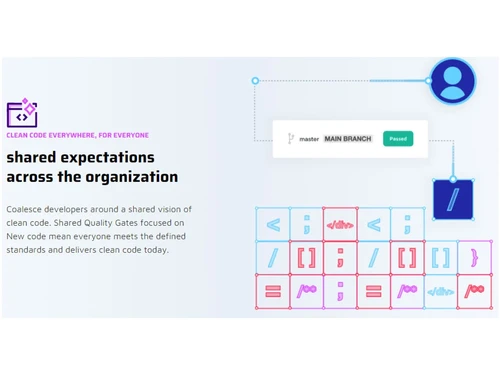
sonarqube clean code everywhere for everyone
sonarqube flexibility and governance

SonarQube

Brand: SonarSource

  • 4.4

  • 4 Ratings

SonarQube is an open-source DevOps tool for continuous code quality inspection, detecting bugs, vulnerabilities, and code smells.

See More

Have you used SonarQube before?

Share your insights for better experience

Add a Review
Starting Price
$32

View plans

100% Genuine
Products
Best Price
Guaranteed
Safe & Secure
Payment
  • Description

  • Pricing

  • Features

  • Specification

  • Review

  • Compare

  • Alternatives

  • FAQ

Starting at $32

SonarQube Software Overview

What is SonarQube?

SonarQube is a DevOps tool that helps developers ensure code quality and security by automatically analyzing code for bugs, vulnerabilities, and code smells. It supports multiple programming languages and integrates seamlessly with popular development environments and CI/CD pipelines.

By providing clear reports and actionable insights, SonarQube enables teams to detect and fix issues early in the development process. It also enforces coding standards, ensures compliance with industry regulations, and tracks code quality over time. Additionally, its dashboards offer real-time monitoring of code health, making it easier for teams to maintain clean, secure, and maintainable code. Whether for small projects or large enterprise applications, SonarQube is a valuable tool for achieving higher code quality.

Why Choose SonarQube Software?

  • Code Quality Analysis: Helps identify bugs, vulnerabilities, and code smells in your codebase, ensuring higher code quality.
  • Multi-Language Support: SonarQube supports multiple programming languages, making it versatile for different types of projects.
  • Real-Time Code Reviews: Provides real-time feedback through integration with your IDE and CI/CD pipelines.
  • Easy Integration: Seamlessly integrates with various DevOps tools, such as Jenkins, GitHub, GitLab, and Bitbucket.
  • Scalable: Suitable for projects of any size, from small teams to large enterprise-level applications.
  • Boosts Developer Productivity: Allows developers to detect issues early in the development process, saving time on bug fixes.
  • Security Focused: It helps in identifying security vulnerabilities, supporting secure coding practices.
  • Detailed Reporting: Offers insightful dashboards and reports that track code quality and project health.
  • Customizable: You can configure quality profiles and rules to suit your team’s coding standards.
  • Cloud Integration: Easily integrates with cloud-based platforms and services like SonarCloud for additional flexibility.

Benefits of SonarQube Software

  • Enhanced Code Consistency: Helps maintain uniform code quality across teams by enforcing coding standards and best practices.
  • Early Bug Detection: Identifies bugs and issues early in the development lifecycle, preventing costly post-production fixes.
  • Comprehensive Language Support: Supports a wide range of programming languages, ensuring compatibility across diverse tech stacks.
  • Integration with Version Control: Integrates easily with version control systems, enabling continuous quality monitoring throughout the development cycle.
  • Customizable Quality Gates: Set specific thresholds for code quality, ensuring only high-quality code is merged.
  • Collaborative Environment: Provides detailed feedback and reports, fostering collaboration among developers and teams for better code improvement.
  • Track Code Quality Trends: Monitor improvements or regressions in code quality over time through comprehensive reporting and historical data tracking.
  • Improved Developer Confidence: Gives developers confidence by proactively addressing security vulnerabilities, bugs, and code inefficiencies.
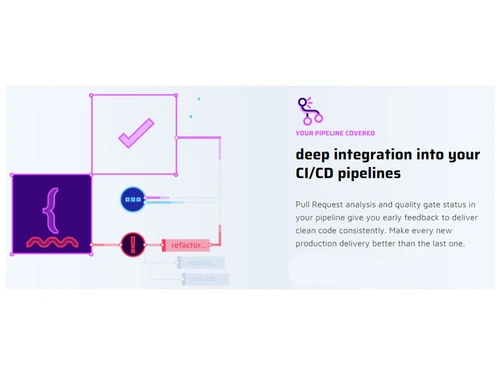
  • CI/CD Pipeline Integration: Seamlessly integrates with CI/CD pipelines to automate code analysis and provide continuous feedback during builds.
  • Cloud Integration: Integrates with cloud platforms for scalable and accessible code quality management.

SonarQube Pricing

SonarQube price in India starts at $32 at techjockey.com.

The pricing model is based on different parameters, including extra features, deployment type, and the total number of users. For further queries related to the product, you can contact our product team and learn more about the pricing and offers.

Read more

SonarSource Company Details

Founded Year:  2008

SonarSource provides open-source and commercial code analyzers to help developers manage code quality.

Director/Founders Freddy Mallet, Olivier Gaudin, Simon Brandhof
Company Size 1-100 Employees

SonarQube Pricing & Plans

[Cloud-based]-Team
Starting at $32
    • Licenses

      Licenses
      Licenses
    • Monthly

      Monthly
      Monthly

Key Features

  • Scan private & open source projects

  • Languages and frameworks-30

  • AI CodeFix

  • AI Code Assurance

  • Quality gates

  • Automatic Analysis for new projects

[Self-managed]-Developer
Starting at $500
    • Licenses

      Licenses
      Licenses
    • Yearly

      Yearly
      Yearly

Key Features

  • Languages and frameworks-29

  • Recommended for 100K Lines of Code or above

  • Limited to 4 integrations with DevOps platforms

  • AI CodeFix (early access)

  • Autodetect AI-generated code

  • AI Code Assurance

SonarQube Features

  • icon_check Sonarlint IDE Integration
    Provides real-time code analysis within your IDE to detect issues early.
  • icon_check Unified Configurations
    Manage consistent code quality rules across different projects and teams.
  • icon_check High Operability
    Ensures smooth performance with scalable architecture for large applications.
  • icon_check Dashboards
    Offers clear visual reports of code quality, security issues, and project status.
  • icon_check Quality Assurance
    Helps maintain clean code by identifying bugs, vulnerabilities, and code smells.
  • icon_check Multi-language
    Supports a wide range of programming languages for comprehensive code analysis.
  • icon_check Development Tools
    Integrates with popular development tools and CI/CD pipelines for seamless workflows.
  • icon_check Continuous Delivery
    Enhances DevOps practices by ensuring quality code is delivered faster.
  • icon_check Reporting & Analytics
    Generates detailed reports and insights to monitor code health and track improvements.
SonarQube Demo Video play icon

Get SonarQube Demo

Watch the demo video to explore key features, real workflows, and how the software fits your business needs.

Understand
Key Features
Personal
Demo Insights
Interactive
Demo Support

SonarQube Specifications

Supported Platforms
Windows Windows
Devices
Desktop Desktop
Deployment
Cloud-Based Cloud-Based
Suitable For
All Industries
Business Specific
All Businesses
Business Size
Small Business Startups Medium Business
Customer Support
Email
Language
English
Training Resources
Videos

Explore the Best Alternative Solutions Similar to Your Business Size and Needs

Enterprises

Designed for complex and large-scale business needs

Github

4.5

Buddy

4.4

See More

SonarQube Review

4.4

Out of 5

img

Overall Rating

Based on
4 Verified Ratings

Rating Breakdown

  • Features 4.5
  • Value for Money 4.3
  • Ease of Use 4.3
  • Customer Support 4.5

90% Recommend this Product

Add Review

Techjockey Trusted Reviews from Verified Users

No reviews are currently available for SonarQube. Discover similar Devops Tools reviews
  • Github

    4.5

    Whats great - The free tier for public repos is generous; unlimited collaborators; GitHub Student for students. For teams, paid tiers add a... read more

  • Buddy

    4.4

    Whats great - Works from mobile app or browser read more

  • Progress Chef

    5.0

    Whats great - Ampla gama de recursos; Fácil de usar; Suporte a Python, Suporte ao cliente excelente; Comunidade ativa. read more

Compare SonarQube With other Devops Tools

Products
Ratings
Pricing
Device Supported
Deployment
Supported Platforms
  • img

    SonarQube

  • 4.4

  • Price On Request

  • Desktop

    Mobile

  • Web based

    On Premises

  • Windows

    Mac OS

  • img

    Github

  • 4.5

  • Price On Request

  • Desktop

    Mobile

  • Web based

    On Premises

  • Windows

    Mac OS

  • img

    Vercel

  • 4.1

  • Price On Request

  • Desktop

    Mobile

  • Web based

    On Premises

  • Windows

    Mac OS

  • img

    Gearset

  • 4.3

  • Price On Request

  • Desktop

    Mobile

  • Web based

    On Premises

  • Windows

    Mac OS

  • img

    Agro CD

  • 4.3

  • Price On Request

  • Desktop

    Mobile

  • Web based

    On Premises

  • Windows

    Mac OS

  • img

    AirOps

  • 4.5

  • Price On Request

  • Desktop

    Mobile

  • Web based

    On Premises

  • Windows

    Mac OS

  • img

    LaunchDarkly

  • 4.5

  • Price On Request

  • Desktop

    Mobile

  • Web based

    On Premises

  • Windows

    Mac OS

  • img

    Copado

  • 4.2

  • Price On Request

  • Desktop

    Mobile

  • Web based

    On Premises

  • Windows

    Mac OS

  • img

    InsForge

  • 4.3

  • Price On Request

  • Desktop

    Mobile

  • Web based

    On Premises

  • Windows

    Mac OS

  • img

    aikido code

  • 4.1

  • Price On Request

  • Desktop

    Mobile

  • Web based

    On Premises

  • Windows

    Mac OS

(2) Product(s) selected

SonarQube Alternatives

See All SonarQube Alternatives

Available

Price on Request

Available

Price on Request

Starting Price:

$10 /Month

Starting Price:

₹23,000 /Month

Starting Price:

$24 /Month

Available

Price on Request
Jeli

4.7

Starting Price:

$3,000

Available

Price on Request

Starting Price:

$149 /year

Starting Price:

$7

Available

Price on Request

Articles for SonarQube

See All Related Articles

How much does SonarQube Software cost?

The price of SonarQube in India starts at $32 on techjockey.com.

Is there a mobile app available for SonarQube Software?

No, SonarQube does not have a mobile app.

Which operating systems are compatible with the SonarQube DevOps tool?

SonarQube is compatible with Windows only.

Does SonarQube offer a free trial?

Yes, SonarQube offers a free trial for its commercial editions.

How does SonarQube function?

SonarQube analyzes code quality, detects bugs and vulnerabilities, and provides detailed reports through its web interface.

Who uses SonarQube Software?

Developers, DevOps teams, and organizations focusing on improving code quality and security can benefit from SonarQube DevOps tool.

Is a free demo available for SonarQube?

Yes, SonarQube offers a free demo upon request.

Is SonarQube available for free?

Yes, SonarQube has a free open-source version with limited features.

What programming languages does SonarQube support?

SonarQube supports over 25 programming languages, including Java, C#, JavaScript, Python, PHP, and more.

Can SonarQube integrate with other tools?

Yes, SonarQube integrates with CI/CD tools like Jenkins, GitHub, GitLab, and Azure DevOps.

20,000+ Software Listed

Best Price Guranteed

Free Expert Consultation

2M+ Happy Customers

Terms and Condtions

close

Users with registered businesses can purchase goods from merchants on the platform to satisfy their business needs. Users are not permitted to utilize any products acquired through the platform for resale, advertising, business, or further distribution.

For each purchase made, users will receive a Tax Invoice (or 'GST invoice') that includes specific details such as:

  • the GSTIN of the user associated with their registered business, and

  • the specified Entity Name for their business.

It should be noted that not all products are eligible for GST Invoice. Only the products displayed by participating sellers with the 'GST-based Invoice Available' callout on the product description page would qualify.

Certain goods and services are not eligible to get a GST Invoice, including items with VAS, i.e., Value Added Services (e.g., Total Mobile Protection/Assured Buyback) and those involving an exchange offer at the time of purchase.

Users must ensure the accuracy of the GSTIN, and business entity name provided for the GST Invoice. Requests for corrections into GST Invoice would not be accommodated by Techjockey.com or any Seller, and any issues arising from user-provided information are the sole responsibility of users.

Techjockey.com is not liable for the GST Invoice or any associated input tax credit. To efficiently claim an input tax credit, users should select the registered place of business address as per the GST authority's data and follow the provisions of the GST Act and rules.

To claim an input tax credit, the delivery and billing addresses must match. Furthermore, input tax credits will not be granted if the delivery address and GSTIN on the invoice are from different states. In case of incorrect GST details provided during the order placement, the order will be canceled automatically.