linkedin
Soundation logo
soundation dashboard
soundation features
soundation transform

Soundation

Brand: Soundation

  • 4.1

  • 3 Ratings

An online music-making platform that lets users create, collaborate, and record music using various professional sounds, instruments, and effects.

See More

Have you used Soundation before?

Share your insights for better experience

Add a Review

Price Available on Request

Questions about pricing or customization? We’re here to help, just a click away.

100% Genuine
Products
Best Price
Guaranteed
Safe & Secure
Payment
  • Description

  • Pricing

  • Features

  • Specification

  • Review

  • Compare

  • Alternatives

  • FAQ

Soundation Software Overview

What is Soundation?

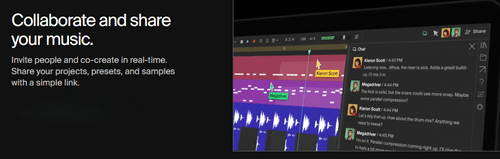
Soundation is an audio mixing software that allows users to create, collaborate, and record music easily. It offers professional-grade sounds, instruments, and effects that anyone can use, whether you're a beginner or an experienced producer. You can invite others to work on your music projects in real-time and share your creations with just a link.

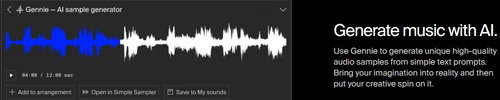
Soundation also includes a feature called Gennie, which lets you generate unique audio samples using simple text prompts. With a library of over 20,000 royalty-free loops and samples, you can easily find inspiration for your music. The platform provides tools for making beats, recording audio, and designing unique sounds, making it a comprehensive tool for music production. Plus, it offers guides and tutorials to help you learn music production step-by-step.

Why Choose Soundation Software?

  • Real-Time Collaboration: It allows multiple users to work on the same project simultaneously, making it easy to create music together from different locations.
  • Extensive Loop Library: With over 20,000 loops and samples available, users have a wide range of sounds to choose from, enhancing creativity and production quality.
  • User-Friendly Interface: The intuitive design makes it accessible for beginners while still offering advanced features for experienced producers.
  • AI Music Generation: Soundation includes AI tools that can generate unique audio samples from simple text prompts, providing inspiration and new ideas for compositions.
  • Custom Instrument Creation: Users can create their own instruments from audio samples, allowing for personalized sound design.
  • Cloud Storage: Projects are saved in the cloud, enabling easy access and sharing without the need for local storage.
  • Export Options: Users can export their completed projects in various formats, making it simple to share music with others or use in different applications.

Benefits of Soundation Software

  • Online Studio: Create and produce music directly in your web browser without needing to install software.
  • Audio Sampling: Turn audio recordings into playable instruments with the Simple Sampler.
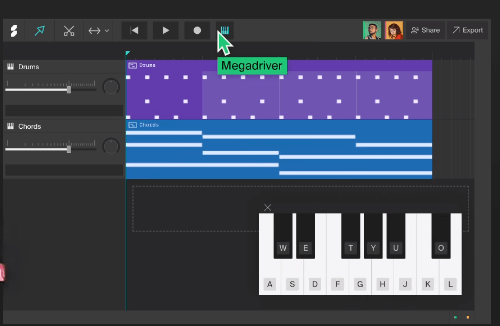
  • Beatmaking: Use the Beatmaker to create beats from scratch or choose from ready-made beats and kits.
  • Extensive Sound Library: Access over 20,000 loops and samples for various musical styles.
  • Custom Sound Design: Design unique sounds using drum machines, samplers, and synthesizers.
  • Audio Effects: Apply various audio effects, including reverb, delay, and EQ, to enhance your tracks.
  • MIDI Recording and Editing: Record and edit MIDI for precise control over your music.
  • Templates: Start projects with customizable templates to inspire creativity.
  • Time Stretching: Adjust the tempo of audio clips without affecting pitch.
  • Vocal Tuning and Filters: Improve vocal tracks with vocal tuning and filtering effects.

Pricing of Soundation

Soundation price details are available on request at techjockey.com.

The pricing model is based on different parameters, including extra features, deployment type, and the total number of users. For further queries related to the product, you can contact our product team and learn more about the pricing and offers.

Read more

Soundation Pricing & Plans

Looking for The Right Pricing?

Share your requirements and get a plan built around your business.

  • Define your business needs
  • Get customised pricing
  • Choose features that fit your workflow

Price Available on Request

Get personalised Soundation pricing that fits your needs. Our team will connect with you.

Soundation Features

  • icon_check Loops & Presets
    A collection of drag-and-drop loops and sound presets for quick music composition.
  • icon_check Instruments
    Virtual instruments like synthesizers and drum machines for creating melodies and rhythms.
  • icon_check Audio Effects
    Built-in effects such as reverb, delay, and EQ to enhance audio tracks.
  • icon_check Smart Trim
    An editing tool that automatically trims audio clips to the needed length.
  • icon_check Master Creations
    Mixing and mastering tools for achieving professional-quality sound.
  • icon_check Audio Recording
    The ability to record live audio directly into the platform.
  • icon_check Time Stretch / Compress
    Adjust the tempo of audio clips without changing their pitch.
  • icon_check Filters
    Audio filters to shape the frequency spectrum, enhancing or reducing specific tones.

Soundation Specifications

Supported Platforms
Windows Windows
Devices
Desktop Desktop
Deployment
Cloud-Based Cloud-Based
Suitable For
All Industries
Business Specific
All Businesses
Business Size
Small Business Startups
Customer Support
Email
Language
English
Training Resources
Documentation Videos

Soundation Review

4.1

Out of 5

img

Overall Rating

Based on
3 Verified Ratings

Rating Breakdown

  • Features 4.3
  • Value for Money 3.8
  • Ease of Use 4.1
  • Customer Support 4.1

100% Recommend this Product

Add Review

Techjockey Trusted Reviews from Verified Users

No reviews are currently available for Soundation. Discover similar Audio Mixing Software reviews

  • Cubase PRO

    4.7

    Whats great - Cubebase pro comes with a excellent features. The great thing is that there updates are always so amazing. I curiously waits ... read more

  • Samplitude Pro X5

    4.8

    Whats great - I like the workflow. I like the fact it includes the master chain like fl studio, studio one to project panel it doesn't give... read more

  • AudioTool

    3.4

    Whats great - Purchase TV and audio setup but the delivery was not on time and installation is still pending. Although the Techjockey team ... read more

Compare Soundation With other Audio Mixing Software

Products
Ratings
Pricing
Device Supported
Deployment
Supported Platforms
  • img

    Soundation

  • 4.1

  • Price On Request

  • Desktop

    Mobile

  • Web based

    On Premises

  • Windows

    Mac OS

  • img

    Cubase PRO

  • 4.6

  • ₹ 52320

  • Desktop

    Mobile

  • Web based

    On Premises

  • Windows

    Mac OS

  • img

    MixMeister Express

  • 4.5

  • Price On Request

  • Desktop

    Mobile

  • Web based

    On Premises

  • Windows

    Mac OS

  • img

    Samplitude Pro X5

  • 4.7

  • Price On Request

  • Desktop

    Mobile

  • Web based

    On Premises

  • Windows

    Mac OS

  • img

    Acoustica

  • 4.0

  • Price On Request

  • Desktop

    Mobile

  • Web based

    On Premises

  • Windows

    Mac OS

  • img

    AudioTool

  • 3.3

  • Price On Request

  • Desktop

    Mobile

  • Web based

    On Premises

  • Windows

    Mac OS

(2) Product(s) selected

Soundation Alternatives

See All Soundation Alternatives

Available

Price on Request

Available

Price on Request

Articles for Soundation

See All Related Articles

How much does Soundation Software cost?

Soundation pricing details can be obtained upon request at techjockey.com.

Is there any Soundation Software app?

Yes, Soundation can be accessed through a web-based platform and is not compatible with mobile devices.

Which operating system does Soundation Software support?

Soundation is a cloud-based application and works with Windows only.

Does Soundation offer a free trial?

Yes, Soundation offers a free version with limited features, allowing users to explore its functionalities.

How does Soundation Software work?

Soundation Software works by providing an online platform where users can create, collaborate, and produce music using virtual instruments, loops, and audio effects in a user-friendly interface.

Who are the potential users of Soundation Software?

Potential users of Soundation include musicians, producers, educators, and hobbyists interested in music creation and collaboration.

Is there any free demo for Soundation Software?

Yes, Soundation offers a free demo version that allows users to explore its features and create music before committing to a paid plan.

Is Soundation Software free?

Yes, Soundation offers a free version, though it comes with limited features compared to the paid plans.

What features are included in the free version of Soundation?

The free version of Soundation includes basic audio editing tools, access to loops and samples, and the ability to create and save projects but with a limited sound library and functionality.

Is it possible to export projects from Soundation?

Yes, users can export their projects in various audio formats such as MP3 and WAV for sharing or further editing on Soundation.

20,000+ Software Listed

Best Price Guranteed

Free Expert Consultation

2M+ Happy Customers

Terms and Condtions

close

Users with registered businesses can purchase goods from merchants on the platform to satisfy their business needs. Users are not permitted to utilize any products acquired through the platform for resale, advertising, business, or further distribution.

For each purchase made, users will receive a Tax Invoice (or 'GST invoice') that includes specific details such as:

  • the GSTIN of the user associated with their registered business, and

  • the specified Entity Name for their business.

It should be noted that not all products are eligible for GST Invoice. Only the products displayed by participating sellers with the 'GST-based Invoice Available' callout on the product description page would qualify.

Certain goods and services are not eligible to get a GST Invoice, including items with VAS, i.e., Value Added Services (e.g., Total Mobile Protection/Assured Buyback) and those involving an exchange offer at the time of purchase.

Users must ensure the accuracy of the GSTIN, and business entity name provided for the GST Invoice. Requests for corrections into GST Invoice would not be accommodated by Techjockey.com or any Seller, and any issues arising from user-provided information are the sole responsibility of users.

Techjockey.com is not liable for the GST Invoice or any associated input tax credit. To efficiently claim an input tax credit, users should select the registered place of business address as per the GST authority's data and follow the provisions of the GST Act and rules.

To claim an input tax credit, the delivery and billing addresses must match. Furthermore, input tax credits will not be granted if the delivery address and GSTIN on the invoice are from different states. In case of incorrect GST details provided during the order placement, the order will be canceled automatically.