linkedin
Spiff logo
play Commission Estimator | Spiff
Spiff Design
Spiff Manage

Spiff

Brand: Spiff

  • 4.1

  • 3 Ratings

Spiff software is a sales commission platform that automates compensation calculations and payouts.

See More

Have you used Spiff before?

Share your insights for better experience

Add a Review

Price Available on Request

Questions about pricing or customization? We’re here to help, just a click away.

100% Genuine
Products
Best Price
Guaranteed
Safe & Secure
Payment
  • Description

  • Pricing

  • Features

  • Specification

  • Review

  • Compare

  • Alternatives

  • FAQ

Spiff Software Overview

What is Spiff?

Spiff software is a comprehensive sales commission solution designed to streamline compensation management processes. It automates commission calculations, ensuring accuracy and efficiency while reducing administrative burden.

With Spiff, businesses can easily track sales performance, manage incentives, and motivate their sales teams effectively. The platform offers transparency, enabling both employees and managers to monitor commissions in real-time. Spiff integrates seamlessly with existing CRM and ERP systems, providing a cohesive solution for sales compensation management.

Why Choose Spiff Software?

  • Efficiency: It automates commission calculations and payouts, saving time and reducing errors associated with manual processes.
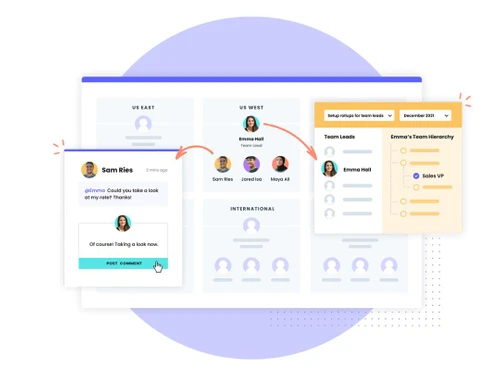
  • Transparency: The platform offers real-time visibility into commission structures and performance metrics, fostering transparency and trust within the sales team.
  • Accuracy: With its advanced algorithms, it ensures accurate commission calculations, minimizing disputes and discrepancies.
  • Integration: It seamlessly integrates with existing CRM and ERP systems, providing a unified solution for sales compensation management.
  • Motivation: By offering clear incentives and rewards it helps motivate sales teams to achieve their targets and drive revenue growth.
  • Scalability: Whether for small businesses or large enterprises, it scales to meet the needs of organizations of all sizes, adapting to changing business requirements.

Benefits of Spiff Platform

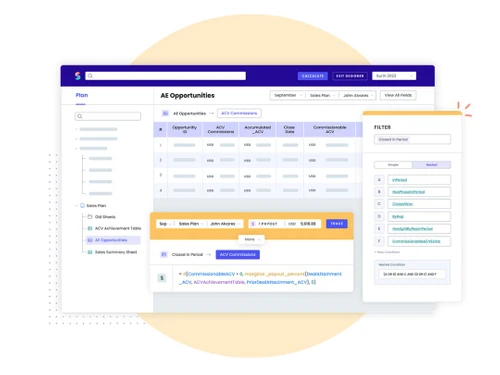
  • Customizable Commission Structures: It allows businesses to define and implement custom commission structures tailored to their specific sales processes and goals.
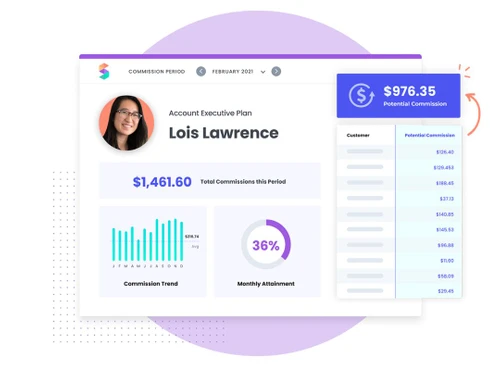
  • Performance Analytics: The platform provides in-depth analytics and reporting capabilities, enabling businesses to track sales performance trends, identify top performers, and make data-driven decisions.
  • Gamification Features: It offers gamification tools that incentivize healthy competition among sales teams, driving engagement and productivity.
  • Compliance Management: It includes features to ensure compliance with industry regulations and internal policies regarding commission calculations and payouts.
  • Forecasting and Planning: It assists businesses in forecasting future sales performance based on historical data and trends, facilitating strategic planning and goal setting.
  • Mobile Accessibility: The software offers mobile-friendly interfaces or dedicated mobile apps, allowing sales reps to access their commission information and performance metrics on the go.

Pricing of Spiff Compensation Management Software

Spiff price details are available on request at techjockey.com.

The pricing model is based on different parameters, including extra features, deployment type, and the total number of users. For further queries related to the product, you can contact our product team and learn more about the pricing and offers.

Read more

Spiff Company Details

Founded Year:  2017

Spiff is a compensation platform for revenue and sales organizations that helps automate complex commission processes and motivate sales.

Director/Founders Albert Candari, Casey Crouch, Jean-Philippe Maitre, Jeron Paul, Matt Stapleton, Mike Ries, Tanner La
Company Size 1-100 Employees

Spiff Pricing & Plans

Looking for The Right Pricing?

Share your requirements and get a plan built around your business.

  • Define your business needs
  • Get customised pricing
  • Choose features that fit your workflow

Price Available on Request

Get personalised Spiff pricing that fits your needs. Our team will connect with you.

Spiff Features

  • icon_check Commission Management
    It enables businesses to efficiently manage and automate commission calculations and payouts.
  • icon_check Sales Performance
    It tracks sales metrics, aiding businesses in identifying trends and areas for improvement.
  • icon_check Reporting & Analytics
    It provides detailed reporting and analytics for informed decision-making in sales operations.
  • icon_check Integrations
    It seamlessly integrates with existing CRM and ERP systems, streamlining sales compensation management processes.
  • icon_check Compensation Management
    It facilitates the management of various compensation structures, ensuring fairness and accuracy in payouts.
  • icon_check Data Import/Export
    The software allows for easy import and export of data, simplifying data management tasks.
  • icon_check Document Management
    It provides tools for organizing and managing sales-related documents, ensuring easy access and compliance.
  • icon_check Employee Database
    It maintains an organized employee database for efficient communication and management.
  • icon_check Workflow Management
    It helps businesses streamline their sales processes by providing tools for managing workflows and tasks efficiently.
Spiff Demo Video play icon

Get Spiff Demo

Watch the demo video to explore key features, real workflows, and how the software fits your business needs.

Understand
Key Features
Personal
Demo Insights
Interactive
Demo Support

Spiff Specifications

Supported Platforms
Ubuntu Ubuntu Windows Windows MacOS MacOS Linux Linux
Devices
Desktop Desktop Mobile Mobile Tablet Tablet iPad iPad
Deployment
Cloud-Based Cloud-Based
Suitable For
All Industries
Business Specific
All Businesses
Business Size
Small Business Medium Business Enterprises
Customer Support
Email Communities
Language
English
Training Resources
Videos

Spiff Review

4.1

Out of 5

img

Overall Rating

Based on
3 Verified Ratings

Rating Breakdown

  • Features 4.1
  • Value for Money 4
  • Ease of Use 4.1
  • Customer Support 4.3

83% Recommend this Product

Add Review

Be the First to Review

This product has no reviews yet. Be the first to leave your feedback.

Add Review

Compare Spiff With other Compensation Management Software

Products
Ratings
Pricing
Device Supported
Deployment
Supported Platforms
  • img

    Spiff

  • 4.1

  • Price On Request

  • Desktop

    Mobile

  • Web based

    On Premises

  • Windows

    Mac OS

  • img

    Visdum

  • 4.4

  • Price On Request

  • Desktop

    Mobile

  • Web based

    On Premises

  • Windows

    Mac OS

  • img

    CompAnalyst

  • 4.1

  • Price On Request

  • Desktop

    Mobile

  • Web based

    On Premises

  • Windows

    Mac OS

  • img

    CaptivateIQ

  • 4.2

  • Price On Request

  • Desktop

    Mobile

  • Web based

    On Premises

  • Windows

    Mac OS

  • img

    Xactly Incent

  • 4.6

  • Price On Request

  • Desktop

    Mobile

  • Web based

    On Premises

  • Windows

    Mac OS

  • img

    CompXL

  • 4.4

  • Price On Request

  • Desktop

    Mobile

  • Web based

    On Premises

  • Windows

    Mac OS

(0) Product(s) selected

Spiff Alternatives

See All Spiff Alternatives

Available

Price on Request

Available

Price on Request

Which operating system does Spiff Software Support?

Spiff Software is compatible with Ubuntu, Windows, Linux and MacOS.

Is there any Spiff Software App?

Spiff Software app is not available for Android and iOS app users.

What is the deployment type of Spiff Software?

Spiff Software supports web-based deployment.

How much does Spiff Software Cost?

Spiff price details are available on request at techjockey.com.

Who are the potential users of Spiff Software?

Spiff Software is typically used by all industries to streamline compensation management processes.

Is there any free trial or demo for Spiff Software?

Yes, Spiff Software free demo is available at techjockey.com.

Is Spiff Software Free?

Spiff Software does not offer a free trial. However, the premium plan with advanced features is available at techjockey.com with exciting deals.

How can you download Spiff Software?

Spiff Software installation is not required, as it is web-based. Just open the Setup Wizard to get started.

How does Spiff Software Work?

Spiff Software works by automating sales commission calculation and payout processes, streamlining incentives management for sales teams, and providing real-time visibility into commission earnings.

20,000+ Software Listed

Best Price Guranteed

Free Expert Consultation

2M+ Happy Customers

Terms and Condtions

close

Users with registered businesses can purchase goods from merchants on the platform to satisfy their business needs. Users are not permitted to utilize any products acquired through the platform for resale, advertising, business, or further distribution.

For each purchase made, users will receive a Tax Invoice (or 'GST invoice') that includes specific details such as:

  • the GSTIN of the user associated with their registered business, and

  • the specified Entity Name for their business.

It should be noted that not all products are eligible for GST Invoice. Only the products displayed by participating sellers with the 'GST-based Invoice Available' callout on the product description page would qualify.

Certain goods and services are not eligible to get a GST Invoice, including items with VAS, i.e., Value Added Services (e.g., Total Mobile Protection/Assured Buyback) and those involving an exchange offer at the time of purchase.

Users must ensure the accuracy of the GSTIN, and business entity name provided for the GST Invoice. Requests for corrections into GST Invoice would not be accommodated by Techjockey.com or any Seller, and any issues arising from user-provided information are the sole responsibility of users.

Techjockey.com is not liable for the GST Invoice or any associated input tax credit. To efficiently claim an input tax credit, users should select the registered place of business address as per the GST authority's data and follow the provisions of the GST Act and rules.

To claim an input tax credit, the delivery and billing addresses must match. Furthermore, input tax credits will not be granted if the delivery address and GSTIN on the invoice are from different states. In case of incorrect GST details provided during the order placement, the order will be canceled automatically.