linkedin
Spline logo
play New: AI Image Generation in Spline Hana
spline-dashboard
spline-console

Spline

Brand: Spline

  • 4.1

  • 3 Ratings

Spline is a browser-based 3D design platform for creating interactive 3D visuals and animations with ease.

See More

Have you used Spline before?

Share your insights for better experience

Add a Review
Starting Price
$15

View plans

100% Genuine
Products
Best Price
Guaranteed
Safe & Secure
Payment
  • Description

  • Pricing

  • Features

  • Specification

  • Review

  • FAQ

Starting at $15

Spline Software Overview

What is Spline?

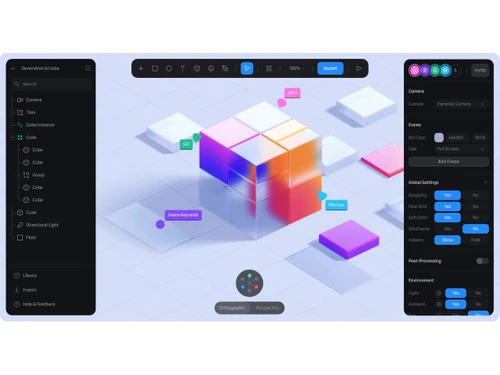
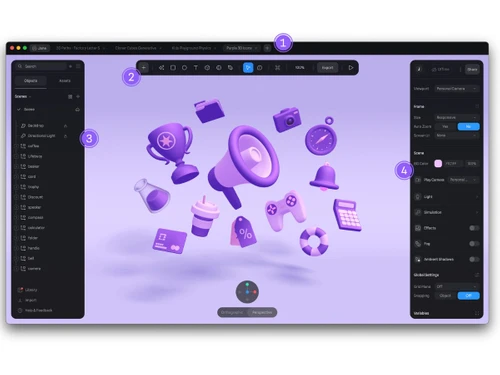
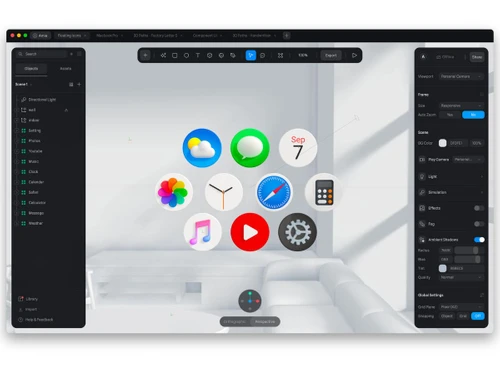
Spline is a web-based 3D design software that allows users to create, edit, and animate interactive 3D content directly in the browser.

It supports real-time collaboration, enabling teams to work together seamlessly. With easy-to-use tools for modeling, materials, and animations, Spline helps designers add engaging 3D visuals to websites and apps without complex coding.

Why Choose Spline Software?

  • Browser-Based Platform: Spline works entirely in the web browser, removing the need for downloads or installations. You can access and start designing from anywhere with ease.
  • Easy 3D Design: The platform simplifies 3D creation, allowing users to design objects and scenes without advanced technical skills.
  • Real-Time Collaboration: Multiple users can work on the same project at the same time. All changes appear instantly, improving teamwork and speed.
  • Interactive 3D Content: Spline helps you create interactive elements such as animations and hover effects that enhance user engagement.
  • Live Preview: Design changes are visible in real time, helping you make faster decisions and maintain design accuracy.
  • Animation Tools: Built-in animation tools allow you to create smooth and realistic motion without any coding.
  • Material & Lighting Controls: Easily customize textures, materials, and lighting to add depth and realism to your designs.
  • Web Integration: Spline designs can be embedded directly into websites, making them ideal for interactive web experiences.
  • No Coding Required: You can build interactive 3D scenes without writing code, making it accessible to non-technical users.
  • Fast Prototyping: Quickly convert ideas into functional 3D prototypes for testing and validation.
  • Cloud-Based Storage: Projects are saved securely in the cloud, allowing access anytime from any device.
  • Export Options: Designs can be exported for various digital platforms, making sharing and publishing simple.

Benefits of Spline Software

  • Design Flexibility: Suitable for UI design, product visualization, marketing creatives, and more.
  • Modern 3D Effects: Create visually rich and immersive 3D effects that help designs stand out.
  • Team Productivity: Collaboration features reduce delays and help teams complete projects faster.
  • Regular Updates: Frequent updates ensure access to the latest features and performance improvements.
  • Scalable for Teams: Works well for individuals, startups, and large teams as design needs grow.
  • Creative Freedom: Encourages experimentation and innovation with flexible and powerful 3D design tools.

Spline Pricing

Spline price starts at USD 15 at techjockey.com.

The pricing model is based on different parameters, including extra features, deployment type, and the total number of users. For further queries related to the product, you can contact our product team and learn more about the pricing and offers.

Read more

Spline Company Details

Founded Year:  2020

Spline is a platform to create 3D designs easily and collaborate with your team. Build and iterate fast with production-ready results.

Director/Founders Alejandro León
Company Size 1-100 Employees

Spline Pricing & Plans

Starter
Starting at $15
    • Seat

      Seat
      Seat
    • Monthly

      Monthly
      Monthly

Key Features

  • Unlimited 3D & 2D files

  • Upload video

  • No watermark on web exports

  • Higher resolution image exports

  • Spline’s material & audio library

Professional
Starting at $25
    • Seat

      Seat
      Seat
    • Monthly

      Monthly
      Monthly

Key Features

  • Everything on Starter, plus:

  • Unlimited folders and projects

  • Video export

  • Unlimited scenes per file

  • Apple & Android exports

  • Code & Self-hosted exports

  • Upload audio

  • File version history

  • Unlimited Variables, APIs & Webhooks

  • Variables local storage

Spline Features

  • icon_check Real-Time Collaboration
    Multiple users work on the same 3D scene simultaneously, with live updates and permission control.
  • icon_check Parametric Modeling
    Create primitive 3D shapes like cubes, spheres, cylinders, which can be adjusted parametrically.
  • icon_check Polygonal Editing
    Use polygon-level tools to manipulate faces, edges, and vertices of 3D models.
  • icon_check 3D Sculpting
    Sculpt organic forms dynamically using dedicated sculpting tools inside the editor.
  • icon_check Events and States
    Define “states” for objects and trigger transitions via events like clicks or hovers.
  • icon_check Animation
    Animate object properties (position, rotation, scale) over time using a keyframe-based timeline.
  • icon_check Camera Controls
    Implement first-person or third-person camera behaviors for interactive navigation.
  • icon_check Variables and Data Binding
    Use variables to connect real-time data (e.g. from APIs) to object properties in scene.
  • icon_check API Integration
    Connect external APIs in real time to drive scene behavior via variables.
  • icon_check Import/Export Management
    Export the 3D scene as vanilla JS code to embed it in standard web projects.
  • icon_check Component System
    Create reusable 3D “components” (objects or groupings) that can be reused across scenes.
  • icon_check Multi Format Support
    Export scenes as images (PNG/JPG), video (MP4/GIF), or 3D formats like GLTF / USDZ.
  • icon_check Webhooks Integration
    Accept external events/data via webhooks to trigger actions inside the scene.
Spline Demo Video play icon

Get Spline Demo

Watch the demo video to explore key features, real workflows, and how the software fits your business needs.

Understand
Key Features
Personal
Demo Insights
Interactive
Demo Support

Spline Specifications

Supported Platforms
Ubuntu Ubuntu Windows Windows iOS iOS MacOS MacOS Linux Linux
Devices
Desktop Desktop Mobile Mobile
Deployment
Cloud-Based Cloud-Based Perpetual Perpetual
Suitable For
All Industries
Business Specific
All Businesses
Business Size
Individual Small Business Startups Medium Business Enterprises
Customer Support
Email Communities
Language
English
Integration
API Integration
Training Resources
Documentation Videos
AI Features
AI Integrated

Spline Review

4.1

Out of 5

img

Overall Rating

Based on
3 Verified Ratings

Rating Breakdown

  • Features 4.3
  • Value for Money 4
  • Ease of Use 4.1
  • Customer Support 4.1

80% Recommend this Product

Add Review

Techjockey Trusted Reviews from Verified Users

No reviews are currently available for Spline. Discover similar 3D Design Software reviews

  • Power NURBS Pro

    4.8

    Whats great - PowerNurbs is an incredible NURBS apparatus, natural and amazing. 3Ds max joined with PowerNurbs winds up a standout amongst ... read more

  • Autodesk Autocad Plant 3D Toolset

    4.6

    Whats great - Produce and offer isometrics, orthographics, and materials reports. read more

  • Power Translator Pro

    4.4

    Whats great - Exquisite on the grounds that its planners imagined the sorts of reports and situations that individuals need to decipher. read more

How much does Spline Software cost?

Spline pricing starts at USD 15, as listed on techjockey.com.

Is there a mobile app available for Spline Software?

No, Spline is currently only available on iOS.

Which operating systems are compatible with Spline Software?

Spline works on all major OS through a web browser, including Ubuntu, iOS, Windows, MacOS, and Linux.

Does Spline Software offer a free trial?

Yes, Spline provides a free plan with limited features for users to try.

How does Spline Software function?

Spline allows users to create, animate, and export interactive 3D designs directly in the browser.

Who uses Spline Software?

Designers, developers, marketers, and teams looking to create 3D web content use Spline.

Is a free demo available for Spline Software?

Yes, users can access the free plan to explore Spline's features.

Is Spline Software available for free?

Yes, Spline offers a free plan with basic 3D design and collaboration tools.

20,000+ Software Listed

Best Price Guranteed

Free Expert Consultation

2M+ Happy Customers

Terms and Condtions

close

Users with registered businesses can purchase goods from merchants on the platform to satisfy their business needs. Users are not permitted to utilize any products acquired through the platform for resale, advertising, business, or further distribution.

For each purchase made, users will receive a Tax Invoice (or 'GST invoice') that includes specific details such as:

  • the GSTIN of the user associated with their registered business, and

  • the specified Entity Name for their business.

It should be noted that not all products are eligible for GST Invoice. Only the products displayed by participating sellers with the 'GST-based Invoice Available' callout on the product description page would qualify.

Certain goods and services are not eligible to get a GST Invoice, including items with VAS, i.e., Value Added Services (e.g., Total Mobile Protection/Assured Buyback) and those involving an exchange offer at the time of purchase.

Users must ensure the accuracy of the GSTIN, and business entity name provided for the GST Invoice. Requests for corrections into GST Invoice would not be accommodated by Techjockey.com or any Seller, and any issues arising from user-provided information are the sole responsibility of users.

Techjockey.com is not liable for the GST Invoice or any associated input tax credit. To efficiently claim an input tax credit, users should select the registered place of business address as per the GST authority's data and follow the provisions of the GST Act and rules.

To claim an input tax credit, the delivery and billing addresses must match. Furthermore, input tax credits will not be granted if the delivery address and GSTIN on the invoice are from different states. In case of incorrect GST details provided during the order placement, the order will be canceled automatically.