linkedin
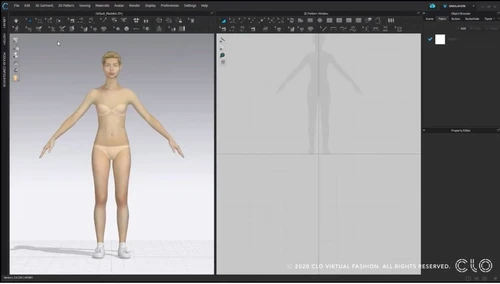
CLO 3D Fashion logo
play Beginner's Guide to CLO Part 1 Foundations: Layout (Lesson 1)

CLO 3D Fashion

Brand: CLO Virtual Fashion

  • 4.7

  • 3 Ratings & 3 Reviews

CLO 3D Fashion is a fashion designing solution created for textile and apparel industries. The software allows users to design clothes, shoes, and various other types of garments. It provides high-quality sketching functions that facilitate fashion designers to create the desired fabric effect. This fashion designing software provides a vast library of textures for designers to select from and us...

See More

Have you used CLO 3D Fashion before?

Share your insights for better experience

Add a Review
Starting Price
$25

View plans

100% Genuine
Products
Best Price
Guaranteed
Safe & Secure
Payment
  • Description

  • Pricing

  • Features

  • Specification

  • Review

  • Compare

  • Alternatives

  • FAQ

Starting at $25

CLO 3D Fashion Software Overview

What is CLO 3D Fashion?

CLO 3D Fashion is a fashion designing solution created for textile and apparel industries. The software allows users to design clothes, shoes, and various other types of garments. It provides high-quality sketching functions that facilitate fashion designers to create the desired fabric effect. This fashion designing software provides a vast library of textures for designers to select from and use it in their designs. For example, designers can get a leathery or suede visual effect to design shoes of those materials. 

CLO 3D Fashion allows designers not only to create new composition with textured effects, but also enables them to handle intricate details for making cloth cuttings, sewing, tacking, etc. for tailoring as well. The fashion designing software allows users to handle comprehensive segment sewing plans for proper utilization of the material. It allows designers to locate what kind of sewing technique has to be used at which point in apparel designing.

Why makes CLO 3D Fashion Software Unique? 

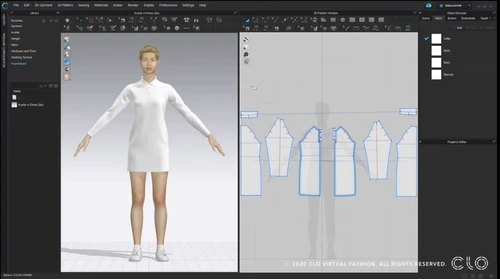
CLO 3D Fashion software offers a vast range of toolsets that allows users to design a wide variety of garments. The software offers real-time interactivity, i.e., the software quickly reviews the changes made to the 2D patterns, colors, textures and provides 3D simulation for it. It enhances the quality of designs by examining the silhouette. Plus, it offers a preview of all the designs before finalization. It gives an exact idea of how the designs will look in real-life before the final rendering. 

What features does CLO 3D Fashion software offer?

Here are a few core features offered by CLO 3D Fashion software:

  1. 2D pattern design
  2. Hardware and trims 
  3. Fine tuning 
  4. Sewing and tacking 
  5. Runway animation 
  6. Line sheets and collaboration via Closet 
  7. 3D environment, arrangement, simulation & layering, and garment edit
  8. Fit check
  9. Fabric texture
  10. Body shape avatar

What is the price of CLO 3D Fashion? 

CLO 3D Fashion software pricing starts at USD 25 at techjockey.com.

Read more

CLO Virtual Fashion Company Details

Founded Year:  2009

CLO Virtual Fashion is committed to innovating the way we communicate fashion through our true-to-life 3D garment simulation technology. Our virtual garment solutions and services connect all teams involved in the digital product lifecycle, enabling more direct collaboration and reduced lead time.

Director/Founders Jaden Oh, JH Boo
Company Size 101-500 Employees

CLO 3D Fashion Pricing & Plans

Student
Key Features
  • Eligibility
  • Online Tutorial
  • CLO Manual
  • Community Forums
  • Customer Service
Starting at $25
    • Licenses

      Licenses
      Licenses
    • Monthly

      Monthly
      Monthly

Key Features

  • Eligibility

  • Online Tutorial

  • CLO Manual

  • Community Forums

  • Customer Service

CLO 3D Fashion Features

  • icon_check Library Management
    New library window for better asset, avatar, and fabric management across projects.
  • icon_check 2D Drawing
    CLO 3D Fashion software provides 2D pattern designing features.
  • icon_check Animation
    Fashion designers can create different types of animations to visualize their composition. There are fabric layering animation,
  • icon_check Pattern Grading
    Users can add pattern size and edit it in the “pattern size table.
  • icon_check 3D Design & Styling
    The software enables apparel designers to create 3D models of garment designs with all the specialized effects needed.
  • icon_check 3D Features
    This fashion design software facilitates the creation of a 3D environment to visualize the apparel composition realistically.
  • icon_check Customization
    Designers can use a wide range of features offered by CLO 3D Fashion software to make customizations for different aspects like
  • icon_check Keyframe Animations
    Create rich, dynamic animations by applying keyframes to components of garments and avatars.
  • icon_check Keyframe Animations
    Create rich, dynamic animations by applying keyframes to components of garments and avatars.
  • icon_check AI Pose Generator
    Automatically generate avatar poses from keywords or images.
  • icon_check Real-Time Fur Generation
    Generate and simulate fur-like materials directly in CLO
  • icon_check 3D Pen Tool
    Draw garment outlines directly on the 3D avatar and convert them into 2D patterns.
  • icon_check Embedded AI Studio
    One unified space for all AI-powered features (pose, background, embroidery, etc.).
  • icon_check Pressure Map Visualizations
    Visualize how fabric pressure is distributed on the avatar to understand tightness or fit.
  • icon_check 8K Rendering
    Render garments at very high resolutions for presentation-quality visuals.
CLO 3D Fashion Demo Video play icon

Get CLO 3D Fashion Demo

Watch the demo video to explore key features, real workflows, and how the software fits your business needs.

Understand
Key Features
Personal
Demo Insights
Interactive
Demo Support

CLO 3D Fashion Specifications

Supported Platforms
Windows Windows Android Android
Devices
Desktop Desktop Mobile Mobile
Deployment
Cloud-Based Cloud-Based
Suitable For
Designers
Business Specific
All Businesses
Business Size
Small Business Startups Medium Business Enterprises SMEs MSMBs MSMEs
Customer Support
Phone Email Communities
Language
English
Training Resources
Videos

Explore the Best Alternative Solutions Similar to Your Business Size and Needs

CLO 3D Fashion Reviews

4.7

Out of 5

img

Overall Rating

Based on
3 Verified Reviews

Rating Breakdown

  • Features 5
  • Value for Money 4.5
  • Ease of Use 4.5
  • Customer Support 5

86% Recommend this Product

Add Review

CLO 3D Fashion Video Reviews

youtubeVideoId

4.8

“How BERSHKA”

Review by: CLO3D

youtubeVideoId

4.8

“Why use CLO3D instead of Marvelous Designer | 3d fashion design software”

Review by: 383design

youtubeVideoId

4.8

“CLO User Story - Jiangsu Sainty”

Review by: Jiangsu Sainty

Compare CLO 3D Fashion With other 3D Design Software

Products
Ratings
Pricing
Device Supported
Deployment
Supported Platforms
  • img

    CLO 3D Fashion

  • 4.7

  • Price On Request

  • Desktop

    Mobile

  • Web based

    On Premises

  • Windows

    Mac OS

  • img

    Coohom

  • 4.4

  • ₹ 750

  • Desktop

    Mobile

  • Web based

    On Premises

  • Windows

    Mac OS

  • img

    Pacdora

  • 4.2

  • Price On Request

  • Desktop

    Mobile

  • Web based

    On Premises

  • Windows

    Mac OS

  • img

    Bambu Studio

  • 4.3

  • Price On Request

  • Desktop

    Mobile

  • Web based

    On Premises

  • Windows

    Mac OS

  • img

    Autodesk 3DS Max

  • 4.3

  • Price On Request

  • Desktop

    Mobile

  • Web based

    On Premises

  • Windows

    Mac OS

  • img

    Spline

  • 4.1

  • Price On Request

  • Desktop

    Mobile

  • Web based

    On Premises

  • Windows

    Mac OS

  • img

    MeshLab

  • 4.2

  • Price On Request

  • Desktop

    Mobile

  • Web based

    On Premises

  • Windows

    Mac OS

  • img

    Rodin AI

  • 4.4

  • Price On Request

  • Desktop

    Mobile

  • Web based

    On Premises

  • Windows

    Mac OS

  • img

    Sweet Home 3D

  • 4.1

  • Price On Request

  • Desktop

    Mobile

  • Web based

    On Premises

  • Windows

    Mac OS

  • img

    Houdini

  • 4.4

  • Price On Request

  • Desktop

    Mobile

  • Web based

    On Premises

  • Windows

    Mac OS

(2) Product(s) selected

CLO 3D Fashion Alternatives

See All CLO 3D Fashion Alternatives

Starting Price:

$18 /Month

Starting Price:

$15 /Seat/Month

Available

Price on Request

Starting Price:

$15 /Month

Available

Price on Request

Starting Price:

$2,645 /Quantity

in3D

4.3

Available

Price on Request

Starting Price:

$299 /Month

Do I need to know 3D modelling in order to use CLO 3D Fashion?

No, CLO 3D Fashion does not require any pre-requisite 3D modelling skills or any 3D software experience.

What kind of licenses does CLO 3D Fashion offer?

CLO 3D Fashion offers three types of licenses: 1. CLO for individuals 2. CLO for Business 3. CLO for Education

Is CLO Fashion 3D compatible with other designing suites?

Yes, the fashion design software supports files from other designing solutions like DXF-ASTM, AAMA, AI/PDF, BOM, OBJ, OpenCollada, etc.

Can I get a demo for CLO 3D Fashion?

Techjockey provides an online demo before purchase for CLO 3D Fashion. Please request a call to get your demo scheduled.

Can I integrate my drawing tablet to integrate with CLO 3D Fashion?

CLO 3D Fashion integrates with almost all drawing tablets available in the market.

How much does CLO 3D Fashion software cost?

CLO 3D Fashion software pricing starts at USD 25 at techjockey.com.

20,000+ Software Listed

Best Price Guranteed

Free Expert Consultation

2M+ Happy Customers

Terms and Condtions

close

Users with registered businesses can purchase goods from merchants on the platform to satisfy their business needs. Users are not permitted to utilize any products acquired through the platform for resale, advertising, business, or further distribution.

For each purchase made, users will receive a Tax Invoice (or 'GST invoice') that includes specific details such as:

  • the GSTIN of the user associated with their registered business, and

  • the specified Entity Name for their business.

It should be noted that not all products are eligible for GST Invoice. Only the products displayed by participating sellers with the 'GST-based Invoice Available' callout on the product description page would qualify.

Certain goods and services are not eligible to get a GST Invoice, including items with VAS, i.e., Value Added Services (e.g., Total Mobile Protection/Assured Buyback) and those involving an exchange offer at the time of purchase.

Users must ensure the accuracy of the GSTIN, and business entity name provided for the GST Invoice. Requests for corrections into GST Invoice would not be accommodated by Techjockey.com or any Seller, and any issues arising from user-provided information are the sole responsibility of users.

Techjockey.com is not liable for the GST Invoice or any associated input tax credit. To efficiently claim an input tax credit, users should select the registered place of business address as per the GST authority's data and follow the provisions of the GST Act and rules.

To claim an input tax credit, the delivery and billing addresses must match. Furthermore, input tax credits will not be granted if the delivery address and GSTIN on the invoice are from different states. In case of incorrect GST details provided during the order placement, the order will be canceled automatically.