linkedin
PolyBoard logo
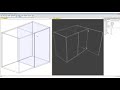
play How to use quick design methods in Polyboard
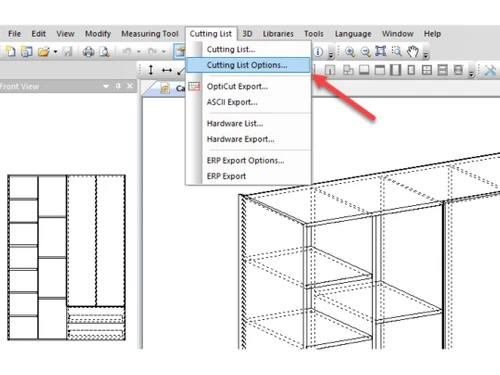
polyboard cutting
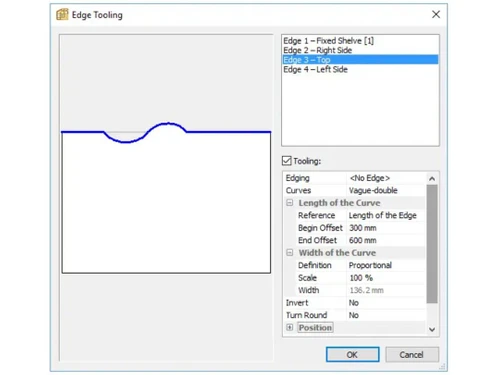
polyboard edge

PolyBoard

Brand: Wood Designer

  • 4.4

  • 4 Ratings

PolyBoard is 3D design software that helps businesses in the manufacturing and furnishing industries design, manage, and produce furniture projects. It's user-friendly, making it easy for businesses to streamline their design and production processes.

See More

Have you used PolyBoard before?

Share your insights for better experience

Add a Review
Starting Price
$2645

View plans

100% Genuine
Products
Best Price
Guaranteed
Safe & Secure
Payment
  • Description

  • Pricing

  • Features

  • Specification

  • Review

  • Compare

  • Alternatives

  • FAQ

Starting at $2,645

PolyBoard Software Overview

What is PolyBoard?

PolyBoard is a powerful 3D design software tailored for businesses in the manufacturing and furnishing industries. It empowers users to design, manage, and produce furniture projects with precision and efficiency.

At its core, PolyBoard offers a comprehensive suite of features that streamline the entire furniture design and production process. From parametric design and complex calculations to project management and 3D rendering, PolyBoard provides the tools to tackle any project with confidence. Additionally, its seamless integration with hardware and production systems ensures a smooth transition from design to manufacturing.

Why Choose PolyBoard?

  • Parametric Design: This dynamic approach enables rapid exploration of design options, allowing businesses to adapt and customise their products to meet specific customer requirements and industry trends.
  • Complex Calculations: PolyBoard offers advanced calculation features, including stress analysis and material optimization, enabling users to create designs that are both aesthetically pleasing and structurally sound.
  • Project Management Tools: Efficient project organisation and tracking are essential for streamlined production processes. PolyBoard provides robust project management tools that help businesses manage projects from concept to completion.
  • 3D Rendering: PolyBoard's 3D rendering engine generates high-quality images and animations, enabling users to showcase their furniture designs in a realistic and immersive manner.
  • Hardware Integration: Seamless hardware integration is crucial for efficient production. PolyBoard seamlessly connects to hardware devices and sensors, providing real-time control and monitoring of physical systems.
  • Production Integration: This integration enables direct transfer of design data to production systems, eliminating manual data entry and minimising the risk of errors.
  • User-Friendly Interface: With its intuitive design and clear navigation, users can quickly become proficient in using the software, reducing training time and maximising productivity.

Benefits of PolyBoard 3D Design Software

  • Increased design efficiency: Streamlined workflows and automated processes accelerate design and production, saving valuable time and resources.
  • Precision in furniture designs: Precise calculations and 3D visualisation minimise errors, resulting in high-quality, well-crafted furniture.
  • Communication among teams: Centralised project management and seamless integration foster collaboration, ensuring everyone is on the same page.
  • Increased cost savings: Optimised designs and automated production processes minimise material waste, reducing costs and promoting sustainability.
  • Streamlined production processes: Automated workflows and direct integration with manufacturing systems streamline production, increasing efficiency and output.
  • Greater customer satisfaction: Flexible design capabilities and precise execution lead to tailored furniture that meets customer expectations and enhances satisfaction.
  • Competitive advantage: PolyBoard's comprehensive features and efficiency gains provide a competitive edge, enabling businesses to deliver high-quality furniture with shorter lead times and reduced costs.

Pricing Of PolyBoard

PolyBoard pricing starts at $2645 and is available at techjockey.com. The pricing model is based on different parameters, including the amount of bandwidth you need, the number of servers you need, and the features you need. For further queries related to the product, you can contact our product team and learn more about the pricing and offers.

Read more

PolyBoard Pricing & Plans

PolyBoard 8-Pro
Starting at $2645
    • Quantity

      Quantity
      Quantity

Key Features

  • 3 months' Premium Support

  • Quick Design libraries

  • Project Management

  • 3D Rendering

  • Production Integration

PolyBoard 8-Pro PP
Starting at $4945
    • Quantity

      Quantity
      Quantity

Key Features

  • 3 months' Premium Support

  • Quick Design libraries

  • Project Management

  • 3D Rendering

  • Production Integration

PolyBoard Features

  • icon_check Parametric Design
    Create and modify designs based on parameters, enabling rapid exploration of design options.
  • icon_check Complex Calculations
    Perform advanced calculations and simulations to ensure structural integrity and optimise performance.
  • icon_check Project Management
    Manage projects from concept to completion, including scheduling, collaboration, and progress tracking.
  • icon_check 3D Rendering
    Generate realistic 3D models and images to visualise and present your designs.
  • icon_check Hardware Integration
    Connect to hardware devices and sensors to control and monitor physical systems.
  • icon_check Production Integration
    Streamline the transition from design to production by integrating with manufacturing equipment.
  • icon_check Seamless Integration
    Integrate with other software and tools to enhance functionality and streamline workflows.
  • icon_check Bulk-Manufacture Mode
    Manage multiple products/projects together — batch-edit quantities/dimensions and output consolidated manufacturing data.
  • icon_check Material & Edging Style Management
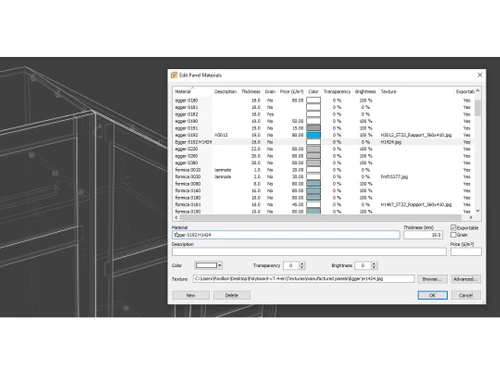
    Assign different materials/edging to panels / parts; changes propagate through the design.
PolyBoard Demo Video play icon

Get PolyBoard Demo

Watch the demo video to explore key features, real workflows, and how the software fits your business needs.

Understand
Key Features
Personal
Demo Insights
Interactive
Demo Support

PolyBoard Specifications

Supported Platforms
Windows Windows MacOS MacOS
Devices
Desktop Desktop
Deployment
Perpetual Perpetual
Suitable For
Manufacturing Furnishing
Business Specific
All Businesses
Business Size
Small Business Startups Medium Business Enterprises
Customer Support
Email Communities
Language
English
Training Resources
Videos

Explore the Best Alternative Solutions Similar to Your Business Size and Needs

PolyBoard Review

4.4

Out of 5

img

Overall Rating

Based on
4 Verified Ratings

Rating Breakdown

  • Features 4.2
  • Value for Money 4.3
  • Ease of Use 4.8
  • Customer Support 4.1

92% Recommend this Product

Add Review

Techjockey Trusted Reviews from Verified Users

No reviews are currently available for PolyBoard. Discover similar 3D Design Software reviews

  • Power NURBS Pro

    4.8

    Whats great - PowerNurbs is an incredible NURBS apparatus, natural and amazing. 3Ds max joined with PowerNurbs winds up a standout amongst ... read more

  • Autodesk Autocad Plant 3D Toolset

    4.6

    Whats great - Produce and offer isometrics, orthographics, and materials reports. read more

  • Power Translator Pro

    4.4

    Whats great - Exquisite on the grounds that its planners imagined the sorts of reports and situations that individuals need to decipher. read more

Compare PolyBoard With other 3D Design Software

Products
Ratings
Pricing
Device Supported
Deployment
Supported Platforms
  • img

    PolyBoard

  • 4.4

  • Price On Request

  • Desktop

    Mobile

  • Web based

    On Premises

  • Windows

    Mac OS

  • img

    CLO 3D Fashion

  • 4.7

  • Price On Request

  • Desktop

    Mobile

  • Web based

    On Premises

  • Windows

    Mac OS

  • img

    Coohom

  • 4.4

  • ₹ 750

  • Desktop

    Mobile

  • Web based

    On Premises

  • Windows

    Mac OS

  • img

    Pacdora

  • 4.2

  • Price On Request

  • Desktop

    Mobile

  • Web based

    On Premises

  • Windows

    Mac OS

  • img

    Bambu Studio

  • 4.3

  • Price On Request

  • Desktop

    Mobile

  • Web based

    On Premises

  • Windows

    Mac OS

  • img

    Autodesk 3DS Max

  • 4.3

  • Price On Request

  • Desktop

    Mobile

  • Web based

    On Premises

  • Windows

    Mac OS

  • img

    Spline

  • 4.1

  • Price On Request

  • Desktop

    Mobile

  • Web based

    On Premises

  • Windows

    Mac OS

  • img

    MeshLab

  • 4.2

  • Price On Request

  • Desktop

    Mobile

  • Web based

    On Premises

  • Windows

    Mac OS

  • img

    Rodin AI

  • 4.4

  • Price On Request

  • Desktop

    Mobile

  • Web based

    On Premises

  • Windows

    Mac OS

  • img

    Sweet Home 3D

  • 4.1

  • Price On Request

  • Desktop

    Mobile

  • Web based

    On Premises

  • Windows

    Mac OS

(0) Product(s) selected

PolyBoard Alternatives

See All PolyBoard Alternatives

Starting Price:

$18 /Month

Starting Price:

$15 /Seat/Month

Available

Price on Request

Starting Price:

$15 /Month

Available

Price on Request
Available

Price on Request

in3D

4.3

Available

Price on Request

Starting Price:

$299 /Month

How much does PolyBoard Software Platform Cost?

PolyBoard pricing starts at $2645 for a perpetual licence at techjockey.com. The pricing may vary based on the specific features and modules required.

Is there any PolyBoard Cabinet Design App?

No, PolyBoard is desktop software that is available for Windows and macOS operating systems. PolyBoard is primarily a desktop software. You can access it through your web browser or desktop application on Windows and Mac operating systems.

Can PolyBoard integrate with other business tools?

Yes, PolyBoard integrates with various tools including OptiCut for cutting optimization and Optiest for CC nesting. It also offers export options compatible with most CAD software.

Is PolyBoard suitable for small businesses?

Yes, PolyBoard is suitable for small to medium woodworking shops. Its intuitive design process makes it perfect for businesses without specialist CAD technicians.

How secure is the data stored in PolyBoard?

For specific information about data security in PolyBoard, it's best to contact their support team through techjockey.com or visit their official website.

Who are the potential users of PolyBoard Software?

PolyBoard is ideal for professional cabinet makers, furniture designers, and woodworking shops looking to streamline their design and manufacturing processes for custom projects.

How does PolyBoard software Work?

PolyBoard allows users to design custom cabinets and furniture quickly. It automatically generates 3D models, cut lists, and CC files, streamlining the process from design to manufacturing.

Which operating system does PolyBoard Software Support?

PolyBoard supports Windows and macOS operating systems. It is available as a desktop application that can be installed on a local computer.

20,000+ Software Listed

Best Price Guranteed

Free Expert Consultation

2M+ Happy Customers

Terms and Condtions

close

Users with registered businesses can purchase goods from merchants on the platform to satisfy their business needs. Users are not permitted to utilize any products acquired through the platform for resale, advertising, business, or further distribution.

For each purchase made, users will receive a Tax Invoice (or 'GST invoice') that includes specific details such as:

  • the GSTIN of the user associated with their registered business, and

  • the specified Entity Name for their business.

It should be noted that not all products are eligible for GST Invoice. Only the products displayed by participating sellers with the 'GST-based Invoice Available' callout on the product description page would qualify.

Certain goods and services are not eligible to get a GST Invoice, including items with VAS, i.e., Value Added Services (e.g., Total Mobile Protection/Assured Buyback) and those involving an exchange offer at the time of purchase.

Users must ensure the accuracy of the GSTIN, and business entity name provided for the GST Invoice. Requests for corrections into GST Invoice would not be accommodated by Techjockey.com or any Seller, and any issues arising from user-provided information are the sole responsibility of users.

Techjockey.com is not liable for the GST Invoice or any associated input tax credit. To efficiently claim an input tax credit, users should select the registered place of business address as per the GST authority's data and follow the provisions of the GST Act and rules.

To claim an input tax credit, the delivery and billing addresses must match. Furthermore, input tax credits will not be granted if the delivery address and GSTIN on the invoice are from different states. In case of incorrect GST details provided during the order placement, the order will be canceled automatically.