USA
USA UAE
UAESmall Business
Designed for startups and growing businesses
See More





Brand: Split Software
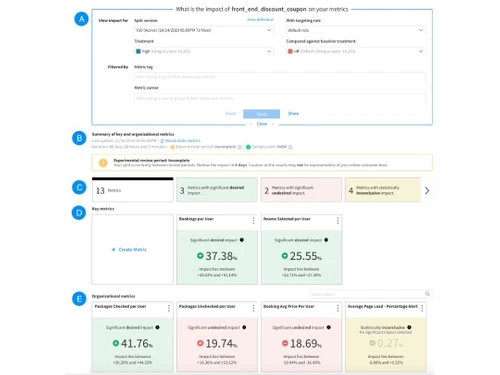
Split is a feature delivery platform that enhances software development through feature flag management, experimentation, and continuous delivery.
See MoreHave you used Split before?
Share your insights for better experience
Brand: Split Software
Founded Year: 2015
Split Software is a feature delivery platform that powers engineering teams to build impactful products.
 Feature Flag API Access Workflow Integration Audit Logs Approval Flows

Watch the demo video to explore key features, real workflows, and how the software fits your business needs.
 Ubuntu
  Windows
  MacOS
MacOS  Linux
Linux  Desktop
  Cloud-Based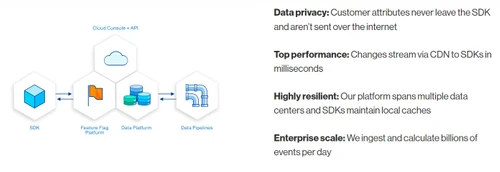
Small Business
Designed for startups and growing businesses
Medium Business
Built for business growth and flexibility
Enterprises
Designed for complex and large-scale business needs
4.5
Out of 5

Overall Rating
Based on
20 Verified Reviews
Rating Breakdown
87% Recommend this Product
Add ReviewOverall, users express strong satisfaction with Split for its robust capabilities in feature flagging and A/B testing, particularly praising its data tracking and integration with CI/CD pipelines. Many users find it invaluable for managing experiments and rolling out features efficiently. However, a common concern is its pricing, which some consider excessive for smaller teams or startups, especially as usage scales. Additionally, the initial setup and learning curve can be time-consuming, making it less accessible for new users.
Pros
"Split is a great tool for managing feature flags and tracking the success of new features with experimentation. It works well with a variety of platforms and is easy to integrate."
"Split’s feature flagging functionality is top-tier. It’s easy to roll out new features and monitor their impact, all from a single dashboard."
"Split has everything we need for both feature flagging and experimenting. The ability to monitor and roll out features based on results is fantastic."
Cons
"The initial setup is a bit complex, especially if you're implementing feature flags on a large scale. It takes time to get everything configured properly."
"The user interface can be a bit overwhelming, especially when you have a lot of active experiments or flags. It takes time to get used to the various dashboards and settings."
"The tool is quite pricey for small teams. It’s great for larger teams, but it can feel like an overkill for smaller companies with fewer experiments."

Jun 3, 2025
Techjockey Verified
“Comprehensive Solution for Experimentation, But Can Be Pricy”
I’ve been using Split for A/B testing, and the tool has been fantastic in terms of data tracking and feature management. However, the price has started to become a pain as we scale.
Pros
Split has everything we need for both feature flagging and experimenting. The ability to monitor and roll out features based on results is fantastic.
Cons
The tool is quite pricey for small teams. It’s great for larger teams, but it can feel like an overkill for smaller companies with fewer experiments.
Reason to switch
We switched from Zentao to Split because Split’s better performance with larger-scale data and experiments helped streamline our process at a lower cost. ??
May 6, 2025
Techjockey Verified
“Highly Functional Tool, But Expensive for Startups”
We’ve been using Split to manage our feature flags, and it has worked great. The ability to roll out features in a controlled way has been very useful. However, as our company grew, the pricing became a concern.
Pros
Split is a great tool for managing feature flags and experimenting with new features in real time. It’s easy to implement, and the results are reliable.
Cons
For startups or small businesses, Split can feel too expensive, especially as the number of users or experiments grows. It’s an enterprise-grade solution, and the pricing reflects that.
Reason to switch
We switched from FeatureFlagCo to Split because Split offered better scalability and more advanced experimentation features, which were necessary as we grew.
Aug 2, 2025
Techjockey Verified
“Ideal for A/B Testing and Continuous Delivery Teams”
Split has been invaluable for our continuous delivery team. It integrates well with our CI/CD pipelines and makes A/B testing much easier. However, there’s a learning curve, and getting everything set up correctly took a while.
Pros
If you need robust A/B testing capabilities, Split is fantastic. The platform integrates well with CI/CD pipelines, making it a great fit for agile teams that focus on continuous delivery.
Cons
It takes a bit of time to understand how to use all of its capabilities effectively. The documentation is helpful, but it requires a bit of trial and error to get everything right.
Reason to switch
We switched from Optimizely to Split because Split's better integration with our CI/CD tools allowed for smoother, more efficient A/B testing in our development cycle.

Split
Price On Request
Desktop
Mobile
Web based
On Premises
Windows
Mac OS

VMOS
Price On Request
Desktop
Mobile
Web based
On Premises
Windows
Mac OS

Jama
Price On Request
Desktop
Mobile
Web based
On Premises
Windows
Mac OS

Google Cloud Console
Price On Request
Desktop
Mobile
Web based
On Premises
Windows
Mac OS

Waydev
Price On Request
Desktop
Mobile
Web based
On Premises
Windows
Mac OS

tuleap
Price On Request
Desktop
Mobile
Web based
On Premises
Windows
Mac OS

NGINX Controller
Price On Request
Desktop
Mobile
Web based
On Premises
Windows
Mac OS

OneOps
Price On Request
Desktop
Mobile
Web based
On Premises
Windows
Mac OS
Skytap Cloud
Price On Request
Desktop
Mobile
Web based
On Premises
Windows
Mac OS

Visure ALM
Price On Request
Desktop
Mobile
Web based
On Premises
Windows
Mac OS

Helix ALM
Price On Request
Desktop
Mobile
Web based
On Premises
Windows
Mac OS
(0) Product(s) selected
Available
Price on Request
Starting Price:
$449
Available
Price on Request
Available
Price on Request

Starting Price:
$49

Available
Price on Request

Available
Price on Request

Starting Price:
€710 /Month

Starting Price:
$172 /Month
Split processes data locally through its SDK architecture, ensuring sensitive data stays within your app.
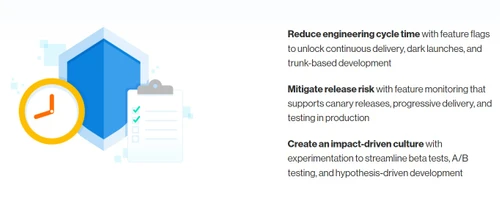
Split accelerates delivery with automated rollout monitoring, helping teams to release features faster with confidence.
Yes, Split offers a demo to showcase how it can improve feature management and testing processes. Consult www.techjockey.com for further details.
Split is compatible on all major platforms as it integrates with various SDKs, running on most environments.
Developers, product managers, and engineering teams benefit from Split's feature flagging, testing, and monitoring capabilities.
Feature flags in Split allow controlling feature releases by enabling or disabling them without redeploying code.
Split supports multiple SDKs, including JavaScript, Python, Ruby, React, etc.
Yes, Split integrates A/B testing to compare feature versions and make data-driven decisions.
Split implements structured approval processes to ensure that feature releases are reviewed and authorized.
20,000+ Software Listed
Best Price Guranteed
Free Expert Consultation
2M+ Happy Customers
Terms and Condtions

Users with registered businesses can purchase goods from merchants on the platform to satisfy their business needs. Users are not permitted to utilize any products acquired through the platform for resale, advertising, business, or further distribution.
For each purchase made, users will receive a Tax Invoice (or 'GST invoice') that includes specific details such as:
the GSTIN of the user associated with their registered business, and
the specified Entity Name for their business.
It should be noted that not all products are eligible for GST Invoice. Only the products displayed by participating sellers with the 'GST-based Invoice Available' callout on the product description page would qualify.
Certain goods and services are not eligible to get a GST Invoice, including items with VAS, i.e., Value Added Services (e.g., Total Mobile Protection/Assured Buyback) and those involving an exchange offer at the time of purchase.
Users must ensure the accuracy of the GSTIN, and business entity name provided for the GST Invoice. Requests for corrections into GST Invoice would not be accommodated by Techjockey.com or any Seller, and any issues arising from user-provided information are the sole responsibility of users.
Techjockey.com is not liable for the GST Invoice or any associated input tax credit. To efficiently claim an input tax credit, users should select the registered place of business address as per the GST authority's data and follow the provisions of the GST Act and rules.
To claim an input tax credit, the delivery and billing addresses must match. Furthermore, input tax credits will not be granted if the delivery address and GSTIN on the invoice are from different states. In case of incorrect GST details provided during the order placement, the order will be canceled automatically.