linkedin
Google Cloud Console logo
play The Cloud Console Tour
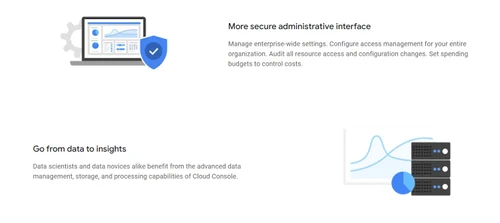
google cloud console administrative interface
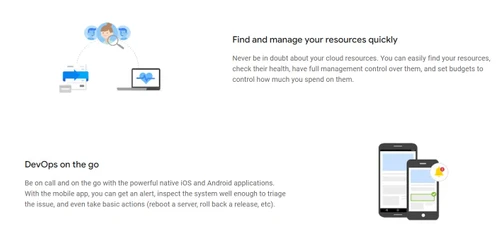
google cloud console devops

Google Cloud Console

Brand: Google

  • 4.3

  • 4 Ratings

Google Cloud Console a wide range of tools for managing cloud resources, configuring billing settings, and ensuring smooth operation of your cloud applications. From monitoring data to managing resources, Google Cloud Console simplifies the tasks required to run cloud services efficiently.

See More

Have you used Google Cloud Console before?

Share your insights for better experience

Add a Review

Price Available on Request

Questions about pricing or customization? We’re here to help, just a click away.

100% Genuine
Products
Best Price
Guaranteed
Safe & Secure
Payment
  • Description

  • Pricing

  • Features

  • Specification

  • Review

  • Compare

  • Alternatives

  • FAQ

Google Cloud Console Software Overview

What is Google Cloud Console Application Lifecycle Management Software?

Google Cloud Console is the primary platform that allows users to manage, configure, and monitor their Google Cloud services. As a leading tool in business software and application lifecycle management software, it provides a centralized dashboard that makes it simple to manage resources, monitor cloud performance, and troubleshoot issues. The platform is designed for both small businesses and large enterprises, making it an essential part of hyperconverged infrastructure solutions to help users maximize the potential of cloud computing with minimal effort.

With Google Cloud Console, users can manage everything from virtual machines to databases. It allows you to access key cloud features, such as billing management, resource monitoring, and cloud storage, all in one place. It is particularly popular among developers, IT professionals, and business owners who want an efficient way to manage their cloud infrastructure. The platform supports a wide variety of Google Cloud products, making it ideal for businesses of all sizes.

Why Choose Google Cloud Console?

  • User-Friendly Interface: Google Cloud Console has a clean, intuitive design, making it easy to use for both beginners and experts.
  • Comprehensive Resource Management: With a wide variety of tools, you can manage your cloud resources seamlessly, ensuring smooth operations.
  • Integrated with Google Cloud: As the main management platform, it is perfectly integrated with other Google Cloud services, enhancing overall functionality.
  • Real-Time Insights: It offers real-time monitoring, so you can track your resources, identify issues, and optimize your cloud setup.
  • Security and Compliance: Google Cloud Console ensures that your data is securely managed and complies with industry standards.

Benefits of Google Cloud Console Application Lifecycle Management Software

  • Streamlined Cloud Management: It offers a central place to control your entire cloud setup, simplifying administration and reducing time spent on managing resources.
  • Scalability: You can easily scale your cloud resources as your business grows, adjusting services according to your needs.
  • Cost Control: The billing features give you full control over your cloud expenses, helping you manage costs effectively.
  • Efficient Troubleshooting: The diagnostic tools help identify issues quickly, allowing for fast resolution and minimizing downtime.
  • Accessibility: The mobile app lets you manage your cloud services on the go, ensuring you can access and control your resources from anywhere.

Pricing Of Google Cloud Console Application Lifecycle Management Software

Google Cloud Console price is available on request at techjockey.com.

The pricing model is based on different parameters, including extra features, deployment type, and the total number of users. For further queries related to the product, you can contact our product team and learn more about the pricing and offers.

Read more

Google Company Details

Founded Year:  1998

Google is a multinational corporation that specializes in Internet-related services and products.

Director/Founders Easir Arafat, Larry Page, Masudur Rahman, Mohammad Faruk, Sergey Brin
Company Size 1000+ Employees

Google Cloud Console Pricing & Plans

Looking for The Right Pricing?

Share your requirements and get a plan built around your business.

  • Define your business needs
  • Get customised pricing
  • Choose features that fit your workflow

Price Available on Request

Get personalised Google Cloud Console pricing that fits your needs. Our team will connect with you.

Google Cloud Console Features

  • icon_check Web Admin UI
    A user-friendly web interface for managing your Google Cloud services easily.
  • icon_check Resource Management
    Manage and monitor virtual machines, storage, and other cloud resources.
  • icon_check Data Management
    Simplifies cloud data management with easy-to-use tools for storage, access, and organization.
  • icon_check Billing
    Detailed billing information and cost management tools to help you track and control cloud expenses.
  • icon_check SSH in Browser
    Securely connect to cloud servers directly through the browser without needing an external SSH client.
  • icon_check Activity Stream
    Monitor recent activities and updates on your cloud resources in real-time.
  • icon_check Mobile App
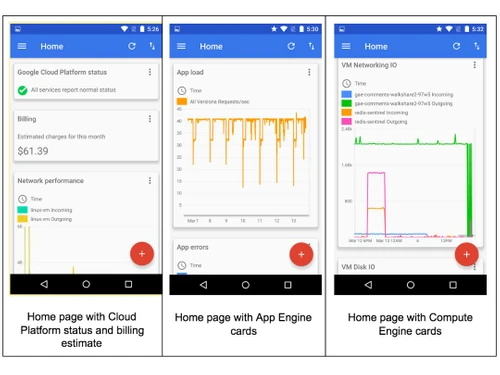
    A mobile application that allows you to manage and monitor your cloud services while on the move.
  • icon_check Cloud Shell
    Access a powerful command-line interface for managing your Google Cloud resources directly in the browser.
  • icon_check Diagnostics
    Quickly identify issues and run diagnostic tests to troubleshoot and resolve problems efficiently.
  • icon_check Admin
    A robust administrative dashboard for managing user access, permissions, and security settings.
Google Cloud Console Demo Video play icon

Get Google Cloud Console Demo

Watch the demo video to explore key features, real workflows, and how the software fits your business needs.

Understand
Key Features
Personal
Demo Insights
Interactive
Demo Support

Google Cloud Console Specifications

Supported Platforms
Windows Windows
Devices
Desktop Desktop
Deployment
Cloud-Based Cloud-Based
Suitable For
All Industries
Business Specific
All Businesses
Business Size
Small Business Startups Enterprises SMBs
Language
English

Explore the Best Alternative Solutions Similar to Your Business Size and Needs

Medium Business

Built for business growth and flexibility

Split

4.5

VMOS

4.1

tuleap

4.2

See More

Google Cloud Console Review

4.3

Out of 5

img

Overall Rating

Based on
4 Verified Ratings

Rating Breakdown

  • Features 4.1
  • Value for Money 4.2
  • Ease of Use 4.6
  • Customer Support 4.2

95% Recommend this Product

Add Review

Techjockey Trusted Reviews from Verified Users

No reviews are currently available for Google Cloud Console. Discover similar Application Lifecycle Management Software reviews

  • Split

    4.5

    Whats great - Split has everything we need for both feature flagging and experimenting. The ability to monitor and roll out features based ... read more

  • Jama

    4.2

    Whats great - Effectively manages project requirements. read more

  • Jira

    4.5

    Whats great - Jira's emphasis on visuals when tracking performance and tickets is something I appreciate. Since our project is a support pr... read more

Compare Google Cloud Console With other Application Lifecycle Management Software

Products
Ratings
Pricing
Device Supported
Deployment
Supported Platforms
  • img

    Google Cloud Console

  • 4.3

  • Price On Request

  • Desktop

    Mobile

  • Web based

    On Premises

  • Windows

    Mac OS

  • img

    VMOS

  • 4.1

  • Price On Request

  • Desktop

    Mobile

  • Web based

    On Premises

  • Windows

    Mac OS

  • img

    Jama

  • 4.1

  • Price On Request

  • Desktop

    Mobile

  • Web based

    On Premises

  • Windows

    Mac OS

  • img

    Waydev

  • 4.5

  • Price On Request

  • Desktop

    Mobile

  • Web based

    On Premises

  • Windows

    Mac OS

  • img

    tuleap

  • 4.2

  • Price On Request

  • Desktop

    Mobile

  • Web based

    On Premises

  • Windows

    Mac OS

  • img

    NGINX Controller

  • 4.0

  • Price On Request

  • Desktop

    Mobile

  • Web based

    On Premises

  • Windows

    Mac OS

  • img

    OneOps

  • 4.1

  • Price On Request

  • Desktop

    Mobile

  • Web based

    On Premises

  • Windows

    Mac OS

  • img

    Skytap Cloud

  • 4.5

  • Price On Request

  • Desktop

    Mobile

  • Web based

    On Premises

  • Windows

    Mac OS

  • img

    Split

  • 4.5

  • Price On Request

  • Desktop

    Mobile

  • Web based

    On Premises

  • Windows

    Mac OS

  • img

    Visure ALM

  • 4.2

  • Price On Request

  • Desktop

    Mobile

  • Web based

    On Premises

  • Windows

    Mac OS

  • img

    Helix ALM

  • 4.3

  • Price On Request

  • Desktop

    Mobile

  • Web based

    On Premises

  • Windows

    Mac OS

(0) Product(s) selected

Google Cloud Console Alternatives

See All Google Cloud Console Alternatives

Jama

4.1

Available

Price on Request

Starting Price:

$449

Available

Price on Request

Available

Price on Request

Available

Price on Request
Available

Price on Request

Articles for Google Cloud Console

See All Related Articles

What is Google Cloud Console used for?

Google Cloud Console is a management platform that helps you configure, monitor, and manage your Google Cloud resources, ensuring smooth operations.

How do I access Google Cloud Console?

You can access Google Cloud Console by signing in to your Google Cloud account via a web browser on your computer or mobile device.

Is Google Cloud Console free?

Google Cloud Console is free to use, but the resources you manage on Google Cloud may incur costs depending on usage and services.

What services can I manage with Google Cloud Console?

With Google Cloud Console, you can manage a variety of services such as virtual machines, databases, storage, billing, and much more.

Can I manage billing with Google Cloud Console?

Yes, Google Cloud Console offers a comprehensive billing section where you can track and manage your cloud expenses.

How can I monitor my cloud resources using Google Cloud Console?

Google Cloud Console provides real-time monitoring tools that allow you to track the performance and health of your cloud resources.

Can I use Google Cloud Console on my phone?

Yes, Google Cloud Console has a mobile app that lets you manage your cloud resources on the go.

How does Google Cloud Console improve cloud management?

Google Cloud Console simplifies cloud management by offering an easy-to-use web interface, powerful tools, and real-time insights for efficient monitoring and resource management.

Is Google Cloud Console secure?

Yes, Google Cloud Console ensures that your cloud services are secure, offering advanced security features and compliance with industry standards.

What are the benefits of using Google Cloud Console for businesses?

Google Cloud Console allows businesses to manage resources efficiently, control costs, improve performance, and troubleshoot issues quickly.

20,000+ Software Listed

Best Price Guranteed

Free Expert Consultation

2M+ Happy Customers

Terms and Condtions

close

Users with registered businesses can purchase goods from merchants on the platform to satisfy their business needs. Users are not permitted to utilize any products acquired through the platform for resale, advertising, business, or further distribution.

For each purchase made, users will receive a Tax Invoice (or 'GST invoice') that includes specific details such as:

  • the GSTIN of the user associated with their registered business, and

  • the specified Entity Name for their business.

It should be noted that not all products are eligible for GST Invoice. Only the products displayed by participating sellers with the 'GST-based Invoice Available' callout on the product description page would qualify.

Certain goods and services are not eligible to get a GST Invoice, including items with VAS, i.e., Value Added Services (e.g., Total Mobile Protection/Assured Buyback) and those involving an exchange offer at the time of purchase.

Users must ensure the accuracy of the GSTIN, and business entity name provided for the GST Invoice. Requests for corrections into GST Invoice would not be accommodated by Techjockey.com or any Seller, and any issues arising from user-provided information are the sole responsibility of users.

Techjockey.com is not liable for the GST Invoice or any associated input tax credit. To efficiently claim an input tax credit, users should select the registered place of business address as per the GST authority's data and follow the provisions of the GST Act and rules.

To claim an input tax credit, the delivery and billing addresses must match. Furthermore, input tax credits will not be granted if the delivery address and GSTIN on the invoice are from different states. In case of incorrect GST details provided during the order placement, the order will be canceled automatically.