linkedin
Broadcom Endpoint Protection (Symantec) logo
play Symantec
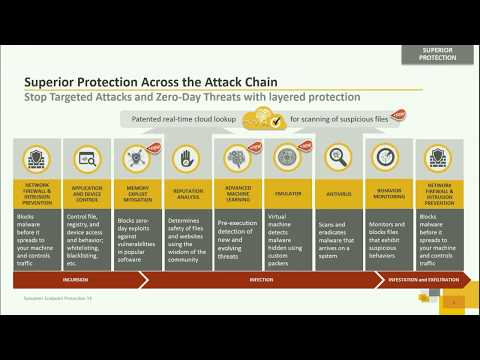
Symantec Endpoint Protection Functions
Symantec Endpoint Protection features

Broadcom Endpoint Protection (Symantec)

Brand: Symantec

  • 4.2

  • 3 Ratings & 3 Reviews

Symantec Endpoint Protection is a security software suite that consists of antivirus, intrusion prevention and firewall functionalities to protect laptops, desktops, apps, mobile devices, servers and other platforms where the data resides in your network. It even provides protection against the most sophisticated attacks such as zero-day attacks and rootkit that usually escape traditional securit...

See More

Have you used Broadcom Endpoint Protection (Symantec) before?

Share your insights for better experience

Add a Review

Price Available on Request

Questions about pricing or customization? We’re here to help, just a click away.

100% Genuine
Products
Best Price
Guaranteed
Safe & Secure
Payment
  • Description

  • Pricing

  • Features

  • Specification

  • Review

  • Compare

  • Alternatives

  • FAQ

Broadcom Endpoint Protection (Symantec)Software Overview

What is Symantec Endpoint Protection?

Symantec Endpoint Protection is a security software suite that consists of antivirus, intrusion prevention and firewall functionalities to protect laptops, desktops, apps, mobile devices, servers and other platforms where the data resides in your network. It even provides protection against the most sophisticated attacks such as zero-day attacks and rootkit that usually escape traditional security measures.

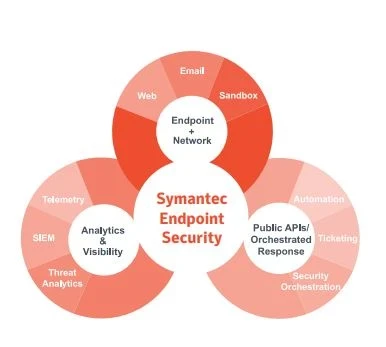
Symantec Endpoint creates a foolproof line of defense and ensures complete protection of your sensitive data. The endpoint security software portfolio includes solutions for endpoint security, server security and endpoint management.

Endpoint Security

Symantec Endpoint Security offers complete protection, detection and response for all your traditional and mobile endpoint devices using innovative technologies. It delivers multilayer protection to stop threats regardless of how they attack the endpoints. Symantec provides flexible management options that fit organizations whether they are on premises, cloud based or hybrid.

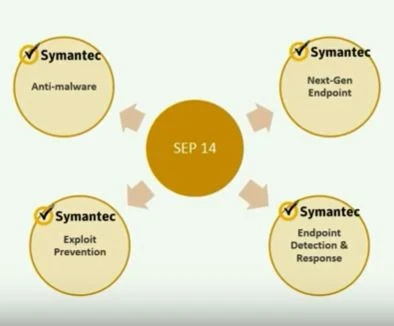
Symantec Endpoint Protection serves as the foundation for both Endpoint Security Enterprise and Endpoint Security Complete.

Benefits of Endpoint Security Solution

  • Keep your business running: As we know compromised endpoints are disruptive to business, Symantec detects and remediates persistent threats towards your enterprise’s endpoint. It keeps your business running smoothly by offering protection against ransomware, stealthy malware, credential theft, and more.
  • Prevent the worst-case scenario: Data breach is every Chie Information Security Officer’s worst nightmare. In this regard, Symantec warns you quickly about any threats to the network, apps, or assets using an attack analytics tool.
  • Fortify your SOC team: SOC team in an organization is strengthened by intelligent automation, AI guided policy management, and Symantec specialists who help you fulfill your organization’s security needs without hiring more staff.
  • Strengthen endpoint security posture: Symantec’s single agent/single cloud setup helps strengthen your overall endpoint security status.

Server Security

Symantec server security offers comprehensive solutions to protect all critical workloads from corruption, loss etc. With their advanced server security solutions, you can discover, protect and monitor workloads across multi clouds and traditional on premises data centre.

Further, it secures your critical data center infrastructure from advanced malware and software vulnerability like zero day. It even protects important business data and tools available in storage devices by providing high-performance malware detection and monitoring for cloud services.

What Does Symantec Server Security Solutions Include

  • Cloud workload protection: It is the process of continuously monitoring and removing threats, if any, from workloads that move across different cloud environments. Symantec protects Google Cloud Platform, AWS, Azure, and Oracle Cloud Infrastructure Workloads.
  • Data center security: It offers complete server protection with full application control to protect data center from threats and unauthorized access across public/private clouds and on premises data centers.
  • Cloud workload protection for storage: Symantec Server Security solutions ensure the accuracy and consistency of data stored in Amazon S3 buckets and Azure Blobs while preventing malware from spreading to other storage, apps & users.
  • Protection engine for cloud services: Symantec’s Protection Engine offers industry leading malware protection with monitoring for cloud services. This helps protect your important data and storage systems against malware threat.
  • Protection engine for network attached storage: This solution provides high performance threat detection services to protect data stored on network attached storage devices. It also increases virus scanning performance for protection against multiple types of malwares.
  • Protection for SharePoint servers: Using Symantec Protection for SharePoint Servers, you can detect and remove viruses and other threats on files uploaded/ downloaded from your SharePoint servers.

Symantec Endpoint Management

Symantec Endpoint Management Suite allows you to actively manage desktops, laptops and servers in real time. It supports the management of endpoints inside and outside the perimeter and quickly deploys updates and patches across hardware platforms and operating systems.

Furthermore, with the help of Symantec Endpoint Management solutions, you can significantly decrease the costs involved in testing and eliminate unnecessary software purchases.

What does Symantec Endpoint Management Solutions Include?

  • Client Management Suite: Available for Mac, Windows, Linux, and virtual desktops, this helps automates time-consuming tasks for securing, managing and deploying devices and software.
  • Asset Management Suite: With Asset Management Suite, get an overview of your organization’s assets, ensure compliance during software audits, among other things.
  • Server Management Suite: This suite provides solutions to control, automate and monitor physical and virtual servers from a central console.
  • Ghost Solution Suite: Symantec Ghost Solution Suite offers a single management console to help you quickly migrate to the latest operating systems, deploy software and cross platform management for laptops, desktops & servers.

Pricing of Symantec Endpoint Protection

The pricing of the Symantec Endpoint Encryption depends on the extent of requirements and usage by businesses. You can request for subscription related details and to avail offers on premium packages at techjcokey.com.

Read more

Symantec Company Details

Founded Year:  1982

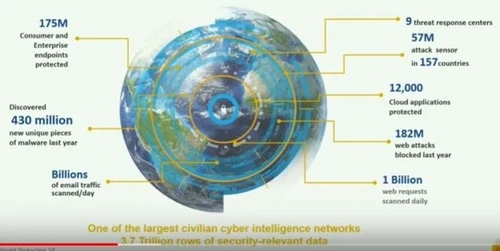
Our Symantec Enterprise Cloud protects applications and data for the modern workforce – wherever employees work and however they access corporate assets.

Director/Founders Gary Hendrix
Company Size 1000+ Employees

Broadcom Endpoint Protection (Symantec) Pricing & Plans

Looking for The Right Pricing?

Share your requirements and get a plan built around your business.

  • Define your business needs
  • Get customised pricing
  • Choose features that fit your workflow

Price Available on Request

Get personalised Broadcom Endpoint Protection (Symantec) pricing that fits your needs. Our team will connect with you.

Broadcom Endpoint Protection (Symantec) Features

  • icon_check Anti Malware
    Symantec Security Software comprises anti-malware and intrusion prevention features for server and desktop computers.
  • icon_check Firewall & intrusion prevention
    This core feature of Symantec controls traffic to the endpoint and prevents malware from infecting your device.
  • icon_check Endpoint Protection
    Symantec protects all your endpoint devices using advanced innovative technologies for all operating systems.
  • icon_check Advanced Threat Protection
    This feature enables users to uncover advanced persistent threats that would otherwise evade the traditional security layer.
  • icon_check Integration
    Symantec Endpoint Encryption provides an integrated management platform to quickly manage and deploy the endpoints.
  • icon_check File Reputation Analysis
    Symantec Insights determines whether a file is verified or malicious by collecting information about file’s characteristics.
  • icon_check Global intelligence network
    Symantec’s Global Intelligence Network can proactively identify vulnerable files and websites.
Broadcom Endpoint Protection (Symantec) Demo Video play icon

Get Broadcom Endpoint Protection (Symantec) Demo

Watch the demo video to explore key features, real workflows, and how the software fits your business needs.

Understand
Key Features
Personal
Demo Insights
Interactive
Demo Support

Broadcom Endpoint Protection (Symantec) Specification

Supported Platforms
Windows Windows
Devices
Desktop Desktop
Deployment
Web-Based Web-Based
Suitable For
All Industries
Business Specific
All Businesses
Business Size
Medium Business Enterprises SMEs MSMBs MSMEs
Language
English

Explore the Best Alternative Solutions Similar to Your Business Size and Needs

Broadcom Endpoint Protection (Symantec) Reviews

4.2

Out of 5

img

Overall Rating

Based on
3 Verified Reviews

Rating Breakdown

  • Features 4.0
  • Value for Money 4.1
  • Ease of Use 4.1
  • Customer Support 4.5

93% Recommend this Product

Add Review

Mayank Durgapal

User

User since: < 6 months

4

Reviewed on: Jul 1, 2019

Techjockey Verified

“Awesome software for Security purpose.”

Pros

Awesome software for Security purpose.

Cons

NO CONS

NISHAT AHMED ATTARI

User

4.5

Reviewed on: Apr 17, 2019

Techjockey Verified

“Assignment arrangement !!”

Pros

For an Anti-Virus/Firewall programming, it is truly peaceful, implying that it doesn't spring up the majority of the time with admonitions and alarms, as different projects do. We are utilizing the cloud rendition of the item, and it appears to work great, we have email notices setup, and we will get an email on the off chance that it squares something, or somebody endeavors to run a program that it supposes is crude, or attempts to get to a site with some known issues, yet else, you introduce it, and it carries out its responsibility. I do like the capacity that I can kind of tweak the introduce bundle for mass sending, it will enable me to pick the gathering of PCs that I need the PC or work area to have a place with and I push that bundle amid our SCCM assignment arrangement, and after that I don't need to login to the symantec entry to move it, or oversee it since my strategies are as of now settled.

Cons

NO CONS

gurbachan

User

4.3

Reviewed on: Jun 2, 2018

Techjockey Verified

“Great idea”

Pros

identified our needs and suggested software within our price range

Cons

N/A

Compare Broadcom Endpoint Protection (Symantec) With other Endpoint Security Software

Products
Ratings
Pricing
Device Supported
Deployment
Supported Platforms
  • img

    Broadcom Endpoint Protection (Symantec)

  • 4.2

  • Price On Request

  • Desktop

    Mobile

  • Web based

    On Premises

  • Windows

    Mac OS

  • img

    Symantec

  • 4.2

  • Price On Request

  • Desktop

    Mobile

  • Web based

    On Premises

  • Windows

    Mac OS

  • img

    NinjaOne

  • 4.7

  • Price On Request

  • Desktop

    Mobile

  • Web based

    On Premises

  • Windows

    Mac OS

  • img

    ThreatLocker

  • 4.2

  • Price On Request

  • Desktop

    Mobile

  • Web based

    On Premises

  • Windows

    Mac OS

  • img

    Syxsense

  • 4.7

  • Price On Request

  • Desktop

    Mobile

  • Web based

    On Premises

  • Windows

    Mac OS

(0) Product(s) selected

Broadcom Endpoint Protection (Symantec) Alternatives

See All Broadcom Endpoint Protection (Symantec) Alternatives

Available

Price on Request

Available

Price on Request

Available

Price on Request

Available

Price on Request

Articles for Broadcom Endpoint Protection (Symantec)

See All Related Articles

What kind of businesses usually uses Symantec Endpoint Encryption?

Symantec Endpoint Encryption is mostly suitable for Startups, enterprises and SMEs.

What are the types of scan available on the software?

The software provides different scan options based on the need of the user. There is an Active Scan which takes 1-2 minutes and Full Scan that takes 30-120 minutes.

Is it possible to view the status of individual clients?

Yes, the software allows the user to manage and view the status of each client from the centralized server.

Does the software allow single sign-on?

Yes, the software automatically connects to active directory to allow the user for single sign-on.

What if the user forgets the passwords?

In case the user forgets the password, the software provides recovery tokens from the management server to allow access to drives.

20,000+ Software Listed

Best Price Guranteed

Free Expert Consultation

2M+ Happy Customers

Terms and Condtions

close

Users with registered businesses can purchase goods from merchants on the platform to satisfy their business needs. Users are not permitted to utilize any products acquired through the platform for resale, advertising, business, or further distribution.

For each purchase made, users will receive a Tax Invoice (or 'GST invoice') that includes specific details such as:

  • the GSTIN of the user associated with their registered business, and

  • the specified Entity Name for their business.

It should be noted that not all products are eligible for GST Invoice. Only the products displayed by participating sellers with the 'GST-based Invoice Available' callout on the product description page would qualify.

Certain goods and services are not eligible to get a GST Invoice, including items with VAS, i.e., Value Added Services (e.g., Total Mobile Protection/Assured Buyback) and those involving an exchange offer at the time of purchase.

Users must ensure the accuracy of the GSTIN, and business entity name provided for the GST Invoice. Requests for corrections into GST Invoice would not be accommodated by Techjockey.com or any Seller, and any issues arising from user-provided information are the sole responsibility of users.

Techjockey.com is not liable for the GST Invoice or any associated input tax credit. To efficiently claim an input tax credit, users should select the registered place of business address as per the GST authority's data and follow the provisions of the GST Act and rules.

To claim an input tax credit, the delivery and billing addresses must match. Furthermore, input tax credits will not be granted if the delivery address and GSTIN on the invoice are from different states. In case of incorrect GST details provided during the order placement, the order will be canceled automatically.