linkedin
Team App logo
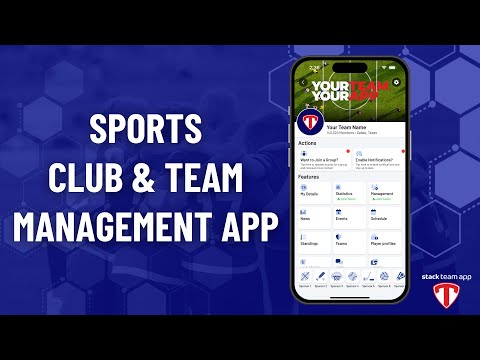
play Team App Introduction
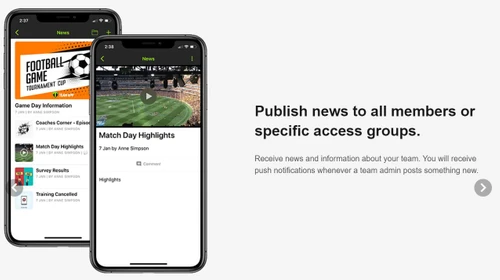
Team App access groups
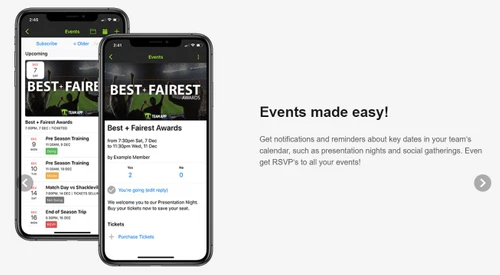
Team App event made eazy

Team App

Brand: Team Mates

  • 4.2

  • 4 Ratings

Team App is a membership management and sports communication platform that enables social groups and teams to enhance their communication skills in real-time. With Team app, sports associations can design their own app in a few minutes, by using various tools and features offered by the platform. Admins can share relevant information via email or as push notifications, keeping members updated abo...

See More

Have you used Team App before?

Share your insights for better experience

Add a Review

Price Available on Request

Questions about pricing or customization? We’re here to help, just a click away.

100% Genuine
Products
Best Price
Guaranteed
Safe & Secure
Payment
  • Description

  • Pricing

  • Features

  • Specification

  • Review

  • Compare

  • Alternatives

  • FAQ

Team App Software Overview

What is Team App?

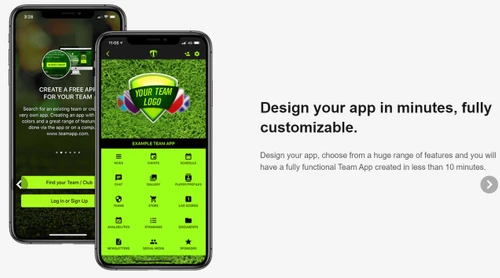
Team App is a membership management and sports communication platform that enables social groups and teams to enhance their communication skills in real-time. With Team app, sports associations can design their own app in a few minutes, by using various tools and features offered by the platform. Admins can share relevant information via email or as push notifications, keeping members updated about the recent changes. They can even generate interactive forums or chat rooms and forward messages in bulk. Further, an integrated team calendar lets members access important dates about social gatherings, presentation nights etc. Team App is compatible with multiple payment modes, enabling associations to accept service charges in real-time.  

How does Team App function?

  1. Step 1: Users can create a Team App of their own, either by visiting the official website or by using the app interface available for Android and iOS.
  2. Step 2: They can personalize the application by uploading the logo, colors, and buttons of their choice.
  3. Step 3: The functionality of the integrated buttons can be altered as per needs. Available functions are live chat, sending news, promoting sponsors, push notifications, creating events and more.
  4. Step 4: Admins can generate access groups to forward business-relevant emails and notifications. Members can be added in the groups or removed as per your convenience. You can also edit the name of the group as well.
  5. Step 5: Once completed with the above procedures, users can download the Team App in their smartphone and carry on with the login task to post content, invite members, allot RSVPs and more. 
  6. Step 6: Once it has been downloaded by everyone in the team, admins can schedule role-based access rights as per their convenience.
  7. Step 7: The App forwards relevant content to smartphone users via push notifications, and via email to non-smartphone users.   

Team App Pricing 

Team App’s pricing is available on request at techjockey.com. To know more about the product, feel free to request a callback with our software experts. 

Team App Benefits

  1. Player Profiles: Team App can be used to display photos of individual players, their bio, details and more. Users can also switch on the optional player sponsor promotion module to earn some extra revenue for their club. 
  2. Team Store: Clubs can accept service-relevant payments like membership fees and fundraisers, and sell merchandise for their club.
  3. Availabilities: Admins or individual members can schedule their date of availability in the Team App and eliminate confusion. 
Read more

Team App Pricing & Plans

Looking for The Right Pricing?

Share your requirements and get a plan built around your business.

  • Define your business needs
  • Get customised pricing
  • Choose features that fit your workflow

Price Available on Request

Get personalised Team App pricing that fits your needs. Our team will connect with you.

Team App Features

  • icon_check Newsletter
    The app forwards timely notifications to the team members, whenever admin posts something new.
  • icon_check Event Schedule
    Users can get notified about key dates scheduled in their team calendar, like social gatherings and presentation nights.
  • icon_check Live Scores
    Sporting associations can let their staff update live scores at regular intervals.
  • icon_check Chat / Messaging
    It can be used to generate chat rooms or forward bulk messages. Members can also upload photos and videos for their co-workers to
  • icon_check Photos
    Users can update photos on the Team App and can change the access rights in real-time.
  • icon_check Social Sharing
    Team App can be linked with Google+, Instagram, Facebook, Twitter, Pinterest and Youtube.
  • icon_check Web Links
    Customizable weblink button by Team App lets users link through any website of their choice.  
  • icon_check Member Directory
    Active members can generate business opportunities by listing their occupational details in the members’ directory featured by
  • icon_check Emergency Contact Details
    Admins get access to optional information inclusive of metrics like contact details, medical concerns, health insurance, and
  • icon_check Attendance Tracker
    Dashboards offer access to attendance-related reports in training, events and games.
  • icon_check Import Members
    Personal details related to individual members along with their email addresses can be imported in bulk. 
  • icon_check Ticketing
    An exclusive ticket management system featured by the app, lets users sell tickets for their game-day and trivia nights.
  • icon_check Surveys
    Admins can run surveys from time to time and they can accept answers on a multiple choice question (MCQ) basis or free form
  • icon_check Live Video Sharing
    Members, who cannot make it to the live game can enjoy the shared videos.
Team App Demo Video play icon

Get Team App Demo

Watch the demo video to explore key features, real workflows, and how the software fits your business needs.

Understand
Key Features
Personal
Demo Insights
Interactive
Demo Support

Team App Specifications

Supported Platforms
Windows Windows iOS iOS Android Android MacOS MacOS
Devices
Desktop Desktop Mobile Mobile Tablet Tablet
Deployment
Cloud-Based Cloud-Based
Suitable For
Sports & Lifestyle
Business Specific
Sports
Business Size
Small Business Startups Medium Business SMBs SMEs MSMEs
Customer Support
Email Communities Forums
Language
English
Training Resources
Documentation Videos

Explore the Best Alternative Solutions Similar to Your Business Size and Needs

Team App Review

4.2

Out of 5

img

Overall Rating

Based on
4 Verified Ratings

Rating Breakdown

  • Features 4.5
  • Value for Money 4.2
  • Ease of Use 4.1
  • Customer Support 4.2

92% Recommend this Product

Add Review

Be the First to Review

This product has no reviews yet. Be the first to leave your feedback.

Add Review

Compare Team App With other Sports League Management Software

Products
Ratings
Pricing
Device Supported
Deployment
Supported Platforms
  • img

    Team App

  • 4.2

  • Price On Request

  • Desktop

    Mobile

  • Web based

    On Premises

  • Windows

    Mac OS

  • img

    Playbook Software

  • 4.2

  • Price On Request

  • Desktop

    Mobile

  • Web based

    On Premises

  • Windows

    Mac OS

  • img

    SportsPlus

  • 4.2

  • Price On Request

  • Desktop

    Mobile

  • Web based

    On Premises

  • Windows

    Mac OS

  • img

    Goalline

  • 4.5

  • Price On Request

  • Desktop

    Mobile

  • Web based

    On Premises

  • Windows

    Mac OS

  • img

    PowerUp Sports

  • 4.4

  • Price On Request

  • Desktop

    Mobile

  • Web based

    On Premises

  • Windows

    Mac OS

  • img

    What's Score

  • 4.2

  • ₹ 1188

  • Desktop

    Mobile

  • Web based

    On Premises

  • Windows

    Mac OS

  • img

    Interpodia

  • 4.2

  • Price On Request

  • Desktop

    Mobile

  • Web based

    On Premises

  • Windows

    Mac OS

  • img

    TeamSnap

  • 4.3

  • Price On Request

  • Desktop

    Mobile

  • Web based

    On Premises

  • Windows

    Mac OS

  • img

    SportsEngine

  • 4.2

  • Price On Request

  • Desktop

    Mobile

  • Web based

    On Premises

  • Windows

    Mac OS

  • img

    LeagueApps

  • 4.2

  • Price On Request

  • Desktop

    Mobile

  • Web based

    On Premises

  • Windows

    Mac OS

(0) Product(s) selected

Team App Alternatives

See All Team App Alternatives

Available

Price on Request

Available

Price on Request

Available

Price on Request

Available

Price on Request

Starting Price:

€10 /Month

Starting Price:

$425 /Year

Articles for Team App

See All Related Articles

Who can use Team App?

Team App can be used by Clubs, Leagues and Associations.

How does Team App help you with document management?

Members can upload documents in PDF format to display in their app, comprising forms, reports and general notices.

Is Team App available for an online demo?

Yes, you can request an online demo of Team App. Our support experts will get back to you in real-time.

Is it possible to conduct votes using Team App?

Yes, members can vote in for the best players, admins can schedule the opening and closing times. Team App can push forward reminders in the form of notifications.

Do club admins get to manage their member list using Team App?

Yes, admins can monitor members’ lists from time to time, they can update phone numbers, emergency contact details, addresses and other relevant information in real-time.

How much does Team App cost?

Team App’s pricing is available on request at techjockey.com.

20,000+ Software Listed

Best Price Guranteed

Free Expert Consultation

2M+ Happy Customers

Terms and Condtions

close

Users with registered businesses can purchase goods from merchants on the platform to satisfy their business needs. Users are not permitted to utilize any products acquired through the platform for resale, advertising, business, or further distribution.

For each purchase made, users will receive a Tax Invoice (or 'GST invoice') that includes specific details such as:

  • the GSTIN of the user associated with their registered business, and

  • the specified Entity Name for their business.

It should be noted that not all products are eligible for GST Invoice. Only the products displayed by participating sellers with the 'GST-based Invoice Available' callout on the product description page would qualify.

Certain goods and services are not eligible to get a GST Invoice, including items with VAS, i.e., Value Added Services (e.g., Total Mobile Protection/Assured Buyback) and those involving an exchange offer at the time of purchase.

Users must ensure the accuracy of the GSTIN, and business entity name provided for the GST Invoice. Requests for corrections into GST Invoice would not be accommodated by Techjockey.com or any Seller, and any issues arising from user-provided information are the sole responsibility of users.

Techjockey.com is not liable for the GST Invoice or any associated input tax credit. To efficiently claim an input tax credit, users should select the registered place of business address as per the GST authority's data and follow the provisions of the GST Act and rules.

To claim an input tax credit, the delivery and billing addresses must match. Furthermore, input tax credits will not be granted if the delivery address and GSTIN on the invoice are from different states. In case of incorrect GST details provided during the order placement, the order will be canceled automatically.