linkedin
Tripleseat logo
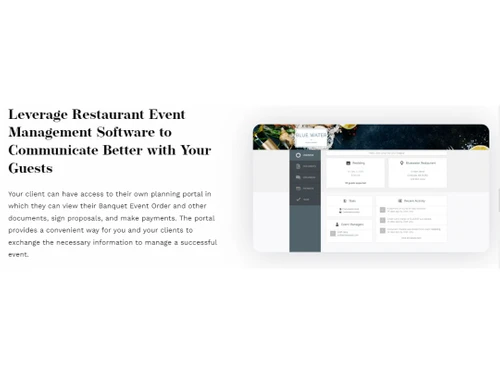
play Billing Details & Menu Item Categories (Level 3) - TSU
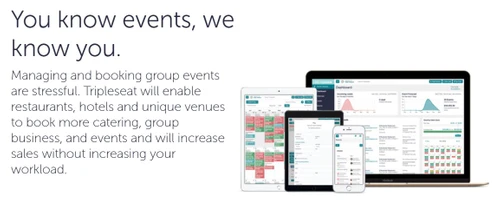
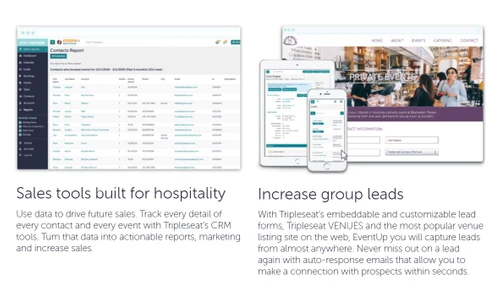
Tripleseat-Group Booking Process
Tripleseat-Operational Efficiency

Tripleseat

Brand: Tripleseat

  • 4.1

  • 4 Ratings & 1 Review

Streamlines event bookings, guest management, and communication. It offers features for managing events, venues, and catering, enhancing efficiency and organization.

See More

Have you used Tripleseat before?

Share your insights for better experience

Add a Review

Price Available on Request

Questions about pricing or customization? We’re here to help, just a click away.

100% Genuine
Products
Best Price
Guaranteed
Safe & Secure
Payment
  • Description

  • Pricing

  • Features

  • Specification

  • Review

  • Compare

  • Alternatives

  • FAQ

Tripleseat Software Overview

What is Tripleseat?

Tripleseat is an event management software designed to simplify the planning and booking process for venues, event planners, and caterers. It helps users manage event inquiries, track leads, and streamline the booking process, ensuring smooth operations.

The platform allows event organizers to manage guest lists, communicate effectively with clients, and create customized proposals. It also includes tools for managing contracts, payments, and catering orders. Tripleseat offers real-time availability tracking for venues and integrates with calendar systems to prevent overbooking. This software is widely used in the hospitality industry, including restaurants, hotels, and event spaces.

Why Choose Tripleseat Software?

  • All-in-One Event Management: It offers a comprehensive platform that simplifies the planning and management of events for restaurants, hotels, and unique venues.
  • Increased Revenue: The software is designed to help venues drive more revenue by streamlining the booking process and enhancing event sales.
  • User-Friendly Interface: Tripleseat is easy to use, allowing staff to manage events efficiently without extensive training.
  • Direct Booking Capabilities: With it, venues can set their availability and allow guests to book events directly, reducing back-and-forth communication.
  • Visual Event Planning Tools: The platform includes features like Tripleseat Floorplans, which provide intuitive 2D and 3D layouts for event spaces, enhancing the planning experience.
  • Ticketing Solutions: Tripleseat Tickets allows users to create and manage ticketed events easily, improving guest experiences while maximizing revenue potential.
  • Trusted by Many: The software is used by over 17,000 venues globally, demonstrating its reliability and effectiveness in the industry.
  • Centralized Management for Hotels: It provides specialized tools for hotels to manage guest room blocks and event spaces in one place.
  • Support for Social Causes: The company actively participates in charitable initiatives, such as supporting No Kid Hungry, aligning with socially responsible values.
  • Enhanced Client Impressions: By streamlining processes and providing visualizations, Tripleseat helps venues impress clients and boost event bookings effectively.

Benefits of Tripleseat Software

  • Enhanced Communication: Built-in tools streamline staff-client communication, reducing errors and improving service.
  • Mobile Access: Manage bookings and inquiries from mobile devices for flexibility.
  • Platform Integration: Connects with third-party apps like payment processors and marketing tools.
  • Analytics & Reporting: Offers insights on sales and event performance for better decision-making.
  • Custom Event Packages: Create tailored packages to meet client needs and boost bookings.
  • CRM Features: Tracks client interactions and preferences to maintain strong relationships.
  • Automated Follow-Ups: Sends post-event follow-ups to gather feedback and drive repeat business.
  • Diverse Event Support: Handles various event types, from weddings to corporate meetings.
  • Training Resources: Provides onboarding and training materials for a smooth software transition.
  • Community Engagement: Helps venues promote events and build local customer loyalty.

Pricing of Tripleseat

Tripleseat price details are available on request at techjockey.com.

The pricing model is based on different parameters, including extra features, deployment type, and the total number of users. For further queries related to the product, you can contact our product team and learn more about the pricing and offers.

Read more

Tripleseat Company Details

Founded Year:  2008

Tripleseat Software is the ideal event management solution for owners and managers of restaurants, banquet, and catering operations.

Director/Founders Dusty Davidson, Jonathan Morse, Kevin Zink
Company Size 1-100 Employees

Tripleseat Pricing & Plans

Looking for The Right Pricing?

Share your requirements and get a plan built around your business.

  • Define your business needs
  • Get customised pricing
  • Choose features that fit your workflow

Price Available on Request

Get personalised Tripleseat pricing that fits your needs. Our team will connect with you.

Tripleseat Features

  • icon_check E-Signatures
    Allows clients to sign contracts digitally, streamlining the agreement process.
  • icon_check Reporting
    Provides detailed reports to track bookings, revenue, and performance metrics for better decision-making.
  • icon_check CRM
    Manages customer relationships by tracking leads, interactions, and communication history in one place.
  • icon_check Event Booking Calendar
    A centralized calendar to manage event schedules and track availability in real time.
  • icon_check Online Payment
    Enables clients to make payments online, making the payment process faster and more secure.
  • icon_check Contact Management
    Organizes and stores client information, ensuring easy access and communication.
  • icon_check Easy Communication
    Simplifies communication with clients through integrated email, text, and proposal management.
  • icon_check Offline Payment Tracking
    Tracks payments made offline, ensuring all financial transactions are documented and accounted for.
  • icon_check Track Individual Sales Performance
    Monitors the performance of individual sales reps, helping to optimize efforts and increase bookings.
  • icon_check Improve Operational Efficiency
    Automates and simplifies various tasks, enhancing overall efficiency and reducing manual workload.
Tripleseat Demo Video play icon

Get Tripleseat Demo

Watch the demo video to explore key features, real workflows, and how the software fits your business needs.

Understand
Key Features
Personal
Demo Insights
Interactive
Demo Support

Tripleseat Specifications

Supported Platforms
Ubuntu Ubuntu Windows Windows MacOS MacOS Linux Linux
Devices
Desktop Desktop Mobile Mobile Tablet Tablet iPad iPad
Deployment
Cloud-Based Cloud-Based
Suitable For
Hospitality
Business Specific
Restaurants Hotels
Business Size
Small Business Startups Medium Business Enterprises
Customer Support
Phone Email Live Chat Communities
Language
English
Training Resources
Videos

Explore the Best Alternative Solutions Similar to Your Business Size and Needs

Tripleseat Review

4.1

Out of 5

img

Overall Rating

Based on
1 Verified Review

Rating Breakdown

  • Features 4.3
  • Value for Money 4.1
  • Ease of Use 4
  • Customer Support 4.2

92% Recommend this Product

Add Review

Tripleseat Video Review

youtubeVideoId

4.3

“Tripleseat Honest Review – Watch Before Using”

Review by: HelperDog

Compare Tripleseat With other Event Management Software

Products
Ratings
Pricing
Device Supported
Deployment
Supported Platforms
  • img

    Tripleseat

  • 4.1

  • Price On Request

  • Desktop

    Mobile

  • Web based

    On Premises

  • Windows

    Mac OS

  • img

    Zoho Backstage

  • 4.4

  • ₹ 7900

  • Desktop

    Mobile

  • Web based

    On Premises

  • Windows

    Mac OS

  • img

    Event Temple

  • 4.5

  • Price On Request

  • Desktop

    Mobile

  • Web based

    On Premises

  • Windows

    Mac OS

  • img

    Eventtia

  • 4.4

  • Price On Request

  • Desktop

    Mobile

  • Web based

    On Premises

  • Windows

    Mac OS

  • img

    Onlive.io

  • 4.2

  • Price On Request

  • Desktop

    Mobile

  • Web based

    On Premises

  • Windows

    Mac OS

  • img

    Goldcast

  • 4.3

  • Price On Request

  • Desktop

    Mobile

  • Web based

    On Premises

  • Windows

    Mac OS

  • img

    WedVista

  • 4.3

  • ₹ 50000

  • Desktop

    Mobile

  • Web based

    On Premises

  • Windows

    Mac OS

  • img

    WedPlan

  • 4.3

  • Price On Request

  • Desktop

    Mobile

  • Web based

    On Premises

  • Windows

    Mac OS

  • img

    Swoogo

  • 4.5

  • Price On Request

  • Desktop

    Mobile

  • Web based

    On Premises

  • Windows

    Mac OS

  • img

    Neoflo

  • 4.2

  • Price On Request

  • Desktop

    Mobile

  • Web based

    On Premises

  • Windows

    Mac OS

(0) Product(s) selected

Tripleseat Alternatives

See All Tripleseat Alternatives

Available

Price on Request

Available

Price on Request

Starting Price:

$11,800 /Year

Available

Price on Request

Available

Price on Request

Available

Price on Request

Available

Price on Request

Starting Price:

$199 /Month

Available

Price on Request

Available

Price on Request

Articles for Tripleseat

See All Related Articles

How much does Tripleseat Software Cost?

Tripleseat pricing details are available upon request on techjockey.com.

Is there any Tripleseat Software App?

No, Tripleseat has no mobile app available for both iOS and Android devices.

Which operating system does Tripleseat Software Support?

Tripleseat is cloud-based and can be accessed from any device with an internet connection, supporting Ubuntu, Windows, MacOS and Linux operating systems.

Does Tripleseat offer a free trial?

Yes, Tripleseat offers a free trial to let users explore the features before committing.

How does Tripleseat Software Work?

Tripleseat streamlines event management by automating lead tracking, booking, and client communication through a user-friendly platform.

Who are the potential users of Tripleseat Software?

Potential users of Tripleseat include event planners, hospitality businesses, restaurants, hotels, and venues looking to manage events.

Is there any free demo for Tripleseat Software?

Yes, Tripleseat offers a free demo to showcase its features and functionality.

Is Tripleseat Software Free?

No, Tripleseat is a paid software with customized pricing based on user requirements.

Does Tripleseat offer customer support?

Yes, Tripleseat provides customer support through phone, email, and live chat.

Can I customize my event proposals in Tripleseat?

Yes, Tripleseat allows users to create and customize branded event proposals.

20,000+ Software Listed

Best Price Guranteed

Free Expert Consultation

2M+ Happy Customers

Terms and Condtions

close

Users with registered businesses can purchase goods from merchants on the platform to satisfy their business needs. Users are not permitted to utilize any products acquired through the platform for resale, advertising, business, or further distribution.

For each purchase made, users will receive a Tax Invoice (or 'GST invoice') that includes specific details such as:

  • the GSTIN of the user associated with their registered business, and

  • the specified Entity Name for their business.

It should be noted that not all products are eligible for GST Invoice. Only the products displayed by participating sellers with the 'GST-based Invoice Available' callout on the product description page would qualify.

Certain goods and services are not eligible to get a GST Invoice, including items with VAS, i.e., Value Added Services (e.g., Total Mobile Protection/Assured Buyback) and those involving an exchange offer at the time of purchase.

Users must ensure the accuracy of the GSTIN, and business entity name provided for the GST Invoice. Requests for corrections into GST Invoice would not be accommodated by Techjockey.com or any Seller, and any issues arising from user-provided information are the sole responsibility of users.

Techjockey.com is not liable for the GST Invoice or any associated input tax credit. To efficiently claim an input tax credit, users should select the registered place of business address as per the GST authority's data and follow the provisions of the GST Act and rules.

To claim an input tax credit, the delivery and billing addresses must match. Furthermore, input tax credits will not be granted if the delivery address and GSTIN on the invoice are from different states. In case of incorrect GST details provided during the order placement, the order will be canceled automatically.