linkedin
Ubiquiti Unifi Access Point logo
play Introducing: Ubiquiti UniFi 6 Access Points
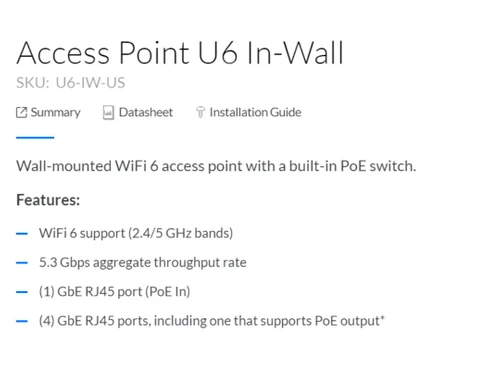
Ubiquiti Unifi Access Point-Access-point-U6 In Wall
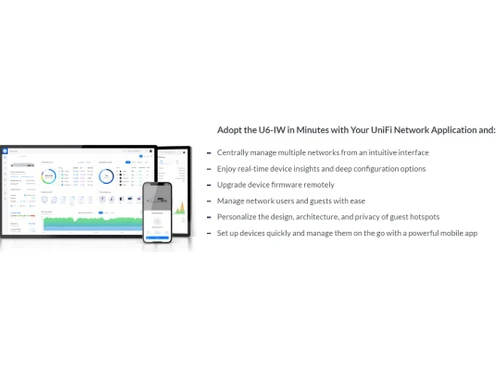
Ubiquiti Unifi Access Point-Manage multiple networks

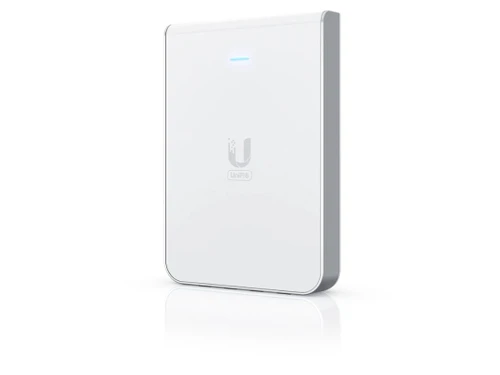
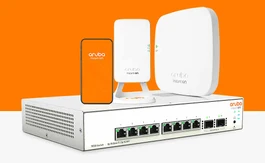
Ubiquiti Unifi Access Point

Brand: Ubiquiti

  • 4.3

  • 1 Rating & 1 Review

The Ubiquiti UniFi Access Point is a wireless networking solution for small- to medium-sized businesses and homes. It features advanced 802.11ac WiFi technology to offer fast speeds and seamless connectivity. With its sleek and compact design, the UniFi Access Point can be easily installed on walls or ceilings, making it an ideal indoor or outdoor wireless networking solution. This access point h...

See More

Have you used Ubiquiti Unifi Access Point before?

Share your insights for better experience

Add a Review

Price Available on Request

Questions about pricing or customization? We’re here to help, just a click away.

100% Genuine
Products
Best Price
Guaranteed
Safe & Secure
Payment
  • Specification

  • Pricing

  • Features

  • Description

  • Review

  • Compare

  • Alternatives

  • FAQ

Ubiquiti Unifi Access Point Specifications

Suitable For
All Industries
Business Specific
All Businesses
Language
English

Ubiquiti Unifi Access Point Pricing & Plans

Looking for The Right Pricing?

Share your requirements and get a plan built around your business.

  • Define your business needs
  • Get customised pricing
  • Choose features that fit your workflow

Price Available on Request

Get personalised Ubiquiti Unifi Access Point pricing that fits your needs. Our team will connect with you.

Ubiquiti Unifi Access Point Features

  • icon_check Management interface-Ethernet Bluetooth
    Provides a centralized management platform for configuring and monitoring multiple access points.
  • icon_check PoE interface
    Receives power and data through a single PoE (Power over Ethernet) cable to simplify installation.
  • icon_check Power method-PoE
    Supports a PoE connection, eliminating the need for a separate power source.
  • icon_check Power supply-UniFi PoE switch
    Provides a cost-effective and scalable solution for powering multiple access points.
  • icon_check Max. power consumption -13.5W (Excluding PoE outpu
    Consumes a maximum of 13.5 watts (excluding PoE output).
  • icon_check Max. PoE wattage per port by PSE -15.4W
    Supports a maximum PoE wattage of 15.4 watts per port, as the PSE (Power Sourcing Equipment) provides.
  • icon_check Voltage range PoE mode-44—57V DC
    Operates within a voltage range of 44-57V DC in PoE mode.
  • icon_check Operating temperature- 30 to 60° C (-22 to 140° F)
    Can operate within 30 to 60° C (-22 to 140° F).
  • icon_check Operating humidity-5 to 95% noncondensing
    Operates within a range of 5 to 95% non-condensing.
  • icon_check Wireless security
    Supports various wireless security protocols, including WEP, WPA, and WPA2.
  • icon_check Networking interface-GbE RJ45 port
    Supports a GbE (Gigabit Ethernet) RJ45 port for high-speed wired network connectivity.

Ubiquiti Unifi Access Point Overview

What is Ubiquiti UniFi Access Point?

The Ubiquiti UniFi Access Point is a wireless networking solution for small- to medium-sized businesses and homes. It features advanced 802.11ac WiFi technology to offer fast speeds and seamless connectivity. With its sleek and compact design, the UniFi Access Point can be easily installed on walls or ceilings, making it an ideal indoor or outdoor wireless networking solution.

This access point has powerful hardware, including a dual-core processor and 256MB RAM. Additionally, it comes with the UniFi Controller software, which provides a centralized management platform for configuring and monitoring multiple access points from a single location.

Key Functionalities of Ubiquiti UniFi Access Point

  • Antenna system: The network switch features a 2x2 MIMO antenna system, providing enhanced coverage and signal strength.
  • Wireless standards: It supports the latest 802.11ac WiFi standard, ensuring fast wireless connectivity.
  • Multiple SSIDs: The network device enables users to segment their wireless network for different purposes or user groups.
  • Seamless roaming: The access point enables devices to move between access points without interrupting their wireless connection.
  • L3 Switching with Inter-VLAN Routing: It enables routing between VLANs for better network performance and security.
  • Bandwidth management: The access point allows administrators to control and allocate bandwidth to specific users or applications.

Benefits of Ubiquiti UniFi Access Point

  • The access point supports wireless uplink, enabling administrators to connect additional access points wirelessly for greater coverage.
  • It includes built-in diagnostics tools, allowing administrators to quickly troubleshoot and resolve network issues.
  • The network device can be deployed in various configurations, including standalone, ceiling-mounted, or wall-mounted.

Pricing of Ubiquiti UniFi Access Point

Ubiquiti UniFi Access Point price details are available on request at techjockey.com.

Ubiquiti UniFi Access Point price in India may vary based on factors like customization, additional features required, number of users, and the deployment type. Please request a call back for subscription-related details and to avail offers on premium packages.

Read more

Ubiquiti Company Details

Founded Year:  2005

Ubiquiti is rethinking IT with industry-leading products for enterprise networking, security, and more unified in an incredible software interface.

Director/Founders Robert Pera
Company Size 1000+ Employees
Ubiquiti Unifi Access Point Demo Video play icon

Get Ubiquiti Unifi Access Point Demo

Watch the demo video to explore key features, real workflows, and how the software fits your business needs.

Understand
Key Features
Personal
Demo Insights
Interactive
Demo Support

Ubiquiti Unifi Access Point Review

4.3

Out of 5

img

Overall Rating

Based on
1 Verified Review

Rating Breakdown

  • Features 4.5
  • Value for Money 4
  • Ease of Use 4.5
  • Customer Support 4.5

90% Recommend this Product

Add Review

Rajiv Gupta

Administrator

Industry: Hospitality User since: 1-2 years

4.3

Reviewed on: May 10, 2023

Techjockey Verified

“Ubiquiti Unifi Access Points Networking Solution”

Pros

Product delivers good performance at an attractive price point, offering operational management benefits. Wireless features facilitate authenticated access to all corporate LANs, enhancing the overall connectivity experience. Controller is straightforward to install, streamlining the overall management process.

Cons

Occasionally, devices encounter challenges in updating firmware or configuration

Compare Ubiquiti Unifi Access Point With other Network Devices

Products
Ratings
Pricing
Device Supported
Deployment
Supported Platforms
  • img

    Ubiquiti Unifi Access Point

  • 4.3

  • Price On Request

  • Desktop

    Mobile

  • Web based

    On Premises

  • Windows

    Mac OS

  • img

    Ubiquiti Wireless

  • 4.1

  • Price On Request

  • Desktop

    Mobile

  • Web based

    On Premises

  • Windows

    Mac OS

  • img

    Sophos Switch

  • 4.4

  • Price On Request

  • Desktop

    Mobile

  • Web based

    On Premises

  • Windows

    Mac OS

  • img

    JioFi

  • 4.5

  • Price On Request

  • Desktop

    Mobile

  • Web based

    On Premises

  • Windows

    Mac OS

(0) Product(s) selected

Ubiquiti Unifi Access Point Alternatives

See All Ubiquiti Unifi Access Point Alternatives
SAVE UPTO 60%

Available

Price on Request

Articles for Ubiquiti Unifi Access Point

See All Related Articles

What does a Ubiquiti access point do?

A Ubiquiti access point is a device that provides wireless network connectivity to client devices, such as computers, laptops, smartphones, and tablets, within its coverage area. It allows these devices to connect to a local area network (LAN) or the internet via a wireless connection.

Can you use the UniFi access point with any router?

You can use a UniFi access point with any router that supports the necessary networking standards, such as Ethernet and Wi-Fi protocols. The UniFi access point is designed to work with a variety of routers, making it a versatile option for businesses and home networks.

What is the speed of the Ubiquiti UniFi access point?

The speed of a Ubiquiti UniFi access point varies depending on the specific model and the wireless standards it supports. Ubiquiti UniFi access points can support different wireless standards such as 802.11n, 802.11ac, and 802.11ax, each of which offers different speeds.

20,000+ Software Listed

Best Price Guranteed

Free Expert Consultation

2M+ Happy Customers

Terms and Condtions

close

Users with registered businesses can purchase goods from merchants on the platform to satisfy their business needs. Users are not permitted to utilize any products acquired through the platform for resale, advertising, business, or further distribution.

For each purchase made, users will receive a Tax Invoice (or 'GST invoice') that includes specific details such as:

  • the GSTIN of the user associated with their registered business, and

  • the specified Entity Name for their business.

It should be noted that not all products are eligible for GST Invoice. Only the products displayed by participating sellers with the 'GST-based Invoice Available' callout on the product description page would qualify.

Certain goods and services are not eligible to get a GST Invoice, including items with VAS, i.e., Value Added Services (e.g., Total Mobile Protection/Assured Buyback) and those involving an exchange offer at the time of purchase.

Users must ensure the accuracy of the GSTIN, and business entity name provided for the GST Invoice. Requests for corrections into GST Invoice would not be accommodated by Techjockey.com or any Seller, and any issues arising from user-provided information are the sole responsibility of users.

Techjockey.com is not liable for the GST Invoice or any associated input tax credit. To efficiently claim an input tax credit, users should select the registered place of business address as per the GST authority's data and follow the provisions of the GST Act and rules.

To claim an input tax credit, the delivery and billing addresses must match. Furthermore, input tax credits will not be granted if the delivery address and GSTIN on the invoice are from different states. In case of incorrect GST details provided during the order placement, the order will be canceled automatically.