linkedin
VidToon logo
play VidToon - The New 2D Animation Video Maker
Vidtoon-dashboard
Vidtoon-drag and drop

VidToon

Brand: Atlas Web Solutions

  • No Ratings & Reviews

VidToon is an animated video creation software that helps users create professional explainer, marketing, educational, and promotional videos using drag-and-drop tools, customizable templates, and AI voiceovers.

See More

Have you used VidToon before?

Share your insights for better experience

Add a Review
Starting Price 27% OFF
$49 $67

View plans

100% Genuine
Products
Best Price
Guaranteed
Safe & Secure
Payment
  • Description

  • Pricing

  • Features

  • Specification

  • Review

  • FAQ

Starting at $49

VidToon Software Overview

What is VidToon?

VidToon is a powerful and user-friendly desktop software designed for creating professional 2D animated explainer videos. Positioned as a leading solution in the video making software category, VidToon 2.1 enables users to produce engaging marketing and explainer content quickly and efficiently. It eliminates the steep learning curve often associated with animation by providing a drag-and-drop interface, a vast library of ready-to-use assets, and intuitive controls. The software is engineered to be faster and more productive, allowing creators to transform ideas into high-quality animations in record time.

Why Choose VidToon?

In today's fast-paced digital environment, capturing audience attention is more challenging than ever. Static content often fails to engage users who are passively scrolling through feeds. VidToon addresses this by leveraging the proven power of animated video. According to industry research, animated explainer videos are highly effective; 76% of marketers report that video has helped increase sales, and videos under 90 seconds are shared 37% more often. VidToon helps you create content that makes viewers stop, watch, and listen. By combining dynamic visuals with clear audio, it ensures your message is not just seen but also absorbed, leading to increased traffic, better brand recall, and higher conversion rates. VidToon is trusted by over 10,000 customers and comes with a 30-day, risk-free money-back guarantee. It runs as a desktop application on Windows (minimum i5 processor, 8GB RAM) or macOS, and is not compatible with tablets, phones, or Chromebooks.

Advanced Features of VidToon

  • Expanded Asset Library:Gain instant access to a massive royalty-free library, including 25 animated characters across 24 professions/niches (each with 84 style variants), 34 HD background images, 30 new animations and transitions, and professional music files to set the perfect tone for your videos, 1,680 total animation files in all.
  • Automated Voice Overs: Bring your characters to life with realistic text-to-speech functionality powered by Microsoft and Google's dynamic voice engines. This allows you to create professional narrations without recording your own voice.
  • Extended Video Length: Create comprehensive and detailed presentations with the ability to produce videos up to 25 minutes long, a significant increase from the previous 3-minute limit.
  • Smart Timeline & Auto-Positioning: Simply drag and drop elements onto the scene, and VidToon smart timeline helps with auto-positioning, streamlining the animation process and saving valuable time.
  • Camera Zoom & Pan: Direct the viewer's focus exactly where you want it with a simple camera zoom-in and zoom-out feature, perfect for highlighting key details.
  • Free Commercial License: A commercial license is included at no extra cost, empowering you to create and sell videos to clients, opening up new revenue streams for freelancers and agencies.
  • Multi-Install License: Included at no extra cost, this license lets you install and use VidToon across multiple computers, so you can create animations from anywhere.

Key Capabilities of VidToon

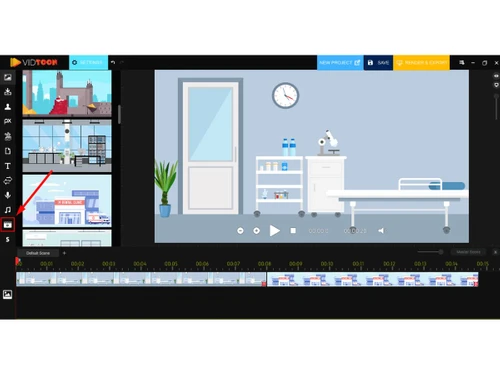
  • Drag-and-Drop Editor: Build scenes and animate characters without any technical expertise. The intuitive interface allows anyone to create professional-looking videos with ease.
  • Pre-Built Character Library: Choose from a wide selection of animated characters in various styles, poses, and industries to tell your story effectively.
  • Timeline-Based Editing: Gain precise control over every element of your video. The timeline allows you to manage scenes, synchronize audio, and fine-tune animations for a polished final product.
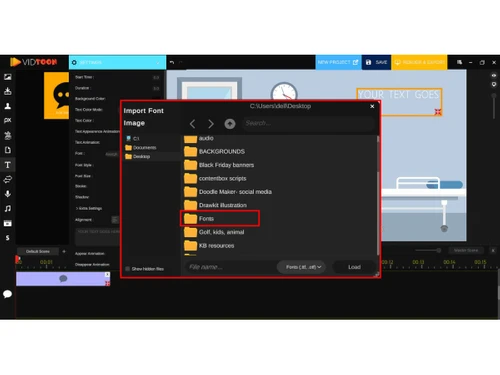
  • Animated Text Effects: Move beyond static text with a range of animated typography options that add motion and clarity to your titles and captions, increasing viewer engagement.
  • FHD Export: Export your finished projects in full high-definition (FHD) quality, ensuring your videos look crisp and professional on any platform.
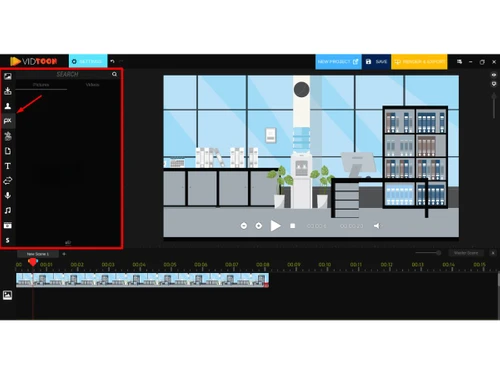
  • Media Integration: Enhance your videos by importing your own images, GIFs, and icons, with built-in support from Pixabay and Giphy to expand your creative options.

How to Use VidToon?

  1. Select Assets: Begin by choosing your desired characters, background images, and music from the extensive built-in library.
  2. Drag & Drop: Arrange your selected assets on the canvas. Use the smart timeline to sequence scenes and elements effortlessly.
  3. Customize & Animate: Add text, apply animations, and insert transitions. Generate a voiceover using the text-to-speech engine or upload your own audio file.
  4. Export: Once you are satisfied with your creation, export the final video in FHD quality, ready to be shared with the world.

VidToon Pricing

VidToon price starts at USD 49 at techjockey.com.

The pricing model is based on different parameters, including extra features, deployment type, and the total number of users. For further queries related to the product, you can contact our product team and learn more about the pricing and offers.

Read more

Atlas Web Solutions Company Details

Founded Year:  2006

Atlas Web Solutions is a SaaS Growth Agency with 6+ years of experience in scaling SaaS businesses.

Director/Founders Mustapha Ajermou
Company Size 1-100 Employees

VidToon Pricing & Plans

VidToon 2.0
Key Features
  • Drag-and-Drop Editor
  • Pre-Built Character Library
  • Scene Templates
  • Timeline-Based Editing
  • Text-to-Speech Integration
  • Voiceover Import
Starting at $49 $67 SAVE UPTO 27%
    • Licenses

      Licenses
      Licenses
    • Monthly

      Monthly
      Monthly

Key Features

  • Drag-and-Drop Editor

  • Pre-Built Character Library

  • Scene Templates

  • Timeline-Based Editing

  • Text-to-Speech Integration

  • Voiceover Import

VidToon Features

  • icon_check Drag & Drop
    Create animated videos easily by dragging elements onto the canvas and arranging them on a timeline without design skills.
  • icon_check Pre-Built Character Library
    Access a wide collection of animated characters in different styles, poses, and industries for quick storytelling.
  • icon_check Templates
    Use ready-made scene templates to quickly build professional explainer videos without starting from scratch.
  • icon_check Timeline-Based Editing
    Manage scenes, animations, and audio precisely using a structured timeline for smooth and controlled video flow.
  • icon_check Text-to-Speech Integration
    Convert written scripts into realistic voiceovers using built-in AI voices from popular speech engines.
  • icon_check Voiceover
    Upload and sync custom voiceovers or audio narrations to match animations and improve storytelling quality.
  • icon_check Background Library
    Choose from a variety of high-quality backgrounds and environments to enhance the visual appeal of scenes.
  • icon_check Animated Text Effects
    Add motion to titles and captions with animated typography that increases viewer engagement and clarity.
  • icon_check Media Asset Library
    Get access to royalty-free icons, images, music, and GIFs that can be used in commercial video projects.
  • icon_check Transition Effects
    Apply smooth transitions between scenes to create a seamless viewing experience and professional finish.
  • icon_check Multi-Scene Management
    Organize and manage multiple scenes efficiently, allowing complex storytelling within a single project timeline.
  • icon_check Cross-Platform Support
    Compatible with both Windows and Mac systems, allowing flexible usage across different desktop environments.
  • icon_check Video Creation
    Create unlimited video projects without restrictions, making it suitable for agencies and frequent creators.
VidToon Demo Video play icon

Get VidToon Demo

Watch the demo video to explore key features, real workflows, and how the software fits your business needs.

Understand
Key Features
Personal
Demo Insights
Interactive
Demo Support

VidToon Specifications

Supported Platforms
Windows Windows MacOS MacOS
Devices
Desktop Desktop
Deployment
Perpetual Perpetual
Suitable For
All Industries
Business Specific
All Businesses
Business Size
Individual Small Business Startups Medium Business SMBs SMEs MSMEs Freelancers
Customer Support
Email Live Chat Communities Forums
Language
English
Integration
API Integration
Training Resources
Live Online Webinars Documentation Videos
AI Features
AI Integrated
Technology
Next Generation

VidToon Review

Techjockey Trusted Reviews from Verified Users

No reviews are currently available for VidToon. Discover similar Video Making Software reviews

  • Designs Videomaker

    5.0

    Whats great - Quick and easy way of creating short form videos. All the content is available. Video making process is very intuitive read more

  • Wondershare Filmora

    4.3

    Whats great - It seemed to me all so familiar and straightforward, I easily processed various video files and made interesting titles and e... read more

  • Monarch Smart Cut Pro

    4.8

    Whats great - Awesome service and product! I would highly recommend Techjockey. read more
Articles for VidToon

See All Related Articles

Is VidToon a one time payment?

No, VidToon is offered as a monthly subscription. The current pricing indicates a monthly payment structure.

How much does VidToon cost?

VidToon price starts at INR 5,264 at techjockey.com.

Is VidToon free?

No, VidToon is a paid software with a monthly subscription. However, there might be an option to get a free demo.

What is VidToon?

VidToon is a top video animation software designed to help users create amazing explainer, marketing, and animated videos online. It is an animated video maker that aims to be easier, more productive, and faster for its users.

Who can use VidToon?

VidToon is ideal for digital marketers, small businesses, content creators, YouTubers, freelancers, agencies, educators, and trainers who want to create animated explainer, marketing, and educational videos.

Does VidToon include commercial rights?

Yes, VidToon includes a free commercial license upgrade. This allows users to make money from all the marketing videos they create using the software without legal hassles.

What is the maximum length of videos I can create with VidToon?

With VidToon, you can now create animated explainer videos that are up to 25 minutes long, which is a significant increase compared to the previous limit of just 3 minutes.

Does VidToon support automated voice-overs?

Yes, VidToon features automated voice-overs with Microsoft and Google Dynamic Text-to-Speech options, allowing you to add realistic voices to your 2D explainer videos. You can also upload and sync your own custom voiceovers.

What kind of assets are included in VidToon?

VidToon comes with a rich library of assets, including ready-to-go animated characters for various scenarios and niches, an expanded royalty-free library with HD background images and music files, and built-in images, GIFs, and icons in association with Pixabay & Giphy. It also provides a media asset library for commercial video projects.

Is VidToon easy to use for beginners?

Yes, VidToon is designed with a modern user interface and features like a smart timeline with drag-and-drop functionality and auto-positioning magic. These elements aim to make it easy for users to create animated videos without needing advanced design skills.

20,000+ Software Listed

Best Price Guranteed

Free Expert Consultation

2M+ Happy Customers

Terms and Condtions

close

Users with registered businesses can purchase goods from merchants on the platform to satisfy their business needs. Users are not permitted to utilize any products acquired through the platform for resale, advertising, business, or further distribution.

For each purchase made, users will receive a Tax Invoice (or 'GST invoice') that includes specific details such as:

  • the GSTIN of the user associated with their registered business, and

  • the specified Entity Name for their business.

It should be noted that not all products are eligible for GST Invoice. Only the products displayed by participating sellers with the 'GST-based Invoice Available' callout on the product description page would qualify.

Certain goods and services are not eligible to get a GST Invoice, including items with VAS, i.e., Value Added Services (e.g., Total Mobile Protection/Assured Buyback) and those involving an exchange offer at the time of purchase.

Users must ensure the accuracy of the GSTIN, and business entity name provided for the GST Invoice. Requests for corrections into GST Invoice would not be accommodated by Techjockey.com or any Seller, and any issues arising from user-provided information are the sole responsibility of users.

Techjockey.com is not liable for the GST Invoice or any associated input tax credit. To efficiently claim an input tax credit, users should select the registered place of business address as per the GST authority's data and follow the provisions of the GST Act and rules.

To claim an input tax credit, the delivery and billing addresses must match. Furthermore, input tax credits will not be granted if the delivery address and GSTIN on the invoice are from different states. In case of incorrect GST details provided during the order placement, the order will be canceled automatically.