linkedin
Vidyard logo
play Vidyard - Keep Connected With Video - Vidyard Demo
Vidyard demo
Vidyard personalized

Vidyard

Brand: Vidyard

  • 4.0

  • 3 Ratings

Vidyard is a video making software to be used for business purposes. It allows organizations to create product demos, sales pitch, etc. Vidyard is a powerful marketing tool which helps users create and edit interactive videos without any prior experience with video editing. The software helps in streamlining of all the marketing related processes, such as, live streaming marketing events, runnin...

See More

Have you used Vidyard before?

Share your insights for better experience

Add a Review
Starting Price
$89

View plans

100% Genuine
Products
Best Price
Guaranteed
Safe & Secure
Payment
  • Description

  • Pricing

  • Features

  • Specification

  • Review

  • Compare

  • Alternatives

  • FAQ

Starting at $89

Vidyard Software Overview

What is Vidyard? 

Vidyard is a video making software to be used for business purposes. It allows organizations to create product demos, sales pitch, etc. Vidyard is a powerful marketing tool which helps users create and edit interactive videos without any prior experience with video editing. The software helps in streamlining of all the marketing related processes, such as, live streaming marketing events, running online video ads, etc. 

Vidyard also comes with a set of CRM tools which enables sales personnel to accelerate their sales performance. It helps them manage their customers as well as their personal information and monitor shifts and trends that affect the customer behavior. Vidyard helps employees come up with result-driven customer marketing plans and retention strategies. 

What are the benefits of using Vidyard app? 

Vidyard offers a powerful platform for marketing, sales, and corporate communications management. Here are some key benefits of using this video editing software. 

  1. It allows organizations to upload and stream videos through their own customizable Vidyard video player. 
  2. The software helps companies measure the effectiveness of their videos by conducting A/B split testing and check which images generate more clicks. 
  3. The video editing software provides 10 different types of player skin for organizations to customize. 
  4. Ensures complete compatibility with a wide range of devices across various platforms. 
  5. Organizations can implement several CTS (Call to Action) strategies with the help of videos to boost customer conversion rate.
  6. It even allows the organizations to provide the complete access of video directory to the customers. 

What are the Vidyard features for quality video editing? 

Here is a quick rundown of the features offered by Vidyard video making software: 

  1. Customer and marketing analytics 
  2. Customer engagement 
  3. CDN services 
  4. CMS services 
  5. Content moderation 
  6. Video creation and editing 
  7. Multi-user interface 
  8. Video downloading system 
  9. Video player templates 
  10. Playlists
  11. SEO support 

What is the cost of Vidyard video editing software for marketing? 

The price of Vidyard video making software for business pricing starts from $ 89 per month per seat at techjockey.com. Please request a call back from our experts to get details regarding the price. 

Read more

Vidyard Pricing & Plans

Starter
Key Features
  • Unlimited videos
  • Full video analytics
  • Team performance analytics
  • Branded Sharing Page for videos
  • CTA templates
  • Password-protected videos
  • Folder management
Starting at $89
    • Seat

      Seat
      Seat
    • Monthly

      Monthly
      Monthly

Key Features

  • Unlimited videos

  • Full video analytics

  • Team performance analytics

  • Branded Sharing Page for videos

  • CTA templates

  • Password-protected videos

  • Folder management

Vidyard Features

  • icon_check Screen Recording
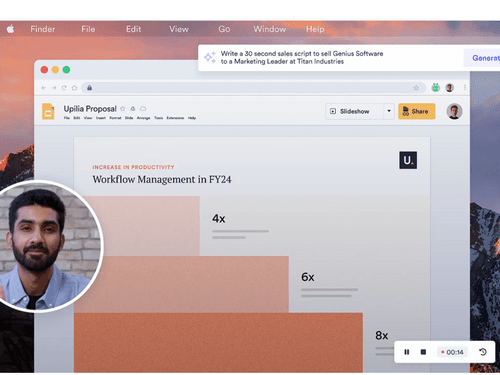
    This video editing software provides screen recording features for employees to create product demos and interactive videos for
  • icon_check Automatic video creation
    The software automates the task of creating videos for the user, with a single press of a button it starts recording the video.
  • icon_check Video Management
    Companies can maintain all their videos on a single platform by categorizing them in different folders for seamless access.
  • icon_check Analytics
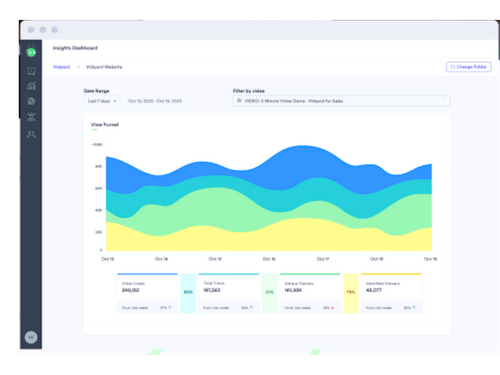
    This video editing software provides detailed analytics to measure the success rate of any marketing campaign.
  • icon_check SEO Tools
    Vidyard offers SEO tools to boost the online search rankings of your marketing videos.
  • icon_check Email Support
    Customer support is provided through the email. Every mail is converted into a ticket to ensure that the complains are addressed
  • icon_check Password Protection
    Organizations can protect their video materials stored in Vidyard from unauthorized access through password security.
  • icon_check Your own Brand
    Companies can create customized videos and add their personal logo for branding purposes.
  • icon_check Download Video
    All the videos created and edited in Vidyard can be downloaded instantly with a click.
  • icon_check Embed Video to websites online
    The content management module offered by Vidyard allows organizations to embed videos onto their websites. The software also
  • icon_check Customization
    The software offers 10 different skins to customize the video player as per the user requirements.
Vidyard Demo Video play icon

Get Vidyard Demo

Watch the demo video to explore key features, real workflows, and how the software fits your business needs.

Understand
Key Features
Personal
Demo Insights
Interactive
Demo Support

Vidyard Specifications

Supported Platforms
Ubuntu Ubuntu Windows Windows MacOS MacOS Linux Linux
Devices
Desktop Desktop
Deployment
Cloud-Based Cloud-Based
Suitable For
All Industries
Business Specific
All Businesses
Business Size
Small Business Startups Medium Business Enterprises
Customer Support
Email Communities
Language
English
Training Resources
Videos
AI Features
AI Integrated

Explore the Best Alternative Solutions Similar to Your Business Size and Needs

Small Business

Designed for startups and growing businesses

Lumen5

4.7

Animoto

4.4

Movio

4.6

See More

Vidyard Review

4.0

Out of 5

img

Overall Rating

Based on
3 Verified Ratings

Rating Breakdown

  • Features 4
  • Value for Money 4.1
  • Ease of Use 3.6
  • Customer Support 4.3

86% Recommend this Product

Add Review

Techjockey Trusted Reviews from Verified Users

No reviews are currently available for Vidyard. Discover similar Video Making Software reviews

  • Designs Videomaker

    5.0

    Whats great - Quick and easy way of creating short form videos. All the content is available. Video making process is very intuitive read more

  • Wondershare Filmora

    4.3

    Whats great - It seemed to me all so familiar and straightforward, I easily processed various video files and made interesting titles and e... read more

  • Monarch Smart Cut Pro

    4.8

    Whats great - Awesome service and product! I would highly recommend Techjockey. read more

Compare Vidyard With other Video Making Software

Products
Ratings
Pricing
Device Supported
Deployment
Supported Platforms
  • img

    Vidyard

  • 4.0

  • Price On Request

  • Desktop

    Mobile

  • Web based

    On Premises

  • Windows

    Mac OS

  • img

    VEED

  • 4.6

  • ₹ 5988

  • Desktop

    Mobile

  • Web based

    On Premises

  • Windows

    Mac OS

  • img

    Movio

  • 4.6

  • Price On Request

  • Desktop

    Mobile

  • Web based

    On Premises

  • Windows

    Mac OS

  • img

    Renderforest

  • 4.5

  • ₹ 899

  • Desktop

    Mobile

  • Web based

    On Premises

  • Windows

    Mac OS

  • img

    D-ID

  • 4.7

  • Price On Request

  • Desktop

    Mobile

  • Web based

    On Premises

  • Windows

    Mac OS

  • img

    Designs Videomaker

  • 5

  • Price On Request

  • Desktop

    Mobile

  • Web based

    On Premises

  • Windows

    Mac OS

  • img

    Lumen5

  • 4.7

  • Price On Request

  • Desktop

    Mobile

  • Web based

    On Premises

  • Windows

    Mac OS

  • img

    Tavus

  • 4.5

  • Price On Request

  • Desktop

    Mobile

  • Web based

    On Premises

  • Windows

    Mac OS

  • img

    Quinvio AI

  • 4.6

  • Price On Request

  • Desktop

    Mobile

  • Web based

    On Premises

  • Windows

    Mac OS

  • img

    Beeble AI

  • 4.7

  • Price On Request

  • Desktop

    Mobile

  • Web based

    On Premises

  • Windows

    Mac OS

(2) Product(s) selected

Vidyard Alternatives

See All Vidyard Alternatives

Starting Price:

$275

Starting Price:

$12 /Month

Starting Price:

$59

Starting Price:

$18 /Month

Starting Price:

$47

Starting Price:

$59 /Month

What are the different video statuses that I can encounter while using the Vidyard video?

There are four video statues that you will encounter while using the Vidyard, these are: 1. Initializing: Video is completed, but not viewable 2. Encoding: Video is being prepared for Vidyard player 3. Ready: Video is fully prepared to watch and share 4. Failed Encoding: There was an error in encoding process

What are the system requirements for Vidyard?

Vidyard is a web application which can be accessed through any internet browser on the PC and mobile. (The only internet browser Vidyard does not support is Internet Explorer 11)

Which smartphone platforms does Vidyard support?

This video editing solution provides a mobile application for both Android and iPhone platforms.

Where does Vidyard store all the videos?

Vidyard uses cloud support for online data storage.

Can I encode videos from YouTube in Vidyard?

Yes, you can encode videos from YouTube in Vidyard.

How can I get a demo for Vidyard?

Please request a call at Techjockey to get the demo for Vidyard video editing software at your preferred time.

20,000+ Software Listed

Best Price Guranteed

Free Expert Consultation

2M+ Happy Customers

Terms and Condtions

close

Users with registered businesses can purchase goods from merchants on the platform to satisfy their business needs. Users are not permitted to utilize any products acquired through the platform for resale, advertising, business, or further distribution.

For each purchase made, users will receive a Tax Invoice (or 'GST invoice') that includes specific details such as:

  • the GSTIN of the user associated with their registered business, and

  • the specified Entity Name for their business.

It should be noted that not all products are eligible for GST Invoice. Only the products displayed by participating sellers with the 'GST-based Invoice Available' callout on the product description page would qualify.

Certain goods and services are not eligible to get a GST Invoice, including items with VAS, i.e., Value Added Services (e.g., Total Mobile Protection/Assured Buyback) and those involving an exchange offer at the time of purchase.

Users must ensure the accuracy of the GSTIN, and business entity name provided for the GST Invoice. Requests for corrections into GST Invoice would not be accommodated by Techjockey.com or any Seller, and any issues arising from user-provided information are the sole responsibility of users.

Techjockey.com is not liable for the GST Invoice or any associated input tax credit. To efficiently claim an input tax credit, users should select the registered place of business address as per the GST authority's data and follow the provisions of the GST Act and rules.

To claim an input tax credit, the delivery and billing addresses must match. Furthermore, input tax credits will not be granted if the delivery address and GSTIN on the invoice are from different states. In case of incorrect GST details provided during the order placement, the order will be canceled automatically.