linkedin
VOICEMEETER logo
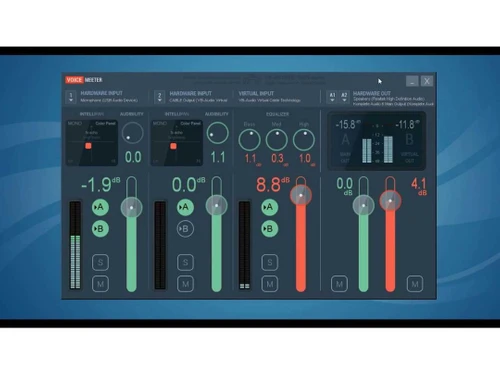
voicemeeter dashboard
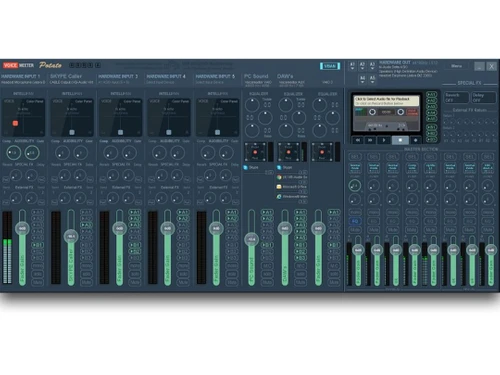
voicemeeter potato
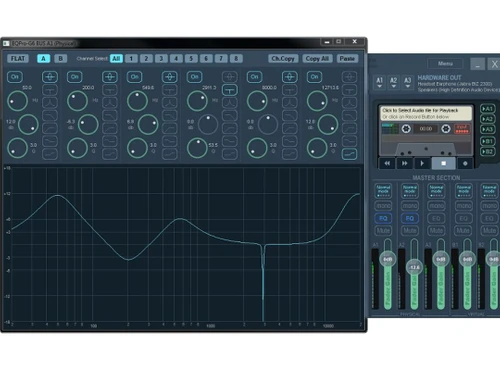
voicemeter tuning

VOICEMEETER

Brand: VB-AUDIO

  • 4.5

  • 3 Ratings

VOICEMEETER EMS is an audio mixer software that allows users to manage and manipulate audio sources and outputs, providing advanced control over audio routing and processing for various applications.

See More

Have you used VOICEMEETER before?

Share your insights for better experience

Add a Review
Starting Price
$5

View plans

100% Genuine
Products
Best Price
Guaranteed
Safe & Secure
Payment
  • Description

  • Pricing

  • Features

  • Specification

  • Review

  • Compare

  • FAQ

Starting at $5

VOICEMEETER Software Overview

What is VOICEMEETER EMS?

VOICEMEETER EMS is a versatile audio mixer software designed for advanced audio management. It enables users to manipulate and control audio sources and outputs with precision, offering extensive control over audio routing and processing. With VOICEMEETER EMS, users can blend multiple audio inputs, apply effects, and adjust levels to create the desired audio output.

The software provides a user-friendly interface for intuitive operation and customization of audio settings. Whether for professional audio production, streaming, or gaming, VOICEMEETER EMS offers powerful tools for enhancing sound quality and flexibility.

Why Choose VOICEMEETER EMS Software?

  • Advanced Audio Control: It provides advanced control over audio sources and outputs, allowing users to precisely manipulate and customize audio settings according to their preferences.
  • Flexible Routing Options: It offers flexible audio routing options, enabling users to easily route audio between different applications, devices, and virtual inputs/outputs.
  • Enhanced Sound Quality: It includes features for audio processing and enhancement, allowing users to apply effects, EQ adjustments, and filters to improve sound quality.
  • Customizable Settings: It offers extensive customization options, allowing users to tailor audio settings, layouts, and configurations to suit their specific needs and preferences.
  • Compatibility: It is compatible with a wide range of audio hardware and software, ensuring seamless integration into existing audio setups and workflows.
  • Cost-Effective Solution: It provides advanced audio mixing capabilities at an affordable price point, offering value for both personal and professional users.

Benefits of VOICEMEETER EMS Platform

  • Streamlined Workflow: It simplifies audio management tasks, reducing the time and effort required to achieve desired audio configurations.
  • Increased Productivity: Offering intuitive controls and customizable settings enhances productivity by allowing users to focus on their audio projects without unnecessary complexities.
  • Professional Sound Mixing: Its advanced audio processing features enable users to achieve professional-quality sound mixing suitable for various applications, including music production, broadcasting, and live streaming.
  • Real-time Monitoring: It provides real-time monitoring capabilities, allowing users to monitor audio levels and quality as they make adjustments, ensuring optimal results.
  • Remote Collaboration: It facilitates remote collaboration by allowing users to share audio streams and collaborate in real time, regardless of their physical location.
  • Continuous Updates and Support: It is regularly updated with new features and improvements, and users have access to dedicated support resources, ensuring a reliable and up-to-date audio mixing solution.

Pricing of VOICEMEETER Audio Mixer Software

VOICEMEETER EMS price in India starts at $5 at techjockey.com.

The pricing model is based on different parameters, including extra features, deployment type, and the total number of users. For further queries related to the product, you can contact our product team and learn more about the pricing and offers.

Read more

VOICEMEETER Pricing & Plans

P1 - I'm a fan
Starting at $5
    • Licenses

      Licenses
      Licenses

VOICEMEETER Features

  • icon_check Advanced Software Mixer
    It provides a sophisticated mixer interface for precise audio control and customization.
  • icon_check Virtual Soundcard
    It creates virtual sound cards for flexible audio routing and processing.
  • icon_check High Quality Audio Effects
    It offers a range of high-quality audio effects for enhancing sound, including reverb, compression, and EQ.
  • icon_check Network Audio Streaming
    Users can stream audio over a network for remote collaboration and broadcasting purposes.
  • icon_check Color Panel EQ
    It features a color panel EQ for intuitive and visual equalization of audio frequencies.
  • icon_check 3D Binaural Effect
    It includes a 3D binaural effect for immersive and spatial audio experiences.
  • icon_check Strip Limiter
    It includes a strip limiter to prevent audio clipping and distortion, ensuring clean and consistent sound output.
  • icon_check Full Parametric EQ
    Users can adjust individual frequency bands with precision using the full parametric EQ functionality.
  • icon_check Denoiser
    The software includes a denoiser tool to reduce background noise and improve audio clarity.
  • icon_check Peak Remover
    It offers a peak remover feature to detect and remove audio peaks, optimizing sound quality automatically.

VOICEMEETER Specifications

Supported Platforms
Windows Windows
Devices
Desktop Desktop
Deployment
Perpetual Perpetual
Suitable For
All Industries
Business Specific
All Businesses
Business Size
Small Business Startups Medium Business Enterprises
Customer Support
Email Communities Forums
Language
English
Training Resources
Documentation Videos

Explore the Best Alternative Solutions Similar to Your Business Size and Needs

VOICEMEETER Review

4.5

Out of 5

img

Overall Rating

Based on
3 Verified Ratings

Rating Breakdown

  • Features 4.3
  • Value for Money 4.6
  • Ease of Use 4.3
  • Customer Support 4.6

90% Recommend this Product

Add Review

Techjockey Trusted Reviews from Verified Users

No reviews are currently available for VOICEMEETER. Discover similar Audio Mixer Software reviews

  • Program4Pc DJ Audio Editor

    4.7

    Whats great - Was a bit sceptical about buying from here. Had issue trying to register with the company of the product I purchased. Emailed... read more

  • Serato DJ

    4.4

    Whats great - Great for both beginners and experienced DJs, solid customer support. read more

  • Ashampoo Music Studio

    4.4

    Whats great - I purchased it due to its affordable price when comparing it with other music editing software, it is priced and offers more ... read more

Compare VOICEMEETER With other Audio Mixer Software

Products
Ratings
Pricing
Device Supported
Deployment
Supported Platforms
  • img

    VOICEMEETER

  • 4.5

  • Price On Request

  • Desktop

    Mobile

  • Web based

    On Premises

  • Windows

    Mac OS

  • img

    edjing Mix

  • 4.4

  • ₹ 1700

  • Desktop

    Mobile

  • Web based

    On Premises

  • Windows

    Mac OS

  • img

    Razer Audio Mixer

  • 4.7

  • Price On Request

  • Desktop

    Mobile

  • Web based

    On Premises

  • Windows

    Mac OS

  • img

    Soundcraft Ui24R

  • 4.4

  • Price On Request

  • Desktop

    Mobile

  • Web based

    On Premises

  • Windows

    Mac OS

  • img

    MixMeister Studio

  • 4.5

  • Price On Request

  • Desktop

    Mobile

  • Web based

    On Premises

  • Windows

    Mac OS

  • img

    Easy Audio Mixer

  • 4.5

  • Price On Request

  • Desktop

    Mobile

  • Web based

    On Premises

  • Windows

    Mac OS

  • img

    R-MIX

  • 4.1

  • Price On Request

  • Desktop

    Mobile

  • Web based

    On Premises

  • Windows

    Mac OS

(0) Product(s) selected

Which operating system does VOICEMEETER EMS Software Support?

VOICEMEETER EMS Software is compatible with Windows.

Is there any VOICEMEETER EMS Software App?

VOICEMEETER EMS Software is not available for Android and iOS app users.

What is the deployment type of VOICEMEETER EMS Software?

Since the product supports On-Premises deployment.

How much does VOICEMEETER EMS Software Cost?

VOICEMEETER EMS price in India starts at $5 at techjockey.com.

Who are the potential users of VOICEMEETER EMS Software?

VOICEMEETER EMS Software is typically used by all industries for advanced audio management.

Is there any free demo for VOICEMEETER EMS Software?

Yes, a demo of VOICEMEETER EMS is available at techjockey.com.

Is VOICEMEETER EMS Software Free?

VOICEMEETER EMS Software is not available for free. You can connect with our product experts to learn more about the pricing plans.

Does VOICEMEETER EMS offer a free trial?

VOICEMEETER EMS Software does not offer a free trial.

How can you download VOICEMEETER EMS Software?

For Fortect software installation, you can go directly to Techjockey’s official website to buy this solution. Once purchased, you will receive a key to download the same via email.

How does VOICEMEETER EMS Software Work?

VOICEMEETER EMS software works by virtualizing audio inputs and outputs, allowing users to route and process audio signals with precision through an intuitive mixer interface.

20,000+ Software Listed

Best Price Guranteed

Free Expert Consultation

2M+ Happy Customers

Terms and Condtions

close

Users with registered businesses can purchase goods from merchants on the platform to satisfy their business needs. Users are not permitted to utilize any products acquired through the platform for resale, advertising, business, or further distribution.

For each purchase made, users will receive a Tax Invoice (or 'GST invoice') that includes specific details such as:

  • the GSTIN of the user associated with their registered business, and

  • the specified Entity Name for their business.

It should be noted that not all products are eligible for GST Invoice. Only the products displayed by participating sellers with the 'GST-based Invoice Available' callout on the product description page would qualify.

Certain goods and services are not eligible to get a GST Invoice, including items with VAS, i.e., Value Added Services (e.g., Total Mobile Protection/Assured Buyback) and those involving an exchange offer at the time of purchase.

Users must ensure the accuracy of the GSTIN, and business entity name provided for the GST Invoice. Requests for corrections into GST Invoice would not be accommodated by Techjockey.com or any Seller, and any issues arising from user-provided information are the sole responsibility of users.

Techjockey.com is not liable for the GST Invoice or any associated input tax credit. To efficiently claim an input tax credit, users should select the registered place of business address as per the GST authority's data and follow the provisions of the GST Act and rules.

To claim an input tax credit, the delivery and billing addresses must match. Furthermore, input tax credits will not be granted if the delivery address and GSTIN on the invoice are from different states. In case of incorrect GST details provided during the order placement, the order will be canceled automatically.