linkedin
WebLOAD logo
play WebLOAD load testing tool overview
WebLOAD Dashboard
WebLOAD Performance

WebLOAD

Brand: Radview Software

  • 4.1

  • 6 Ratings

WebLOAD is a performance testing software that simulates user load on web applications to improve performance and scalability.

See More

Have you used WebLOAD before?

Share your insights for better experience

Add a Review

Price Available on Request

Questions about pricing or customization? We’re here to help, just a click away.

100% Genuine
Products
Best Price
Guaranteed
Safe & Secure
Payment
  • Description

  • Pricing

  • Features

  • Specification

  • Review

  • Compare

  • FAQ

WebLOAD Software Overview

What is WebLOAD?

WebLOAD is a performance testing software tool that tests how web applications perform under a heavy user load. This software creates realistic traffic to simulate heavy load on the web application, monitors system behavior, and finds issues or slow spots. The identified bottlenecks are then resolved to optimize web application scalability.

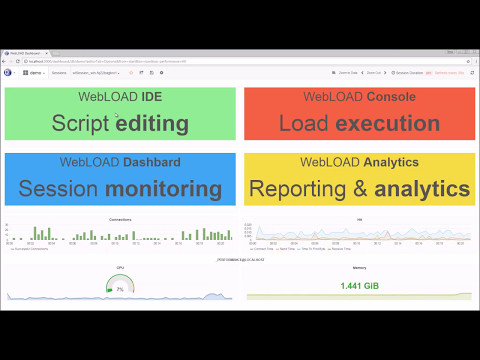
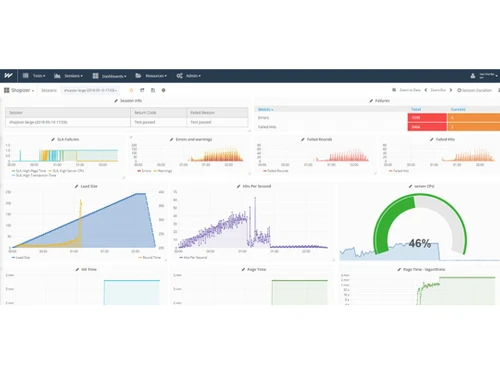
The interface of the software comes with a visual test designer, a scripting editor, and a real-time dashboard for analysis of test results.

WebLOAD helps in creating automatic JavaScript scripting, automatic correlation, and parameterization. It simulates real user behavior to find bottlenecks. It integrates with CI/CD tools and gives detailed metrics and analytics. The software can handle cloud and on-premise deployments, and comes with debugging tools. It supports more than 100 protocols, speeds up scripting, and increases test accuracy.

Why Choose WebLOAD Performance Testing Tools?

  • Performance Testing: It tests how a web application responds under varying user loads by simulating real user actions and measuring performance.
  • Load Testing: It generates heavy traffic to test the system's behavior, detect slowdowns, identify bottlenecks, and optimize it to ensure the application's reliability.
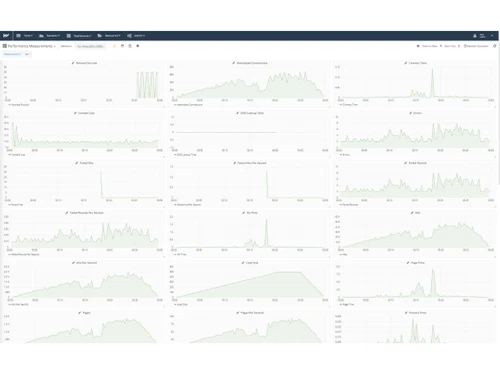
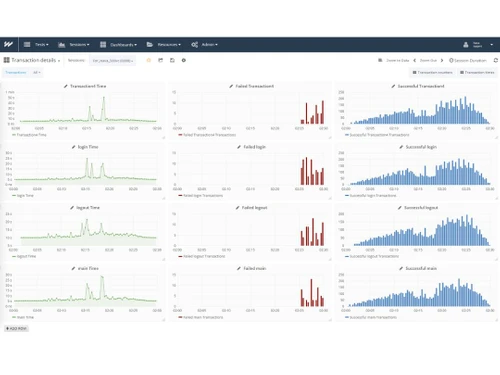
  • Report and Analytics: Comes with live dashboards giving performance metrics and generates detailed reports to track performance metrics.
  • Cloud Scalability: Tests cloud-based applications across distributed environments to assess load, usage, and scaling efficiency.
  • Automated Scripting: It uses JavaScript-based scripting with auto-correlation and parameterization to create flexible, reusable, and dynamic test scenarios.

Benefits of WebLOAD

  • Load Testing Tool: It simulates multiple user loads to test web application stability, speed, and reliability under heavy traffic.
  • Gives Detailed Insights: It gives in-depth performance data to identify slow areas, errors, and system bottlenecks during testing of web applications.
  • Scripting and Automation: It supports JavaScript scripting, auto-correlation, and parameterization for flexible, automated test scenario creation.
  • Real-Time Monitoring: The software provides live dashboards that show system behavior with key metrics.
  • Powerful Analytics: This Performance Testing Tool can generates detailed reports with metrics that guide performance tuning and improvements.
  • Optimize Performance: Helps improve web application speed, scalability, and user experience by identifying and fixing performance-related issues.

Pricing of WebLOAD

WebLOAD details are available on request at techjockey.com.

WebLOAD may vary based on factors like customization, additional features required, number of users, and the deployment type. Please request a callback for subscription-related details and to avail offers on premium packages at techjockey.com.

Read more

Radview Software Company Details

Founded Year:  1993

RadView Software develops load testing tool and performance monitoring for web and mobile applications

Director/Founders Ilan Kinreich
Company Size 1-100 Employees

WebLOAD Pricing & Plans

Looking for The Right Pricing?

Share your requirements and get a plan built around your business.

  • Define your business needs
  • Get customised pricing
  • Choose features that fit your workflow

Price Available on Request

Get personalised WebLOAD pricing that fits your needs. Our team will connect with you.

WebLOAD Features

  • icon_check Dashboards
  • icon_check Performance Testing
  • icon_check Load Testing
  • icon_check API Testing
  • icon_check Debugging and Testing
  • icon_check Regression Testing
  • icon_check Optimize Server Performance
  • icon_check CI/CD Integration
    Integrates with CI/CD tools to enable continuous performance testing within automated development pipelines.
  • icon_check Error Detection
    Identifies failures, slow transactions, and system issues quickly to improve application reliability and stability.
  • icon_check Automated Correlation
    Automatically handles dynamic values like session IDs and tokens, reducing scripting complexity significantly.
  • icon_check Selenium Integration
    Combines Selenium scripts with load testing to simulate real browser interactions under heavy user load.
  • icon_check Protocol Support
    Supports HTTP, HTTPS, REST, SOAP, WebSockets, and AJAX for comprehensive web and API testing scenarios.
  • icon_check Real-Time Analytics
    Provides live dashboards with detailed insights into system behavior, helping teams monitor tests as they run.
WebLOAD Demo Video play icon

Get WebLOAD Demo

Watch the demo video to explore key features, real workflows, and how the software fits your business needs.

Understand
Key Features
Personal
Demo Insights
Interactive
Demo Support

WebLOAD Specifications

Supported Platforms
Windows Windows Linux Linux
Devices
Desktop Desktop
Deployment
Cloud-Based Cloud-Based Perpetual Perpetual
Suitable For
All Industries
Business Specific
All Businesses
Business Size
Small Business Startups Medium Business Enterprises
Customer Support
Phone Email Live Chat
Language
English
Integration
API Integration
Training Resources
Live Online Webinars Documentation Videos
AI Features
AI Integrated

Explore the Best Alternative Solutions Similar to Your Business Size and Needs

WebLOAD Review

4.1

Out of 5

img

Overall Rating

Based on
6 Verified Ratings

Rating Breakdown

  • Features 4.3
  • Value for Money 4.1
  • Ease of Use 4.0
  • Customer Support 4.1

88% Recommend this Product

Add Review

Be the First to Review

This product has no reviews yet. Be the first to leave your feedback.

Add Review

Compare WebLOAD With other Performance Testing Tools

Products
Ratings
Pricing
Device Supported
Deployment
Supported Platforms
  • img

    WebLOAD

  • 4.1

  • Price On Request

  • Desktop

    Mobile

  • Web based

    On Premises

  • Windows

    Mac OS

  • img

    LoadNinja

  • 4.6

  • Price On Request

  • Desktop

    Mobile

  • Web based

    On Premises

  • Windows

    Mac OS

  • img

    GTmetrix

  • 4.3

  • Price On Request

  • Desktop

    Mobile

  • Web based

    On Premises

  • Windows

    Mac OS

  • img

    Pingdom

  • 4.5

  • Price On Request

  • Desktop

    Mobile

  • Web based

    On Premises

  • Windows

    Mac OS

  • img

    PFLB

  • 4.5

  • Price On Request

  • Desktop

    Mobile

  • Web based

    On Premises

  • Windows

    Mac OS

  • img

    Tricentis NeoLoad

  • 4

  • Price On Request

  • Desktop

    Mobile

  • Web based

    On Premises

  • Windows

    Mac OS

  • img

    FrugalTesting

  • 4.3

  • Price On Request

  • Desktop

    Mobile

  • Web based

    On Premises

  • Windows

    Mac OS

  • img

    SmartMeter

  • 4.5

  • Price On Request

  • Desktop

    Mobile

  • Web based

    On Premises

  • Windows

    Mac OS

  • img

    Loadview

  • 4.6

  • Price On Request

  • Desktop

    Mobile

  • Web based

    On Premises

  • Windows

    Mac OS

  • img

    LoadRunner

  • 3.2

  • Price On Request

  • Desktop

    Mobile

  • Web based

    On Premises

  • Windows

    Mac OS

(0) Product(s) selected

How much does WebLOAD cost?

WebLOAD pricing details can be availed at techjockey.com on request.

Who uses WebLOAD?

WebLOAD is used by Quality Assurance engineers, DevOps teams, and IT professionals for performance and load testing of web applications.

How does WebLOAD Performance Testing Software work?

WebLOAD is a performance testing software that simulates virtual users interacting with your application, monitors system behavior, and identifies performance bottlenecks.

Which operating systems are compatible with WebLOAD Performance Testing Tool?

WebLOAD runs on operating systems like Windows, Linux, and macOS for both client and server environments.

Is a free demo available for WebLOAD software?

Yes, a free demo of WebLOAD is available to help users explore its features and interface before purchase.

Does WebLOAD support cloud-based testing?

Yes, WebLOAD Performance Testing software supports cloud deployment and allows scalable load testing across distributed environments and virtual machines.

Can WebLOAD test APIs?

Yes, WebLOAD comes with built-in support for API testing, validating performance, reliability, and data exchange under load.

What scripting language does WebLOAD use?

WebLOAD uses JavaScript for scripting, creating flexible test scenarios with custom logic.

Does WebLOAD integrate with CI/CD tools?

Yes, WebLOAD integrates with Jenkins, Git, and other CI/CD platforms.

What kind of reports does WebLOAD Performance Testing Tool generate?

WebLOAD provides detailed analytics, customizable reports, and real-time dashboards to help visualize performance metrics and test results.

20,000+ Software Listed

Best Price Guranteed

Free Expert Consultation

2M+ Happy Customers

Terms and Condtions

close

Users with registered businesses can purchase goods from merchants on the platform to satisfy their business needs. Users are not permitted to utilize any products acquired through the platform for resale, advertising, business, or further distribution.

For each purchase made, users will receive a Tax Invoice (or 'GST invoice') that includes specific details such as:

  • the GSTIN of the user associated with their registered business, and

  • the specified Entity Name for their business.

It should be noted that not all products are eligible for GST Invoice. Only the products displayed by participating sellers with the 'GST-based Invoice Available' callout on the product description page would qualify.

Certain goods and services are not eligible to get a GST Invoice, including items with VAS, i.e., Value Added Services (e.g., Total Mobile Protection/Assured Buyback) and those involving an exchange offer at the time of purchase.

Users must ensure the accuracy of the GSTIN, and business entity name provided for the GST Invoice. Requests for corrections into GST Invoice would not be accommodated by Techjockey.com or any Seller, and any issues arising from user-provided information are the sole responsibility of users.

Techjockey.com is not liable for the GST Invoice or any associated input tax credit. To efficiently claim an input tax credit, users should select the registered place of business address as per the GST authority's data and follow the provisions of the GST Act and rules.

To claim an input tax credit, the delivery and billing addresses must match. Furthermore, input tax credits will not be granted if the delivery address and GSTIN on the invoice are from different states. In case of incorrect GST details provided during the order placement, the order will be canceled automatically.