linkedin
LoadNinja logo
play LoadNinja, A SaaS Load Testing Tool for Web Applications from SmartBear
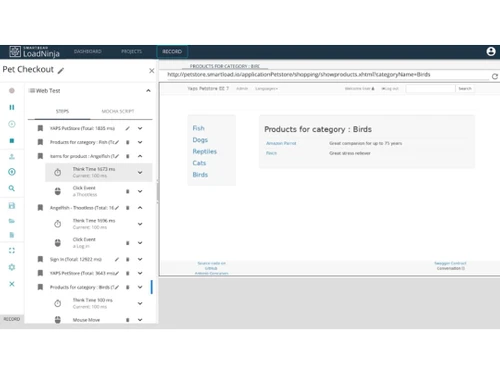
LoadNinja script
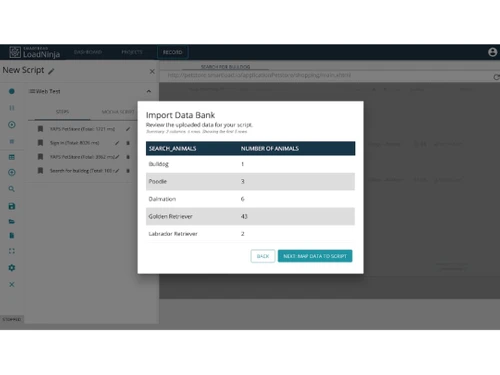
LoadNinja record

LoadNinja

Brand: SmartBear

  • 4.6

  • 3 Ratings

LoadNinja is a cloud-based performance testing tool that enables teams to load test web applications with real browsers at scale. It allows users to create and execute tests without scripting, providing real-time performance insights, detailed analytics, and browser-based debugging to optimize appli...

See More

Have you used LoadNinja before?

Share your insights for better experience

Add a Review
Starting Price
$301

View plans

100% Genuine
Products
Best Price
Guaranteed
Safe & Secure
Payment
  • Description

  • Pricing

  • Features

  • Specification

  • Review

  • Compare

  • FAQ

Starting at $301

LoadNinja Software Overview

What is LoadNinja?

LoadNinja is a testing tool and a performance testing tool that helps the teams to efficiently load test web applications using real browsers instead of traditional protocol-based testing. This approach provides more accurate performance insights by simulating real user interactions.

With LoadNinja, testers can create, execute, and analyze load tests without the need for complex scripting, making it accessible for both developers and QA teams. It offers real-time performance monitoring, detailed analytics, and browser-based debugging, helping teams identify and resolve bottlenecks quickly.

Why Choose LoadNinja Performance Testing Tools?

  • Real Browser Testing: Unlike traditional load testing tools that rely on protocol-based simulations, LoadNinja uses real browsers to mimic actual user interactions. This approach ensures more accurate performance data by capturing real-world scenarios, including rendering times, network conditions, and UI responsiveness.
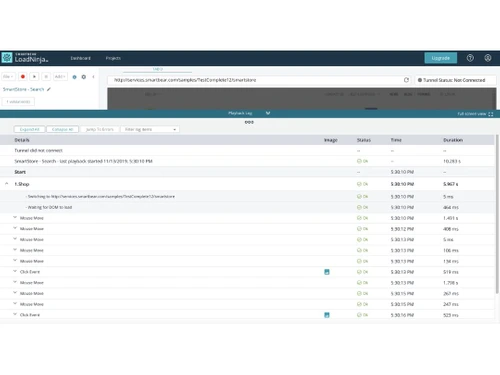
  • Scriptless Test Creation: LoadNinja eliminates the need for complex scripting by offering a record-and-replay feature. Users can easily create test scenarios by interacting with their application as a real user would, significantly reducing the time and effort required to set up tests.
  • Real-Time Performance Monitoring: LoadNinja provides instant insights into various performance metrics, including server response times, page load speeds, and application bottlenecks. These real-time reports allow development and QA teams to quickly identify and address performance issues before they impact end users.
  • AI-Driven Test Automation: The tool leverages AI-powered automation to optimize test execution and maintenance. It can intelligently identify elements within a web application, reducing the chances of broken tests due to UI changes.
  • Scalability & Cloud-Based Execution: LoadNinja runs tests in the cloud, allowing teams to simulate thousands of virtual users without needing on-premise hardware. This cloud-based approach makes it easier to scale tests up or down based on project requirements, ensuring the application can handle varying levels of user traffic efficiently.
  • Seamless CI/CD Integration: LoadNinja integrates with popular DevOps and CI/CD tools, such as Jenkins and Azure DevOps, enabling continuous performance testing throughout the development lifecycle.
  • Browser-Based Debugging: With LoadNinja, teams can analyze detailed test logs and performance reports directly from the browser. It provides insights into script execution, response times, and UI behaviors, making it easier to pinpoint and resolve bottlenecks that may degrade user experience.
  • Faster Time to Market: By automating test creation, reducing scripting efforts, and providing instant performance insights, LoadNinja accelerates the development and testing process.

Benefits of LoadNinja Performance Testing Tools

  • Reduced Testing Effort: Automates performance testing with minimal manual input, freeing up time for testers and developers to focus on other critical tasks.
  • Enhanced Test Accuracy: Eliminates reliance on protocol-based simulations, ensuring real-world performance data and reducing discrepancies between test results and actual user experiences.
  • Lower Maintenance Costs: Scriptless test creation and AI-powered automation reduce test maintenance efforts, preventing frequent script updates due to UI or code changes.
  • Comprehensive User Experience Analysis: Provides insights into frontend performance, such as rendering times and element responsiveness, helping improve overall user satisfaction.
  • Support for Dynamic Applications: Works efficiently with single-page applications (SPAs) and AJAX-heavy websites, accurately testing modern web applications with complex interactions.
  • Easy Collaboration: Allows multiple team members to create, review, and analyze test cases, fostering better collaboration between QA, developers, and DevOps teams.
  • Data-Driven Testing: Supports parameterized tests, enabling testers to simulate different user inputs and scenarios to ensure robust application performance under varied conditions.
  • Multi-Location Load Testing: Simulates user traffic from different geographical locations, helping businesses optimize global application performance and detect region-specific slowdowns.
  • Reduced Test Execution Time: Cloud-based execution and AI-driven automation allow for faster test execution, enabling quicker feedback loops and rapid iteration cycles.
  • Better Resource Utilization: Eliminates the need for extensive on-premise infrastructure, reducing hardware costs while optimizing cloud resources for efficient large-scale testing.

Pricing ofLoadNinja Performance Testing Tools

LoadNinja pricing starts at $ 301 at techjockey.com.

The pricing model is based on different parameters, including the amount of bandwidth you need, the number of servers you need, and the features you need. For further queries related to the product, you can contact our product team and learn more about the pricing and offers.

Read more

SmartBear Company Details

Founded Year:  2009

SmartBear provides a portfolio of trusted tools that give software development teams around the world visibility into end-to-end quality through test management and automation, API development lifecycle, and application stability.

Director/Founders Jason Cohen, Sallyann Freudenberg
Company Size 501-1000 Employees

LoadNinja Pricing & Plans

On-Demand(Starter)
Key Features
  • 8 Load Hours
  • 100 Virtual Users
  • $4.99 monthly maintenance fee
Starting at $301
    • Licenses

      Licenses
      Licenses
    • Monthly

      Monthly
      Monthly

Key Features

  • 8 Load Hours

  • 100 Virtual Users

  • $4.99 monthly maintenance fee

LoadNinja Features

  • icon_check Performance Testing
    Measures application speed, stability, and responsiveness under various load conditions.
  • icon_check Load Testing
    Simulates real user traffic with real browsers to test application performance under peak loads.
  • icon_check User Friendly Interface
    No-code test creation makes performance testing accessible to all users.
  • icon_check Record and Playback Scripts
    Easily record test scenarios and replay them without scripting.
  • icon_check API Testing
    Evaluates backend performance, response times, and integration reliability.
  • icon_check Cross Browser Testing
    Ensures app consistency across different browsers using real browser environments.
  • icon_check Reporting
    Provides real-time insights with detailed analytics on performance, errors, and system metrics.
  • icon_check Real Time Monitoring
    Track performance metrics like response time, throughput, and errors during test execution in real time.
  • icon_check CI/CD Integration
    Integrate with DevOps pipelines like Jenkins to automate performance testing in continuous delivery workflows.
  • icon_check Debugging Tools
    Use logs, error tracking, and diagnostics to analyze issues and improve application performance efficiently.
  • icon_check Collaboration
    Enable team collaboration with shared test scripts, reports, and role-based access for efficient workflows.
  • icon_check Performance Analytics
    Visual dashboards provide insights into application behavior, bottlenecks, and system performance trends.
LoadNinja Demo Video play icon

Get LoadNinja Demo

Watch the demo video to explore key features, real workflows, and how the software fits your business needs.

Understand
Key Features
Personal
Demo Insights
Interactive
Demo Support

LoadNinja Specifications

Supported Platforms
Ubuntu Ubuntu Windows Windows MacOS MacOS Linux Linux
Devices
Desktop Desktop Mobile Mobile Tablet Tablet iPad iPad
Deployment
Cloud-Based Cloud-Based
Suitable For
All Industries
Business Specific
All Businesses
Business Size
Individual Small Business Startups Medium Business Enterprises SMBs SMEs MSMEs Freelancers
Customer Support
Phone Email Live Chat Communities Forums
Language
English
Integration
API Integration
Training Resources
Live Online Webinars Documentation Videos

Explore the Best Alternative Solutions Similar to Your Business Size and Needs

LoadNinja Review

4.6

Out of 5

img

Overall Rating

Based on
3 Verified Ratings

Rating Breakdown

  • Features 4.3
  • Value for Money 4.6
  • Ease of Use 4.5
  • Customer Support 5

83% Recommend this Product

Add Review

Be the First to Review

This product has no reviews yet. Be the first to leave your feedback.

Add Review

Compare LoadNinja With other Performance Testing Tools

Products
Ratings
Pricing
Device Supported
Deployment
Supported Platforms
  • img

    LoadNinja

  • 4.6

  • Price On Request

  • Desktop

    Mobile

  • Web based

    On Premises

  • Windows

    Mac OS

  • img

    GTmetrix

  • 4.3

  • Price On Request

  • Desktop

    Mobile

  • Web based

    On Premises

  • Windows

    Mac OS

  • img

    Pingdom

  • 4.5

  • Price On Request

  • Desktop

    Mobile

  • Web based

    On Premises

  • Windows

    Mac OS

  • img

    WebLOAD

  • 4.1

  • Price On Request

  • Desktop

    Mobile

  • Web based

    On Premises

  • Windows

    Mac OS

  • img

    Tricentis NeoLoad

  • 4

  • Price On Request

  • Desktop

    Mobile

  • Web based

    On Premises

  • Windows

    Mac OS

  • img

    PFLB

  • 4.5

  • Price On Request

  • Desktop

    Mobile

  • Web based

    On Premises

  • Windows

    Mac OS

  • img

    SmartMeter

  • 4.5

  • Price On Request

  • Desktop

    Mobile

  • Web based

    On Premises

  • Windows

    Mac OS

  • img

    FrugalTesting

  • 4.3

  • Price On Request

  • Desktop

    Mobile

  • Web based

    On Premises

  • Windows

    Mac OS

  • img

    Loadview

  • 4.6

  • Price On Request

  • Desktop

    Mobile

  • Web based

    On Premises

  • Windows

    Mac OS

  • img

    LoadRunner

  • 3.2

  • Price On Request

  • Desktop

    Mobile

  • Web based

    On Premises

  • Windows

    Mac OS

(0) Product(s) selected

How much does LoadNinja cost?

LoadNinja pricing starts at $ 301 at techjockey.com. Pricing is customized based on specific business needs.

Which operating system does LoadNinja support?

LoadNinja is a cloud-based tool, so it works on any operating system with a modern web browser.

How does LoadNinja Performance Testing Tools work?

LoadNinja uses real browsers to simulate user traffic, record test scenarios, execute load tests, and provide real-time performance insights.

Is LoadNinja suitable for small businesses?

Yes, LoadNinja's scriptless testing and cloud-based scalability make it ideal for small businesses with limited testing resources.

Does LoadNinja offer a free trial or a demo?

Yes, LoadNinja typically offers a free trial or demo to help users evaluate its features before purchasing.

What features does LoadNinja offer?

LoadNinja provides performance testing, load testing, scriptless test creation, API testing, cross-browser testing, and real-time reporting.

Is there any LoadNinja App?

No, LoadNinja is a web-based tool and does not have a standalone mobile or desktop app.

Who are the potential users of LoadNinja Performance Testing Tools?

QA teams, developers, DevOps engineers, and businesses looking to test and optimize web application performance.

How secure is LoadNinja?

QA teams, developers, DevOps engineers, and businesses looking to test and optimize web application performance.

What is LoadNinja Performance Testing Tools used for?

LoadNinja is a cloud-based performance testing tool used to simulate real user traffic, analyze application performance, and identify bottlenecks. It helps developers and QA teams test web applications under load using real browsers, ensuring scalability, speed, and reliability.

20,000+ Software Listed

Best Price Guranteed

Free Expert Consultation

2M+ Happy Customers

Terms and Condtions

close

Users with registered businesses can purchase goods from merchants on the platform to satisfy their business needs. Users are not permitted to utilize any products acquired through the platform for resale, advertising, business, or further distribution.

For each purchase made, users will receive a Tax Invoice (or 'GST invoice') that includes specific details such as:

  • the GSTIN of the user associated with their registered business, and

  • the specified Entity Name for their business.

It should be noted that not all products are eligible for GST Invoice. Only the products displayed by participating sellers with the 'GST-based Invoice Available' callout on the product description page would qualify.

Certain goods and services are not eligible to get a GST Invoice, including items with VAS, i.e., Value Added Services (e.g., Total Mobile Protection/Assured Buyback) and those involving an exchange offer at the time of purchase.

Users must ensure the accuracy of the GSTIN, and business entity name provided for the GST Invoice. Requests for corrections into GST Invoice would not be accommodated by Techjockey.com or any Seller, and any issues arising from user-provided information are the sole responsibility of users.

Techjockey.com is not liable for the GST Invoice or any associated input tax credit. To efficiently claim an input tax credit, users should select the registered place of business address as per the GST authority's data and follow the provisions of the GST Act and rules.

To claim an input tax credit, the delivery and billing addresses must match. Furthermore, input tax credits will not be granted if the delivery address and GSTIN on the invoice are from different states. In case of incorrect GST details provided during the order placement, the order will be canceled automatically.