 USA
USA UAE
UAESmall Business
Designed for startups and growing businesses

See More





Brand: J1 Holdings
WordHero helps users quickly create blog posts, ads, emails, and other content using advanced language models.
See MoreHave you used WordHero before?
Share your insights for better experience
Core Writing & Editing Tools
 Version History Vocabulary Enhancement Paraphrasing Content Formatting Grammar & Punctuation Check Tone & Style Adjustment Spelling & Proofing File Upload Management Readability Score Content Scoring
 Content Generation
Custom Templates Audience Targeting Blog Post Creation Social Media Posts Marketing Copy Headlines & Taglines SEO-Optimized Content Content Ideas Automated Outlining Video Script Generation Topic Clustering Collaboration
Export & Sharing Options Team Collaboration API Access Security and Compliance
Data Encryption GDPR Compliant AI Act Compliance User Access Management SOC 2 Compliance Bias Mitigation Audit Logs Integrations
API Integration Google Workspace Integration Browser Extension Microsoft Office Integration Learning Management System (LMS) Integration CMS Integration Third Party Integration Language Support
Multilingual Writing Translation Assistance Localization Suggestions Analytics & Reporting
Content Optimization Suggestions Performance Analytics Predictive Analysis AI Capabilities
Multi-Model Support Summarisation Custom Prompts AI Content Generation Plagiarism Detection Citation Generation AI Detection Citation Suggestions Administrative Features
API Access Role-Based Access Control (RBAC) User Access Management Team Management Data Loss Prevention 

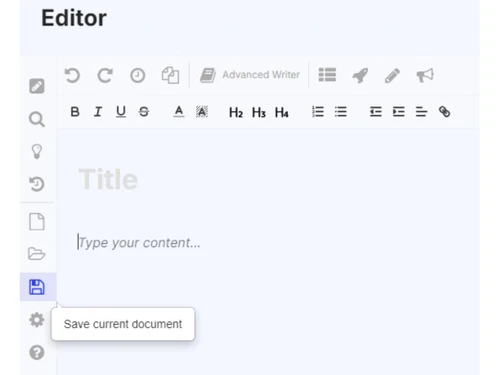
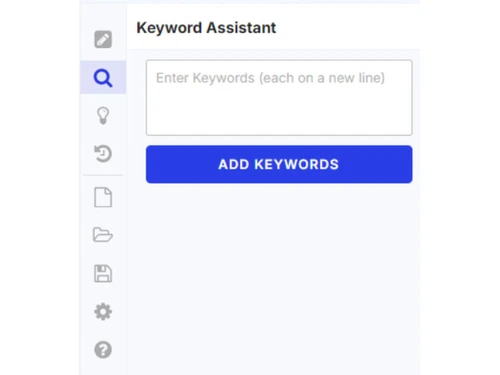
Watch the demo video to explore key features, real workflows, and how the software fits your business needs.
 Ubuntu
  Windows
  MacOS
MacOS  Linux
Linux  Desktop
  Cloud-Based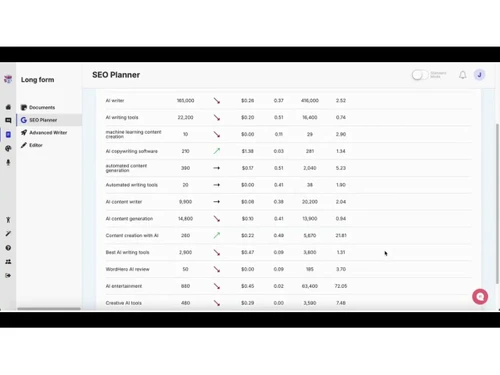
Small Business
Designed for startups and growing businesses
Medium Business
Built for business growth and flexibility
Enterprises
Designed for complex and large-scale business needs
Techjockey Trusted Reviews from Verified Users
No reviews are currently available for WordHero. Discover similar AI Writing Assistants reviews

WordAi
Whats great - I've been using WordAi for the last 2 months. Being a professional blogger and running my own business, I've seen the need fo... read more

Hushl
Whats great - Sandbox feedback loop—community suggestions elevate content read more

LongShot
Whats great - Compared to many AI writing tools with fewer features, LongShot gives great value. SEO tools, fact checking, niche templates ... read more

WordHero
Price On Request
Desktop
Mobile
Web based
On Premises
Windows
Mac OS

Paperpal
Price On Request
Desktop
Mobile
Web based
On Premises
Windows
Mac OS

Rayo
Price On Request
Desktop
Mobile
Web based
On Premises
Windows
Mac OS

Quillbot AI
Price On Request
Desktop
Mobile
Web based
On Premises
Windows
Mac OS

Junia AI
Price On Request
Desktop
Mobile
Web based
On Premises
Windows
Mac OS

HIX AI Writer
₹ 1081
Desktop
Mobile
Web based
On Premises
Windows
Mac OS

Text Cortex
Price On Request
Desktop
Mobile
Web based
On Premises
Windows
Mac OS

Shopia
Price On Request
Desktop
Mobile
Web based
On Premises
Windows
Mac OS

SEO AI
Price On Request
Desktop
Mobile
Web based
On Premises
Windows
Mac OS

Yarnit
Price On Request
Desktop
Mobile
Web based
On Premises
Windows
Mac OS

Autoblogging AI
Price On Request
Desktop
Mobile
Web based
On Premises
Windows
Mac OS
(0) Product(s) selected
Starting Price:
₹2,596 /Month
Starting Price:
$34 /Month
Starting Price:
$49 /Month
Starting Price:
$49 /month

Starting Price:
$19

Starting Price:
$29 /Month

Starting Price:
$16 /Month

Starting Price:
$13 /Month

Starting Price:
$25 /Month

Starting Price:
£2 /Month

Starting Price:
$45 /Month
WordHero pricing starts at USD 49, as listed on techjockey.com.
No, WordHero does not have a dedicated mobile app but can be accessed via web browsers on mobile devices.
WordHero is a cloud-based tool that works on any operating system including Ubuntu, Windows, macOS, and Linux.
No, WordHero does not offer a free trial.
WordHero uses AI to generate content based on user inputs, keywords, or prompts.
Marketers, bloggers, freelancers, and businesses use WordHero for content creation.
No, there is no official free demo, but users can explore features through paid plans or offers.
No, WordHero is a paid tool and does not offer a completely free version.
20,000+ Software Listed
Best Price Guranteed
Free Expert Consultation
2M+ Happy Customers
Terms and Condtions

Users with registered businesses can purchase goods from merchants on the platform to satisfy their business needs. Users are not permitted to utilize any products acquired through the platform for resale, advertising, business, or further distribution.
For each purchase made, users will receive a Tax Invoice (or 'GST invoice') that includes specific details such as:
the GSTIN of the user associated with their registered business, and
the specified Entity Name for their business.
It should be noted that not all products are eligible for GST Invoice. Only the products displayed by participating sellers with the 'GST-based Invoice Available' callout on the product description page would qualify.
Certain goods and services are not eligible to get a GST Invoice, including items with VAS, i.e., Value Added Services (e.g., Total Mobile Protection/Assured Buyback) and those involving an exchange offer at the time of purchase.
Users must ensure the accuracy of the GSTIN, and business entity name provided for the GST Invoice. Requests for corrections into GST Invoice would not be accommodated by Techjockey.com or any Seller, and any issues arising from user-provided information are the sole responsibility of users.
Techjockey.com is not liable for the GST Invoice or any associated input tax credit. To efficiently claim an input tax credit, users should select the registered place of business address as per the GST authority's data and follow the provisions of the GST Act and rules.
To claim an input tax credit, the delivery and billing addresses must match. Furthermore, input tax credits will not be granted if the delivery address and GSTIN on the invoice are from different states. In case of incorrect GST details provided during the order placement, the order will be canceled automatically.

