linkedin
WorkWise logo
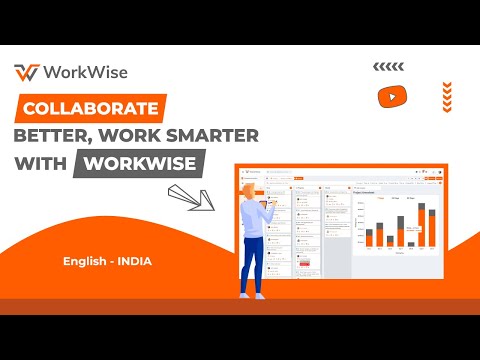
play Collaborate Better, Work Smarter with Workwise
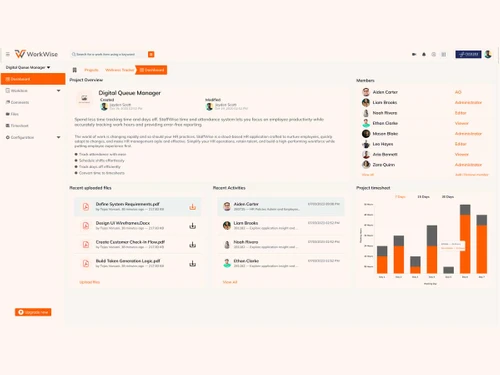
workwise dashboard
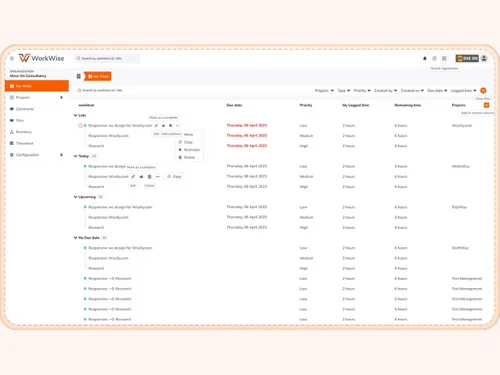
workwise tasks

WorkWise

Brand: Wiseliy

  • 3.9

  • 4 Ratings

WorkWise organizes projects in a way that teams spend more time working, not searching! Daily work flows smoothly through shared tasks and timelines.

See More

Have you used WorkWise before?

Share your insights for better experience

Add a Review
Starting Price 17% OFF
₹2,000 excl.GST  ₹2,400
₹ 2,360 incl. GST

View plans

offer Save upto 18%, Get GST Invoice on your business purchase T&C
offer Buy Now & Pay Later, Check offer on payment page.
Buy Now
100% Genuine
Products
Best Price
Guaranteed
Safe & Secure
Payment
  • Description

  • Pricing

  • Features

  • Specification

  • Review

  • FAQ

Starting at ₹2,000
Buy Now

WorkWise Software Overview

What is WorkWise Software?

WorkWise is a cloud-based task management software built for modern teams. It provides a shared digital space where daily responsibilities feel structured and visible. WorkWise supports teams that prefer clarity over constant reminders and follow-ups. The platform suits growing businesses that require unerring order without unnecessary complexity.

WorkWise fits naturally into team routines without demanding heavy process changes. It supports consistent work habits while allowing flexibility across different working styles. The software solution feels approachable for small teams and expanding organizations alike. It focuses on keeping work understandable rather than overwhelming. WorkWise, all in all, acts as a steady workspace where progress remains clearly visible and manageable.

Why Choose WorkWise Software?

  • Trusted Time Management: Timesheets log hours accurately across tasks and projects. Managers monitor productivity without constant reminders or manual tracking.
  • Custom Workflow Flexibility: Workflows adapt to team processes and project types. Teams maintain efficiency even when requirements change suddenly or unexpectedly.
  • Project Transparency: Managers and members see project status and task assignments at any moment. Confusion is minimized during busy workdays.
  • Effortless Document Sharing: Important files remain attached to relevant tasks. Teams can avoid email clutter and misplaced documents completely.
  • Visual Progress Insights: Dashboards display project timelines, progress, and task completion rates clearly. Decisions are made faster without digging for reports.
  • Scalability Support: Small teams and growing agencies find the platform fits their evolving needs. Expansion comes about without losing workflow organization or structure.

Benefits of WorkWise Software

  • Organized Workspaces: Each project stays structured for easy management. Team confusion is reduced significantly during busy days.
  • Unified Communication: Team conversations and file sharing take place in one spot. Updates are always recorded and easy to locate.
  • Transparent Performance Tracking: Managers can see task progress instantly. Reporting is simplified without extra manual work.
  • Accessible Resources: Documents and notes are attached directly to projects. Teams get to save a lot of time avoiding scattered storage solutions.
  • Clear Accountability: Tasks automatically demonstrate ownership in real time. Employees feel responsible without constant reminders or micromanagement.
  • Visual Planning Tools: Timelines and task calendars keep schedules clear. Teams adapt to changes without losing organization.

WorkWise Software Pricing

WorkWise Software price in India starts at INR 2,400 per month at techjockey.com.

The pricing model is based on different parameters, including extra features, deployment type, and the total number of users. For further queries related to the product, you can contact our product team and learn more about the pricing and offers.

Read more

Wiseliy Company Details

Founded Year:  2017

Wisely is a team of highly qualified and experienced tech professionals competent enough to translate any challenging goal into a reality. Our journey began in 2017, with a very small and basic requirements list from our clients spread across the globe to craft an application

Director/Founders Wisely
Company Size 1-100 Employees

WorkWise Pricing & Plans

Professional

Calculated Price

₹ 2000 ₹2400
SAVE UPTO 17%
Exclusive of all taxes
    • Licenses

      Licenses
      Licenses
    • Monthly

      Monthly
      Monthly

Key Features

  • For 25+ active members (Minimum 25)

  • 5 GB File Storage

  • Custom Project Roles

  • Multi Org. Access (Add up to 2)

  • API Integration

  • Smart Chat (100-Message History)

  • 9/6 On-Call Support

Business

Calculated Price

₹ 3000 ₹3500
SAVE UPTO 14%
Exclusive of all taxes
    • Licenses

      Licenses
      Licenses
    • Monthly

      Monthly
      Monthly

Key Features

  • For 50+ active members (Minimum 50)

  • 10 GB File Storage

  • Unlimited Project Roles Customization

  • Multi-Organization Expansion (Up to 5)

  • Timesheet Approvals - Custom flow

  • Unified WhatsApp Integration

  • Unlimited Email Templates

WorkWise Features

  • icon_check Project Management
    Use pre-built templates to quickly start new projects & task structures.
  • icon_check Push Notifications
    Get instant updates & alerts via push and email when changes happen.
  • icon_check Email Templates
    Customize emails sent by the system to match tone or branding.
  • icon_check API Integration
    Connect with other apps via APIs (e.g. external tools or bespoke systems).
  • icon_check Team Collaboration
    Communicate in real time through comments and shared updates.
  • icon_check Document Sharing
    Upload, share, and manage project files in one secure workspace.
  • icon_check Timeline & Calendar Views
    Visualize deadlines and dependencies through interactive timelines.
  • icon_check Timesheet Logging
    Track work hours, billable time, and productivity easily.
  • icon_check Custom Workflows
    Build tailored approval flows and automate repetitive steps.
  • icon_check Dashboards
    View project insights, team progress, and workload in real time.
  • icon_check Role-Based Access Control (RBAC)
    Control who can view or edit information within each project.
  • icon_check Performance Tracking
    Measure output and progress to improve team efficiency.
  • icon_check Real-Time Comments
    Collaborate instantly with contextual comments on tasks.
  • icon_check White Labeling
    Brand the app interface as your own for enterprise customers.
  • icon_check Social Media Integration
    Integrate messaging or notifications to WhatsApp/social channels.
WorkWise Demo Video play icon

Get WorkWise Demo

Watch the demo video to explore key features, real workflows, and how the software fits your business needs.

Understand
Key Features
Personal
Demo Insights
Interactive
Demo Support

WorkWise Specifications

Supported Platforms
Windows Windows
Devices
Desktop Desktop
Deployment
Cloud-Based Cloud-Based
Suitable For
All Industries
Business Specific
All Businesses
Business Size
Small Business Startups Medium Business Enterprises SMBs SMEs MSMBs
Customer Support
Phone Email Forums
Language
English
Integration
API Integration
Training Resources
Live Online

WorkWise Review

3.9

Out of 5

img

Overall Rating

Based on
4 Verified Ratings

Rating Breakdown

  • Features 3.6
  • Value for Money 4.1
  • Ease of Use 4.1
  • Customer Support 4

80% Recommend this Product

Add Review

Techjockey Trusted Reviews from Verified Users

No reviews are currently available for WorkWise. Discover similar Task Management Software reviews

  • Task Tracker

    4.9

    Whats great - Task Tracker is a very easy-to-use application, as it is having attendance feature with accurate geolocation, assigning tasks... read more
  • Kerika

    4.9

    Whats great - Ease of Use: The software is designed to be user-friendly, making it accessible to a wide range of users within the organisat... read more

  • TaskOPad

    4.8

    Whats great - Would recommend this app for managing your daily activities. After-service is quite nice. read more

Articles for WorkWise

See All Related Articles

How much does WorkWise Software cost?

The software price in India starts at INR 2,400 per month at techjockey.com. Pricing may change for different users based on features, deployment type, and total users.

Who uses WorkWise Software?

WorkWise is commonly used by small businesses, agencies, and growing teams. It helps teams manage tasks, projects, and collaboration smoothly.

Is there a mobile app available for WorkWise Software?

There is no mobile app available for WorkWise Software. It is designed only for use on Windows desktop systems.

Which operating systems are compatible with WorkWise Software?

WorkWise task management software is compatible with Windows operating systems. In other words, it is built specifically for Windows desktop environments.

Does WorkWise Software offer a free trial?

Yes, WorkWise software does offer a free trial option. Users can explore the platform before committing to a paid plan.

How does WorkWise Software function?

WorkWise functions as a cloud-based platform for managing projects and tasks. Teams may use it to organize work, track progress, and collaborate efficiently.

20,000+ Software Listed

Best Price Guranteed

Free Expert Consultation

2M+ Happy Customers

Terms and Condtions

close

Users with registered businesses can purchase goods from merchants on the platform to satisfy their business needs. Users are not permitted to utilize any products acquired through the platform for resale, advertising, business, or further distribution.

For each purchase made, users will receive a Tax Invoice (or 'GST invoice') that includes specific details such as:

  • the GSTIN of the user associated with their registered business, and

  • the specified Entity Name for their business.

It should be noted that not all products are eligible for GST Invoice. Only the products displayed by participating sellers with the 'GST-based Invoice Available' callout on the product description page would qualify.

Certain goods and services are not eligible to get a GST Invoice, including items with VAS, i.e., Value Added Services (e.g., Total Mobile Protection/Assured Buyback) and those involving an exchange offer at the time of purchase.

Users must ensure the accuracy of the GSTIN, and business entity name provided for the GST Invoice. Requests for corrections into GST Invoice would not be accommodated by Techjockey.com or any Seller, and any issues arising from user-provided information are the sole responsibility of users.

Techjockey.com is not liable for the GST Invoice or any associated input tax credit. To efficiently claim an input tax credit, users should select the registered place of business address as per the GST authority's data and follow the provisions of the GST Act and rules.

To claim an input tax credit, the delivery and billing addresses must match. Furthermore, input tax credits will not be granted if the delivery address and GSTIN on the invoice are from different states. In case of incorrect GST details provided during the order placement, the order will be canceled automatically.