USA
USA UAE
UAESmall Business
Designed for startups and growing businesses


See More





Brand: Kerika Inc
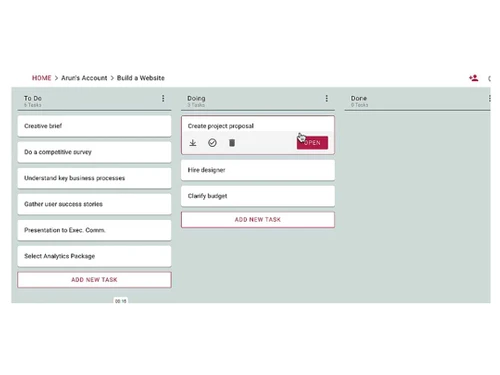
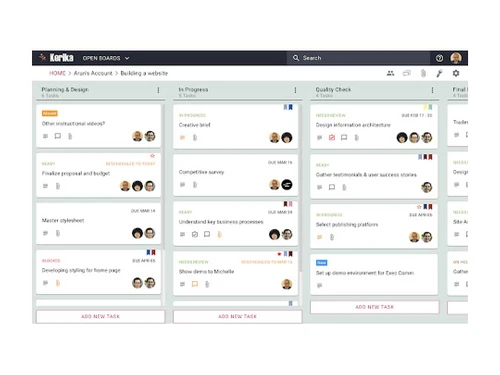
Kerika Task Management Software streamlines collaboration with visual boards and real-time updates, empowering teams to efficiently plan and execute tasks.
See MoreHave you used Kerika before?
Share your insights for better experience
Brand: Kerika Inc
Founded Year: 2002
Kerika is work management for distributed teams. It is used by governments, corporations, nonprofits, schools and colleges around the world.
 Drag & Drop Task Progress Tracking Document Management Templates Alerts & Notifications Dashboards Whiteboard Task Boards Whiteboards Subtasks & Checklists Real-Time Chat on Cards File Attachments & Web Links Smart Highlights

Watch the demo video to explore key features, real workflows, and how the software fits your business needs.
 Ubuntu
  Windows
  iOS
iOS  Android MacOS Windows(Phone)
  Linux
Linux  Desktop
  Mobile
  Tablet
  iPad
iPad  Cloud-Based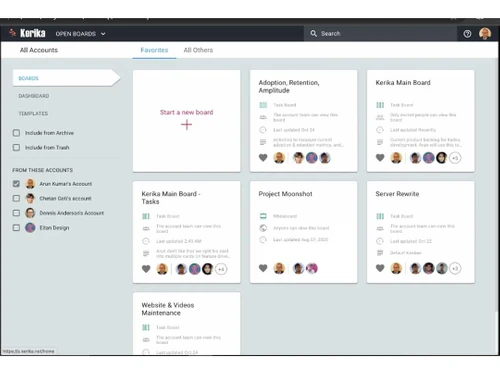
Small Business
Designed for startups and growing businesses
Medium Business
Built for business growth and flexibility
Enterprises
Designed for complex and large-scale business needs
4.9
Out of 5

Overall Rating
Based on
6 Verified Reviews
Rating Breakdown
91% Recommend this Product
Add ReviewUsers consistently praise Kerika for its user-friendly interface and effective task management capabilities, making it a valuable tool for collaboration, especially among remote teams. The ability to customize boards and workflows, along with features like file sharing and task tracking, are frequently highlighted as significant advantages. While feedback is overwhelmingly positive, with no notable complaints reported, the limited volume of reviews suggests a need for broader user experiences to fully gauge its effectiveness across different organizations.
Pros
"It provides advanced features for efficient collaboration, including attachment of files, creation detailed task cards."
"It provides advanced features for efficient collaboration, including attachment of files, creation of detailed checklists."
"I am not tech savvy and I liked how simple the interface is. Good tool for task management, workload management."
Cons
" I can create a dedicated board for each campaign I am running. This allows me to keep all the essential information, tasks, and assets neatly organized."

Vivek Sonani 
Software Engineer
Oct 23, 2023
Techjockey Verified
“Easily manageable product”
I have been using this product to manage my tasks in a way that allows me to complete them on time and according to my schedule.
Pros
Ease of Use: The software is designed to be user-friendly, making it accessible to a wide range of users within the organisation. Customization: You can customise boards and workflows to fit your organisation's unique needs and processes. Access Control: It offers granular access control, so you can define who can view and edit specific tasks and projects.
Cons
I didn't find any fault.
Oct 10, 2023
Techjockey Verified
“I can easily create and assign tasks, set due dates, and allocate resources efficiently.”
Pros
Intuitive interface for efficient task management. Collaborative capabilities for streamlined teamwork. Task tracking and reporting features for enhanced productivity. Easy task editing and updating for all board members. User-friendly collaboration tools, including chat within task cards. Simplified project planning and scheduling process Convenient progress tracking with customizable card statuses. Email alerts and notifications to ensure no important tasks are missed Secure data storage with Google Drive integration. Time-saving file-sharing functionality within the platform.
Cons
Nothing
Reason to switch
Its much more userfriendly
Oct 9, 2023
Techjockey Verified
“Easy file sharing and task assigning.”
Pros
It provides advanced features for efficient collaboration, including attachment of files, creation detailed task cards.
Cons
Nothing to complain about.
Reason to switch
Kerika is much easier to use and has all the tool I need.

Kerika
₹ 200.00 excl. GST
Desktop
Mobile
Web based
On Premises
Windows
Mac OS

TickTick
Price On Request
Desktop
Mobile
Web based
On Premises
Windows
Mac OS

Task Tracker
₹ 225
Desktop
Mobile
Web based
On Premises
Windows
Mac OS

TaskOPad
Price On Request
Desktop
Mobile
Web based
On Premises
Windows
Mac OS

Microsoft Planner
₹ 996
Desktop
Mobile
Web based
On Premises
Windows
Mac OS
Zoho ToDo
Price On Request
Desktop
Mobile
Web based
On Premises
Windows
Mac OS

Taskmaan
₹ 2000
Desktop
Mobile
Web based
On Premises
Windows
Mac OS

Akiflow
Price On Request
Desktop
Mobile
Web based
On Premises
Windows
Mac OS

Aarvi Task Management System
Price On Request
Desktop
Mobile
Web based
On Premises
Windows
Mac OS

Todoist
₹ 330
Desktop
Mobile
Web based
On Premises
Windows
Mac OS

Sunsama
Price On Request
Desktop
Mobile
Web based
On Premises
Windows
Mac OS
(0) Product(s) selected
Starting Price:
$4 /Month
Starting Price:
₹996 /Month ₹1,200
Available
Price on Request
Starting Price:
$34 /month
Starting Price:
$20 /month

Starting Price:
$7 /month

Available
Price on Request

Starting Price:
$50 $100
Starting Price:
$4 /Month

Starting Price:
$30 /Month
Kerika software is compatible with Windows and macOS operating systems.
Kerika app is available for Android devices.
The Kerika system supports web-based deployment.
Kerika solution pricing is INR 200 at techjockey.com.
Kerika system can be used by HRs, Small to large-scale businesses, entrepreneurs, and anyone who needs task management software.
The Kerika software demo is available for free with techjockey.com.
Kerika does not offer a free trial.
Kerika Software is a web-based platform. So, just open the Setup Wizard to get started.
Kerika is a user-friendly task management software for remote teams. It offers a suite of versatile tools tailored for various project types. Its straightforward interface enables easy adoption for all team members, promoting real impact and productivity. Try Kerika for free to enhance your remote team's success.
20,000+ Software Listed
Best Price Guranteed
Free Expert Consultation
2M+ Happy Customers
Terms and Condtions

Users with registered businesses can purchase goods from merchants on the platform to satisfy their business needs. Users are not permitted to utilize any products acquired through the platform for resale, advertising, business, or further distribution.
For each purchase made, users will receive a Tax Invoice (or 'GST invoice') that includes specific details such as:
the GSTIN of the user associated with their registered business, and
the specified Entity Name for their business.
It should be noted that not all products are eligible for GST Invoice. Only the products displayed by participating sellers with the 'GST-based Invoice Available' callout on the product description page would qualify.
Certain goods and services are not eligible to get a GST Invoice, including items with VAS, i.e., Value Added Services (e.g., Total Mobile Protection/Assured Buyback) and those involving an exchange offer at the time of purchase.
Users must ensure the accuracy of the GSTIN, and business entity name provided for the GST Invoice. Requests for corrections into GST Invoice would not be accommodated by Techjockey.com or any Seller, and any issues arising from user-provided information are the sole responsibility of users.
Techjockey.com is not liable for the GST Invoice or any associated input tax credit. To efficiently claim an input tax credit, users should select the registered place of business address as per the GST authority's data and follow the provisions of the GST Act and rules.
To claim an input tax credit, the delivery and billing addresses must match. Furthermore, input tax credits will not be granted if the delivery address and GSTIN on the invoice are from different states. In case of incorrect GST details provided during the order placement, the order will be canceled automatically.